
1. પરિચય
The Acegmet JXM8000 is a True RMS (TRMS) digital multimeter designed for accurate and reliable electrical measurements. It features both automatic and manual ranging capabilities, allowing for versatile use in various applications. This manual provides essential information for the safe and effective operation, maintenance, and troubleshooting of your device.
2. સલામતી માહિતી
Always adhere to safety precautions when using electrical testing equipment. Failure to do so may result in electric shock, injury, or damage to the multimeter or equipment under test.
- ઓવરલોડ પ્રોટેક્શન: The multimeter is equipped with overload protection. When the input voltage is below 250V, the device automatically prevents burnout.
- Fuse Disconnect Function: In case of excessive current, the internal fuses will blow to protect the multimeter's internal circuitry. If a fuse blows, the screen will display "FUSE" and an alarm will sound.
- Wrong Polarity Alarm: If the test leads are connected to ports that do not match the selected measurement function (gear position), the screen will display "LEAD" and emit an audible beep. Correct the lead connection immediately.
- Ensure the multimeter's safety class (IEC61010 CAT.600V CAT IV, 1000V CAT.III) is appropriate for the measurement task.
- વોલ્યુમ માપવાનો પ્રયાસ કરશો નહીંtagનિર્દિષ્ટ મહત્તમ મર્યાદા કરતાં વધુ પ્રવાહો અથવા પ્રવાહો.
- Inspect test leads for damage before each use. Replace damaged leads immediately.
- Do not operate the multimeter if it appears damaged or is not functioning correctly.
3. ઉત્પાદન ઓવરview
The Acegmet JXM8000 Digital Multimeter features a robust design with a clear display and intuitive controls.
3.1 ઘટકો અને નિયંત્રણો
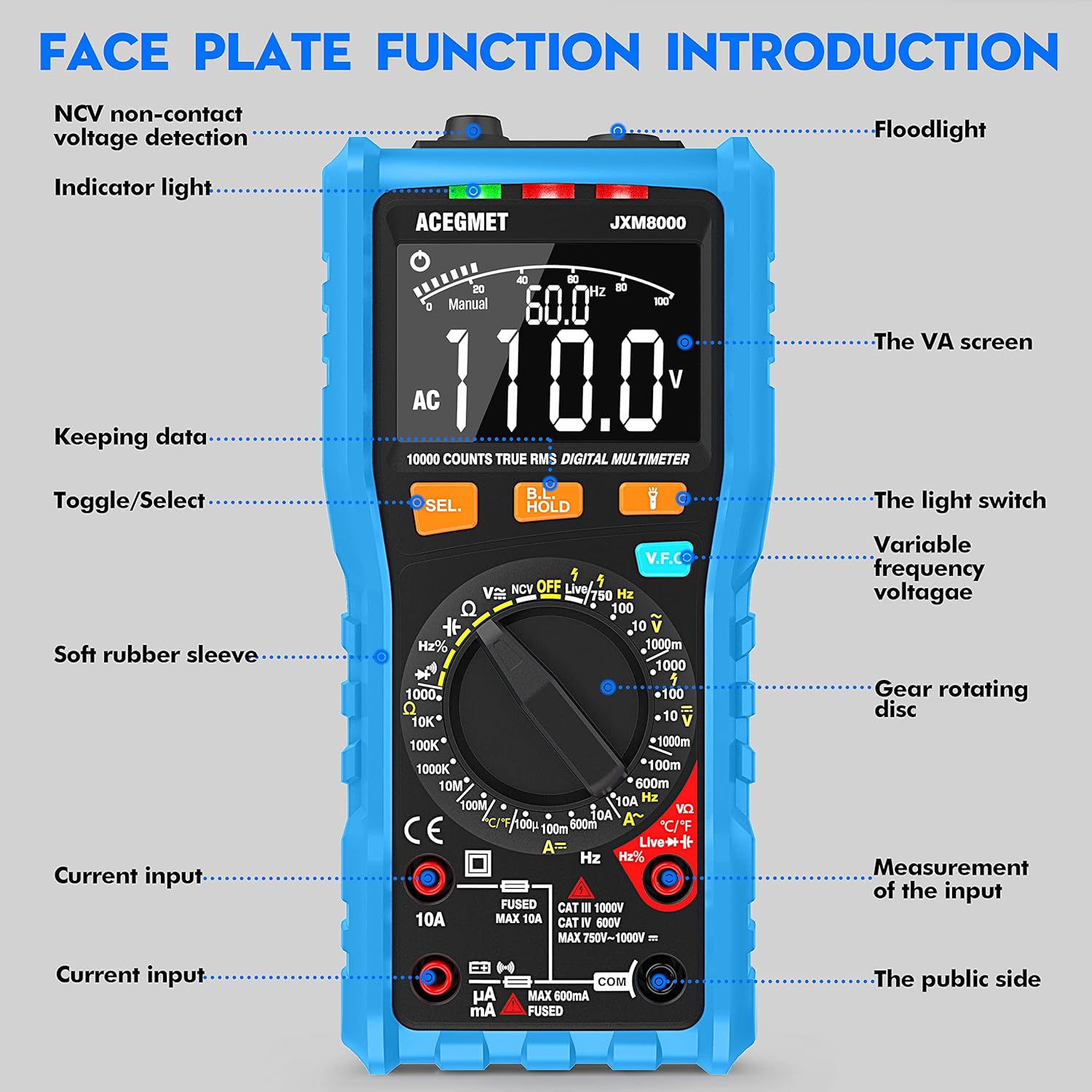
આકૃતિ 3.1: ફ્રન્ટ view of the Acegmet JXM8000 Digital Multimeter with labeled components.
- VA Screen: Large LCD display for measurement readings, units, and indicators.
- સૂચક પ્રકાશ: Provides visual feedback for certain functions, such as NCV.
- ફ્લેશલાઇટ: Located at the top, activated by the light switch for illumination in dark areas.
- SEL. Button (Toggle/Select): Used to switch between different measurement modes within a single rotary switch position (e.g., AC/DC, Diode/Continuity).
- HOLD Button (Keeping Data): ડિસ્પ્લે પર વર્તમાન રીડિંગ સ્થિર કરે છે. રિલીઝ કરવા માટે ફરીથી દબાવો.
- V.F.C Button (Variable Frequency Voltage): Activates the Variable Frequency Control measurement mode.
- Gear Rotating Disc: The central rotary switch used to select the desired measurement function.
- ઇનપુટ જેક્સ: Ports for connecting test leads. These include common (COM), voltage/resistance/frequency/capacitance (VΩHznF), and current (mA/10A) inputs.
- Soft Rubber Sleeve: A protective outer casing designed to prevent accidental electric shock and provide durability.
3.2 મુખ્ય લક્ષણો
- ટ્રુ આરએમએસ (ટીઆરએમએસ): Accurately measures AC voltage and current for non-sine wave signals.
- Auto/Manual Ranging: Offers flexibility for both automatic range selection and manual range control.
- બિન-સંપર્ક ભાગtage (NCV) શોધ: AC વોલ્યુમ શોધે છેtagશારીરિક સંપર્ક વિના.
- Live Line Test: Identifies live wires.
- તાપમાન માપન: Measures temperature in both Celsius and Fahrenheit.
- 10000 કાઉન્ટ્સ ડિસ્પ્લે: Provides high-resolution readings.
- ડેટા હોલ્ડ: Freezes the displayed measurement.
- ઓટો શટ-ડાઉન: Automatically powers off after 15 minutes of inactivity to conserve battery life.
- ઓછી બેટરી સંકેત: જ્યારે બેટરી બદલવાની જરૂર હોય ત્યારે ચેતવણીઓ.
4. સેટઅપ
4.1 બેટરી ઇન્સ્ટોલેશન
The multimeter requires 2 x AA 1.5V batteries. To install or replace batteries:
- ખાતરી કરો કે મલ્ટિમીટર બંધ છે અને ટેસ્ટ લીડ્સ ડિસ્કનેક્ટ થયેલ છે.
- Carefully remove the soft rubber sleeve.
- ઉપકરણની પાછળ બેટરી કમ્પાર્ટમેન્ટ કવર શોધો.
- રિટેનિંગ સ્ક્રૂ(ઓ) ખોલો અને કવર દૂર કરો.
- Insert the 2 x AA batteries, observing correct polarity (+/-).
- બેટરી કમ્પાર્ટમેન્ટ કવર બદલો અને તેને સ્ક્રુ(ઓ) વડે સુરક્ષિત કરો.
- Reinstall the soft rubber sleeve.
૬.૨ કનેક્ટિંગ ટેસ્ટ લીડ્સ
Always connect the black test lead to the "COM" (Common) jack. Connect the red test lead to the appropriate input jack based on the desired measurement:
- વોલ્યુમ માટેtage, Resistance, Frequency, Capacitance, Diode, and Continuity measurements, connect the red lead to the "VΩHznF" jack.
- For Current measurements (up to 600mA), connect the red lead to the "mA" jack.
- For High Current measurements (up to 10A), connect the red lead to the "10A" jack.
Ensure test leads are fully inserted into the jacks before taking measurements.
5. ઓપરેટિંગ સૂચનાઓ
5.1 પાવર ચાલુ/બંધ
To power on the multimeter, rotate the gear rotating disc from the "OFF" position to any desired measurement function. To power off, rotate the disc back to the "OFF" position.
5.2 Automatic and Manual Ranging

Figure 5.1: Rotary switch indicating Automatic and Manual Ranging sections.
- Automatic Range Function: When the rotary switch is set to the "AUTOMATIC RANGE" section, the multimeter automatically selects the appropriate measurement range for AC/DC voltage, resistance, capacitance, frequency, on/off (continuity), and diode tests. This simplifies operation.
- Manual Range Function: When the rotary switch is set to the "MANUAL RANGE" section, you can manually select specific ranges for NCV, Live wire identification, AC/DC voltage, AC/DC current, temperature, and resistance measurements. This provides greater control for experienced users.
5.3 Specific Measurements
Follow these general steps for most measurements:
- Connect test leads correctly as described in Section 4.2.
- Rotate the gear rotating disc to the desired measurement function.
- If multiple functions are available at one position (e.g., AC/DC voltage), press the "SEL." button to toggle between them.
- Apply the test leads to the circuit or component under test.
- Read the measurement value on the VA screen.
5.3.1 વોલ્યુમtage માપન (AC/DC)
Set the rotary switch to the 'V' (Voltage) position. Use the 'SEL.' button to switch between AC (~) and DC ( ) voltage. Connect test leads in parallel with the circuit or component.
૬.૨ વર્તમાન માપન (AC/DC)
Set the rotary switch to the 'A' (Current) position. Use the 'SEL.' button to switch between AC (~) and DC ( ) current. Connect test leads in series with the circuit. Ensure the correct input jack (mA or 10A) is used.
૬.૫ પ્રતિકાર માપન (Ω)
Set the rotary switch to the 'Ω' (Resistance) position. Connect test leads across the component. Ensure the circuit is de-energized before measuring resistance.
5.3.4 સાતત્ય પરીક્ષણ
Set the rotary switch to the 'Ω' (Resistance) position and press 'SEL.' until the continuity symbol ( ) is displayed. A continuous beep indicates a low-resistance path (continuity).
5.3.5.૨.. ડાયોડ ટેસ્ટ
Set the rotary switch to the 'Ω' (Resistance) position and press 'SEL.' until the diode symbol ( ) is displayed. Connect the red lead to the anode and the black lead to the cathode of the diode. The forward voltage ડ્રોપ દર્શાવવામાં આવશે.
5.3.6 Capacitance Measurement (nF/µF/mF)
Set the rotary switch to the 'nF' (Capacitance) position. Connect test leads across the capacitor. Ensure the capacitor is discharged before testing.
5.3.7 Frequency Measurement (Hz)
Set the rotary switch to the 'Hz' (Frequency) position. Connect test leads to the signal source.
5.3.8 Temperature Measurement (°C/°F)

Figure 5.2: Multimeter demonstrating NCV, Live Line, and Temperature testing functions.
Set the rotary switch to the '°C/°F' (Temperature) position. Connect the included K-type thermocouple probe to the input jacks (usually VΩHznF and COM). Place the probe tip on or near the object whose temperature is to be measured. Press 'SEL.' to switch between Celsius and Fahrenheit.
5.3.9 બિન-સંપર્ક વોલ્યુમtage (NCV) તપાસ
Set the rotary switch to the 'NCV' position. Move the top of the multimeter near an AC voltage source. The indicator light will flash, and an audible beep will sound, with the frequency of beeps increasing as the multimeter gets closer to the voltage સ્ત્રોત.
5.3.10 Live Line Test
Set the rotary switch to the 'Live' position. Insert the red test lead into the 'VΩHznF' jack. Touch the red test lead to the conductor to be tested. The display will indicate 'LIVE' and an audible alarm will sound if a live wire is detected.
5.4 ડેટા હોલ્ડ ફંક્શન
Press the "HOLD" button to freeze the current reading on the display. Press it again to release the hold function and resume live readings.
5.5 Backlight and Flashlight
Press the light switch button (often integrated with the HOLD button or a separate button) to turn on the display backlight for better visibility in low-light conditions. A long press may activate the flashlight located at the top of the multimeter.
6. જાળવણી
6.1 સફાઈ
મલ્ટિમીટર સાફ કરો casinજાહેરાત સાથે gamp cloth and mild detergent. Do not use abrasive cleaners or solvents. Ensure the device is powered off and disconnected from all circuits before cleaning.
6.2 બેટરી રિપ્લેસમેન્ટ
When the low battery indicator appears on the display, replace the batteries as described in Section 4.1. Remove batteries if the multimeter will not be used for an extended period.
6.3 ફ્યુઝ રિપ્લેસમેન્ટ

આકૃતિ 6.1: આંતરિક view highlighting fuse protection.
If a fuse blows (indicated by "FUSE" on the display and an alarm), it must be replaced with a fuse of the same type and rating. The JXM8000 uses fast-blow ceramic fuses. Refer to the specifications for correct fuse ratings.
- Ensure the multimeter is powered off and all test leads are disconnected.
- Carefully remove the soft rubber sleeve.
- Unscrew the screws securing the back casing and carefully open the multimeter.
- Locate the blown fuse(s) and gently remove them.
- Install new fuses of the correct type and rating.
- Carefully reassemble the multimeter, ensuring all screws are tightened.
- Reinstall the soft rubber sleeve.
6.4 સંગ્રહ
Store the multimeter in a cool, dry place, away from direct sunlight and extreme temperatures. If storing for an extended period, remove the batteries.
7. મુશ્કેલીનિવારણ
- Display shows "LEAD" and beeps: This indicates incorrect test lead connection for the selected function. Reconnect the test leads to the appropriate input jacks.
- ડિસ્પ્લે "OL" બતાવે છે: This indicates an overload condition, meaning the measured value exceeds the selected range or the multimeter's maximum capacity. Switch to a higher range (if in manual mode) or ensure the measurement is within the device's limits.
- Multimeter does not power on: બેટરી ઇન્સ્ટોલેશન તપાસો અને ખાતરી કરો કે બેટરી ખાલી નથી થઈ ગઈ. જો જરૂરી હોય તો બદલો.
- અચોક્કસ વાંચન: Check battery level, ensure test leads are properly connected, and verify the correct measurement function and range are selected. Clean test lead tips if corroded.
- કોઈ સાતત્ય બીપ નથી: Ensure the circuit is de-energized. Check test leads for damage.
8. સ્પષ્ટીકરણો
| પરિમાણ | સ્પષ્ટીકરણ |
|---|---|
| મેક્સ ડિસ્પ્લે | 9999 ગણાય છે |
| શ્રેણી પસંદગી | Automatic & Manual Range |
| માપન ઝડપ | 10 વખત/સેકન્ડ |
| ઓવરલોડ ડિસ્પ્લે | OL ડિસ્પ્લે |
| Wrong Insert Alarm | Display LEAD |
| On-off Test | બઝર |
| NCV/VFC Function | હા |
| Live Line Test | હા |
| ડેટા હોલ્ડ ફંક્શન | હા |
| ઓછી બેટરી સંકેત | હા |
| ઓટો શટ-ડાઉન | 15 મિનિટ |
| પાવર સપ્લાય | 2 x AA 1.5V બેટરી |
| સલામતી વર્ગ | IEC61010 CAT.600V CAT IV, 1000V CAT.III |
| એસી વર્તમાન રેંજ | 99.99mA/600mA ±(1.0% + 3); 10A (1.5% + 3) |
| એસી વોલ્યુમtage રેન્જ | 999.9mV/9.999V/99.99V ± (0.8%+3); 750V ± (1.0%+5) |
| ડીસી વોલ્યુમtage રેન્જ | 999.9mV/9.999V/99.99V/999.9V ± (0.5%+3) |
| ડીસી વર્તમાન રેંજ | 99.99µA/999.9mA/600mA ±(0.8% + 3); 10A (1.2% + 3) |
| પ્રતિકાર શ્રેણી | 999.9Ω/9.999KΩ/99.99KΩ/999.9KΩ/9.999MΩ ± (0.8%+32); 99.99MΩ ± (1.2%+5) |
| ક્ષમતા શ્રેણી | 9.999nF ±(4.0% + 30); 99.99nF/999.9nF/9.999µF/99.99µF/999.9µF/9.999mF/99.99mF ±(4.0% + 3) |
| આવર્તન શ્રેણી | 9.999Hz/99.99Hz/999.9Hz/9.999kHz/99.99kHz/999.9kHz/9.999MHz ±(1.0%+3) |
| તાપમાન શ્રેણી | -4℉-1832℉ / -20℃-1000℃ ±(1.0%+3) |
9. વોરંટી અને સપોર્ટ
The Acegmet JXM8000 Digital Multimeter comes with an 18-month warranty from the date of purchase. This warranty covers defects in materials and workmanship under normal use. It does not cover damage caused by misuse, accident, unauthorized modification, or neglect.
For technical support, warranty claims, or service inquiries, please contact Acegmet customer service through the retailer's platform or the official Acegmet website. Please have your purchase receipt and product model number (JXM8000) available when contacting support.