
પરિચય
This manual provides essential information for the safe and efficient operation of your Domo DO157A Tower Fan. Please read these instructions carefully before use and retain them for future reference.
The Domo DO157A is a versatile appliance combining the functions of an air cooler, fan, and humidifier, designed to enhance your indoor comfort.

છબી: આગળ view of the Domo DO157A Tower Fan.
સલામતી માહિતી
આગ, ઇલેક્ટ્રિક આંચકો અને વ્યક્તિગત ઈજાના જોખમને ઘટાડવા માટે વિદ્યુત ઉપકરણોનો ઉપયોગ કરતી વખતે હંમેશા મૂળભૂત સલામતી સાવચેતીઓનું પાલન કરો.
- વોલ્યુમની ખાતરી કરોtagઉપકરણ પર દર્શાવેલ e તમારા સ્થાનિક મુખ્ય ભાગને અનુરૂપ છેtage કનેક્ટ કરતા પહેલા.
- ઉપકરણ, પ્લગ અથવા કોર્ડને પાણી અથવા અન્ય પ્રવાહીમાં બોળશો નહીં.
- Unplug from the outlet when not in use, before cleaning, or before moving the appliance.
- ઉપકરણને બાળકોની પહોંચથી દૂર રાખો.
- ક્ષતિગ્રસ્ત કોર્ડ અથવા પ્લગ સાથે અથવા ઉપકરણમાં ખામી સર્જાયા પછી અથવા કોઈપણ રીતે નુકસાન થયા પછી કોઈપણ ઉપકરણને ચલાવશો નહીં.
- Refer to the official safety document for detailed safety guidelines: સુરક્ષા માહિતી (PDF).
ઉત્પાદન ઘટકો
Familiarize yourself with the main parts of your Domo DO157A Tower Fan:
- Main Unit (Tower Fan)
- 7-લિટર પાણીની ટાંકી
- Washable Filter System (Honeycomb Cooling Membrane)
- રીમોટ કંટ્રોલ
- Coolpack (for enhanced cooling)
- એલઇડી ડિસ્પ્લે સાથે નિયંત્રણ પેનલ
છબી: View of the tower fan with the filter system removed, showing the honeycomb cooling membrane.
સેટઅપ
- અનપેકીંગ: Carefully remove the appliance from its packaging. Retain packaging for storage or disposal.
- પ્લેસમેન્ટ: Place the tower fan on a firm, level surface. Ensure there is adequate space around the unit for proper airflow.
- પાણીની ટાંકી ભરવા:
- યુનિટના નીચેના પાછળના ભાગમાંથી પાણીની ટાંકી બહાર કાઢો.
- Fill the 7-liter water tank with clean, cold water. For enhanced cooling, place the included Coolpack (after freezing) into the water tank.
- Ensure the water level does not exceed the maximum fill line.
- Slide the water tank back into the unit until it clicks into place.
- પાવર કનેક્શન: પાવર કોર્ડને યોગ્ય ઇલેક્ટ્રિકલ આઉટલેટ (230V) માં પ્લગ કરો.
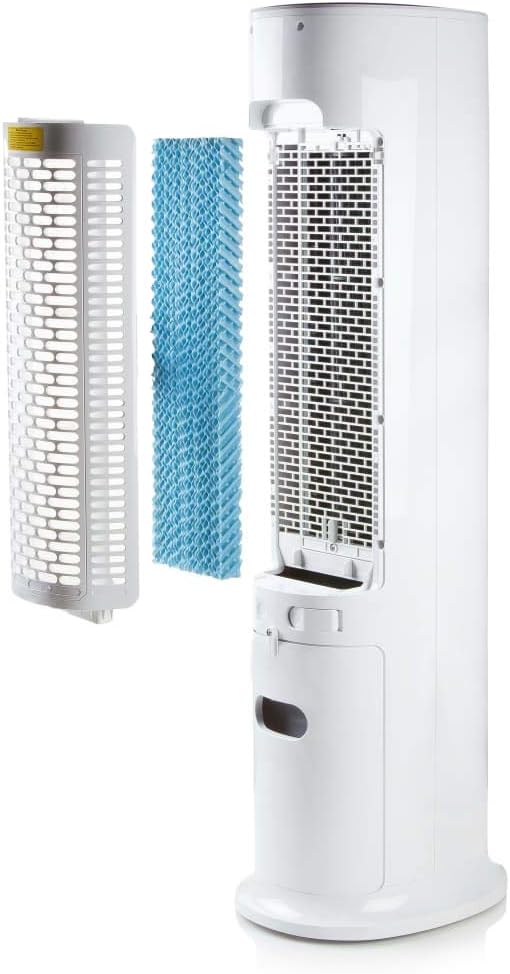
Image: Demonstrating the process of filling the water tank of the tower fan.
ઓપરેટિંગ સૂચનાઓ
The Domo DO157A can be operated using the control panel on top of the unit or the included remote control.
કંટ્રોલ પેનલ અને રિમોટ કંટ્રોલ ફંક્શન્સ

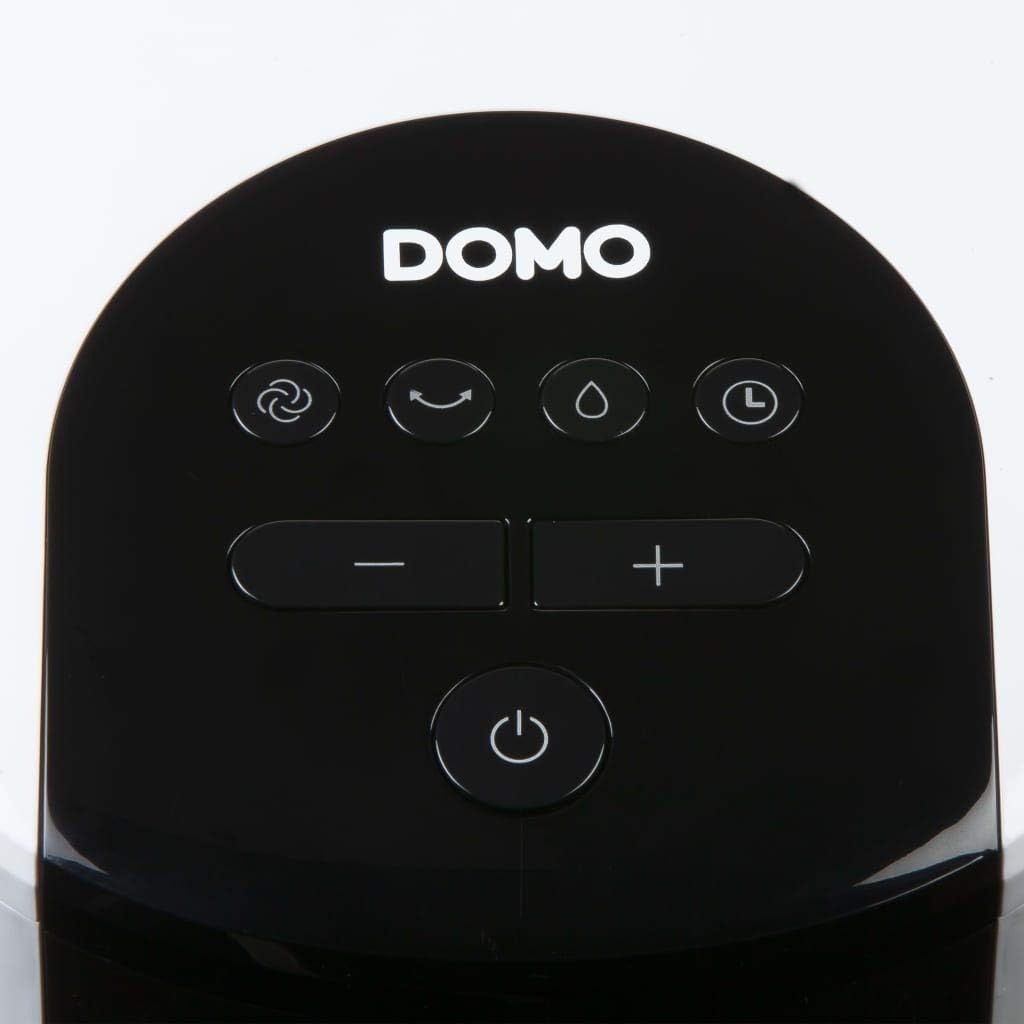
છબી: ક્લોઝ-અપ view of the control panel on the top of the tower fan.
- પાવર બટન (🏻): યુનિટને ચાલુ અથવા બંધ કરે છે.
- મોડ બટન (☺): Cycles through 3 ventilation modes:
- સામાન્ય: પસંદ કરેલી ગતિએ સતત હવા પ્રવાહ.
- પ્રાકૃતિક: Simulates natural breeze with varying fan speeds.
- ઊંઘ: Reduces fan speed and noise for quiet operation during sleep.
- Speed Buttons (- / +): Adjusts fan speed (4 levels).
- Cooling/Humidifier Button (💧): Activates or deactivates the air cooling and humidifying function. This function requires water in the tank.
- ટાઈમર બટન (⏱): Sets the operating timer for up to 10 hours. Each press adds 1 hour.
- ઓસિલેશન બટન (↻): Activates or deactivates the oscillation function, allowing the fan to rotate and distribute air over a wider area.
પ્રારંભિક કામગીરી
- Press the Power button to turn on the unit. The default mode is usually Normal.
- Use the Speed buttons to select your desired fan speed (1-4).
- To activate cooling/humidifying, press the Cooling/Humidifier button. Ensure the water tank is filled.
- Select a ventilation mode (Normal, Natural, Sleep) using the Mode button.
- Press the Oscillation button for wider air distribution.
- Set the timer if desired using the Timer button.

Image: The tower fan operating in a living room, illustrating the airflow direction.
જાળવણી
નિયમિત જાળવણી શ્રેષ્ઠ કામગીરી સુનિશ્ચિત કરે છે અને તમારા ઉપકરણનું આયુષ્ય લંબાવે છે.
બાહ્ય સફાઈ
- સફાઈ કરતા પહેલા હંમેશા યુનિટને અનપ્લગ કરો.
- સોફ્ટ સાથે બાહ્ય સપાટીઓ સાફ કરો, ડીamp કાપડ ઘર્ષક ક્લીનર્સ અથવા સોલવન્ટનો ઉપયોગ કરશો નહીં.
- ખાતરી કરો કે પાણી આંતરિક ઘટકોમાં પ્રવેશતું નથી.
પાણીની ટાંકીની સફાઈ
- એકમમાંથી પાણીની ટાંકી દૂર કરો.
- બાકી રહેલું પાણી ખાલી કરો.
- Clean the tank with mild soap and water. Rinse thoroughly.
- ફરીથી દાખલ કરતા પહેલા ટાંકીને હવામાં સંપૂર્ણપણે સૂકવવા દો.
- Clean the water tank regularly, especially if using the humidifying function frequently, to prevent mold or mildew buildup.
ફિલ્ટર સિસ્ટમની સફાઈ
- The high-quality filter system is washable.
- Carefully remove the filter (honeycomb cooling membrane) from the unit as shown in the "Product Components" section.
- ધૂળ અને કચરો દૂર કરવા માટે વહેતા પાણી હેઠળ ફિલ્ટરને ધોઈ નાખો.
- ફિલ્ટરને એકમમાં ફરીથી દાખલ કરતા પહેલા તેને સંપૂર્ણપણે સૂકવવા દો.
- Regular cleaning of the filter is recommended, especially for allergy sufferers, to maintain hygiene and efficiency.
મુશ્કેલીનિવારણ
If you encounter issues with your Domo DO157A, refer to the following common problems and solutions:
| સમસ્યા | સંભવિત કારણ | ઉકેલ |
|---|---|---|
| યુનિટ ચાલુ થતું નથી. | વીજ પુરવઠો નથી. | તપાસો કે પાવર કોર્ડ કાર્યકારી આઉટલેટમાં સુરક્ષિત રીતે પ્લગ થયેલ છે કે નહીં. |
| કોઈ ઠંડક અસર નથી. | પાણીની ટાંકી ખાલી છે અથવા ઠંડક કાર્ય સક્રિય થયેલ નથી. | Fill the water tank. Press the Cooling/Humidifier button to activate the function. Ensure Coolpack is frozen and placed in the tank if desired. |
| નબળો હવા પ્રવાહ. | Fan speed is too low; air filter is dirty. | Increase the fan speed. Clean the air filter as per maintenance instructions. |
| અપ્રિય ગંધ. | Stagnant water in the tank or dirty filter. | Empty and clean the water tank. Clean the filter. Use fresh water. |
વિશિષ્ટતાઓ
| લક્ષણ | વિગત |
|---|---|
| બ્રાન્ડ | ડોમો |
| મોડેલનું નામ / નંબર | DO157A |
| પ્રકાર | Tower Fan, Air Cooler, Humidifier |
| સામગ્રી | પ્લાસ્ટિક |
| માઉન્ટિંગ પ્રકાર | ફ્રીસ્ટેન્ડિંગ |
| રંગ | સફેદ |
| હવા પ્રવાહ ક્ષમતા | 294.29 Cubic Feet per Minute (500 m³/h) |
| નિયંત્રણ પ્રકાર | Remote Control, On-unit Control Panel |
| પાણીની ટાંકીની ક્ષમતા | 7 લિટર |
| ભલામણ કરેલ ફ્લોર એરિયા | 25 ચોરસ મીટર |
| ઉત્પાદન વજન | 11.2 કિલોગ્રામ |
| વાટtage | 65 ડબ્લ્યુ |
| અવાજ સ્તર | ૩૦ ડેસિબલ્સ |
| ઝડપની સંખ્યા | 4 |
| ભાગtage | 230 વોલ્ટ |
| પરિમાણો (D x W x H) | 34 સેમી x 26 સેમી x 106.5 સેમી |
| ટાઈમર | 10 કલાક સુધી |
| વેન્ટિલેશન મોડ્સ | સામાન્ય, કુદરતી, ઊંઘ |
| ખાસ લક્ષણો | Sleep mode, Washable filter system, Oscillation, Coolpack included |
વોરંટી અને આધાર
For warranty information, please refer to the documentation provided with your purchase or contact Domo customer support. Keep your proof of purchase for warranty claims.
If you require further assistance or have questions not covered in this manual, please contact Domo customer service through their official website or the contact details provided with your product.