
1. ઉત્પાદન ઓવરview
The Alecto WS-1560 is a wireless weather station designed to provide accurate indoor and outdoor environmental data. Featuring a clear color display and a remote outdoor sensor, it offers comprehensive weather information and additional useful functions for your home.
મુખ્ય લક્ષણો:
- Measures indoor and outdoor temperature and humidity.
- Long-range wireless outdoor sensor (up to 100 meters).
- 5.7-inch well-lit color display with animated weather forecast icons.
- Temperature and ice alarm functions.
- સ્નૂઝ ફંક્શન સાથે અલાર્મ ઘડિયાળ.
- Memory function for latest and highest readings.
- Moon phase indicator, date, day, and time display.
- Battery-operated main unit and outdoor sensor with backup batteries.

Figure 1.1: Alecto WS-1560 Main Unit and Wireless Outdoor Sensor.
2. પેકેજ સામગ્રી
Ensure all components are present and in good condition upon unpacking:
- Alecto WS-1560 Main Unit (Indoor Display)
- વાયરલેસ આઉટડોર સેન્સર
- વપરાશકર્તા માર્ગદર્શિકા
- (Power adapter and batteries may be included depending on package)
Video 2.1: Illustrative video showing typical weather station components and basic setup. (Note: This video is for a related product and may not show the exact Alecto WS-1560 model.)
3. સેટઅપ અને ઇન્સ્ટોલેશન
3.1. બેટરી ઇન્સ્ટોલેશન
Both the main unit and the outdoor sensor require batteries for operation. Ensure you use the correct type and polarity.
- આઉટડોર સેન્સર:
- Open the battery compartment on the back of the wireless outdoor sensor.
- Insert 2x AA batteries (not included) according to the polarity markings (+/-).
- બેટરીના ડબ્બાને સુરક્ષિત રીતે બંધ કરો.
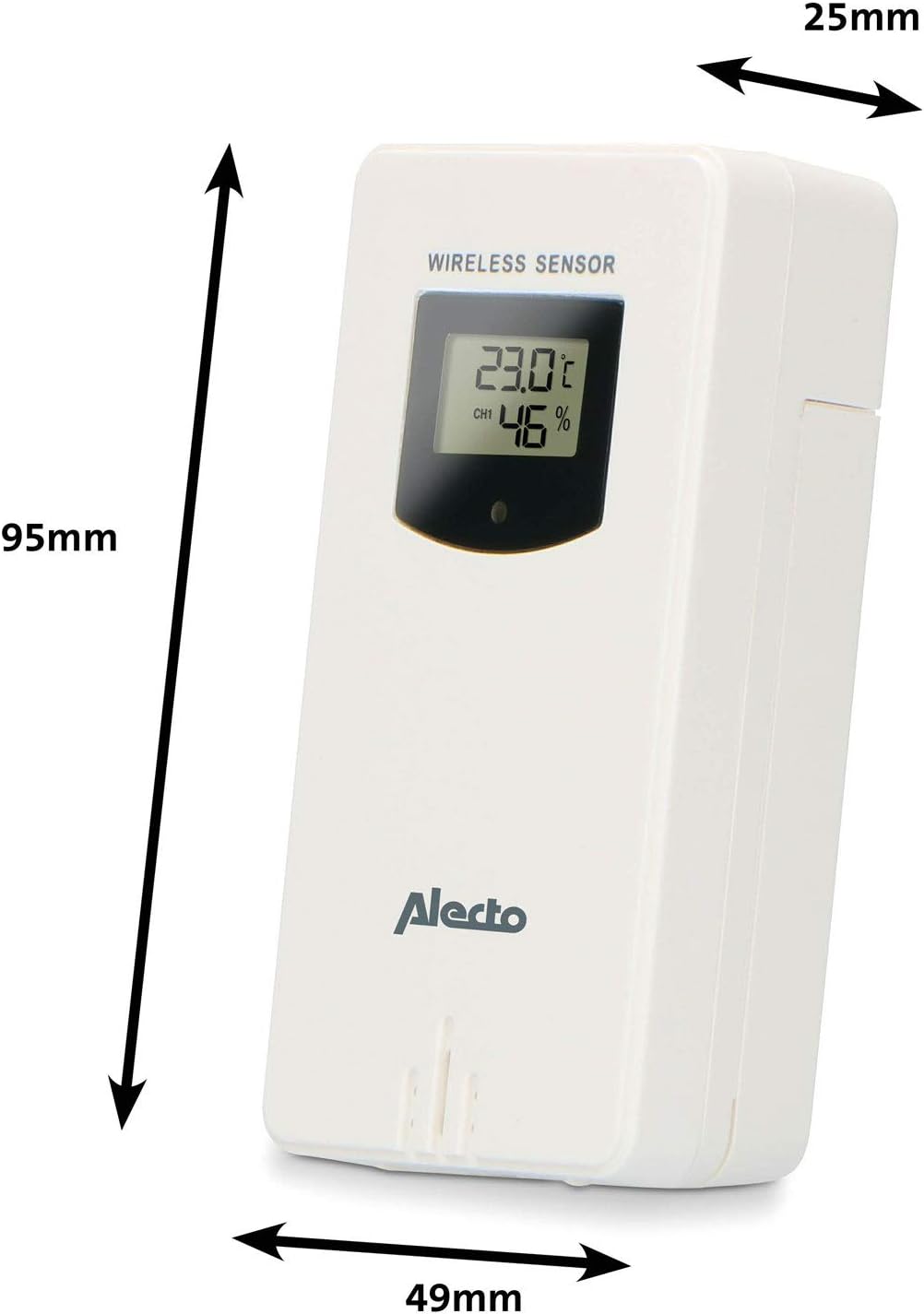
Figure 3.1: Wireless Outdoor Sensor dimensions and battery compartment location.
- મુખ્ય એકમ:
- Open the battery compartment on the back of the main unit.
- Insert 2x AA batteries (not included) according to the polarity markings (+/-). These serve as backup batteries.
- બેટરીના ડબ્બાને સુરક્ષિત રીતે બંધ કરો.
- Connect the main unit to a power outlet using the provided power adapter (if included).

Figure 3.2: Main Unit dimensions and power input.
3.2. સેન્સર પ્લેસમેન્ટ
For accurate outdoor readings, proper placement of the wireless sensor is crucial:
- Place the sensor in a shaded area, away from direct sunlight, to prevent inaccurate temperature readings.
- Ensure good air circulation around the sensor.
- Mount the sensor vertically, approximately 1.5 to 2.5 meters (5 to 8 feet) above the ground.
- Avoid placing the sensor near heat sources (e.g., vents, windows) or moisture sources.
- The maximum transmission range is 100 meters (328 feet) in open air. Walls and other obstacles will reduce this range.

આકૃતિ 3.3: ઉદાample of outdoor sensor placement on a wall.
3.3. Pairing the Sensor with the Main Unit
The main unit and sensor should automatically pair once both are powered on. If pairing does not occur:
- Ensure both units have fresh batteries and are within range.
- Press the "TX" button inside the outdoor sensor's battery compartment to manually send a signal.
- On the main unit, you may need to initiate a search for the outdoor sensor (refer to the "Operation" section for specific button functions).
4. ઓપરેશન
4.1. પ્રદર્શન લેઆઉટ
૭.૫-ઇંચનો કલર ડિસ્પ્લે સ્પષ્ટ ઓવરવે પ્રદાન કરે છેview of all measured data. Key areas include:
- બહારનું તાપમાન અને ભેજ: Displays current outdoor conditions.
- ઘરની અંદરનું તાપમાન અને ભેજ: Displays current indoor conditions.
- એનિમેટેડ હવામાન આગાહી: Icons predict upcoming weather (sunny, partly cloudy, cloudy, rainy, snowy).
- સમય અને તારીખ: Current time, day, and date.
- બેરોમેટ્રિક દબાણ: Current atmospheric pressure.
- ચંદ્ર તબક્કો: Graphical representation of the current moon phase.
- Temperature/Ice Alarm Indicators: Alerts for specific temperature thresholds or potential ice conditions.

આકૃતિ 4.1: વિગતવાર view of the main unit's color display.
4.2. બટન કાર્યો
The main unit features several buttons for setting and adjusting functions. Common buttons include:
- સેટ: Enters setup mode for time, date, and other settings.
- DIRECTIONS: Switches between display modes or confirms settings.
- UP/DOWN (or +/-): Adjusts values during setup or cycles through channels.
- એલાર્મ: Sets or activates the alarm function.
- MEM: Displays maximum/minimum temperature and humidity records. Long press to clear records.
- સ્નૂઝ / લાઇટ: Activates snooze during an alarm or adjusts backlight brightness.
Video 4.2: Illustrative video demonstrating various features and settings of a weather station. (Note: This video is for a related product and may not show the exact Alecto WS-1560 model.)
4.3. સમય અને તારીખ સેટ કરવી
- Press and hold the "SET" button until the time display starts flashing.
- Use the "UP" or "DOWN" buttons to adjust the hour, then press "SET" to confirm and move to minutes.
- મિનિટ, વર્ષ, મહિનો અને દિવસ માટે પુનરાવર્તન કરો.
- Press "SET" again to exit the setting mode.
4.4. એલાર્મ સેટિંગ્સ
- Press the "ALARM" button once to view એલાર્મ સમય.
- Press and hold the "ALARM" button until the alarm time starts flashing.
- Use the "UP" or "DOWN" buttons to set the desired alarm hour and minute.
- Press "ALARM" to confirm.
- To activate/deactivate the alarm, press the "ALARM" button briefly when the alarm time is displayed. An alarm icon will appear/disappear.
4.5. મહત્તમ/ન્યૂનતમ રેકોર્ડ્સ
The weather station automatically records the maximum and minimum temperature and humidity values over a 24-hour period.
- Press the "MEM" button briefly to view the maximum recorded values.
- Press "MEM" again to view the minimum recorded values.
- Press "MEM" a third time to return to current readings.
- To clear the records, press and hold the "MEM" button for a few seconds.
5. જાળવણી
- સફાઈ: ડિસ્પ્લે અને યુનિટની સપાટીઓને સોફ્ટ, ડી વડે સાફ કરો.amp કાપડ ઘર્ષક ક્લીનર્સ અથવા સોલવન્ટનો ઉપયોગ કરશો નહીં.
- બેટરી રિપ્લેસમેન્ટ: Replace batteries in both the main unit and the outdoor sensor when the low battery indicator appears on the display. Always replace all batteries at the same time with new ones of the same type.
- સેન્સર કેર: Periodically check the outdoor sensor for debris or obstructions that might affect its readings. Ensure it remains in a shaded, well-ventilated area.
6. મુશ્કેલીનિવારણ
| સમસ્યા | સંભવિત કારણ | ઉકેલ |
|---|---|---|
| No outdoor temperature/humidity reading (or "---" displayed) |
|
|
| તાપમાન/ભેજના અચોક્કસ રીડિંગ્સ |
|
|
| ડિસ્પ્લે મંદ અથવા ખાલી છે |
|
|
7. સ્પષ્ટીકરણો
| મોડલ નંબર | WS-1560 |
| બ્રાન્ડ | એલેક્ટો |
| પાવર સ્ત્રોત (મુખ્ય એકમ) | Power Adapter (if included) + 2x AA batteries (backup) |
| Power Source (Outdoor Sensor) | 2x AA બેટરી |
| ઉત્પાદન પરિમાણો (મુખ્ય એકમ) | 5.1 x 16.5 x 12.3 સેમી |
| ઉત્પાદન વજન | 440 ગ્રામ |
| વાયરલેસ સેન્સર રેન્જ | ૧૦૦ મીટર સુધી (ખુલ્લી હવામાં) |
| ડિસ્પ્લે માપ | 5.7 ઇંચ / 14.5 સે.મી |
| મૂળ | ચીન |
8. વોરંટી અને સપોર્ટ
વોરંટી માહિતી, ટેકનિકલ સપોર્ટ અથવા સેવા પૂછપરછ માટે, કૃપા કરીને તમારા ઉત્પાદન સાથે સમાવિષ્ટ વોરંટી કાર્ડનો સંદર્ભ લો અથવા સત્તાવાર Alecto ની મુલાકાત લો. webસાઇટ. ખરીદીના પુરાવા તરીકે તમારી ખરીદી રસીદ રાખો.
એલેક્ટો Webસાઇટ: www.alecto.nl (General Alecto website, specific support page may vary)