
Temtop LKC-1000S+
ટેમટોપ LKC-1000S+ 2જી એર ક્વોલિટી મોનિટર યુઝર મેન્યુઅલ
Model: LKC-1000S+ 2nd
1. પરિચય
The Temtop LKC-1000S+ 2nd is a professional air quality monitor designed to measure various indoor and outdoor air pollutants. This device provides real-time data for PM2.5, PM10, Formaldehyde (HCHO), Total Volatile Organic Compounds (TVOC), Air Quality Index (AQI), temperature, and humidity. It features a histogram function for PM2.5 trends and a data export capability for detailed analysis. This manual provides essential information for the proper use and maintenance of your air quality monitor.
2. ઉત્પાદન ઓવરview
The Temtop LKC-1000S+ 2nd air quality monitor is equipped with advanced sensors for accurate readings and a clear TFT display for easy data interpretation.

Image 2.1: The Temtop LKC-1000S+ 2nd Air Quality Monitor, showing its sleek design and digital display.
2.1 મુખ્ય લક્ષણો
- Measures PM2.5, PM10, HCHO, TVOC, AQI, Temperature, and Humidity.
- Advanced 3rd generation laser particle sensor with a lifespan of up to 20,000 hours.
- Factory-calibrated electrochemical sensors for high-precision formaldehyde detection.
- New bar graph function displays PM2.5 changes over the past 12 hours.
- Data export function via USB.
- Large TFT screen for clear readability.

છબી 2.2: ઓવરview of the Temtop LKC-1000S+ 2nd's measurement capabilities, including PM2.5, PM10, particles, temperature, humidity, AQI, TVOC, formaldehyde, histogram, and data export.
૨.૧ ઉપકરણ ઘટકો

Image 2.3: Diagram illustrating the main components of the monitor: Air Outlet, Air Inlet, LCD Screen, and control buttons for AQI/Temp/Humi, PM2.5/PM10/Particles, and HCHO/TVOC.
- એર ઇનલેટ: Where air samples are drawn into the device.
- એર આઉટલેટ: Where processed air exits the device.
- એલસીડી સ્ક્રીન: Displays all measurement data and device status.
- નિયંત્રણ બટનો: For navigating menus and selecting measurement parameters.
- યુએસબી પોર્ટ: For charging and data export.

છબી ૪.૨: વિસ્ફોટ થયો view showing the internal sensors: DART Electrochemical HCHO Sensor, Sensirion Temp & Humi Sensor, and Temtop Laser PM2.5 Sensor (3rd Gen).
3. સેટઅપ
૩.૧ અનપેકિંગ અને પ્રારંભિક નિરીક્ષણ
Upon receiving your Temtop LKC-1000S+ 2nd, carefully unpack all components. The package should include:
- Temtop LKC-1000S+ 2nd Air Quality Monitor
- યુએસબી ચાર્જિંગ કેબલ
- વપરાશકર્તા માર્ગદર્શિકા
- સંગ્રહ બોક્સ

Image 3.1: Contents of the Temtop LKC-1000S+ 2nd package, including the monitor, USB charging cable, and manual.
Inspect the device for any signs of damage. If any components are missing or damaged, contact customer support.
3.2 ઉપકરણને ચાર્જ કરવું
The monitor is powered by a built-in 3000mAh rechargeable Lithium-ion battery. Before first use, fully charge the device.
- Connect the provided USB charging cable to the monitor's USB port.
- USB કેબલના બીજા છેડાને સુસંગત USB પાવર એડેપ્ટર (શામેલ નથી) અથવા કમ્પ્યુટરના USB પોર્ટ સાથે કનેક્ટ કરો.
- The battery indicator on the screen will show the charging status. A full charge typically takes several hours.
- એકવાર સંપૂર્ણ ચાર્જ થઈ ગયા પછી, ચાર્જિંગ કેબલને ડિસ્કનેક્ટ કરો.

Image 3.2: The monitor connected via USB cable, illustrating both charging and data export capabilities.
4. ઓપરેટિંગ સૂચનાઓ
4.1 પાવરિંગ ચાલુ/બંધ
- To power on: Press and hold the power button (usually the central button) until the screen illuminates.
- To power off: Press and hold the power button until the screen turns off.
4.2 ડિસ્પ્લેને સમજવું
The large TFT screen displays real-time measurements for various air quality parameters. The main screen typically shows PM2.5, PM10, and particle count, along with an overall air quality indicator (e.g., "Good").
- PM2.5 (µg/m³): Particulate matter less than 2.5 micrometers in diameter.
- PM10 (µg/m³): Particulate matter less than 10 micrometers in diameter.
- HCHO (mg/m³): Formaldehyde concentration.
- TVOC (mg/m³): Total Volatile Organic Compounds concentration.
- AQI: Air Quality Index, an overall indicator of air quality.
- તાપમાન (°C/°F): આસપાસનું તાપમાન.
- ભેજ (%): સંબંધિત ભેજનું પ્રમાણ.
4.3 Navigating Measurements and Functions
Use the dedicated buttons to switch between different measurement displays and access functions:
- PM2.5 બટન: પર સિંગલ-ક્લિક કરો view the pollutant index for PM2.5.
- HCHO/TVOC Button: પર સિંગલ-ક્લિક કરો view HCHO and TVOC readings. Double-click to view the corresponding histogram.
- AQI Button: પર સિંગલ-ક્લિક કરો view AQI, temperature, and humidity.
- Power/Menu Button: Press to power on/off, or short press to enter/exit menu options.
4.4 Interpreting Air Quality Levels (EPA Standards)
The device provides a visual indication of air quality based on EPA standards, often using color codes:
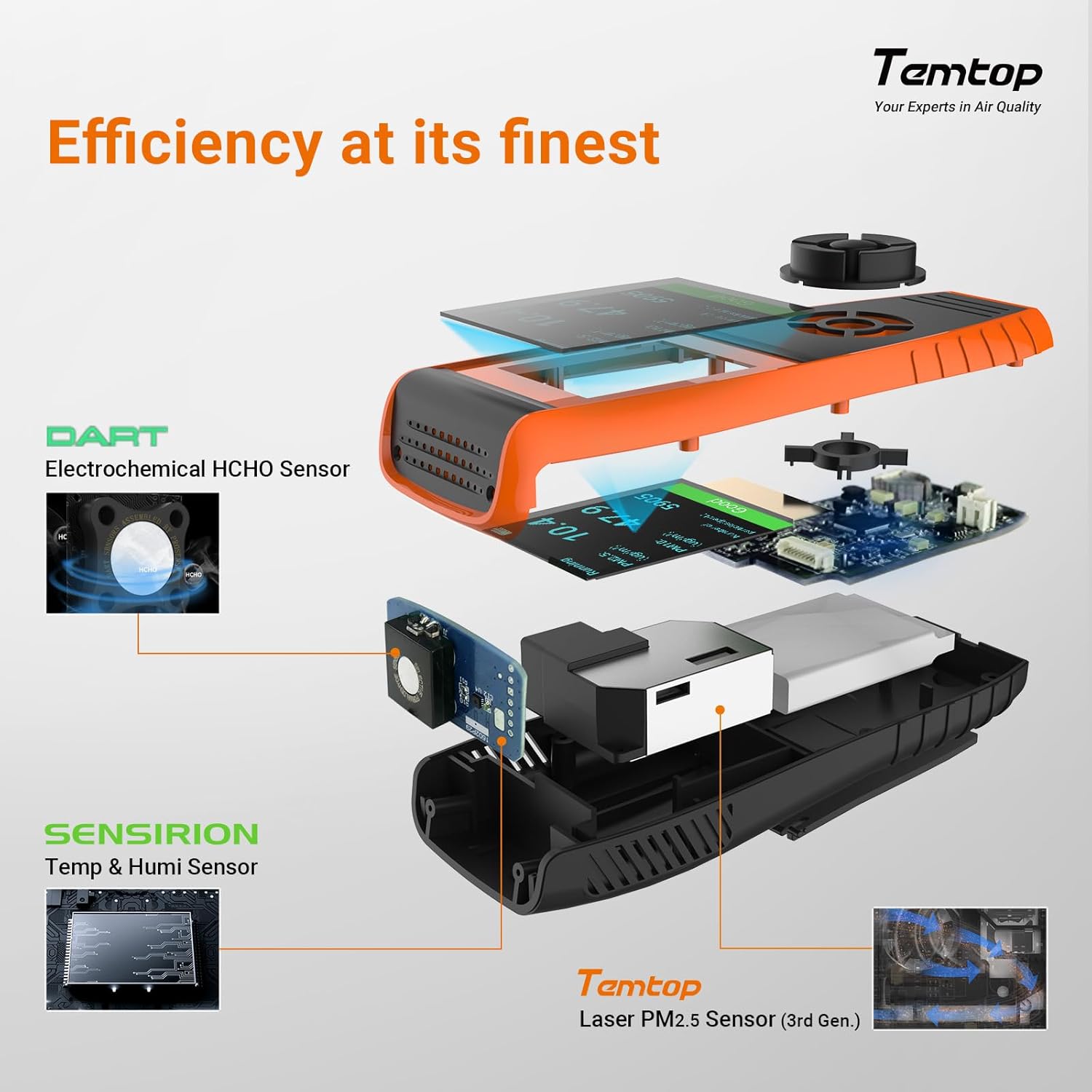
Image 4.1: The monitor's display showing air quality levels categorized by color, referencing EPA standards for Good/Safe, Moderate, Unhealthy for Sensitive Groups, Unhealthy, Very Unhealthy, and Hazardous.
- લીલો: Good/Safe
- યલો મધ્યમ
- નારંગી: સંવેદનશીલ જૂથો માટે બિનઆરોગ્યપ્રદ
- લાલ: બિનઆરોગ્યપ્રદ
- જાંબલી: ખૂબ જ બિનઆરોગ્યપ્રદ
- મરૂન: જોખમી
4.5 ડેટા નિકાસ
The monitor supports data export via its USB port, allowing for detailed analysis of recorded measurements.
- Connect the monitor to a computer using the provided USB cable.
- ઉપકરણ દૂર કરી શકાય તેવા સ્ટોરેજ ઉપકરણ તરીકે દેખાવું જોઈએ.
- Access the stored data files (e.g., CSV format) and copy them to your computer for analysis.
The device's memory allows for at least 3 months of continuous data recording.
5. જાળવણી
5.1 સફાઈ
To clean the device, use a soft, dry cloth. Do not use abrasive cleaners, solvents, or immerse the device in water. Keep the air inlet and outlet free from dust and obstructions.
૫.૨ સેન્સર કેર
The advanced laser particle sensor has a long lifespan of up to 20,000 hours. The electrochemical sensors are factory-calibrated for accuracy. Avoid exposing the device to extreme temperatures, high humidity, or corrosive gases, as this can affect sensor performance and lifespan.
5.3 બેટરી કેર
બેટરીનું આયુષ્ય વધારવા માટે, વારંવાર બેટરીને સંપૂર્ણપણે ડિસ્ચાર્જ કરવાનું ટાળો. ઉપકરણને નિયમિતપણે ચાર્જ કરો, ખાસ કરીને જો તે લાંબા સમય સુધી સંગ્રહિત રહેશે.
6. મુશ્કેલીનિવારણ
If you encounter issues with your Temtop LKC-1000S+ 2nd, refer to the following common problems and solutions:
| સમસ્યા | સંભવિત કારણ | ઉકેલ |
|---|---|---|
| ઉપકરણ પાવર ચાલુ કરતું નથી. | ઓછી બેટરી અથવા ઉપકરણમાં ખામી. | Charge the device for at least 2 hours. If it still doesn't power on, contact support. |
| અચોક્કસ વાંચન. | Sensor obstruction, environmental factors, or calibration issue. | Ensure air inlets/outlets are clear. Move the device to a stable environment. Allow 5-10 minutes for readings to stabilize. If issues persist, contact support. |
| Cannot export data. | ખોટું USB કનેક્શન અથવા ડ્રાઇવર સમસ્યા. | Ensure the USB cable is securely connected to both the device and the computer. Try a different USB port or computer. |
| સ્ક્રીન ખાલી છે અથવા સ્થિર છે. | સોફ્ટવેર ખામી. | બળજબરીથી પુનઃપ્રારંભ કરવા માટે પાવર બટનને 10-15 સેકન્ડ માટે દબાવી રાખો. |
For problems not listed here or if solutions do not resolve the issue, please contact Temtop customer support.
7. સ્પષ્ટીકરણો
| પરિમાણ | મૂલ્ય |
|---|---|
| મોડલ નંબર | LKC-1000S+2nd |
| ઉત્પાદક | Elitech (Brand: Temtop) |
| ઉત્પાદન પરિમાણો | 6.55 x 3.2 x 17.55 સેમી |
| વજન | 408.23 ગ્રામ |
| બેટરીનો પ્રકાર | ૧ લિથિયમ-આયન બેટરી (શામેલ) |
| બેટરી ક્ષમતા | 3000mAh (recyclable) |
| પાવર સ્ત્રોત | બેટરી |
| ભાગtage | 5 વોલ્ટ |
| સેન્સર પ્રકાર | Electrochemical (HCHO), Laser (PM2.5/PM10), Sensirion (Temp/Humi) |
| PM2.5 Sensor Lifespan | 20,000 કલાક સુધી |
| માપન | PM2.5, PM10, HCHO, TVOC, AQI, Temperature, Humidity |
| ડેટા નિકાસ | હા, યુએસબી દ્વારા |
| યુપીસી | 757233346244 |
8. વોરંટી અને સપોર્ટ
8.1 વોરંટી માહિતી
Specific warranty details for the Temtop LKC-1000S+ 2nd Air Quality Monitor are not provided in this manual. Please refer to the warranty card included with your product or visit the official Temtop website for the most current warranty policy.
8.2 ગ્રાહક સપોર્ટ
For technical assistance, troubleshooting, or any questions regarding your device, please contact Temtop customer support. Contact information can typically be found on the product packaging, the official Temtop webસાઇટ, અથવા વોરંટી કાર્ડ.
Ask a question about this manual
Ask about setup, troubleshooting, compatibility, parts, safety, or missing instructions. Manuals+ will review the question and use this page’s manual context to help answer it.