
1. ઉત્પાદન ઓવરview
The HQST 30 Amp ANL Fuse with Transparent Holder is designed to provide essential over-current protection for your electrical systems, particularly in solar power setups. It safeguards batteries, connection wires, and charge controllers by interrupting the circuit when current exceeds safe limits.
This fuse holder features a transparent, non-conductive cover for easy status identification and gold-plated terminal contacts for corrosion resistance. It is compatible with various wire gauges and supports replaceable ANL fuses.
2. મુખ્ય લક્ષણો
- વર્તમાન રક્ષણ પર: Designed to protect your battery, connection wire, and charge controller from excess current. It will fuse itself to cut off electricity when the current exceeds the safe limit of the electrical system.
- Reliable and Safe: The fuse is ignition protected, featuring gold-plated terminal contacts for corrosion resistance. The transparent and non-conductive cover allows for easy identification of the fuse's operational status.
- બદલી શકાય તેવા ફ્યુઝ: Compatible with all 20A, 30A, 40A, 60A, and 100A ANL fuses, allowing for easy replacement.
- Common M8 Bolt: Adopts the commonly used M8 bolt, supporting 10/8/6/4/2/0 AWG wiring cables.
3. સ્પષ્ટીકરણો
| સ્પષ્ટીકરણ | વિગત |
|---|---|
| બ્રાન્ડ | HQST |
| મોડલ | HQST-SET-ANL30 |
| મહત્તમ વર્તમાન | 30 Amps |
| સામગ્રી | કોપર |
| માઉન્ટિંગ પ્રકાર | ધારક |
| Compatible Wire Gauges | 10/8/6/4/2/0 AWG |
| બોલ્ટ કદ | M8 |
પરિમાણો

Image: Fuse base dimensions. The holder measures approximately 122.1mm (4.8 inches) in length, 37.8mm (1.49 inches) in height, and 36.2mm (1.43 inches) in width.
4. ઇન્સ્ટોલેશન સૂચનાઓ
4.1 વાયરિંગ ડાયાગ્રામ
The ANL fuse should be installed inline between your charge controller and the battery to protect both components and the connecting wires from over-current conditions.

Image: Wiring diagram illustrating the ANL fuse placement between a charge controller and a battery, connected by tray cables and fuse cables.
૩.૩ સ્ટેપ-બાય-સ્ટેપ ઇન્સ્ટોલેશન
Follow these steps to install the HQST 30 Amp ANL Fuse with Transparent Holder:
- ધારક તૈયાર કરો: Open the transparent cover of the fuse holder.
- ફ્યુઝ દાખલ કરો: Place the 30A ANL fuse into the designated slot within the holder.
- વાયર કનેક્ટ કરો: Securely attach your 10/8/6/4/2/0 AWG wiring cables to the M8 bolts on either side of the fuse holder. Ensure the wires are properly crimped with appropriate terminals.
- જોડાણો સજ્જડ કરો: Carefully tighten the nuts and washers to ensure a secure connection. A loose connection can cause excessive heat, potentially damaging the fuse and holder.
- કવર બંધ કરો: Replace the transparent cover to protect the fuse and connections.
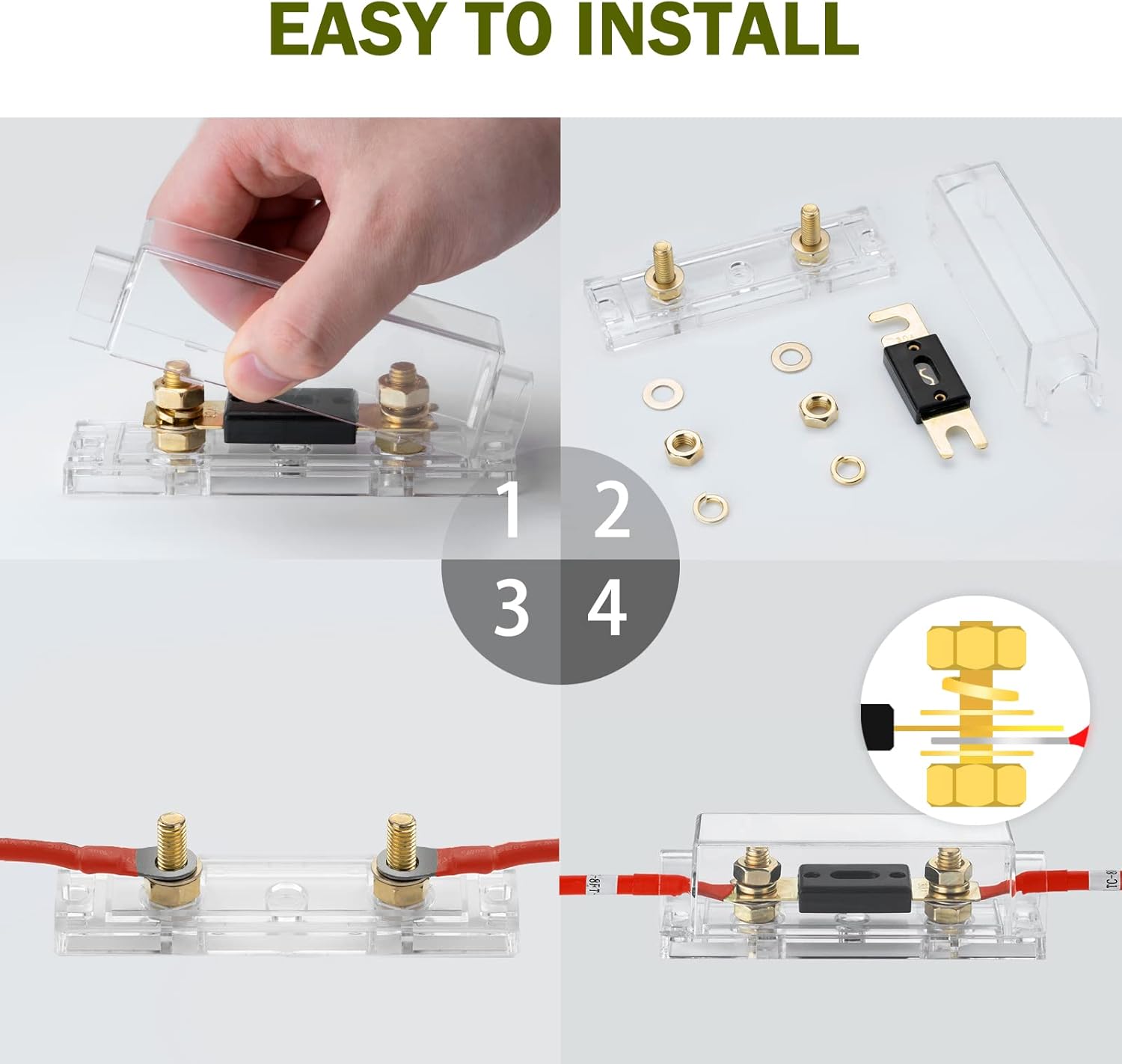
Image: Visual guide for installation. Step 1 shows the open holder, Step 2 shows the fuse inserted, Step 3 shows wires connected, and Step 4 shows the final tightened connection.
5. ઓપરેશન
Once installed, the HQST ANL Fuse operates passively. It continuously monitors the current flowing through the circuit. If the current exceeds 30 Amps, the fuse element will melt, creating an open circuit and stopping the flow of electricity. This action prevents damage to your connected components such as the battery, charge controller, and wiring.

Image: Over-current protection features. Highlights include 30A current rating, 72V voltage rating, general over-current protection, and ignition protected design.
6. જાળવણી
6.1 ફ્યુઝ રિપ્લેસમેન્ટ
If the fuse blows, it indicates an over-current event has occurred. To replace the fuse:
- પાવર ડિસ્કનેક્ટ કરો: Ensure all power sources to the circuit are disconnected before attempting any maintenance.
- Open Holder: Carefully open the transparent cover of the fuse holder.
- Remove Blown Fuse: Remove the old, blown ANL fuse. The transparent cover allows for easy visual inspection to confirm if the fuse element is broken.
- નવો ફ્યુઝ દાખલ કરો: Insert a new ANL fuse of the correct amperage (e.g., 30A) into the holder.
- સુરક્ષિત અને ફરીથી કનેક્ટ કરો: Close the transparent cover and reconnect power to the circuit.
The fuse holder is compatible with 20A, 30A, 40A, 60A, and 100A ANL fuses. Ensure you replace it with a fuse of the appropriate rating for your system.
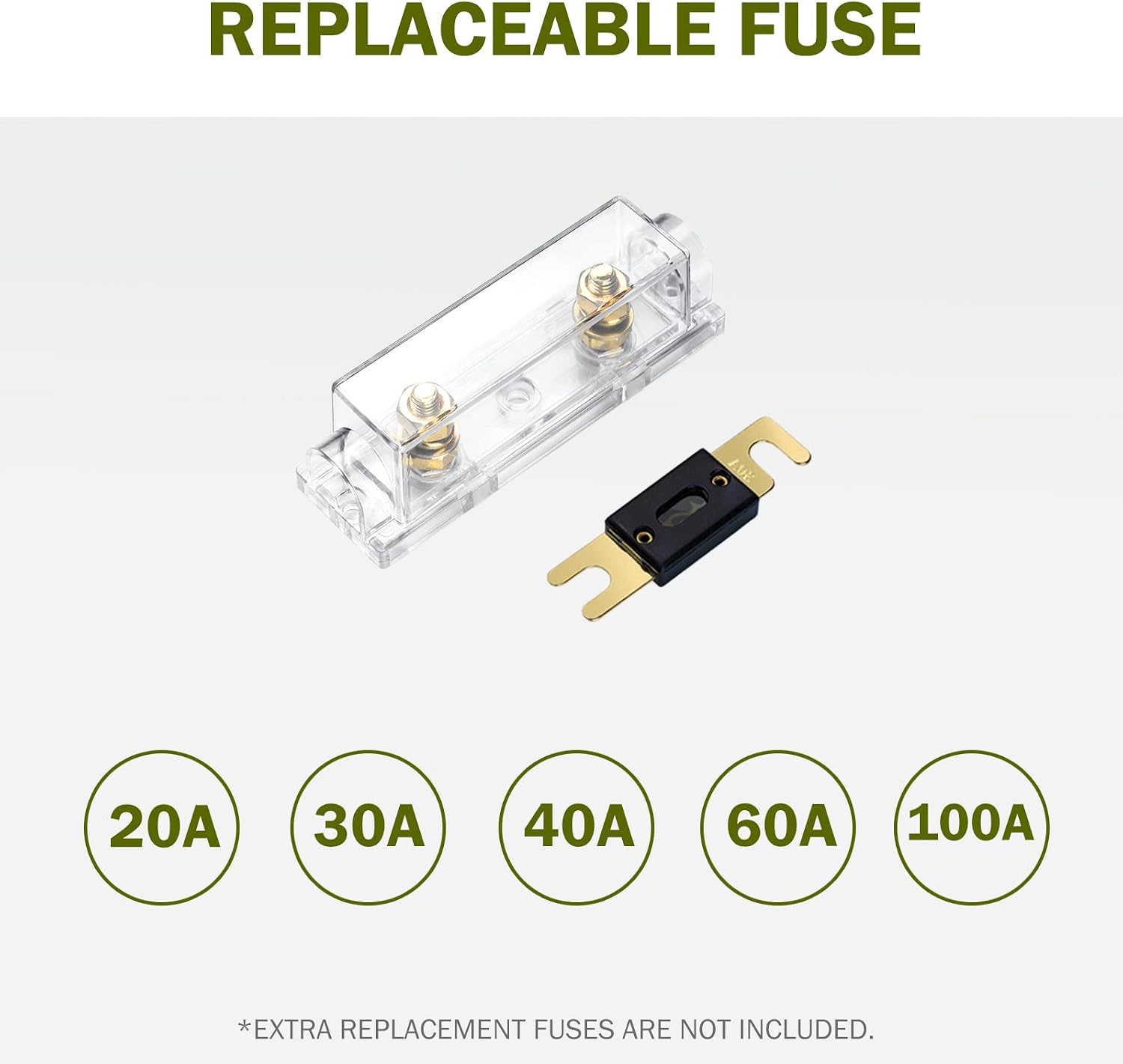
Image: Replaceable fuse. Shows the fuse holder and a separate ANL fuse, with compatible ratings (20A, 30A, 40A, 60A, 100A) listed below. Note: Extra replacement fuses are not included.
6.2 Connection Inspection
Periodically inspect the connections to ensure they remain tight and free from corrosion. Loose connections can lead to resistance, heat buildup, and potential system failure.
7. મુશ્કેલીનિવારણ
If your system is not receiving power after installation, consider the following:
- Check Fuse Status: Visually inspect the fuse through the transparent cover. If the metal element inside is broken, the fuse has blown and needs replacement.
- જોડાણો ચકાસો: Ensure all wiring connections are secure and tightened properly. A loose connection can prevent current flow or cause excessive heat.
- સાચો Ampયુગ: Confirm that the installed fuse matches the required amperage for your system. Using an incorrect fuse can lead to premature blowing or insufficient protection.
8. વોરંટી અને સપોર્ટ
For information regarding product warranty or technical support, please refer to the official HQST website or contact HQST customer service directly. Details may also be available on the product packaging or purchase documentation.
You can visit the HQST Store for additional products and support: HQST Store on Amazon