
પરિચય
This manual provides comprehensive instructions for the Lexmark MS431dw Monochrome Laser Printer. It covers setup, operation, maintenance, and troubleshooting to ensure optimal performance and longevity of your device. The Lexmark MS431dw is designed for efficient monochrome printing, offering speeds up to 40 pages per minute and automatic duplex printing.

છબી: આગળ-જમણી બાજુ view of the Lexmark MS431dw Monochrome Laser Printer.
સેટઅપ
1. પ્રિન્ટરને અનપેક કરવું
Carefully remove the printer from its packaging. Ensure all packing materials, tapes, and protective films are removed from the exterior and interior of the printer. Retain the packaging for future transport if needed.
2. ટોનર કારતૂસ ઇન્સ્ટોલ કરવું
- પ્રિન્ટરનું આગળનું કવર ખોલો.
- Remove the new toner cartridge from its packaging and gently shake it to distribute the toner.
- Insert the toner cartridge into the designated slot until it clicks into place.
- આગળનું કવર બંધ કરો.
3. પેપર લોડ કરી રહ્યું છે
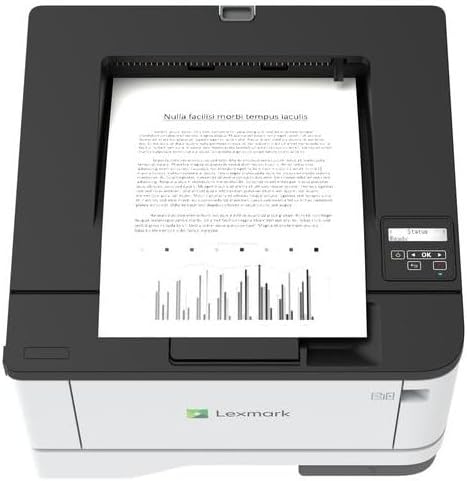
છબી: ટોચ view of the Lexmark MS431dw with paper loaded in the input tray.
Open the paper tray and adjust the paper guides to fit the size of your paper. Load the paper stack into the tray, ensuring it is flat and below the maximum fill line. Close the paper tray. The printer supports various media types, including card stock.
4. કનેક્ટિંગ પાવર
પાવર કોર્ડને પ્રિન્ટરના પાવર ઇનપુટ સાથે અને પછી ગ્રાઉન્ડેડ ઇલેક્ટ્રિકલ આઉટલેટ સાથે જોડો.
5. Connecting to a Network/Computer
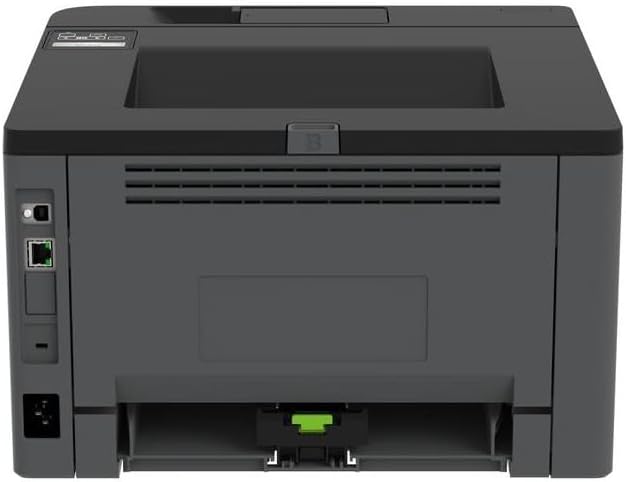
છબી: પાછળનો ભાગ view of the Lexmark MS431dw, highlighting the Ethernet and power connection ports.
The Lexmark MS431dw supports Ethernet connectivity. Connect an Ethernet cable from your network router or switch to the Ethernet port on the back of the printer. For direct connection to a computer, use a USB cable (not included) if available, or configure network printing.
6. ડ્રાઇવર ઇન્સ્ટોલેશન
Turn on the printer. Insert the driver CD (if provided) into your computer, or download the latest drivers from the official Lexmark support website. Follow the on-screen instructions to complete the driver installation.
ઓપરેટિંગ સૂચનાઓ
1. નિયંત્રણ પેનલ ઓવરview

છબી: ટોચ view of the Lexmark MS431dw, showing the printer's control panel with display and buttons.
The control panel features a display screen and navigation buttons (Up, Down, OK, Back) to access printer settings, status, and functions. Refer to the on-screen menus for specific options.
2. મૂળભૂત પ્રિન્ટીંગ
- ખાતરી કરો કે પ્રિન્ટર ચાલુ છે અને તમારા કમ્પ્યુટર અથવા નેટવર્ક સાથે જોડાયેલ છે.
- તમે તમારા કમ્પ્યુટર પર જે દસ્તાવેજ છાપવા માંગો છો તે ખોલો.
- પસંદ કરો છાપો એપ્લિકેશનના મેનુમાંથી (દા.ત., File > છાપો).
- Choose the Lexmark MS431dw from the list of available printers.
- Adjust print settings as desired (e.g., number of copies, paper size).
- ક્લિક કરો છાપો.
3. Automatic Duplex Printing
The MS431dw supports automatic two-sided (duplex) printing. To enable this feature:
- In the print dialog box on your computer, navigate to the printer properties or preferences.
- Look for an option related to "Two-sided printing" or "Duplex printing."
- Select the desired duplex option (e.g., long-edge binding, short-edge binding).
- Confirm your selection and proceed with printing.
જાળવણી
1. Replacing the Toner Cartridge
When the toner level is low, the printer's display will indicate a warning. To replace the cartridge:
- ખાતરી કરો કે પ્રિન્ટર ચાલુ છે.
- આગળનું કવર ખોલો.
- જૂના ટોનર કારતૂસને બહાર કાઢીને તેને બહાર કાઢો.
- Unpack a new Lexmark-compatible toner cartridge and gently shake it.
- Insert the new cartridge until it locks into place.
- આગળનું કવર બંધ કરો.
2. પ્રિન્ટરની સફાઈ
Regular cleaning helps maintain print quality and extends printer life.
- બાહ્ય: સોફ્ટ સાથે બાહ્ય સપાટીઓ સાફ કરો, ડીamp, લિન્ટ-ફ્રી કાપડ. ઘર્ષક ક્લીનર્સ અથવા સોલવન્ટનો ઉપયોગ કરશો નહીં.
- આંતરિક: Periodically open the front cover and gently remove any dust or paper debris from accessible areas using a dry, lint-free cloth. Avoid touching the fuser unit.
મુશ્કેલીનિવારણ
This section addresses common issues you might encounter. For more detailed troubleshooting, refer to the Lexmark support webસાઇટ
૧. પેપર જામ
- If a paper jam occurs, the printer display will show an error message indicating the location of the jam.
- Carefully open the indicated covers or trays.
- Gently pull the jammed paper in the direction of the paper path. Avoid tearing the paper.
- Close all covers and trays. The printer should resume printing.
૬.૨. નબળી પ્રિન્ટ ગુણવત્તા
- ઝાંખા પ્રિન્ટ્સ: The toner cartridge may be low. Replace it if necessary.
- છટાઓ અથવા ફોલ્લીઓ: Clean the printer's interior as described in the Maintenance section. Ensure the toner cartridge is properly seated.
- ખાલી પૃષ્ઠો: Verify the toner cartridge is installed correctly and has toner. Check printer drivers and print settings.
૫.૨. કનેક્ટિવિટી સમસ્યાઓ
- પ્રિન્ટર મળ્યું નથી: Ensure the Ethernet cable is securely connected to both the printer and the network. Verify network settings on the printer and computer.
- ઑફલાઇન સ્થિતિ: Check the printer's power and network connection. Restart both the printer and your computer.
વિશિષ્ટતાઓ
| લક્ષણ | વિગત |
|---|---|
| મોડલ નંબર | 29S0110 |
| પ્રિન્ટીંગ ટેકનોલોજી | લેસર |
| પ્રિન્ટર આઉટપુટ | મોનોક્રોમ |
| મહત્તમ પ્રિન્ટ ઝડપ (મોનોક્રોમ) | ૯૦ પીપીએમ સુધી (પ્રતિ મિનિટ પાનાં) |
| કનેક્ટિવિટી ટેકનોલોજી | ઈથરનેટ |
| ખાસ લક્ષણ | Auto-Duplex (Automatic Two-sided Printing) |
| મહત્તમ ઇનપુટ શીટ ક્ષમતા | 900 શીટ્સ |
| પ્રિન્ટ મીડિયા સપોર્ટ | Card stock, Plain paper |
| વસ્તુનું વજન | ૨૪૯૪.૮ ગ્રામ (આશરે ૫.૫ પાઉન્ડ) |
| વાટtage | 570 વોટ |
| યુપીસી | 734646695558 |
નોંધ: વિશિષ્ટતાઓ સૂચના વિના બદલવાને પાત્ર છે.
વોરંટી અને આધાર
વોરંટી માહિતી
Your Lexmark MS431dw printer is covered by a standard manufacturer's warranty. For specific terms, conditions, and duration of your warranty, please refer to the documentation included with your product or visit the official Lexmark webસાઇટ. વોરંટી દાવાઓ માટે તમારી ખરીદીનો પુરાવો રાખો.
ગ્રાહક આધાર
For technical assistance, driver downloads, or further support, please visit the official Lexmark support portal.
Visit the Lexmark Store for Support