
1. પરિચય
This manual provides detailed instructions for the safe and effective use of the VOLTCRAFT LSG-4. The LSG-4 is a versatile digital multimeter that combines the functions of a wire tracker, signal tracer, continuity tester, and a standard multimeter. It is designed for detecting cables and wires, tracing their routes, and performing various electrical measurements.
2. સલામતી માહિતી
Always read and understand all safety warnings and instructions before operating the device. Failure to follow these instructions may result in electric shock, fire, or serious injury.
- Do not use the device if it appears damaged or is not functioning correctly.
- Ensure the device is turned off before connecting or disconnecting test leads.
- Always use the correct function and range for your measurements.
- Adhere to all local and national safety regulations.
- The device is designed for use in dry conditions. Avoid exposure to moisture.
- બાળકોની પહોંચથી દૂર રાખો.
3. ઉત્પાદન ઓવરview
The VOLTCRAFT LSG-4 is a robust and reliable tool for electrical professionals and DIY enthusiasts. It features a tone generator and a highly sensitive inductive receiver for precise cable tracing, even through walls up to 15 cm deep. Its integrated multimeter functions cover standard electrical measurements, making it a comprehensive solution for various tasks. The device is protected by a durable rubber casing, making it suitable for demanding work environments.

Image 1: The VOLTCRAFT LSG-4 device, showing both the main multimeter unit and the inductive probe.
4. ઘટકો
- LSG-4 DMM Unit: The main digital multimeter unit with display, function dial, and input jacks.
- LSG-4 Probe: The inductive receiver unit for tracing signals.
- ટેસ્ટ લીડ્સ: Red and black test leads for multimeter functions.
- RJ11 કેબલ: For connecting the tone generator to telephone lines or network cables.
- મગર ક્લિપ્સ: For connecting the tone generator to bare wires.

Image 2: The LSG-4 multimeter unit with connected test leads and an RJ11 cable, along with crocodile clips.
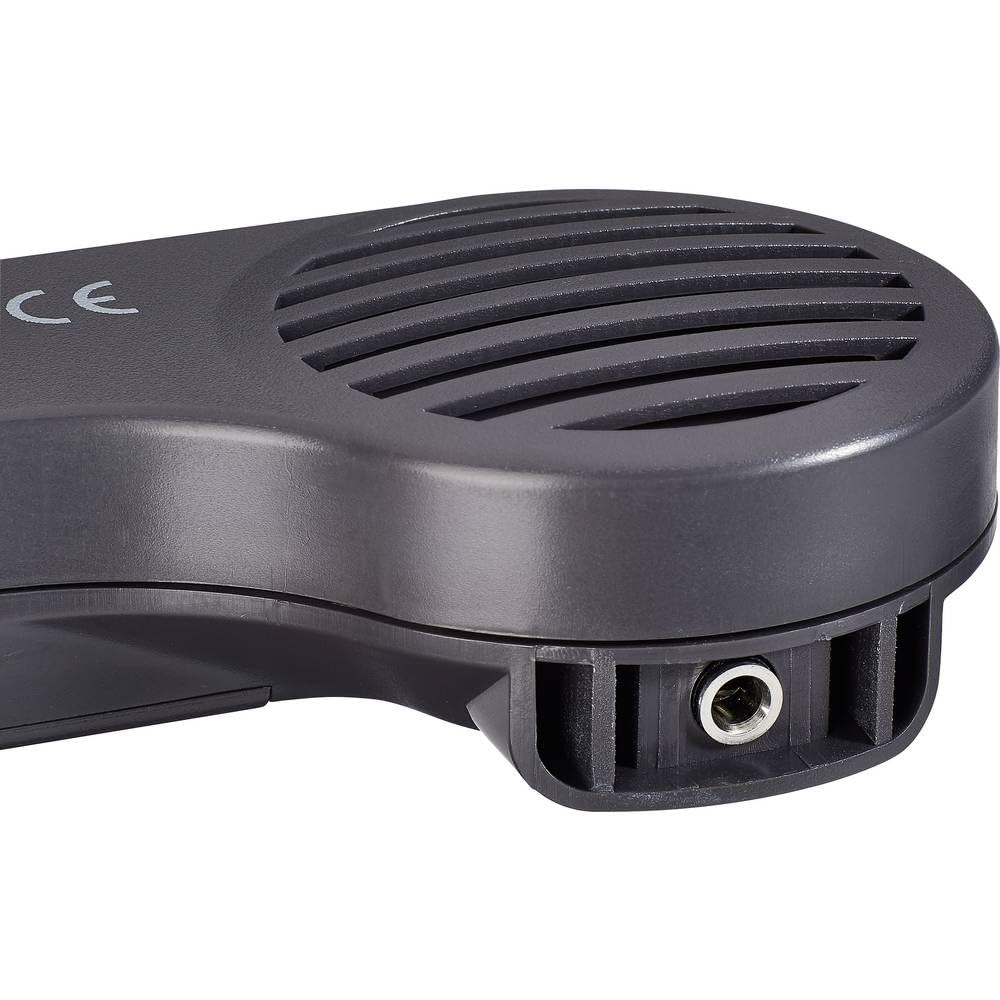
છબી ૫.૧: નજીકથી નજર view of the LSG-4 probe, highlighting its speaker and input jack.
5. સેટઅપ
5.1 બેટરી ઇન્સ્ટોલેશન
The LSG-4 is battery-powered. Open the battery compartment on the back of the DMM unit and the probe unit. Insert the required batteries, ensuring correct polarity. Close the compartment securely.
5.2 Connecting Test Leads (for Multimeter Functions)
For multimeter measurements, insert the red test lead into the VΩmA jack and the black test lead into the COM jack on the DMM unit.
5.3 Connecting Tone Generator (for Wire Tracking)
To use the wire tracking function, connect the tone generator output from the DMM unit to the cable you wish to trace:
- RJ11 કનેક્શન: Plug the RJ11 cable into the dedicated RJ11 port on the DMM unit and the other end into the network or telephone jack of the cable to be traced.
- મગર ક્લિપ્સ: Attach the crocodile clips to the tone generator output on the DMM unit, then securely clip them to the bare ends of the wire to be traced.
6. ઓપરેટિંગ સૂચનાઓ
6.1 Wire Tracking and Signal Tracing
- Connect the tone generator to the cable as described in Section 5.3.
- Turn on the DMM unit and select the 'Tone' function.
- Turn on the LSG-4 probe.
- Adjust the sensitivity of the probe using its control dial to optimize signal detection.
- Move the tip of the probe along the suspected path of the cable. The probe will emit an audible tone when it detects the signal from the tone generator.
- Follow the strongest signal to accurately trace the cable's route.
૫.૨ મલ્ટિમીટર કાર્યો
The LSG-4 offers standard multimeter functions. To use these:
- વિભાગ 5.2 માં વર્ણવ્યા મુજબ ટેસ્ટ લીડ્સને જોડો.
- Turn on the DMM unit and select the desired measurement function (e.g., VAC, વીDC, Ω, Cont).
- Touch the test probes to the circuit or component you wish to measure.
- ડિસ્પ્લે પર માપન મૂલ્ય વાંચો.
- Use the 'Hold' button to freeze the current reading on the display.
- The 'MAX' button can be used to capture the maximum measured value.
7. જાળવણી
- સફાઈ: ઉપકરણને નરમ, સૂકા કપડાથી સાફ કરો. ઘર્ષક ક્લીનર્સ અથવા સોલવન્ટનો ઉપયોગ કરશો નહીં.
- બેટરી રિપ્લેસમેન્ટ: Replace batteries when the low battery indicator appears on the display to ensure accurate measurements.
- સંગ્રહ: Store the device in a cool, dry place away from direct sunlight and extreme temperatures. Remove batteries if storing for extended periods.
- માપાંકન: Regular calibration by qualified personnel is recommended to maintain measurement accuracy.
8. મુશ્કેલીનિવારણ
- ડિસ્પ્લે/પાવર નહીં: બેટરી ઇન્સ્ટોલેશન તપાસો અને ખાતરી કરો કે બેટરી ચાર્જ થયેલ છે.
- અચોક્કસ વાંચન: Ensure test leads are properly connected and the correct function/range is selected. Replace batteries if low.
- Weak/No Signal during Tracing: Ensure the tone generator is connected correctly and active. Adjust probe sensitivity. Check for excessive interference from other electrical sources.
- Continuity Test Fails: Ensure the circuit is de-energized. Check test leads for damage.
9. સ્પષ્ટીકરણો
| લક્ષણ | સ્પષ્ટીકરણ |
|---|---|
| બ્રાન્ડ | વOLલ્ટ્રાફ્ટ |
| મોડલ | વીસી-10906565 |
| પાવર સ્ત્રોત | બેટરી સંચાલિત |
| શૈલી | ડિજિટલ |
| માપન પ્રકાર | Multimeter (Wire Tracker, Signal Tracer, Continuity Tester) |
| Cable Tracing Depth | Up to 15 cm in walls |
| અનુપાલન | CE, RoHS |
| મૂળ દેશ | ચીન |
| GTIN | 04053199991488 |
10. વોરંટી અને સપોર્ટ
VOLTCRAFT products are designed for reliability and performance. For warranty information, please refer to the documentation included with your purchase or visit the official VOLTCRAFT website. For technical support, troubleshooting assistance, or spare parts, please contact VOLTCRAFT customer service or your authorized dealer.
નોંધ: સ્પષ્ટીકરણો સૂચના વિના બદલાઈ શકે છે. સૌથી સચોટ માહિતી માટે હંમેશા નવીનતમ ઉત્પાદન દસ્તાવેજોનો સંદર્ભ લો.