
1. પરિચય
This manual provides instructions for the installation, operation, and maintenance of the Maxspect Jump MJ-L165 65W LED Lighting System. Please read this manual thoroughly before using the product to ensure proper function and longevity.
The Maxspect Jump MJ-L165 is an advanced LED lighting system designed for aquatic environments. It features a full-spectrum output with multi-phase color temperature technology, allowing for configuration to various color spectrums without compromising performance.
2. ઉત્પાદન સુવિધાઓ
- Full-Spectrum Output: Utilizes a comprehensive array of LED colors to support diverse aquatic life.
- Multi-Phase Color Temperature Technology: Enables easy adjustment of color spectrums.
- ઉચ્ચ શક્તિ કાર્યક્ષમતા: Rated at 65W for effective illumination.
- કોમ્પેક્ટ ડિઝાઇન: Dimensions of 8.5 x 7 x 1.5 inches and a weight of 1.8 lbs.
- એલઇડી રૂપરેખાંકન: Includes 6x Hyper Red, 6x Green, 6x Blue, 6x Warm White, 6x Cyan Blue, 4x Deep Blue, 2x Ultraviolet 390nm, 2x Violet 410nm, 2x Royal Blue, and 2x Cool White LEDs.
3. પેકેજ સામગ્રી
અનપેક કરતી વખતે, કૃપા કરીને ચકાસો કે બધા ઘટકો હાજર છે અને તેમને કોઈ નુકસાન થયું નથી. પેકેજમાં આ હોવું જોઈએ:
- Maxspect Jump MJ-L165 LED Lighting Unit
- Mounting Arm/Bracket
- પાવર એડેપ્ટર અને કોર્ડ
- વપરાશકર્તા માર્ગદર્શિકા (આ દસ્તાવેજ)

Figure 3.1: Maxspect Jump MJ-L165 LED Lighting System with its adjustable mounting arm.
4. સેટઅપ સૂચનાઓ
4.1 Mounting the Light Fixture
- Assemble the Mounting Arm: Attach the mounting arm components as shown in the diagram. Ensure all screws are tightened securely.
- Attach to Aquarium: Secure the mounting bracket to the rim of your aquarium. Adjust the bracket to fit the thickness of the tank glass or acrylic.
- લાઇટ પોઝિશન કરો: Connect the LED lighting unit to the mounting arm. Adjust the arm's angle and height to achieve the desired light coverage over your aquarium. Refer to the dimensions diagram for optimal positioning.
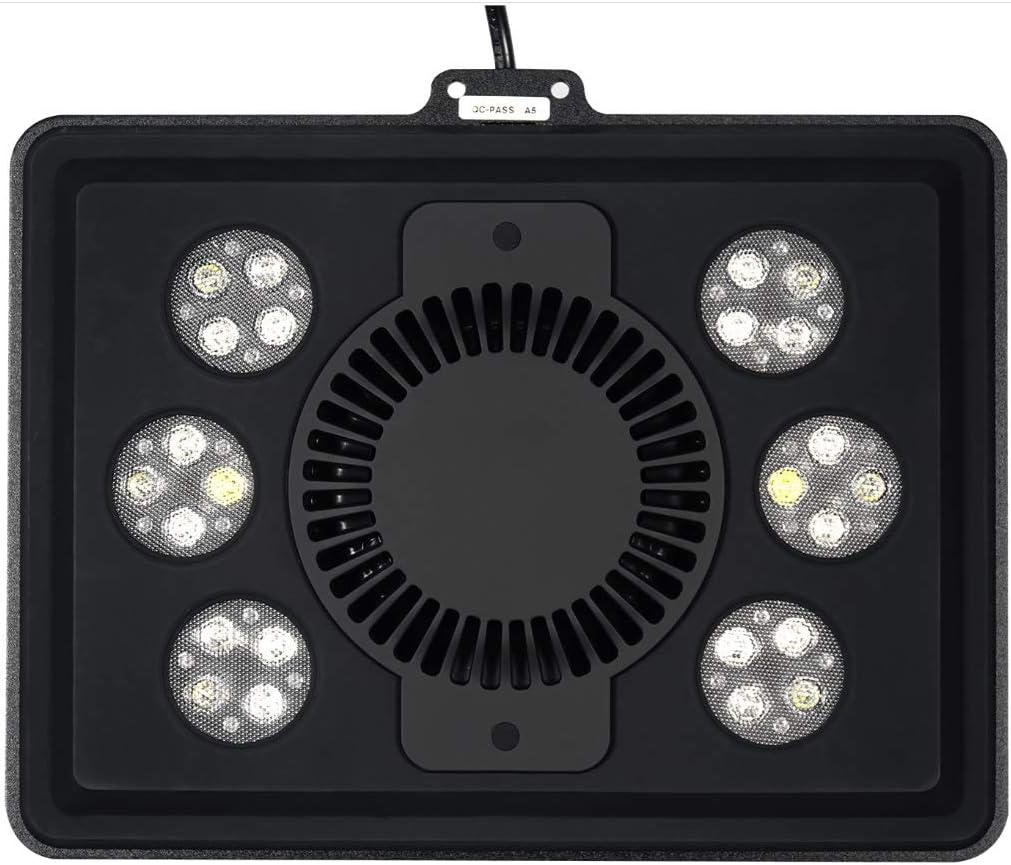
Figure 4.1: Dimensional diagram illustrating mounting options and coverage area. The light can cover an area of approximately 12 x 24 inches.
4.2 પાવર કનેક્શન
- પાવર કોર્ડ કનેક્ટ કરો: Insert the power cord into the designated port on the LED lighting unit.
- આઉટલેટમાં પ્લગ ઇન કરો: Plug the power adapter into a standard electrical outlet. Ensure the outlet is protected by a Ground Fault Circuit Interrupter (GFCI) for safety in aquatic environments.

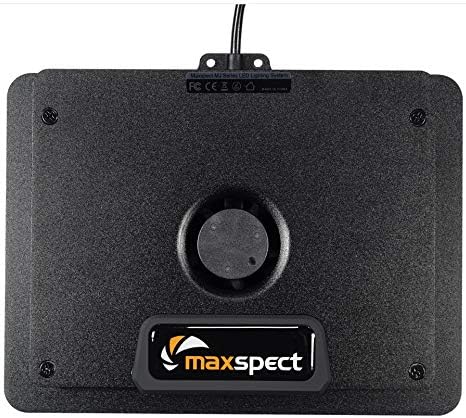
Figure 4.2: Underside of the Maxspect Jump MJ-L165, showing the cooling fan and power input connection point.
5. ઓપરેટિંગ સૂચનાઓ
5.1 પાવરિંગ ચાલુ/બંધ
Once connected to power, the unit should power on. To turn off the unit, disconnect it from the power source. For daily operation, it is recommended to use a timer (not included) to control the light cycle.
5.2 Adjusting Light Spectrum and Intensity
The Maxspect Jump MJ-L165 allows for configuration of different color spectrums. Specific controls for spectrum and intensity adjustment are typically managed via a dedicated controller or a mobile application (if available for this model). Refer to the separate controller/app manual for detailed instructions on programming light cycles, intensity levels, and color channels.
આકૃતિ 5.1: વિગતવાર view of the multi-color LED array, showcasing the various diodes responsible for the full-spectrum output.
6. જાળવણી
6.1 Cleaning the Light Fixture
- પાવર ડિસ્કનેક્ટ કરો: Always unplug the unit from the power outlet before performing any maintenance.
- સ્વચ્છ બાહ્ય: સોફ્ટનો ઉપયોગ કરો, ડીamp cloth to wipe the exterior of the light fixture. Avoid using abrasive cleaners or solvents, as these can damage the finish or LED lenses.
- Clean Fan and Vents: Periodically inspect and clean the cooling fan and ventilation openings to ensure proper airflow. Use a soft brush or compressed air to remove dust and debris.
- Clean LED Lenses: Gently wipe the LED lenses with a soft, lint-free cloth to remove salt creep or water spots, which can reduce light output.
6.2 નિયમિત નિરીક્ષણ
Regularly check the power cord for any signs of damage. Ensure the mounting arm remains securely fastened to the aquarium. Address any issues promptly to prevent potential hazards.
7. મુશ્કેલીનિવારણ
| સમસ્યા | સંભવિત કારણ | ઉકેલ |
|---|---|---|
| પ્રકાશ ચાલુ થતો નથી. | પાવર નથી, કનેક્શન ઢીલું છે, પાવર એડેપ્ટરમાં ખામી છે. | Check power outlet. Ensure all connections are secure. Test with another outlet. Contact support if adapter is suspected faulty. |
| પ્રકાશ આઉટપુટ મંદ અથવા અસંગત છે. | Dirty LED lenses, incorrect settings, partial component failure. | Clean LED lenses as per maintenance section. Verify settings via controller/app. If problem persists, contact support. |
| Fan is noisy or not operating. | Dust/debris in fan, fan malfunction. | Clean fan and vents. Ensure nothing obstructs fan blades. If noise continues or fan fails, contact support. |
If you encounter issues not listed here or if the suggested solutions do not resolve the problem, please contact Maxspect customer support.
8. સ્પષ્ટીકરણો
| લક્ષણ | વિગત |
|---|---|
| મોડલ નંબર | MJ-L165 |
| બ્રાન્ડ | Maxspect |
| રેટેડ પાવર | 65W |
| પ્રકાશ સ્ત્રોત પ્રકાર | એલઇડી |
| પાવર સ્ત્રોત | કોર્ડેડ ઇલેક્ટ્રિક |
| કવરેજ વિસ્તાર | ૦.૯ x ૦.૫ ઇંચ (અંદાજે) |
| પરિમાણો (L x W x H) | 8.5 x 7 x 1.5 ઇંચ |
| વસ્તુનું વજન | 1.8 lbs (અંદાજે 816 ગ્રામ) |
| પ્રકાશ સ્ત્રોતોની સંખ્યા | 1 (unit) |
| બેટરી સમાવાયેલ | ના |
9. વોરંટી અને સપોર્ટ
For warranty information, please refer to the documentation provided with your purchase or visit the official Maxspect webસાઇટ. વોરંટીના નિયમો અને શરતો પ્રદેશ અને રિટેલર પ્રમાણે બદલાઈ શકે છે.
For technical support, troubleshooting assistance, or inquiries regarding replacement parts, please contact your authorized Maxspect dealer or Maxspect customer service directly. Contact information can typically be found on the manufacturer's webસાઇટ