
1. પરિચય
Thank you for choosing the iClever GK08 Wireless Keyboard and Mouse Combo. This full-size keyboard with a numeric keypad and a silent mouse offers a stable 2.4 GHz connection, USB-C recharging, and dual-layout compatibility for Mac and Windows systems. This manual provides detailed instructions to help you set up, operate, and maintain your new device.
2. સલામતી માહિતી
- ઉપકરણને પાણી, આગ અને ઊંચા તાપમાનથી દૂર રાખો.
- ઉપકરણને ડિસએસેમ્બલ અથવા સંશોધિત કરવાનો પ્રયાસ કરશો નહીં.
- ચાર્જિંગ માટે ફક્ત આપેલ USB-C કેબલનો ઉપયોગ કરો.
- ઉપકરણને મજબૂત અસરમાં મૂકવા અથવા આધીન કરવાનું ટાળો.
- સ્થાનિક નિયમો અનુસાર બેટરી અને ઇલેક્ટ્રોનિક ઘટકોનો જવાબદારીપૂર્વક નિકાલ કરો.
3. સેટઅપ માર્ગદર્શિકા
3.1 પેકેજ સામગ્રી
- iClever GK08 Wireless Keyboard
- iClever Wireless Mouse
- USB-A Nano Receiver (stored inside the mouse)
- USB-C ચાર્જિંગ કેબલ
- Washable Dust Cover
- વપરાશકર્તા માર્ગદર્શિકા
3.2 પ્રારંભિક ચાર્જિંગ
Before first use, ensure both the keyboard and mouse are fully charged.
- Connect the provided USB-C charging cable to the keyboard's USB-C port (located on the top edge).
- કેબલના બીજા છેડાને USB પાવર સ્ત્રોત સાથે જોડો (દા.ત., કમ્પ્યુટર USB પોર્ટ, USB વોલ એડેપ્ટર).
- The charging indicator light on the keyboard will illuminate during charging and turn off when fully charged.
- For the mouse, connect the USB-C cable to its charging port. The mouse also has an indicator light.
- A full charge takes approximately 2 hours and provides up to 45 days of use for the keyboard.
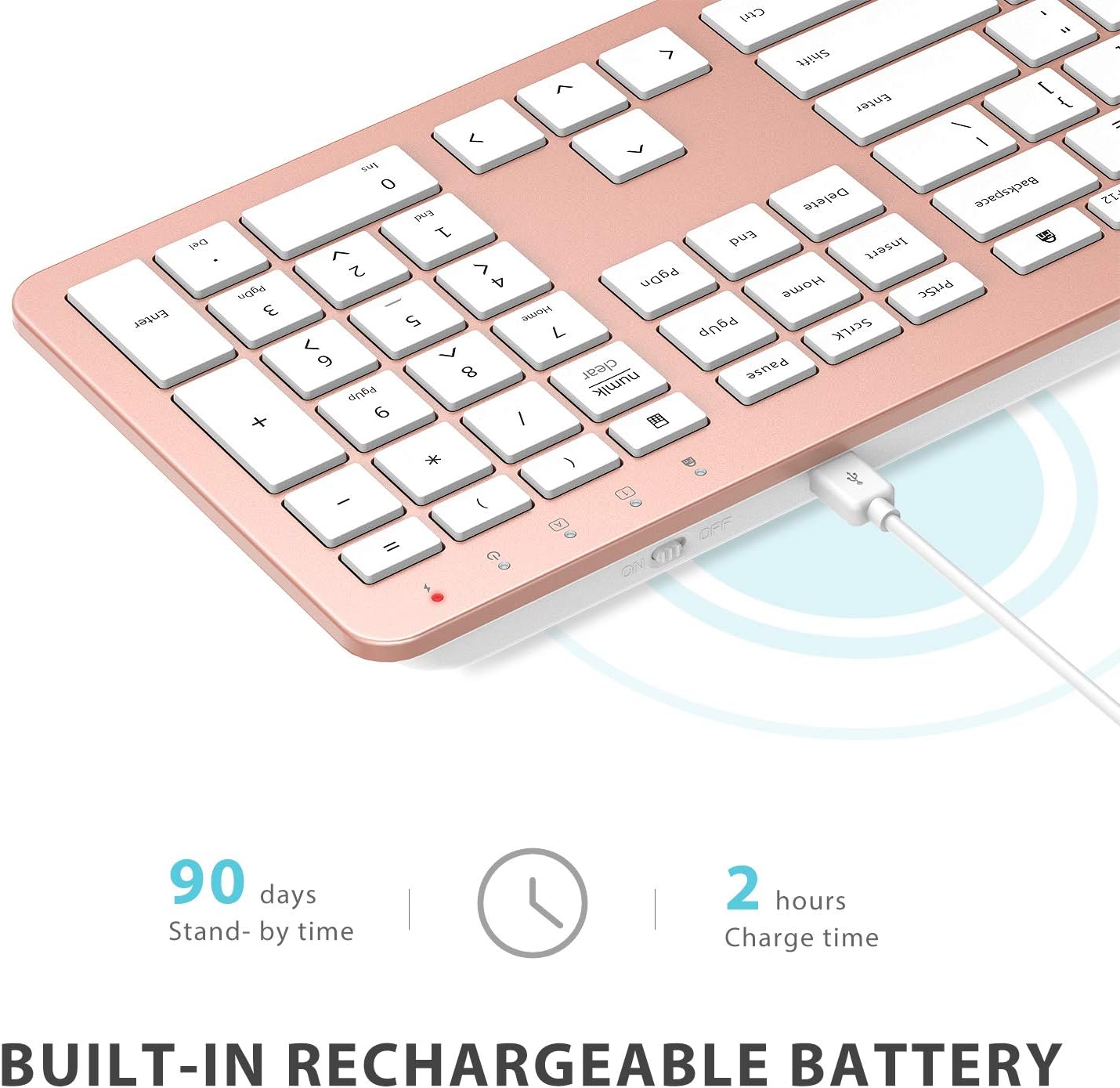
Image: The iClever GK08 keyboard connected to a USB-C charging cable, illustrating the charging process and battery life indicators.
3.3 Connecting to Your Computer (2.4 GHz Wireless)
The keyboard and mouse connect via a single 2.4 GHz USB-A nano receiver.
- Locate the USB-A nano receiver. It is typically stored in a compartment on the underside of the mouse.
- Plug the nano receiver into an available USB-A port on your computer.
- Turn on the keyboard using the ON/OFF switch (usually on the top edge).
- Turn on the mouse using the ON/OFF switch (located on the underside).
- Your computer should automatically detect and install the necessary drivers. The devices are ready for use once recognized.
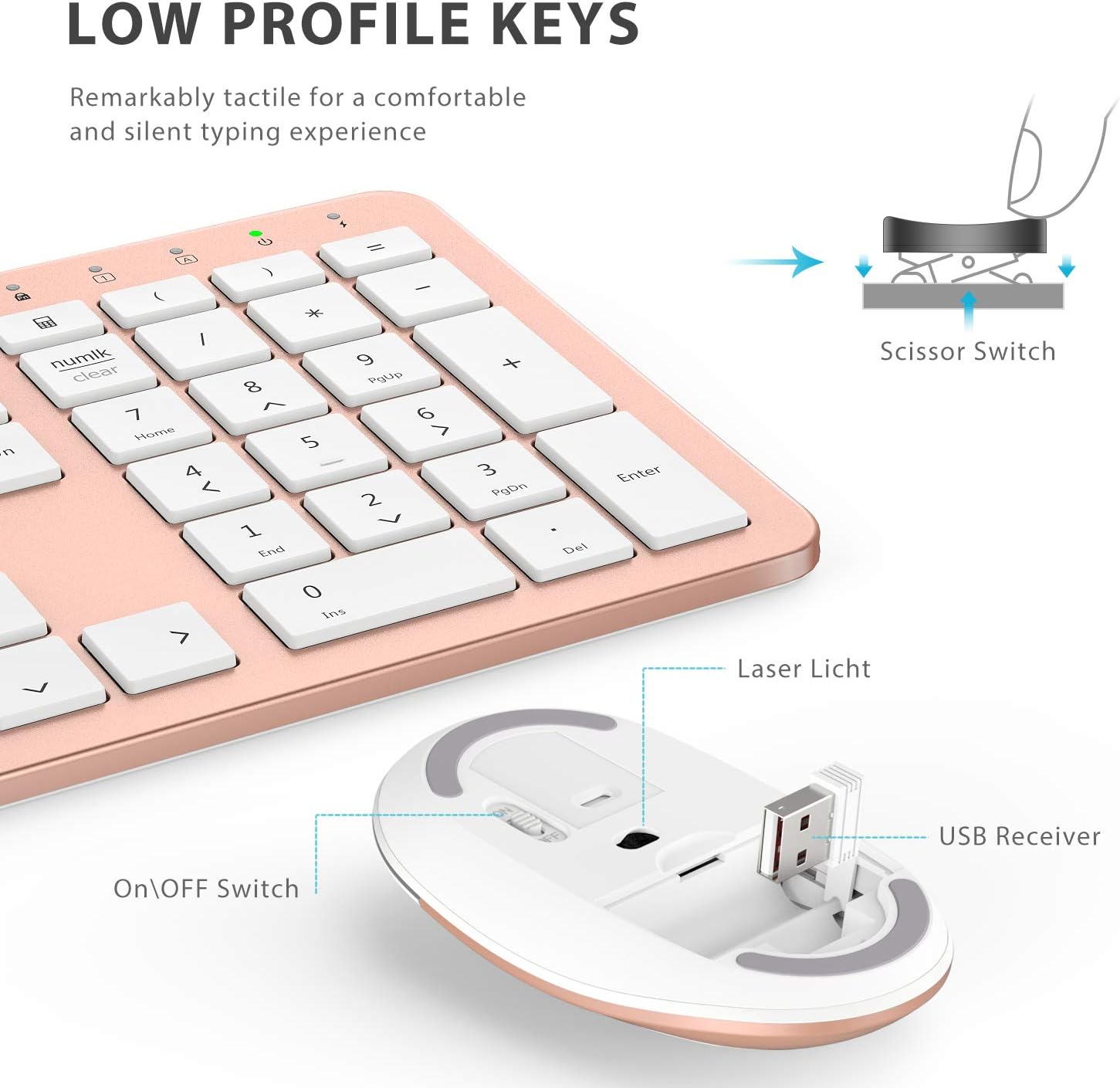
છબી: ક્લોઝ-અપ view of the iClever mouse, highlighting the compartment where the USB nano receiver is stored for convenience.
૧.૧ સુસંગતતા તપાસ
This combo requires an available USB-A port for the nano receiver. For newer Macs with only USB-C ports, a USB-C to USB-A adapter (not included) is required. It is compatible with:
- Windows 10/11 PC & laptop
- macOS desktops / notebooks with USB-A port (e.g., iMac Retina 4K/5K, MacBook Air/Pro ≤ 2017)
- ક્રોમ ઓએસ

Image: A visual representation emphasizing the requirement of a USB-A port for the 2.4G wireless receiver, with a note about USB-C adapters for newer devices.
4. ઓપરેટિંગ સૂચનાઓ
4.1 કીબોર્ડ કાર્યો
- પૂર્ણ-કદનું લેઆઉટ: The keyboard features a 110-key layout with a dedicated numeric keypad for efficient data entry.
- Quiet Scissor-Switch Keys: Enjoy a comfortable and quiet typing experience with low-profile keys that produce less than 50 dB of sound.
- Media Shortcuts: Access common media functions directly from the keyboard.
- Dual-Layout Compatibility: The keyboard has clearly printed Mac and PC legends.
Switching Between Mac and Windows Layouts:
- માટે વિન્ડોઝ: દબાવો Fn + W to activate Win, Alt, NumLK functions.
- માટે મેક ઓએસ: દબાવો Fn + Q to activate Alt (Option), Cmd, Clear functions.

Image: The iClever GK08 keyboard displaying the dual Mac and Windows key legends, with instructions for switching between operating system layouts using the Fn key combinations.
૪.૨ માઉસ કાર્યો
- સાયલન્ટ ક્લિક: The mouse is designed for quiet operation, minimizing distractions.
- એડજસ્ટેબલ DPI: The mouse features 3 adjustable DPI levels (800/1200/1600) to customize cursor sensitivity. Press the DPI button (usually located near the scroll wheel) to cycle through the settings.

Image: A visual demonstrating the quiet operation of the iClever mouse and the three adjustable DPI settings (800, 1200, 1600) for varied precision needs.
4.3 Auto-Sleep Feature
To conserve battery life, both the keyboard and mouse will enter an auto-sleep mode after 10 minutes of inactivity. To wake them up, simply press any key on the keyboard or move the mouse.
Video: A seller-provided video demonstrating the plug-and-play functionality and long battery life of the iClever Wireless Keyboard and Mouse. This video highlights the ease of setup and extended usage between charges.
5. જાળવણી
- સફાઈ: સોફ્ટનો ઉપયોગ કરો, ડીamp cloth to clean the surfaces of the keyboard and mouse. Avoid harsh chemicals.
- ધૂળ આવરણ: Utilize the included washable dust cover to protect the keyboard from dust and spills when not in use.
- સંગ્રહ: When not in use for extended periods, turn off both devices to conserve battery. Store the USB receiver inside the mouse.
6. મુશ્કેલીનિવારણ
- કોઈ કનેક્શન નથી:
- Ensure both keyboard and mouse are turned ON.
- Verify the USB nano receiver is securely plugged into a working USB-A port on your computer.
- Try plugging the receiver into a different USB-A port.
- Check if the devices are charged.
- લેગ અથવા ઇન્ટરમિટન્ટ કનેક્શન:
- Ensure the devices are within the 33 ft / 10 m operating range of the receiver.
- Avoid placing the receiver near strong interference sources (e.g., other wireless devices, large metal objects).
- Re-pair the devices by unplugging and re-plugging the receiver.
- Keyboard Not Typing Correctly (Mac/Windows):
- Ensure you have selected the correct operating system layout using Fn + W વિન્ડોઝ માટે અથવા Fn + Q મેક માટે.
- માઉસ કર્સર કૂદી જાય છે અથવા અચોક્કસ છે:
- માઉસ પરના DPI બટનનો ઉપયોગ કરીને DPI સેટિંગને સમાયોજિત કરો.
- Ensure the mouse sensor is clean and free from obstructions.
- માઉસનો ઉપયોગ યોગ્ય સપાટી પર કરો (ખૂબ પ્રતિબિંબિત કે પારદર્શક નહીં).
7. સ્પષ્ટીકરણો
| લક્ષણ | વિગત |
|---|---|
| બ્રાન્ડ | iClever |
| મોડલ નંબર | GK08 |
| રંગ | રોઝ ગોલ્ડ |
| કનેક્ટિવિટી ટેકનોલોજી | 2.4 GHz wireless (USB-A nano receiver) |
| વાયરલેસ રેંજ | 33 ફૂટ/10 મીટર સુધી |
| કીબોર્ડ લેઆઉટ | QWERTY, Full-size 110-key with Numpad |
| કી પ્રકાર | Scissor Switch (Quiet typing < 50 dB) |
| પાવર સ્ત્રોત | Rechargeable Lithium Ion Battery (Keyboard) |
| ચાર્જિંગ પોર્ટ | યુએસબી-સી |
| ચાર્જિંગ સમય | આશરે. 2 કલાક |
| Battery Life (Keyboard) | 45 દિવસ સુધી (સામાન્ય ઉપયોગ) |
| માઉસ DPI સેટિંગ્સ | 800 / 1200 / 1600 DPI |
| સુસંગત ઓપરેટિંગ સિસ્ટમ્સ | Windows 8/10/11, macOS, Chrome OS |
| ખાસ લક્ષણો | Dual Mac/Windows layout, 10-min auto-sleep, Washable dust cover |
8. વોરંટી અને સપોર્ટ
iClever products typically come with a standard manufacturer's warranty. Please refer to the warranty card included in your product packaging or visit the official iClever webવિગતવાર વોરંટી નિયમો અને શરતો માટે સાઇટ.
For technical support, troubleshooting assistance, or any product-related inquiries, please contact iClever customer service through their official webસાઇટ અથવા તમારા ઉત્પાદન દસ્તાવેજોમાં આપેલી સંપર્ક માહિતી.
Supportનલાઇન સપોર્ટ: www.iclever.com/support