
Suntek HC-801LTE (801Plus)
Suntek HC-801LTE 4G Trail Hunting Camera User Manual
Model: HC-801LTE (801Plus)
Brand: Suntek
1. પરિચય
Thank you for choosing the Suntek HC-801LTE 4G Trail Hunting Camera. This high-quality 4G wildlife camera features a 36MP image resolution and 4K video preview, offering advanced monitoring capabilities. It is designed for tracking animal movements, searching for traces, and for security purposes, such as detecting intrusions. With its cloud service integration and mobile app control, you can receive instant notifications and manage your camera remotely. This manual provides detailed instructions to help you set up, operate, and maintain your camera for optimal performance.
2. પેકેજ સામગ્રી
બધી વસ્તુઓ હાજર છે તેની ખાતરી કરવા માટે કૃપા કરીને પેકેજની સામગ્રી તપાસો:
- HC-801PRO Hunting Camera
- એન્ટેના
- યુએસબી કેબલ
- માઉન્ટિંગ સ્ટ્રેપ
- User Manual (on CD, English version included)

Image: The HC-801LTE camera shown with its standard accessories, including the 4G antenna, USB cable, and a black mounting strap.
નોંધ: SIM card, SD card, and AA batteries are not included and must be purchased separately.
3. ઉત્પાદન ઓવરview
Familiarize yourself with the main components of your HC-801LTE camera:
- ફ્રન્ટ પેનલ: Main lens, PIR sensors, IR LEDs, TFT display.
- સાઇડ પેનલ: Latches for securing the camera housing.
- નીચેની પેનલ: USB port, Micro SD card slot, external DC power port, SIM card slot, tripod mount.
- પાછળની પેનલ: Battery compartment, mounting strap guides, product label.

છબી: આગળ view of the HC-801LTE camera, highlighting the lens, PIR sensors, and the integrated display.

છબી: બાજુ view of the HC-801LTE camera, illustrating the robust latches that secure the device.
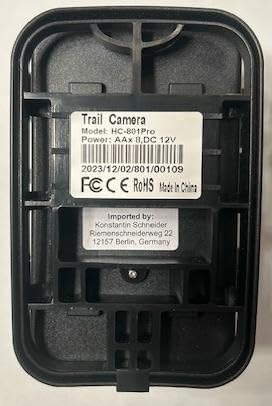
છબી: પાછળ view of the HC-801LTE camera, displaying the battery compartment and the product label with model and power specifications.
4. સેટઅપ
Follow these steps to prepare your camera for use:
- બેટરી ઇન્સ્ટોલેશન: Open the camera housing and insert 8 AA batteries into the battery compartment, ensuring correct polarity. The camera can also be powered permanently with a 9-12V, 1.5A network power supply.
- માઇક્રો એસડી કાર્ડ ઇન્સ્ટોલેશન: Insert a Micro SD card (up to 64GB, not included) into the designated slot. Ensure the card is formatted correctly for optimal performance.
- સિમ કાર્ડ ઇન્સ્ટોલેશન: For 4G functionality, insert a compatible SIM card into the SIM card slot. Ensure the SIM card is activated and has an active data plan.
- Antenna Attachment: Screw the provided 4G antenna firmly into the antenna port on top of the camera.
- માઉન્ટ કરવાનું: Use the included mounting strap to secure the camera to a tree or pole. Alternatively, use the tripod mount for flexible positioning.

Image: The HC-801LTE camera with its 4G antenna, demonstrating its connectivity with a smartphone running the Suntekcam application.
5. ઓપરેટિંગ સૂચનાઓ
This section details how to operate your Suntek HC-801LTE camera and utilize its features.
5.1 પાવરિંગ ચાલુ/બંધ
Locate the power switch inside the camera housing. Switch it to the 'ON' position to power on the camera. To power off, switch it to the 'OFF' position.
5.2 ઓપરેટિંગ મોડ્સ
The camera supports various operating modes:
- ફોટો મોડ: સ્થિર છબીઓ કેપ્ચર કરે છે.
- વિડિઓ મોડ: Records video clips.
- ફોટો + વિડિઓ મોડ: Captures a still image followed by a video clip upon detection.
5.3 Suntekcam App Usage
The Suntekcam app allows for remote control and monitoring of your camera:
- એપ ડાઉનલોડ કરો: Scan the QR code provided in the camera's manual or visit http://app.appurl.me/79814428341 ડાઉનલોડ કરવા માટે
Ask a question about this manual
Ask about setup, troubleshooting, compatibility, parts, safety, or missing instructions. Manuals+ will review the question and use this page’s manual context to help answer it.