
પરિચય
This instruction manual provides comprehensive guidance for the SOAR NFL True Wireless Earbuds V.4. These earbuds feature Bluetooth 5.0 technology, a built-in microphone, and touch controls, offering 3-4 hours of playtime per charge. The included charging case ensures portability and extended use. Please read this manual thoroughly before using your earbuds to ensure proper operation and longevity.
બૉક્સમાં શું છે
Upon opening your SOAR NFL True Wireless Earbuds V.4 package, you should find the following items:
- One (1) Pair of True Wireless Earbuds
- એક (1) ચાર્જિંગ કેસ
- One (1) Micro-USB Charging Cable

The image above displays the SOAR NFL True Wireless Earbuds V.4 in their retail packaging. The package includes the earbuds, the charging case, and a micro-USB charging cable.
ઉત્પાદન ઓવરview
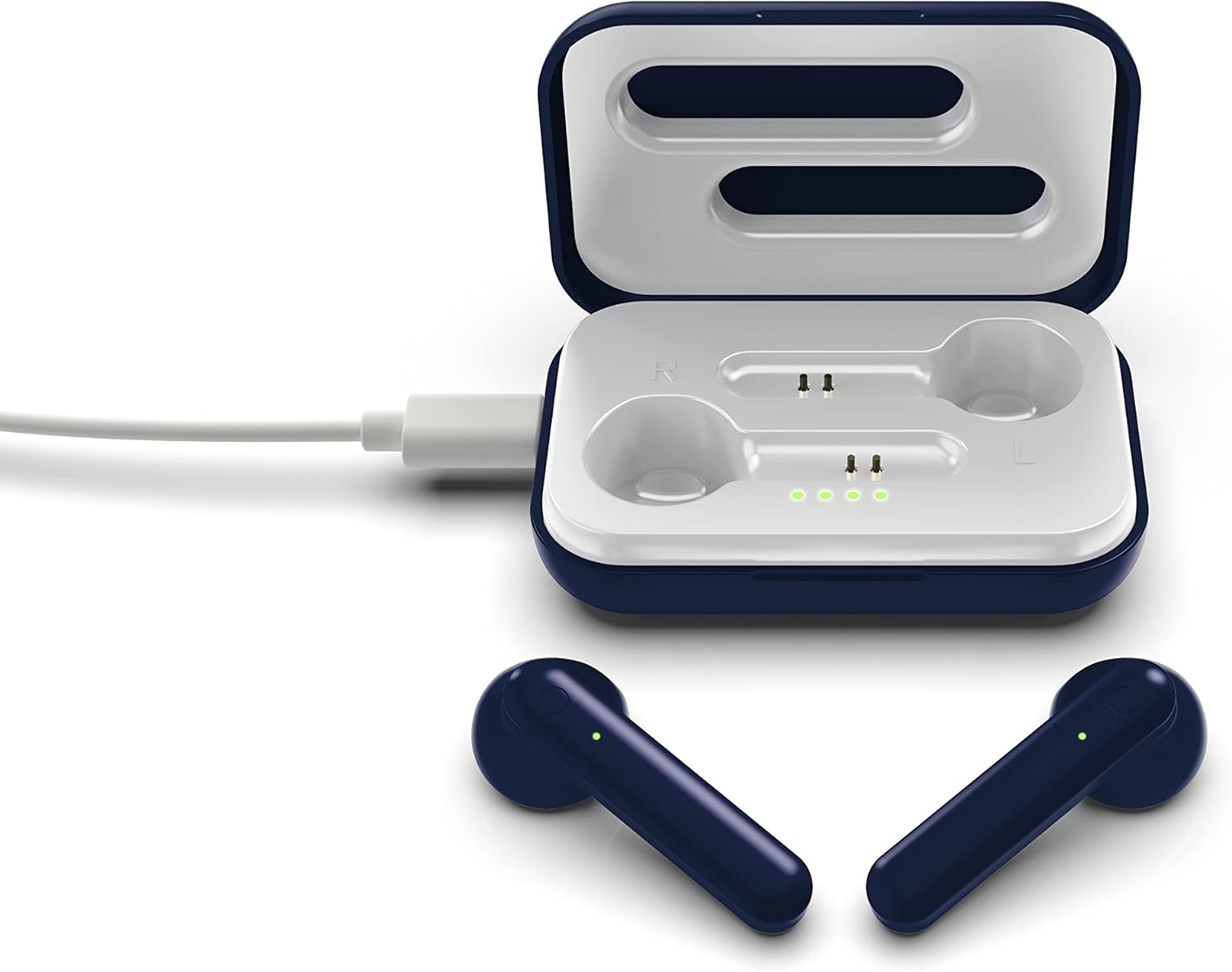
The SOAR NFL True Wireless Earbuds V.4 consist of two individual earbuds and a portable charging case. Each earbud features a touch-sensitive area for controls and an LED indicator. The charging case has a lid, charging ports for the earbuds, and LED indicators to show its battery status.

This image shows the earbuds outside their charging case, which is open and connected to a charging cable. The charging case has designated slots for each earbud (Left and Right) and LED indicators for charging status.
The image above illustrates the earbuds securely placed within their charging case. The illuminated LED lights on the case indicate the charging status of both the case and the earbuds.
સેટઅપ
૪.૧. ઇયરબડ્સ અને કેસ ચાર્જ કરવા
પ્રથમ ઉપયોગ કરતા પહેલા, ઇયરબડ્સ અને ચાર્જિંગ કેસ બંનેને સંપૂર્ણપણે ચાર્જ કરો.
- કેસ ચાર્જિંગ: Connect the provided Micro-USB cable to the charging port on the case and the other end to a USB power source (e.g., computer, wall adapter). The LED indicators on the case will illuminate to show charging progress.
- ઇયરબડ્સ ચાર્જ કરવું: Place the earbuds into their respective slots in the charging case. Ensure they are correctly seated. The earbuds will begin charging automatically from the case's internal battery. The LED indicators on the earbuds will show their charging status.
- સંપૂર્ણ ચાર્જ કરવાથી લગભગ 3-4 કલાકનો રમતનો સમય મળે છે.
2. બ્લૂટૂથ જોડી
તમારા ઇયરબડ્સને ઉપકરણ સાથે કનેક્ટ કરવા માટે:
- ખાતરી કરો કે ઇયરબડ્સ ચાર્જ થયા છે.
- Open the charging case. The earbuds will automatically power on and enter pairing mode. The LED indicator on one earbud will flash, indicating it is ready to pair.
- તમારા ઉપકરણ (સ્માર્ટફોન, ટેબ્લેટ, વગેરે) પર, બ્લૂટૂથ સક્ષમ કરો.
- માટે શોધો available Bluetooth devices and select "SOAR TWS4" from the list.
- Once connected, the earbud LED indicator will stop flashing. You will hear an audible confirmation.
- જો ઉપકરણમાં બ્લૂટૂથ સક્ષમ હોય, તો કેસમાંથી દૂર કર્યા પછી ઇયરબડ્સ આપમેળે છેલ્લા જોડીવાળા ઉપકરણ સાથે ફરીથી કનેક્ટ થઈ જશે.
ઓપરેટિંગ સૂચનાઓ
The SOAR NFL True Wireless Earbuds V.4 feature touch controls for easy management of audio and calls.
પાવર ચાલુ/બંધ
- પાવર ચાલુ: ચાર્જિંગ કેસ ખોલો, અથવા બંને ઇયરબડ પરના ટચ એરિયાને 3 સેકન્ડ સુધી દબાવી રાખો.
- પાવર બંધ: ઇયરબડ્સને ચાર્જિંગ કેસમાં પાછા મૂકો અને ઢાંકણ બંધ કરો, અથવા બંને ઇયરબડ્સ પરના ટચ એરિયાને 5 સેકન્ડ સુધી લાંબા સમય સુધી દબાવી રાખો.
સંગીત પ્લેબેક
- ચલાવો/થોભો: બંને ઇયરબડ પર એક વાર ટેપ કરો.
- આગળનો ટ્રેક: જમણા ઇયરબડ પર બે વાર ટૅપ કરો.
- પાછલો ટ્રેક: ડાબા ઇયરબડ પર બે વાર ટૅપ કરો.
ક Callલ મેનેજમેન્ટ
- જવાબ/કૉલ સમાપ્ત કરો: ઇનકમિંગ કોલ અથવા એક્ટિવ કોલ દરમિયાન બંને ઇયરબડ પર એક વાર ટેપ કરો.
- કૉલ નકારો: Long-press on either earbud for 2 seconds during an incoming call.
વૉઇસ સહાયક
- વ Voiceઇસ સહાયકને સક્રિય કરો: કોઈપણ ઇયરબડ પર ત્રણ વાર ટૅપ કરો.
જાળવણી
Proper care will extend the life of your earbuds.
- સફાઈ: ઇયરબડ્સ અને ચાર્જિંગ કેસ સાફ કરવા માટે નરમ, સૂકા કપડાનો ઉપયોગ કરો. કઠોર રસાયણો અથવા ઘર્ષક સામગ્રીનો ઉપયોગ કરશો નહીં.
- સંગ્રહ: જ્યારે ઉપયોગમાં ન હોય, ત્યારે ઇયરબડ્સને સુરક્ષિત રાખવા અને ચાર્જ રાખવા માટે તેમના ચાર્જિંગ કેસમાં રાખો.
- પાણી પ્રતિકાર: આ ઇયરબડ્સ છે પાણી પ્રતિરોધક નથી. Avoid exposure to liquids, moisture, and extreme temperatures.
- ચાર્જિંગ: Use only the provided Micro-USB cable or a certified equivalent for charging.
મુશ્કેલીનિવારણ
જો તમને તમારા ઇયરબડ્સમાં સમસ્યાઓ આવે, તો નીચેના સામાન્ય ઉકેલોનો સંદર્ભ લો:
| સમસ્યા | ઉકેલ |
|---|---|
| One earbud is not connecting or producing sound. |
|
| Earbuds are not pairing with my device. |
|
| ઇયરબડ્સ ચાર્જ થઈ રહ્યાં નથી. |
|
વિશિષ્ટતાઓ
| લક્ષણ | વિગત |
|---|---|
| મોડેલનું નામ | ટ્રુ વાયરલેસ ઇયરબડ્સ V.4 |
| આઇટમ મોડલ નંબર | NFL-TWS4-SHKS |
| કનેક્ટિવિટી ટેકનોલોજી | બ્લૂટૂથ, વાયરલેસ |
| વાયરલેસ કોમ્યુનિકેશન ટેકનોલોજી | બ્લૂટૂથ 5.0 |
| બ્લૂટૂથ રેન્જ | 30 ફૂટ (9.14 મીટર) સુધી |
| બેટરી લાઇફ (રમવાનો સમય) | ચાર્જ દીઠ 3-4 કલાક |
| નિયંત્રણ પ્રકાર | ટચ, મીડિયા કંટ્રોલ |
| ખાસ લક્ષણ | માઇક્રોફોન શામેલ છે |
| ઇયર પ્લેસમેન્ટ | કાન માં |
| પાણી પ્રતિકાર સ્તર | પાણી પ્રતિરોધક નથી |
| સામગ્રી | પ્લાસ્ટિક |
| ઉત્પાદન પરિમાણો | 1.25 x 4.5 x 6.5 ઇંચ |
| વસ્તુનું વજન | 3.52 ઔંસ |
| ઉત્પાદક | Prime Brands Group, Inc. |
| યુપીસી | 192129070757 |
સત્તાવાર ઉત્પાદન વિડિઓ
આ વિડિઓ એક દ્રશ્ય પૂરું પાડે છેview of the SOAR TWS4 True Wireless Earbuds V.4, highlighting key features such as the wireless charging case, touch controls, and Bluetooth 5.0 technology. It demonstrates the product's design and functionality.
વોરંટી અને આધાર
Your SOAR NFL True Wireless Earbuds V.4 are covered by a 1 વર્ષની મર્યાદિત વોરંટી. This warranty covers manufacturing defects and issues arising from normal use. It does not cover damage caused by misuse, accidents, unauthorized modifications, or exposure to liquids.
For warranty claims, technical support, or further assistance, please contact the manufacturer, Prime Brands Group, Inc., or visit their official webસાઇટ. વોરંટી માન્યતા માટે તમારી ખરીદીનો પુરાવો રાખો.