
1. પરિચય
This manual provides essential instructions for the safe and efficient use of your Generic charger, designed for Zebra TC51, TC52, TC56, TC57, TC52x, and TC57x Android Scanners. Please read this manual thoroughly before operating the device to ensure proper functionality and longevity.
2. સલામતી માહિતી
- Use only the provided power supply with the charger.
- ચાર્જરને પાણી કે વધુ પડતા ભેજના સંપર્કમાં ન લાવો.
- Avoid dropping or subjecting the charger to severe impacts.
- બાળકોની પહોંચથી દૂર રાખો.
- ચાર્જરને ડિસએસેમ્બલ કરવાનો અથવા તેમાં ફેરફાર કરવાનો પ્રયાસ કરશો નહીં.
3. પેકેજ સામગ્રી
ખાતરી કરો કે બધી વસ્તુઓ તમારા પેકેજમાં હાજર છે:
- Generic Charging Cradle
- Power Supply (AC Adapter)

Image: The Generic charging cradle and power supply, shown with a compatible Zebra scanner for illustration.
4. ઉત્પાદન ઓવરview
The Generic charger is designed to provide reliable power to your Zebra TC51, TC52, TC56, TC57, TC52x, and TC57x Android Scanners. It features a removable insert to accommodate devices with or without a protective boot/case.

છબી: વિગતવાર view of the Generic charger cradle, highlighting its design.
5. સેટઅપ સૂચનાઓ
૪.૧ ચાર્જરને કનેક્ટ કરવું
- Connect the DC power connector from the power supply to the machine's interface on the charging cradle.
- પાવર સપ્લાયને પ્રમાણભૂત ઇલેક્ટ્રિકલ આઉટલેટમાં પ્લગ કરો.
5.2 Adjusting for Protective Case (Removable Insert)
The charging cradle features a removable insert (shim) to allow charging of your Zebra scanner with or without a protective boot/case.
- For devices without a protective case: Ensure the insert is in place within the charging cradle.
- For devices with a protective case: Gently remove the insert from the charging cradle. This provides additional space for the device with its case.
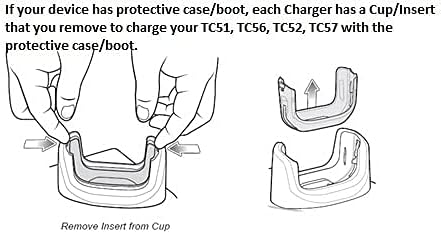
Image: Diagram illustrating the process of removing the insert from the charging cup to accommodate a device with a protective case.

છબી: ક્લોઝ-અપ view of the removable insert, highlighting its design and how it fits into the charging cradle.
5.3 Visual Setup Guide
Video: A short demonstration of the charger and its fast-charging capabilities for your workday.
Video: An operational demonstration of the scanner charger cable for Zebra TC51, showing connection and charging status.
Video: A demonstration of the charger cradle for Zebra TC5X series, including how to insert and remove the device for charging.
Video: A visual guide on using the USB charger cable for Zebra TC51, TC510K, TC52, TC56, TC57 models.
6. ઓપરેટિંગ સૂચનાઓ
6.1 તમારા ઉપકરણને ચાર્જ કરી રહ્યું છે
- ખાતરી કરો કે ચાર્જર પાવર સ્ત્રોત સાથે યોગ્ય રીતે જોડાયેલ છે.
- Carefully place your Zebra scanner into the charging cradle, ensuring the charging contacts align.
- A charging indicator light (usually red or orange) on the scanner or cradle will illuminate to confirm charging has begun.
- The indicator light will change (e.g., to green) or turn off when charging is complete.
7. જાળવણી
- Clean the charging contacts on both the cradle and your device regularly with a dry, soft cloth to ensure optimal connection.
- જ્યારે ઉપયોગમાં ન હોય ત્યારે ચાર્જરને ઠંડી, સૂકી જગ્યાએ સ્ટોર કરો.
- Avoid wrapping the cable too tightly to prevent damage.
8. મુશ્કેલીનિવારણ
૮.૧ ઉપકરણ ચાર્જ થઈ રહ્યું નથી
- પાવર કનેક્શન તપાસો: Ensure the power supply is securely plugged into both the wall outlet and the charging cradle.
- Verify Device Placement: Make sure the Zebra scanner is correctly seated in the cradle and the charging contacts are aligned.
- સંપર્કોનું નિરીક્ષણ કરો: Clean the charging contacts on both the device and the cradle for any debris or corrosion.
- Removable Insert: If using a protective case, ensure the removable insert has been taken out of the cradle. If not using a case, ensure the insert is properly seated.
- અન્ય આઉટલેટનો પ્રયાસ કરો: Test the charger with a different electrical outlet to rule out power source issues.
9. સ્પષ્ટીકરણો
| લક્ષણ | સ્પષ્ટીકરણ |
|---|---|
| બ્રાન્ડ | સામાન્ય |
| સુસંગત ઉપકરણો | Zebra TC51, TC52, TC56, TC57, TC52x, TC57x Android Scanners |
| કનેક્ટર પ્રકાર | 2-પિન |
| પાવર સ્ત્રોત | કોર્ડેડ ઇલેક્ટ્રિક |
| વાટtage | 15 વોટ્સ |
| આઉટપુટ વોલ્યુમtage | 5 વોલ્ટ |
| આઉટપુટ વર્તમાન | 3 Amps |
| ખાસ લક્ષણ | Removable Insert for Protective Case |
| કનેક્ટિવિટી ટેકનોલોજી | યુએસબી |
| માઉન્ટિંગ પ્રકાર | ટેબલટોપ માઉન્ટ |
| રંગ | કાળો |
10. વોરંટી માહિતી
કૃપા કરીને ઉત્પાદન પેકેજિંગ અથવા રિટેલરનો સંદર્ભ લો website for specific warranty details. Keep your proof of purchase for any warranty claims.
11. ગ્રાહક આધાર
For further assistance, technical support, or inquiries, please contact the retailer or manufacturer directly. Contact information can typically be found on the product packaging or the seller's online store page.