
1. પરિચય
Thank you for choosing the Caliber HPG318DAB Portable DAB+/FM Radio. This device offers high-quality digital and analog radio reception, a compact design for portability, and convenient alarm functions. This manual provides essential information for the safe and efficient use of your radio.
2. સલામતી માહિતી
- ઉપયોગ કરતા પહેલા બધી સૂચનાઓ કાળજીપૂર્વક વાંચો અને ભવિષ્યના સંદર્ભ માટે સાચવો.
- ઉપકરણને વરસાદ, ભેજ અથવા અતિશય તાપમાનના સંપર્કમાં ન લાવો.
- ઉપકરણને ગરમીના સ્ત્રોતોની નજીક અથવા સીધા સૂર્યપ્રકાશમાં રાખવાનું ટાળો.
- ઉપકરણને ડિસએસેમ્બલ કરશો નહીં અથવા તેને જાતે રિપેર કરવાનો પ્રયાસ કરશો નહીં. બધી સર્વિસિંગ લાયક કર્મચારીઓને સોંપો.
- ફક્ત આપેલા ચાર્જિંગ કેબલ અને એડેપ્ટરનો જ ઉપયોગ કરો.
- બાળકોની પહોંચથી દૂર રાખો.
3. પેકેજ સામગ્રી
ખાતરી કરો કે બધી વસ્તુઓ પેકેજમાં હાજર છે:
- Caliber HPG318DAB Portable DAB+/FM Radio Unit
- વપરાશકર્તા માર્ગદર્શિકા
- યુએસબી ચાર્જિંગ કેબલ
- પાવર એડેપ્ટર
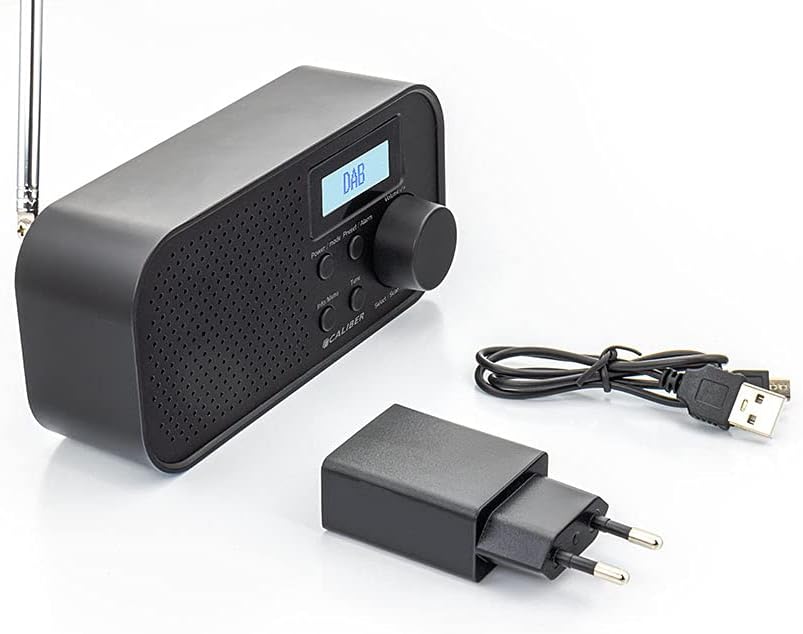
Image: Caliber HPG318DAB radio unit, USB charging cable, and power adapter.
4. ઉત્પાદન ઓવરview
4.1 ફ્રન્ટ પેનલ નિયંત્રણો
છબી: આગળ view of the Caliber HPG318DAB radio, highlighting the LCD screen, speaker grille, and control buttons.
- એલસીડી સ્ક્રીન: Displays station information, time, and menu options.
- પાવર / મોડ બટન: Turns the radio on/off and switches between DAB+ and FM modes.
- મેનુ/માહિતી બટન: Accesses menu settings and displays additional information.
- Preset/Alarm Button: Saves/recalls preset stations and sets alarm functions.
- Select/Scan Button: Confirms selections and initiates station scans.
- સ્નૂઝ બટન: અસ્થાયી રૂપે એલાર્મને શાંત કરે છે.
- વોલ્યુમ નોબ: ઓડિયો વોલ્યુમ સમાયોજિત કરે છે.
- સ્પીકર ગ્રિલ: ઓડિયો આઉટપુટ.
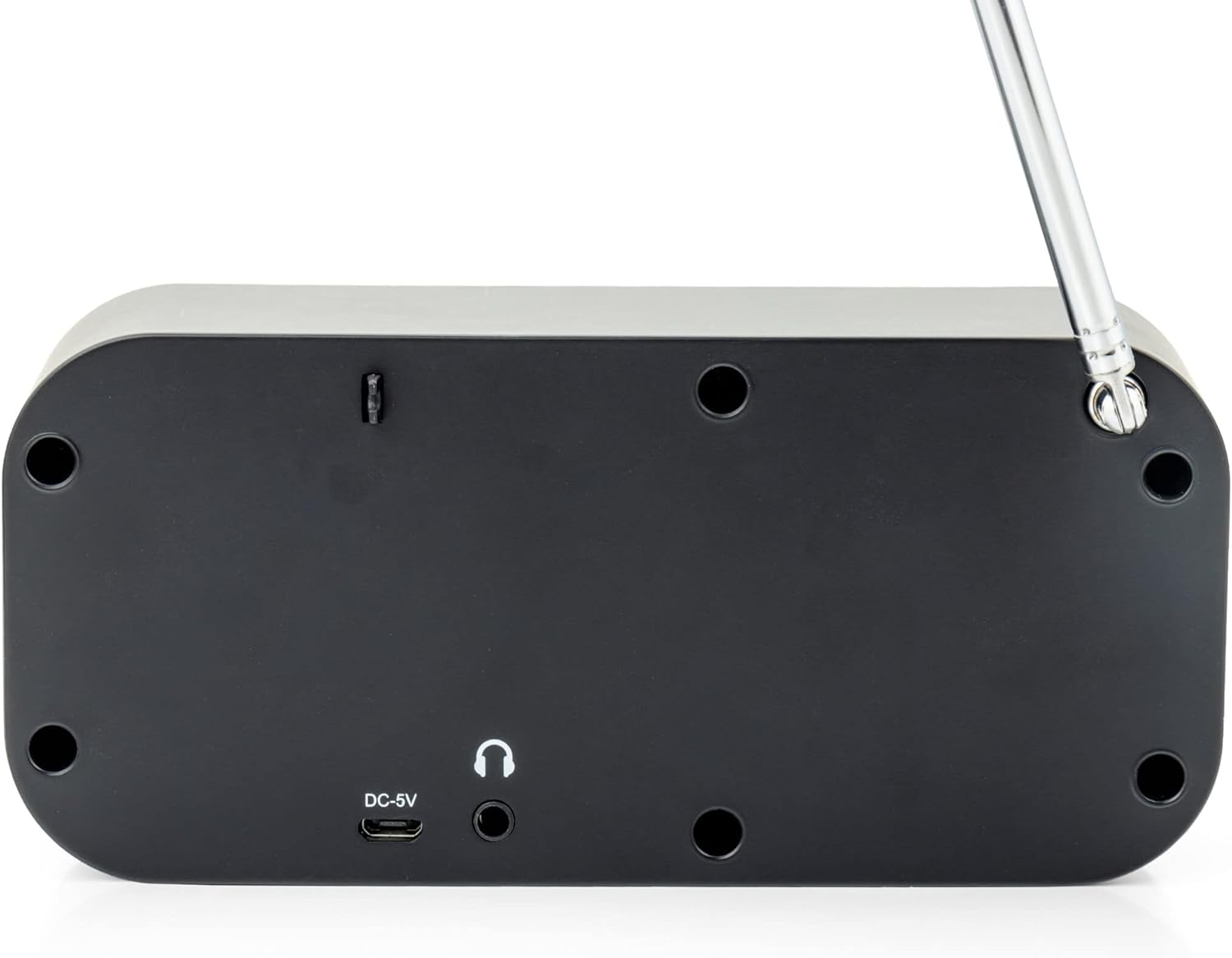
4.2 રીઅર પેનલ કનેક્શન્સ

છબી: પાછળનો ભાગ view of the Caliber HPG318DAB radio, showing the DC-5V charging port, 3.5mm headphone jack, and telescopic antenna.
- DC-5V ઇનપુટ: અહીં USB ચાર્જિંગ કેબલ કનેક્ટ કરો.
- 3.5mm હેડફોન જેક: For connecting headphones or earphones.
- ટેલિસ્કોપિક એન્ટેના: શ્રેષ્ઠ રેડિયો રિસેપ્શન માટે વિસ્તૃત કરો.
5. સેટઅપ
5.1 બેટરી ચાર્જ કરી રહી છે
The Caliber HPG318DAB features a built-in rechargeable battery, providing up to 8 hours of playback on a full charge.
- Connect the small end of the provided USB charging cable to the DC-5V ઇનપુટ port on the rear of the radio.
- Connect the larger end of the USB cable to the provided power adapter.
- પાવર એડેપ્ટરને સ્ટાન્ડર્ડ વોલ આઉટલેટમાં પ્લગ કરો.
- The charging indicator on the LCD screen will show the charging status. Once fully charged, the indicator will change.
Note: It is recommended to fully charge the battery before first use.
૪.૨ એન્ટેના ગોઠવણ
For optimal radio reception, fully extend the telescopic antenna located on the rear of the device. Adjust its position to improve signal strength if reception is poor.
6. ઓપરેટિંગ સૂચનાઓ
૪.૧ પાવર ચાલુ/બંધ અને મોડ પસંદગી
- રેડિયો ચાલુ કરવા માટે ON, દબાવો અને પકડી રાખો પાવર/મોડ બટન
- રેડિયો ચાલુ કરવા માટે બંધ, દબાવો અને પકડી રાખો પાવર/મોડ ફરીથી બટન.
- વચ્ચે સ્વિચ કરવા માટે DAB+ અને FM modes, short press the પાવર/મોડ button while the radio is on. The current mode will be displayed on the LCD screen.
૨.૨ DAB+ રેડિયો ઓપરેશન
- Switch to DAB+ mode using the પાવર/મોડ બટન
- The radio will automatically perform a full scan for available DAB+ stations upon first use or if no stations are found. To initiate a manual scan, press the મેનુ/માહિતી button, navigate to 'Full Scan', and press Select/Scan.
- નો ઉપયોગ કરો વોલ્યુમ નોબ to scroll through the list of available stations. Press Select/Scan સ્ટેશન પસંદ કરવા માટે.
- To save a station as a preset (up to 10 presets): While listening to a station, press and hold the Preset/Alarm બટન નો ઉપયોગ કરો વોલ્યુમ નોબ to select a preset number (1-10), then press Select/Scan ખાતરી કરવા માટે.
- To recall a preset station: Short press the Preset/Alarm બટન, નો ઉપયોગ કરો વોલ્યુમ નોબ to select the desired preset number, then press Select/Scan.
- દબાવો મેનુ/માહિતી માટે બટન view additional information (e.g., program type, signal strength, time) provided by Radio Data System (RDS).
૬.૫ એફએમ રેડિયો ઓપરેશન
- નો ઉપયોગ કરીને FM મોડ પર સ્વિચ કરો પાવર/મોડ બટન
- To automatically scan for stations: Press and hold the Select/Scan બટન. રેડિયો સ્કેન કરશે અને આગામી મજબૂત સ્ટેશન પર બંધ થઈ જશે.
- To manually tune: Rotate the વોલ્યુમ નોબ to adjust the frequency in small increments.
- To save a station as a preset (up to 10 presets): While listening to a station, press and hold the Preset/Alarm બટન નો ઉપયોગ કરો વોલ્યુમ નોબ to select a preset number (1-10), then press Select/Scan ખાતરી કરવા માટે.
- To recall a preset station: Short press the Preset/Alarm બટન, નો ઉપયોગ કરો વોલ્યુમ નોબ to select the desired preset number, then press Select/Scan.
- દબાવો મેનુ/માહિતી માટે બટન view additional information (e.g., station name, program type) provided by Radio Data System (RDS).
6.4 વોલ્યુમ નિયંત્રણ
મોટાને ફેરવો વોલ્યુમ નોબ વોલ્યુમ વધારવા માટે ઘડિયાળની દિશામાં અને ઘટાડવા માટે ઘડિયાળની વિરુદ્ધ દિશામાં.
૫.૫ હેડફોનનો ઉપયોગ
Connect any standard 3.5mm headphones or earphones to the 3.5mm હેડફોન જેક on the rear of the radio for private listening. The internal speaker will automatically mute when headphones are connected.
6.6 એલાર્મ કાર્યો
The radio includes alarm clock and sleep timer functions.
એલાર્મ ઘડિયાળ સેટ કરવી:
- દબાવો અને પકડી રાખો Preset/Alarm button until the alarm setup menu appears.
- નો ઉપયોગ કરો વોલ્યુમ નોબ to navigate through options like Alarm 1, Alarm 2, Time, Source (Buzzer/DAB/FM), and Volume. Press Select/Scan દરેક સેટિંગની પુષ્ટિ કરવા માટે.
- Set the desired alarm time, choose your preferred alarm source (buzzer, DAB+ station, or FM station), and set the alarm volume.
- Ensure the alarm is set to 'On' in the menu.
સ્નૂઝ ફંક્શનનો ઉપયોગ કરીને:
જ્યારે એલાર્મ વાગે ત્યારે, દબાવો સ્નૂઝ button to temporarily pause the alarm for a short period (e.g., 9 minutes). The alarm will sound again after the snooze period.
સ્લીપ ટાઈમર સેટ કરવું:
- દબાવો મેનુ/માહિતી બટન
- Navigate to the 'Sleep' option using the વોલ્યુમ નોબ અને દબાવો Select/Scan.
- Select the desired sleep timer duration (e.g., 15, 30, 45, 60, 90 minutes, or Off). The radio will automatically turn off after the selected time.
7. જાળવણી
7.1 સફાઈ
To clean the radio, use a soft, dry cloth. Do not use abrasive cleaners, waxes, or solvents as they may damage the finish.
7.2 સંગ્રહ
When not in use for extended periods, store the radio in a cool, dry place away from direct sunlight and extreme temperatures. Ensure the battery is partially charged before storage to maintain its lifespan.
7.3 બેટરી કેર
To prolong the life of the built-in Lithium-ion battery, avoid fully discharging it frequently. Charge the radio regularly, even if not in constant use.
8. મુશ્કેલીનિવારણ
| સમસ્યા | સંભવિત કારણ | ઉકેલ |
|---|---|---|
| રેડિયો ચાલુ થતો નથી. | બેટરી ખતમ થઈ ગઈ છે. | Connect the radio to power using the USB cable and adapter to charge the battery. |
| ખરાબ રેડિયો રિસેપ્શન (DAB+/FM). | એન્ટેના વિસ્તૃત નથી અથવા નબળો સિગ્નલ વિસ્તાર છે. | Fully extend the telescopic antenna and adjust its position. Try moving the radio to a different location. |
| કોઈ અવાજ નથી. | Volume is too low or headphones are connected. | નો ઉપયોગ કરીને વોલ્યુમ વધારો વોલ્યુમ નોબ. Disconnect headphones if you want sound from the speaker. |
| એલાર્મ વાગતો નથી. | Alarm not set correctly or turned off. | Check alarm settings (time, source, volume, 'On' status) in the menu. |
9. સ્પષ્ટીકરણો
| લક્ષણ | સ્પષ્ટીકરણ |
|---|---|
| મોડલ નંબર | HPG318DAB |
| પરિમાણો (L x W x H) | 15 x 4 x 6.5 સેમી |
| વજન | 255 ગ્રામ |
| પાવર સ્ત્રોત | Battery-Powered (1 Lithium-ion battery required) |
| બેટરી જીવન | 8 કલાક સુધી |
| સપોર્ટેડ રેડિયો બેન્ડ્સ | DAB+, FM |
| કનેક્ટિવિટી ટેકનોલોજી | AUX (for headphones), USB (for charging) |
| Maximum Speaker Output | 25 વોટ |
| સામગ્રી | પ્લાસ્ટિક |
| રંગ | કાળો |
| ખાસ લક્ષણો | Portable, Alarm Function, RDS, LCD Screen |
10. વોરંટી અને સપોર્ટ
For warranty information and customer support, please refer to the documentation provided with your purchase or visit the official Caliber webસાઇટ. કોઈપણ વોરંટી દાવા માટે તમારી ખરીદીનો પુરાવો રાખો.