
1. પરિચય
This manual provides detailed instructions for the installation, operation, and maintenance of your CPVAN BC01-Pro Outdoor Security Camera. Please read this manual thoroughly before using the product to ensure proper functionality and safety. Keep this manual for future reference.
2. બોક્સમાં શું છે
ખાતરી કરો કે બધા ઘટકો તમારા પેકેજમાં હાજર છે:
- CPVAN BC01-Pro Outdoor Security Camera
- Solar Panel (3.3W with 3-meter charging cable)
- Adjustable Wall Mount (for camera)
- Mounting Bracket (for solar panel)
- માઉન્ટિંગ સ્ક્રૂ અને વોલ એન્કર
- યુએસબી ચાર્જિંગ કેબલ
- વપરાશકર્તા માર્ગદર્શિકા (આ દસ્તાવેજ)
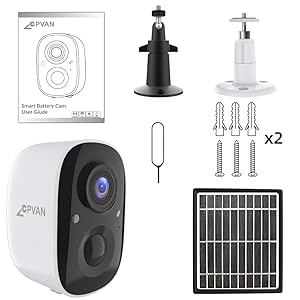
Figure 2.1: All components included in the CPVAN BC01-Pro package.
3. સેટઅપ
3.1 પ્રારંભિક ચાર્જિંગ
Before first use, fully charge the camera's built-in 5200mAh rechargeable battery using the provided USB cable. The charging indicator light will change to indicate a full charge.
૫.૧ કેમેરા અને સોલાર પેનલ લગાવવા
Choose an outdoor location with optimal sunlight exposure for the solar panel and a clear view for the camera. The camera features a 360° adjustable wall mount for flexible positioning.
- Secure the camera's wall mount to a desired surface using the provided screws and anchors.
- કેમેરાને માઉન્ટેડ બ્રેકેટ સાથે જોડો.
- સોલાર પેનલને એવી જગ્યાએ લગાવો જ્યાં દિવસભર મહત્તમ સીધો સૂર્યપ્રકાશ મળે.
- Connect the solar panel's charging cable to the camera's charging port. Ensure the port cover is securely closed after connection to maintain weather resistance.

આકૃતિ 3.1: ઉદાample installation of the camera and solar panel on an exterior wall.
૫.૪ Wi-Fi અને એપ્લિકેશન સાથે કનેક્ટ થવું
Download the VicoHome APP from your smartphone's app store. Follow the in-app instructions to connect your camera to your Wi-Fi network and complete the setup process. This typically involves scanning a QR code displayed on your phone with the camera.
4. કેમેરાનું સંચાલન
4.1 જીવંત View અને ટુ-વે ઓડિયો
Access the live video feed through the VicoHome APP. The camera supports two-way audio, allowing you to listen and speak through the camera's built-in speaker and microphone.

Figure 4.1: VicoHome App interface for live view and two-way audio communication.
4.2 Motion Detection and Activity Zones
The camera features AI PIR motion detection to reduce false alarms. You can define specific activity zones within the camera's view via the VicoHome APP. Smart AI recognition (subscription required) can differentiate between people, cars, pets, and packages, sending real-time alerts to your device.
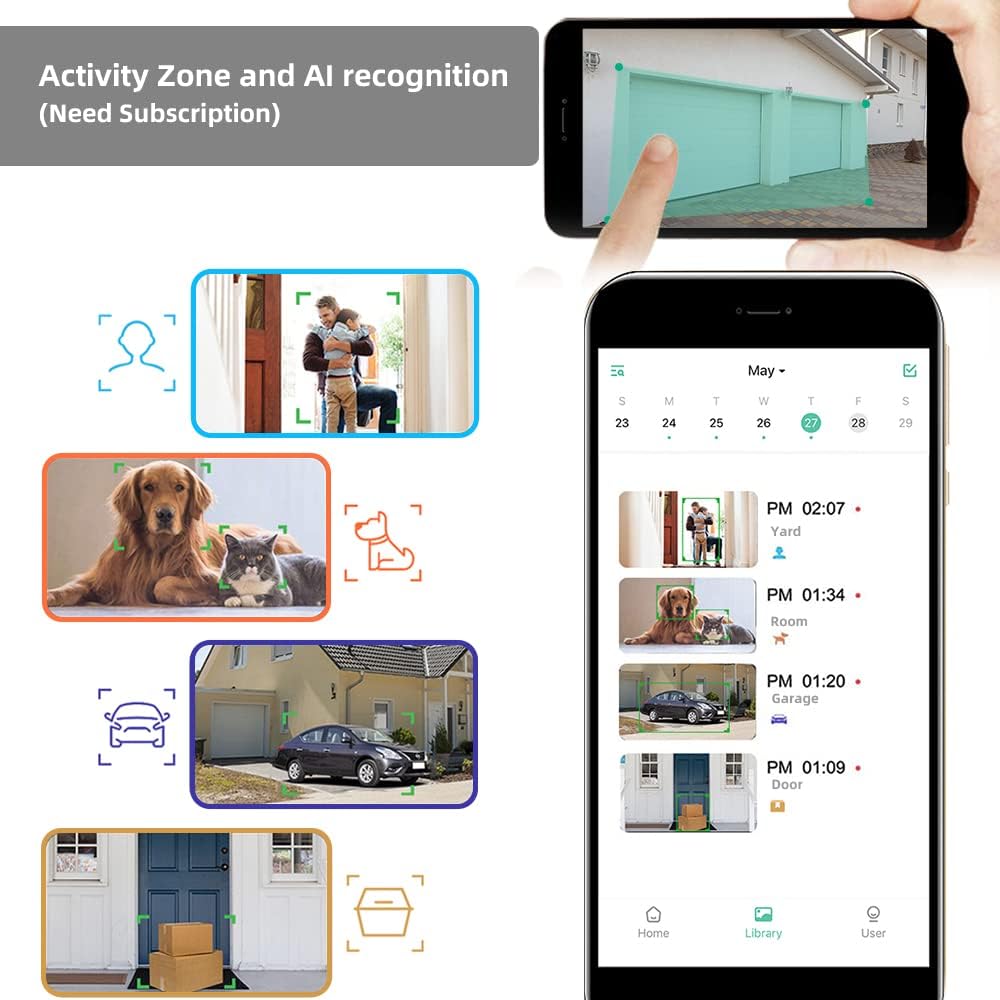
Figure 4.2: Configuring activity zones and viewing AI-detected events in the app.

Figure 4.3: Camera's field of view and motion detection capabilities.
4.3 નાઇટ વિઝન
The camera offers 1080P HD video quality day and night. It automatically activates night vision mode using 8 IR LEDs in low light conditions. A powerful spotlight can be manually activated to provide full-color night vision.

Figure 4.4: Visual comparison of night vision modes.
૬.૮ રેકોર્ડિંગ અને સ્ટોરેજ
The camera supports event recording. A 7-day rolling cloud storage is permanently free, with a 30-day trial of advanced cloud features available (subscription required). Local storage via Micro SD card is also supported.

Figure 4.5: Cloud service and local storage options.
5. જાળવણી
૩.૪ બેટરી મેનેજમેન્ટ
The solar panel continuously recharges the camera's battery, minimizing the need for manual recharging. Ensure the solar panel is clean and positioned for maximum sun exposure.


Figure 5.1: Solar power ensures continuous battery charge.
5.2 Cleaning and Environmental Protection
The camera has an IP65 waterproof rating, protecting it from dust and water splashes. Periodically clean the camera lens and solar panel surface with a soft, damp cloth to ensure clear images and efficient charging. Avoid using harsh chemicals.

Figure 5.2: The camera's IP65 rating ensures durability in various weather conditions.
5.3 ફર્મવેર અપડેટ્સ
Regularly check the VicoHome APP for available firmware updates. Keeping your camera's firmware updated ensures optimal performance, security, and access to new features.
6. મુશ્કેલીનિવારણ
- કેમેરા Wi-Fi થી કનેક્ટ થતો નથી: Ensure your Wi-Fi network is 2.4GHz (5GHz is not supported). Check Wi-Fi signal strength at the camera's location. Restart your router and camera.
- નબળી છબી ગુણવત્તા: કેમેરા લેન્સ સાફ કરો. ખાતરી કરો કે કેમેરાના ક્ષેત્રમાં કોઈ અવરોધો નથી view. Check your internet connection speed.
- બેટરી ચાર્જ થઈ રહી નથી: Verify the solar panel is receiving direct sunlight and is clean. Check the connection between the solar panel and the camera. Ensure the camera is within the recommended operating temperature range (-4°F to 122°F).
- ખોટી ગતિ ચેતવણીઓ: Adjust motion detection sensitivity in the app. Define specific activity zones to exclude irrelevant areas.
- No audio or poor two-way audio: Check microphone and speaker settings in the app. Ensure your smartphone's volume is up.
7. સ્પષ્ટીકરણો
| લક્ષણ | વિગત |
|---|---|
| મોડલ | BC01-Pro |
| વિડિઓ રિઝોલ્યુશન | 1080p HD (1920x1080 pixels) |
| અસરકારક સ્થિર રિઝોલ્યુશન | 2 MP |
| નું ક્ષેત્ર View | 110-ડિગ્રી વાઇડ-એંગલ |
| નાઇટ વિઝન | 8 IR LEDs, Color Night Vision (with spotlight) |
| ગતિ શોધ | AI PIR Motion Detection, Activity Zone support |
| પાવર સ્ત્રોત | Rechargeable Battery (5200mAh), Solar Panel (3.3W) |
| કનેક્ટિવિટી | Wi-Fi (2.4GHz) |
| સંગ્રહ | Cloud Storage (7-day free rolling, subscription for advanced features), Micro SD Card |
| ઓડિયો | Two-Way Audio, Built-in Siren |
| હવામાન પ્રતિકાર | IP65 વોટરપ્રૂફ |
| ઓપરેટિંગ તાપમાન | -4°F થી 122°F (-20°C થી 50°C) |
| પરિમાણો | 2.64 x 2.28 x 3.5 ઇંચ |
| વજન | 400 ગ્રામ (14.1 ઔંસ) |
| નિયંત્રણ પદ્ધતિ | VicoHome એપ્લિકેશન |
8. વોરંટી અને સપોર્ટ
For warranty information and technical assistance, please refer to the official CPVAN website or contact customer support. We are committed to providing the best possible experience with our products and typically respond to inquiries within 24 hours.