
1. પરિચય
Thank you for choosing the LUXCEO P200 RGB LED Video Light. This portable and versatile lighting tool is designed for various photography and videography applications, offering full-color control, adjustable brightness, and multiple mounting options. Please read this manual thoroughly before use to ensure proper operation and to maximize the lifespan of your device.

Image 1: The LUXCEO P200 RGB LED Video Light, showcasing its sleek design and vibrant color capabilities.
2. સલામતી સૂચનાઓ
- Do not disassemble or modify the device. Unauthorized modifications can lead to electric shock, fire, or product damage.
- ઉપકરણને અતિશય તાપમાન, સીધા સૂર્યપ્રકાશ અને ઉચ્ચ ભેજથી દૂર રાખો.
- Use only the provided USB-C cable and a 5V2A charger for charging. Using incompatible chargers may damage the battery.
- Although the device is IP67 waterproof, ensure the charging port cover is securely closed before exposing it to water. Avoid prolonged submersion in deep water.
- Do not block the ventilation openings during operation to prevent overheating.
- બાળકોની પહોંચથી દૂર રાખો.
- સ્થાનિક નિયમો અનુસાર ઉત્પાદન અને તેની બેટરીનો જવાબદારીપૂર્વક નિકાલ કરો.
3. પેકેજ સામગ્રી
Please check the package contents upon opening to ensure all items are present and in good condition.

Image 2: Visual representation of all items included in the LUXCEO P200 product package.
- RGB Tube Light (P200) x 1
- વહન થેલી x 1
- Iron Bar x 1
- USB-C કેબલ x 1
- Lanyards x 2
- રીમોટ કંટ્રોલ x 1
- વપરાશકર્તા માર્ગદર્શિકા x 1
4. ઉત્પાદન ઓવરview
૨.૩ ભૌતિક ઘટકો

છબી 3: ક્લોઝ-અપ view highlighting the dimensions, light transmission, 1/4" screw hole, and USB-C/USB-A ports of the P200 light.
- Light Tube: Main light source with high light transmission soft lampછાંયો
- પાવર બટન: Located on one end for turning the device on/off.
- યુએસબી-સી ચાર્જિંગ પોર્ટ: આંતરિક બેટરી ચાર્જ કરવા માટે.
- યુએસબી આઉટપુટ પોર્ટ: Functions as a power bank to charge other devices.
- 1/4" Standard Nut Hole: Located at the bottom for mounting on tripods or light stands.
- બિલ્ટ-ઇન મેગ્નેટ: Two magnets on both ends for quick attachment to metal surfaces.
4.2 મુખ્ય લક્ષણો
- Full RGB Color: Offers 360° full-color adjustment with 0-100 adjustable saturation and 1%-100% adjustable brightness.
- એડજસ્ટેબલ રંગ તાપમાન: Seamlessly adjust from 3000K (warm white) to 6000K (cool white).
- ઉચ્ચ CRI: Ra>95+ for accurate color rendering.
- IP67 વોટરપ્રૂફ: Designed to be resistant to dust and water immersion up to 1 meter for 30 minutes.
- બિલ્ટ-ઇન 4000mAh બેટરી: Provides up to 150-360 minutes of operation depending on brightness. Functions as a power bank.
- બહુવિધ નિયંત્રણ પદ્ધતિઓ: Control via integrated buttons, remote control, or smartphone application.
- બહુમુખી માઉન્ટિંગ: Features a 1/4" screw hole and built-in magnets for flexible placement.

Image 4: The LUXCEO P200 demonstrating its IP67 waterproof capability by being submerged in water.
5. સેટઅપ
5.1 પ્રારંભિક ચાર્જિંગ
Before first use, fully charge the LUXCEO P200.
- Connect the provided USB-C cable to the charging port on the light.
- Connect the other end of the USB-C cable to a 5V2A USB power adapter (not included).
- The charging indicator light will show charging status. A full charge typically takes about 3 hours.
- ચાર્જ કરતી વખતે ઉપકરણનો ઉપયોગ કરી શકાય છે.
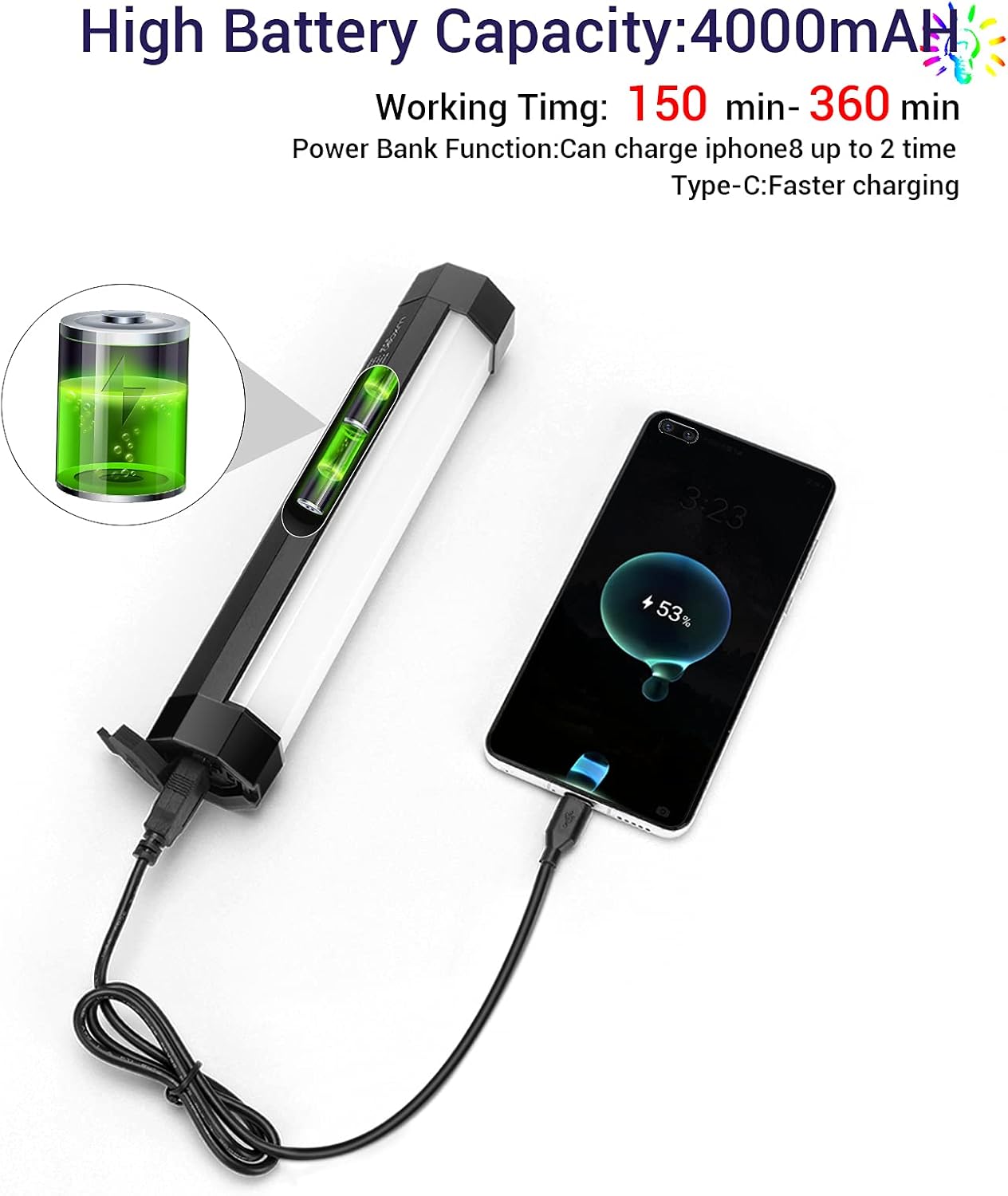
Image 5: The LUXCEO P200 light connected via USB-C cable, demonstrating its power bank functionality by charging a smartphone.
5.2 પાવર ચાલુ/બંધ
- To power on, press and hold the power button located on one end of the light until the light illuminates.
- To power off, press and hold the power button again until the light turns off.
6. ઓપરેશન
6.1 મેન્યુઅલ નિયંત્રણો
The LUXCEO P200 features integrated buttons for basic adjustments. Refer to the specific button functions on the device for detailed control.
6.2 રીમોટ કંટ્રોલ
The included remote control provides convenient access to various lighting modes and settings.

Image 6: The LUXCEO P200 light shown alongside its remote control and the smartphone application interface, illustrating multiple control options.
- પાવર બટન: લાઈટ ચાલુ કે બંધ કરો.
- મોડ બટન: Cycle through different lighting modes (e.g., CCT, RGB, Scene Effects).
- બ્રાઇટનેસ એડજસ્ટમેન્ટ: પ્રકાશની તીવ્રતા વધારો અથવા ઘટાડો.
- Color/Temperature Adjustment: Change color hue in RGB mode or color temperature in CCT mode.
- સંતૃપ્તિ ગોઠવણ: Control the intensity of the color in RGB mode.
6.3 એપ્લિકેશન નિયંત્રણ
For advanced control and features, download the LUXCEO app on your smartphone.
- Download the official LUXCEO app from your device's app store.
- તમારા સ્માર્ટફોન પર બ્લૂટૂથ સક્ષમ કરો.
- Open the app and follow the on-screen instructions to connect to your P200 light. Multiple LUXCEO lights can be controlled simultaneously.
- The app allows for precise control over color, brightness, saturation, and offers additional features such as:
- Music Rhythm Mode: Changes lighting color according to music.
- Customizable Scene Effects: Create and save personalized lighting scenarios.

Image 7: Screenshot of the LUXCEO app interface, demonstrating options for music sync, scene settings, color temperature, and full-color selection.
6.4 માઉન્ટિંગ વિકલ્પો
- ૧/૪" સ્ક્રુ હોલ: Mount the light onto any standard tripod, light stand, or camera accessory with a 1/4" thread.
- બિલ્ટ-ઇન મેગ્નેટ: The magnets on both ends allow for quick attachment to metal surfaces. Use the included iron bar to attach the light to non-metallic surfaces like curtains or tents.

Image 8: The LUXCEO P200 light illustrating its magnetic attachment capabilities to various surfaces, including with the use of an iron bar.
7. જાળવણી
- સફાઈ: Wipe the light with a soft, dry cloth. Do not use harsh chemicals or abrasive materials.
- સંગ્રહ: When not in use for extended periods, store the light in its carrying bag in a cool, dry place. Charge the battery at least once every three months to maintain battery health.
- બેટરી સંભાળ: Avoid fully discharging the battery frequently. For optimal battery life, keep the charge between 20% and 80%.
8. મુશ્કેલીનિવારણ
If you encounter issues with your LUXCEO P200, refer to the following common problems and solutions:
- Q: Why is the light not turning on?
- A: Ensure the battery is charged. Connect the light to a power source using the USB-C cable and check if the charging indicator activates. If the light still does not turn on after charging, contact customer support.
- Q: Why does the light flicker?
- A: The LUXCEO P200 uses a constant current analog dimming mechanism designed to eliminate flicker. If flickering occurs, ensure the light is fully charged and try resetting it by powering off and on. If the issue persists, contact customer support.
- પ્રશ્ન: રિમોટ કંટ્રોલ કામ કરતું નથી.
- A: Check if the remote control's battery needs replacement. Ensure there are no obstructions between the remote and the light. For initial pairing, follow the instructions in the remote control's specific guide.
- Q: The app cannot connect to the light.
- A: Ensure Bluetooth is enabled on your smartphone and the light is powered on. Try restarting both the app and the light. If the problem persists, try reinstalling the app.
- પ્ર: ચાર્જ કરતી વખતે પ્રકાશનો ઉપયોગ કરી શકાય?
- A: Yes, the light can be used while charging. For best results, use the original charging cable and a 5V2A charger.
- પ્ર: શું પ્રકાશ વોટરપ્રૂફ છે?
- A: Yes, the LUXCEO P200 is IP67 waterproof. Ensure the charging port cover is sealed properly before exposing it to water.
9. સ્પષ્ટીકરણો
| મોડલ | P200 |
| ઉત્પાદન પરિમાણો | ૬ x ૩.૮ x ૨.૭ ઇંચ (૬"લિટર x ૩.૮"પગ x ૨.૭"ઉંચાઈ) |
| વસ્તુનું વજન | 13.7 ઔંસ |
| બેટરીનો પ્રકાર | 1 લિથિયમ આયન બેટરી (સમાવેલ) |
| બેટરી ક્ષમતા | 4000mAh |
| Battery Life (Brightest Mode) | Approx. 150 minutes (2.5 hours) |
| ચાર્જિંગ સમય | Approx. 3 hours (with 5V2A charger) |
| રંગ તાપમાન શ્રેણી | ૨૨૦૦ હજાર - ૬૫૦૦ હજાર |
| બ્રાઇટનેસ એડજસ્ટમેન્ટ | ૧૦% - ૧૦૦% |
| કલર રેન્ડરિંગ ઇન્ડેક્સ (CRI) | Ra>95+ |
| વોટરપ્રૂફ રેટિંગ | IP67 |
| કનેક્ટિવિટી ટેકનોલોજી | Remote Control, Bluetooth (App Control) |
| હાર્ડવેર ઇંટરફેસ | USB Type C (charging), USB Type A (power bank output) |
| ઉત્પાદક | લક્ઝીઓ |
10. વોરંટી અને સપોર્ટ
The LUXCEO P200 RGB LED Video Light comes with a 1 વર્ષની વોરંટી ખરીદીની તારીખથી. વધુમાં, એ 30-દિવસની મની-બેક ગેરંટી ઓફર કરવામાં આવે છે.
If you experience any issues with your product or require assistance, please do not hesitate to contact LUXCEO customer support. Refer to the contact information provided on the product packaging or the official LUXCEO webસપોર્ટ ચેનલો માટેની સાઇટ.