
1. પરિચય
Thank you for choosing the Truman TM 1000 HD Receiver. This manual provides detailed instructions for the proper installation, operation, and maintenance of your new satellite receiver. Please read this manual thoroughly before using the device to ensure optimal performance and safety.
2. સલામતી માહિતી
- Ensure the receiver is placed on a stable, flat surface to prevent falls.
- ઉપકરણને વરસાદ, ભેજ અથવા અતિશય તાપમાનના સંપર્કમાં ન લાવો.
- ઓવરહિટીંગને રોકવા માટે વેન્ટિલેશન ઓપનિંગ્સને અવરોધિત કરવાનું ટાળો.
- વીજળીના તોફાન દરમિયાન અથવા લાંબા સમય સુધી ઉપયોગ ન કરવામાં આવે ત્યારે પાવર કોર્ડ ડિસ્કનેક્ટ કરો.
- રીસીવર જાતે ખોલવાનો કે રિપેર કરવાનો પ્રયાસ કરશો નહીં. બધી સર્વિસિંગ લાયક કર્મચારીઓને સોંપો.
- The device features automatic low current protection for the signal input.
3. પેકેજ સામગ્રી
કૃપા કરીને નીચેની વસ્તુઓ માટે પેકેજ તપાસો:
- Truman TM 1000 HD Receiver
- રીમોટ કંટ્રોલ
- પાવર એડેપ્ટર
- વપરાશકર્તા માર્ગદર્શિકા (આ દસ્તાવેજ)
- Note: A Wi-Fi adapter is not included and must be purchased separately if wireless connectivity is desired.
4. ઉત્પાદન ઓવરview
The Truman TM 1000 HD Receiver is a high-definition satellite receiver designed to provide a rich viewing experience. It supports various resolutions and offers multiple features for channel management and media playback.
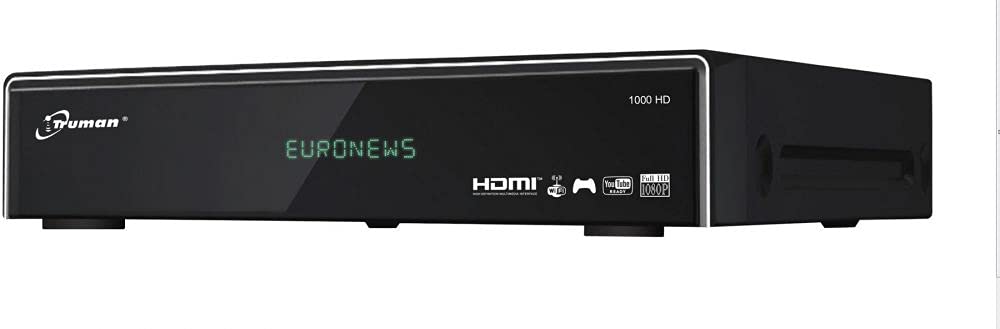
આકૃતિ 4.1: આગળ view of the Truman TM 1000 HD Receiver. This image shows the compact design of the receiver, featuring a front panel display and control buttons, indicating its readiness for integration into a home entertainment system.
મુખ્ય લક્ષણો:
- Full HD support: 1080p, 1080i, 720p, 576p, 480p, 576i, 480i.
- Supports up to 6000 channels.
- માટે યુએસબી પોર્ટ viewing and recording media.
- Simultaneous recording of one channel and viewing of another.
- Picture-in-picture (PIP) functionality for up to 16 channels.
- Automatic search for frequencies and satellites.
- Multi-language and user-friendly menu interface.
- Ethernet (LAN) port for network connectivity.
- Wi-Fi support (requires external Wi-Fi adapter).
- Electronic Program Guide (EPG).
5. સેટઅપ
૨.૨ રીસીવરને કનેક્ટ કરવું
- Satellite Dish Connection: Connect the coaxial cable from your satellite dish LNB to the "LNB IN" port on the back of the receiver.
- ટીવી કનેક્શન: Connect an HDMI cable from the "HDMI OUT" port on the receiver to an available HDMI input on your television.
- પાવર કનેક્શન: Connect the power adapter to the "DC IN" port on the receiver, then plug the adapter into a wall outlet.
- નેટવર્ક કનેક્શન (વૈકલ્પિક):
- ઈથરનેટ: Connect an Ethernet cable from your router to the "LAN" port on the receiver.
- Wi-Fi: If using a Wi-Fi adapter (not included), plug it into an available USB port on the receiver.
- USB Device (Optional): For recording or media playback, insert a USB storage device into an available USB port.
૪.૫ પહેલી વાર પાવર ચાલુ
- તમારું ટેલિવિઝન ચાલુ કરો અને યોગ્ય HDMI ઇનપુટ સ્રોત પસંદ કરો.
- Power on the Truman TM 1000 HD Receiver.
- Follow the on-screen instructions for initial setup, which typically includes language selection, time zone, and satellite/channel scanning.
- Perform an automatic satellite search to find available frequencies and channels.
6. ઓપરેટિંગ સૂચનાઓ
6.1 Basic Channel Operations
- ચેનલ પસંદગી: નો ઉપયોગ કરો CH+ / CH- buttons on the remote control to change channels, or enter the channel number directly.
- વોલ્યુમ નિયંત્રણ: નો ઉપયોગ કરો VOL + / VOL- વોલ્યુમ સમાયોજિત કરવા માટે બટનો.
- મેનુ એક્સેસ: દબાવો મેનુ સેટિંગ્સ અને સુવિધાઓ માટે મુખ્ય મેનુને ઍક્સેસ કરવા માટે બટન.
- ઈલેક્ટ્રોનિક પ્રોગ્રામ ગાઈડ (EPG): દબાવો ઇપીજી માટે બટન view the program schedule.
6.2 રેકોર્ડિંગ અને પ્લેબેક
To record programs, ensure a USB storage device is connected to the receiver.
- ઇન્સ્ટન્ટ રેકોર્ડિંગ: While watching a channel, press the આરઈસી button on the remote control to start recording. Press રોકો રેકોર્ડિંગ સમાપ્ત કરવા માટે.
- સુનિશ્ચિત રેકોર્ડિંગ: Use the EPG to select a program and schedule a recording.
- પ્લેબેક: Access the media player through the main menu or a dedicated button (if available) to browse and play recorded content or other media files from your USB device.
- Simultaneous Operations: The receiver supports recording one channel while watching another channel from the same transponder.
6.3 Network Features (LAN/Wi-Fi)
If connected to a network, the receiver may offer additional features such as firmware updates, internet applications, or media streaming.
- નેટવર્ક સેટઅપ: Go to the "Network Settings" in the main menu.
- ઈથરનેટ: If using a wired connection, ensure the cable is connected. The receiver should obtain an IP address automatically.
- Wi-Fi: If using a Wi-Fi adapter, select your network from the list, enter the password, and connect.
7. જાળવણી
- સફાઈ: રીસીવરના બાહ્ય ભાગને સાફ કરવા માટે નરમ, સૂકા કપડાનો ઉપયોગ કરો. પ્રવાહી ક્લીનર્સ અથવા ઘર્ષક સામગ્રીનો ઉપયોગ કરશો નહીં.
- વેન્ટિલેશન: Ensure the ventilation slots are clear of dust and obstructions to prevent overheating.
- ફર્મવેર અપડેટ્સ: Periodically check for firmware updates through the receiver's menu (if available) to ensure optimal performance and access to new features.
8. મુશ્કેલીનિવારણ
| સમસ્યા | સંભવિત કારણ | ઉકેલ |
|---|---|---|
| કોઈ શક્તિ નથી | Power cable disconnected; power outlet issue. | પાવર કેબલ કનેક્શન તપાસો; કોઈ અલગ આઉટલેટ અજમાવી જુઓ. |
| કોઈ સિગ્નલ નથી / "કોઈ સિગ્નલ નથી" સંદેશ | LNB cable disconnected; satellite dish misalignment; incorrect satellite settings. | Check LNB cable connection; ensure dish is correctly aligned; verify satellite settings in the menu. |
| ટીવી પર કોઈ ચિત્ર નથી | Incorrect HDMI input selected on TV; faulty HDMI cable. | Select the correct HDMI input on your TV; try a different HDMI cable. |
| રીમોટ કંટ્રોલ કામ કરતું નથી | Dead batteries; obstruction between remote and receiver. | બેટરી બદલો; રીસીવરના IR સેન્સરને સ્પષ્ટ દૃષ્ટિ રેખા મળે તેની ખાતરી કરો. |
| Wi-Fi થી કનેક્ટ કરી શકાતું નથી | No Wi-Fi adapter; incorrect password; network issue. | Ensure a compatible Wi-Fi adapter is connected; re-enter Wi-Fi password; check router. |
9. સ્પષ્ટીકરણો
| લક્ષણ | વર્ણન |
|---|---|
| બ્રાન્ડ | ટ્રુમેન |
| મોડલ | TM 1000 HD |
| વિડિઓ રીઝોલ્યુશન સપોર્ટ | 1080p, 1080i, 720p, 576p, 480p, 576i, 480i |
| ચેનલ ક્ષમતા | 6000 ચેનલો સુધી |
| કનેક્ટિવિટી | USB, Ethernet (LAN), Wi-Fi (external adapter required) |
| રેકોર્ડિંગ | PVR function via USB (record one, watch another on same transponder) |
| બહુ-view | Picture-in-picture up to 16 channels |
| શોધ કાર્ય | Automatic frequency and satellite search |
| મેનુ ભાષા | મલ્ટી-લેંગ્વેજ સપોર્ટ |
| રક્ષણ | Automatic low current protection for signal input |
| ઇપીજી | ઇલેક્ટ્રોનિક પ્રોગ્રામ માર્ગદર્શિકા |
10. વોરંટી અને સપોર્ટ
For warranty information, please refer to the warranty card included with your product or contact your local dealer. For technical support or service inquiries, please visit the official Truman webસાઇટ અથવા તેમના ગ્રાહક સેવા વિભાગનો સંપર્ક કરો.
નોંધ: ચોક્કસ વોરંટી શરતો અને સપોર્ટ સંપર્ક વિગતો પ્રદેશ પ્રમાણે બદલાઈ શકે છે.