
1. પરિચય
This manual provides detailed instructions for the setup, operation, and maintenance of your WISE TIGER LED Digital Alarm Clock (Model CK-LED1302). Please read this manual thoroughly before use to ensure proper functionality and to maximize your product experience.

Image 1.1: WISE TIGER LED Digital Alarm Clock and its remote control.
2. પેકેજ સામગ્રી
કૃપા કરીને ચકાસો કે તમારા પેકેજમાં બધી વસ્તુઓ હાજર છે:
- WISE TIGER LED Digital Alarm Clock (Model CK-LED1302)
- રીમોટ કંટ્રોલ
- યુએસબી પાવર કેબલ
- વપરાશકર્તા માર્ગદર્શિકા (આ દસ્તાવેજ)
- Fixed Bracket (for desk placement)
3. ઉત્પાદન ઓવરview
The WISE TIGER LED Digital Alarm Clock features a modern 3D design, offering clear time display and multiple functions for various environments.
3.1 મુખ્ય લક્ષણો
- સમય પ્રદર્શન: 12-hour or 24-hour format.
- કૅલેન્ડર ડિસ્પ્લે: Shows date.
- અલાર્મ ઘડિયાળ: With snooze function.
- તાપમાન પ્રદર્શન: આસપાસનું તાપમાન દર્શાવે છે.
- એડજસ્ટેબલ તેજ: Automatic brightness sensor and manual adjustment via remote control.
- નાઇટ લાઇટ ફંક્શન: Provides soft illumination.
- મેમરી કાર્ય: Built-in battery retains time settings for 4-8 hours during power disconnection.
- બહુમુખી પ્લેસમેન્ટ: Suitable for desk or wall mounting.

Image 3.1: Visual representation of the clock's main functions.
3.2 ઘટકો
ઓવર માટે નીચેના આકૃતિનો સંદર્ભ લોview of the clock's components and connection points.
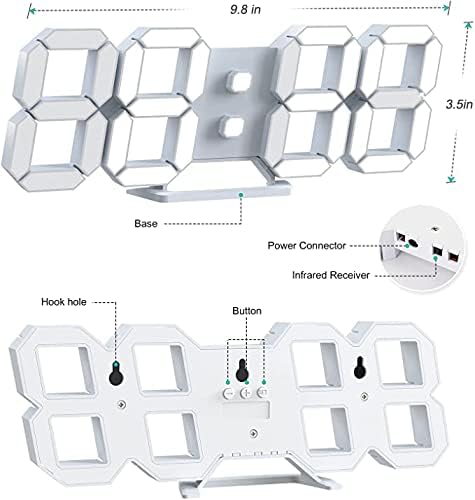
છબી ૨.૧: પાછળ view and dimensions of the clock, highlighting the power connector, infrared receiver, and mounting options.
- પ્રદર્શન: Large 3D LED digits for time, date, and temperature.
- આધાર: Removable stand for desk placement.
- પાવર કનેક્ટર USB port for power input.
- ઇન્ફ્રારેડ રીસીવર: રિમોટ કંટ્રોલ સિગ્નલો માટે.
- Hook Holes: દિવાલ માઉન્ટિંગ માટે.
- નિયંત્રણ બટનો: Located on the back for basic settings (Power, Up, Down, Set).
4. સેટઅપ
4.1 પાવર કનેક્શન
- Connect the provided USB power cable to the power connector on the back of the clock.
- USB કેબલના બીજા છેડાને પ્રમાણભૂત USB પાવર એડેપ્ટર (શામેલ નથી) અથવા કમ્પ્યુટર USB પોર્ટમાં પ્લગ કરો.
- The clock will power on and display the time.
The clock is powered by the USB cable only. A built-in battery serves to record time settings when power is disconnected, ensuring settings are retained for 4-8 hours.

Image 4.1: Explanation of the clock's power and memory function.
૩.૧ પ્લેસમેન્ટ વિકલ્પો
The clock can be used as a desk clock or a wall clock.
- ડેસ્ક પ્લેસમેન્ટ: Attach the fixed bracket to the bottom of the clock. The angle of the bracket can be adjusted for optimal viewing
- વોલ માઉન્ટિંગ: Remove the fixed bracket if attached. Use the installation slots (hook holes) on the back of the clock to hang it securely on a wall using appropriate fasteners (not included).

Image 4.2: The clock configured for wall mounting and desk placement.
5. ઓપરેટિંગ સૂચનાઓ
The clock's functions are primarily controlled using the included remote control. Basic settings can also be adjusted via the buttons on the back of the clock.
5.1 સમય અને તારીખ સેટ કરવી
- દબાવો TIME button on the remote control to enter time setting mode.
- નો ઉપયોગ કરો UP અને નીચે arrows to adjust the hour.
- દબાવો TIME again to move to minute setting, then use UP અને નીચે સંતુલિત કરવા માટે.
- દબાવવાનું ચાલુ રાખો TIME વર્ષ, મહિનો અને દિવસ સેટિંગ્સ દ્વારા ચક્ર કરવા માટે, દરેકને ગોઠવીને UP અને નીચે.
- દબાવો TIME one last time or wait a few seconds for the settings to save automatically.
૧ ૧૨/૨૪ કલાક ફોર્મેટ
૧૨-કલાક અને ૨૪-કલાકના સમય ફોર્મેટ વચ્ચે સ્વિચ કરવા માટે, દબાવો 12/24H રીમોટ કંટ્રોલ પરનું બટન.

છબી ૪.૧: ઉદાહરણample of 12-hour and 24-hour time display.
5.3 એલાર્મ સેટ કરવું
- દબાવો એલાર્મ button on the remote control to enter alarm setting mode.
- નો ઉપયોગ કરો UP અને નીચે arrows to set the desired alarm hour.
- દબાવો એલાર્મ again to move to minute setting, then use UP અને નીચે સંતુલિત કરવા માટે.
- દબાવો એલાર્મ one last time or wait for the settings to save.
- એલાર્મને સક્રિય/નિષ્ક્રિય કરવા માટે, દબાવો એલાર્મ button briefly outside of setting mode. An alarm icon will appear/disappear on the display.
5.4 સ્નૂઝ ફંક્શન
જ્યારે એલાર્મ વાગે ત્યારે, દબાવો સ્નૂઝ button on the remote control to temporarily silence the alarm. The alarm will sound again after a set interval (typically 5-10 minutes).

Image 5.2: The snooze alarm function in use.
5.5 બ્રાઇટનેસ એડજસ્ટમેન્ટ
The clock features both automatic and manual brightness control.
- સ્વચાલિત તેજ: The built-in sensor automatically adjusts the display brightness based on ambient light conditions.
- Manual Brightness: દબાવો તેજસ્વી button on the remote control to cycle through different brightness levels (e.g., high, medium, low).

Image 5.3: Automatic brightness adjustment based on ambient light.

Image 5.4: Manual adjustment through three brightness levels.
5.6 તાપમાન પ્રદર્શન
The clock automatically displays the ambient temperature. No manual adjustment is typically required for this function.
6. જાળવણી
To ensure the longevity and optimal performance of your WISE TIGER LED Digital Alarm Clock, follow these maintenance guidelines:
- સફાઈ: Use a soft, dry cloth to wipe the display and casing. Avoid abrasive cleaners, solvents, or spray cleaners directly on the clock.
- શક્તિ: Always use the provided USB cable for power. Ensure the power source is stable.
- પર્યાવરણ: Keep the clock away from extreme temperatures, direct sunlight, and high humidity.
- રીમોટ કંટ્રોલ: Store the remote control in a safe place to prevent loss or damage. Ensure batteries are replaced when needed (typically 2 Lithium Ion batteries, included).
7. મુશ્કેલીનિવારણ
If you encounter issues with your clock, refer to the following common problems and solutions:
| સમસ્યા | સંભવિત કારણ | ઉકેલ |
|---|---|---|
| ઘડિયાળ ચાલુ થતી નથી | કોઈ પાવર અથવા છૂટક જોડાણ નથી | Ensure USB cable is securely connected and power source is active. Try a different USB port or adapter. |
| રીમોટ કંટ્રોલ કામ કરતું નથી | Remote batteries are dead or remote is out of range/blocked | Replace remote control batteries. Ensure remote is pointed at the clock's infrared receiver (refer to Image 3.2) and within 8 meters. Remove any obstructions. |
| સમય અચોક્કસ છે | Time was not set precisely | Reset the time carefully, ensuring you set it at the exact second of the desired time. |
| Display is too dim or too bright | Brightness setting needs adjustment | દબાવો તેજસ્વી button on the remote to cycle through manual brightness levels. Check if automatic brightness is functioning correctly in different light conditions. |
| એલાર્મ વાગતું નથી | Alarm is not activated or set incorrectly | Ensure the alarm is set and activated (alarm icon visible). Verify the alarm time is correct. |
8. સ્પષ્ટીકરણો
| લક્ષણ | વિગત |
|---|---|
| બ્રાન્ડ | WISE TIGER |
| મોડલ નંબર | CK-LED1302 |
| ડિસ્પ્લે પ્રકાર | ડિજિટલ |
| રંગ | સફેદ |
| ઉત્પાદન પરિમાણો | ૨.૩૬"પગ x ૪.૦૬"પગ |
| પાવર સ્ત્રોત | કોર્ડેડ ઇલેક્ટ્રિક (USB) |
| મેમરી બેટરી | 2 Lithium Ion batteries (included), retains settings for 4-8 hours |
| માઉન્ટિંગ પ્રકાર | વોલ માઉન્ટ, ડેસ્ક માઉન્ટ |
| ખાસ લક્ષણો | Adjustable Brightness, Alarm Clock, Temperature Display, Date Display, 12/24 Hour Format |
| સામગ્રી | એક્રેલોનિટ્રિલ બુટાડીએન સ્ટાયરેન |
| વસ્તુનું વજન | ૧૧.૩ ઔંસ (આશરે ૩૨૦ ગ્રામ) |
| યુપીસી | 728990655931 |
9. વોરંટી અને સપોર્ટ
વોરંટી માહિતી અથવા ટેકનિકલ સપોર્ટ માટે, કૃપા કરીને ઉત્પાદન પેકેજિંગનો સંદર્ભ લો અથવા જ્યાંથી ઉત્પાદન ખરીદ્યું હતું તે રિટેલરનો સંપર્ક કરો. ખરીદીના પુરાવા તરીકે તમારી ખરીદી રસીદ રાખો.