
White Shark GH-2044 Wolf
White Shark GH-2044 Wolf Gaming Headset User Manual
પરિચય
This manual provides essential instructions for the proper setup, operation, and maintenance of your White Shark GH-2044 Wolf Gaming Headset. Please read this guide thoroughly before using the product to ensure optimal performance and longevity. Keep this manual for future reference.
ઉત્પાદન ઓવરview
The White Shark GH-2044 Wolf is a wired over-ear gaming headset designed for immersive audio experiences. It features a built-in microphone for communication and a USB connection for compatibility with multiple devices.
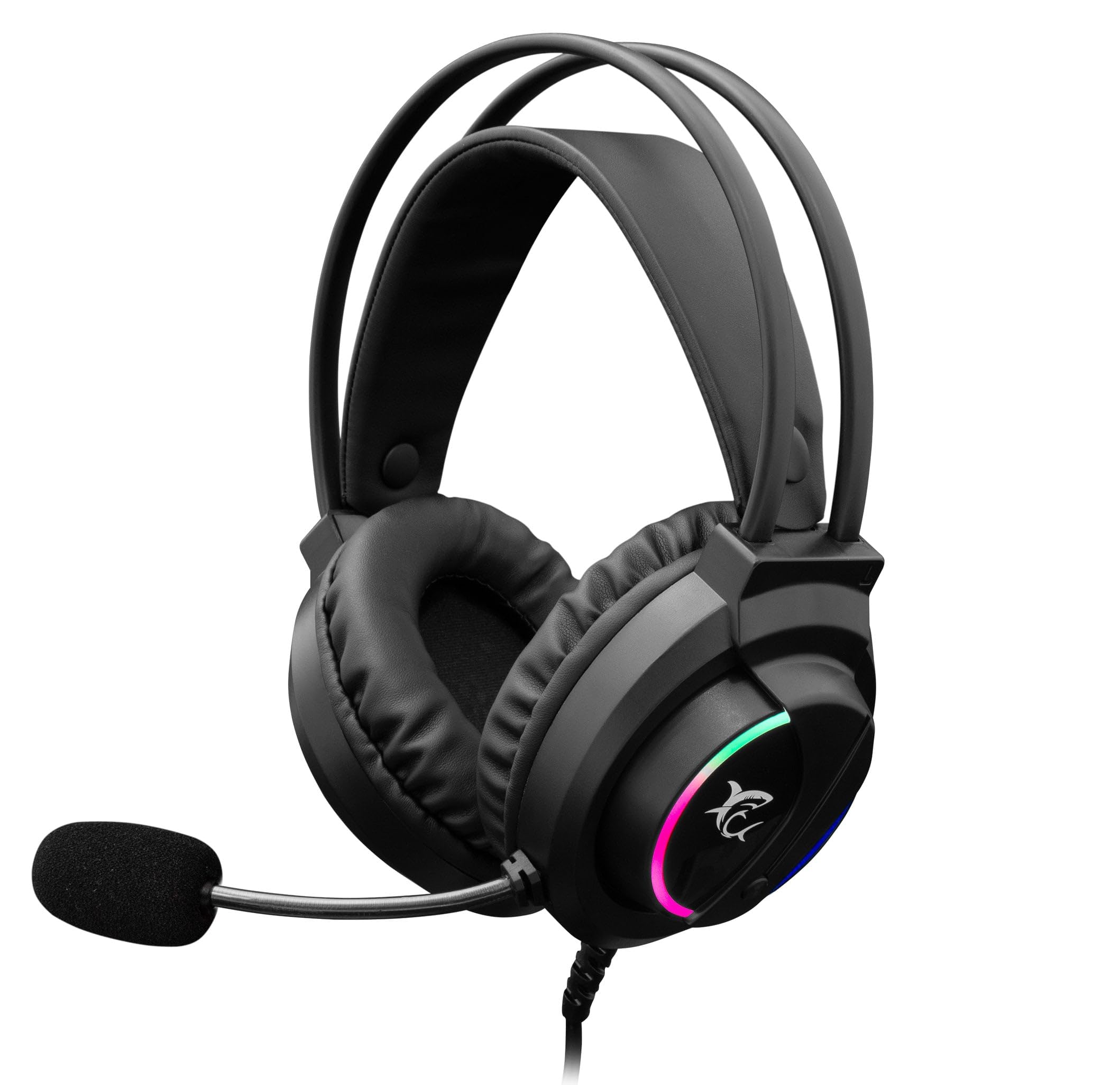
Image: The White Shark GH-2044 Wolf Gaming Headset packaging box, displaying the headset and key features.

Image: The White Shark GH-2044 Wolf Gaming Headset, showcasing its illuminated earcups and flexible microphone.

છબી: ક્લોઝ-અપ view of the earcup on the White Shark GH-2044 Wolf Gaming Headset, highlighting the integrated volume control wheel.

Image: A detailed close-up of the flexible microphone, showing its foam cover for clear voice capture.
સેટઅપ સૂચનાઓ
- હેડસેટ કનેક્ટ કરો: Plug the USB connector of the GH-2044 Wolf Gaming Headset into an available USB port on your computer, gaming console, or other compatible device.
- ડ્રાઇવર ઇન્સ્ટોલેશન (જો જરૂરી હોય તો): For most operating systems, the headset will be recognized automatically, and standard drivers will be installed. If prompted, follow the on-screen instructions to complete any driver installation.
- ઓડિયો આઉટપુટ/ઇનપુટ પસંદગી: Navigate to your device's sound settings. Select the White Shark GH-2044 Wolf as your primary audio output device (for sound) and as your primary audio input device (for the microphone).
- વોલ્યુમ સમાયોજિત કરો: Use the volume control wheel located on the headset's earcup to adjust the audio level to your preference.
ઓપરેટિંગ સૂચનાઓ
- વોલ્યુમ નિયંત્રણ: The headset features an integrated volume control wheel on the left earcup. Rotate the wheel up to increase volume and down to decrease volume.
- માઇક્રોફોનનો ઉપયોગ: The flexible microphone can be adjusted to your desired position for optimal voice pickup. Ensure the microphone is positioned close to your mouth for clear communication.
- માઇક્રોફોન મ્યૂટ: (Information not explicitly provided in product data, assume software control or inline control if present.) If an inline mute button is present on the cable, press it to mute/unmute the microphone. Otherwise, use your device's software settings to control microphone mute.
- એલઇડી લાઇટિંગ: The earcups feature spectrum LED lighting. This lighting is typically powered by the USB connection and operates automatically.
જાળવણી
- સફાઈ: Use a soft, dry cloth to clean the headset. Do not use liquid cleaners or abrasive materials, as these can damage the finish and internal components.
- સંગ્રહ: હેડસેટને સીધા સૂર્યપ્રકાશ અને અતિશય તાપમાનથી દૂર ઠંડી, સૂકી જગ્યાએ રાખો. હેડસેટ પર ભારે વસ્તુઓ રાખવાનું ટાળો.
- કેબલ કેર: Avoid sharp bends or excessive pulling on the USB cable to prevent internal damage.
- કાનના કુશન: Periodically check ear cushions for wear and tear. Replacement cushions may be available from the manufacturer or authorized retailers.
મુશ્કેલીનિવારણ
- કોઈ અવાજ નથી:
- ખાતરી કરો કે USB કનેક્ટર પોર્ટમાં સંપૂર્ણપણે દાખલ થયેલ છે.
- Check your device's sound settings to confirm the White Shark GH-2044 Wolf is selected as the output device.
- Verify the volume control wheel on the headset is turned up.
- ઉપકરણ-વિશિષ્ટ સમસ્યાને નકારી કાઢવા માટે હેડસેટને બીજા ઉપકરણ પર પરીક્ષણ કરો.
- માઇક્રોફોન કામ કરતું નથી:
- Ensure the microphone is not muted (check inline control or software settings).
- Confirm the White Shark GH-2044 Wolf is selected as the input device in your device's sound settings.
- Adjust microphone sensitivity in your device's sound settings.
- બીજી એપ્લિકેશન અથવા ઉપકરણ સાથે માઇક્રોફોનનું પરીક્ષણ કરો.
- વિકૃત ઑડિઓ:
- Lower the volume on both the headset and your device.
- ખાતરી કરો કે ઑડિઓ સ્રોત વિકૃત નથી.
- અલગ USB પોર્ટ સાથે કનેક્ટ કરવાનો પ્રયાસ કરો.
વિશિષ્ટતાઓ
| લક્ષણ | સ્પષ્ટીકરણ |
|---|---|
| બ્રાન્ડ | સફેદ શાર્ક |
| મોડલ નંબર | GH-2044 Wolf |
| કનેક્ટિવિટી ટેકનોલોજી | વાયર્ડ યુએસબી |
| હેડસેટનો પ્રકાર | ઓવર-કાન |
| માઇક્રોફોન શામેલ છે | હા |
| અવાજ નિયંત્રણ | કોઈ નહિ |
| સુસંગત ઉપકરણો | બહુવિધ |
| નિયંત્રણ પ્રકાર | વોલ્યુમ નિયંત્રણ |
| સામગ્રી | ચામડું (કાનના ગાદલા) |
| ભલામણ કરેલ ઉપયોગો | ગેમિંગ |
| ઉત્પાદન પરિમાણો | 20 x 10 x 24.5 સેમી |
| વજન | 300 ગ્રામ |
| રંગ | કાળો |
| સમાવાયેલ ઘટકો | Headband, Ear Cushions |
વોરંટી અને આધાર
For warranty information and technical support, please refer to the documentation provided with your purchase or contact your retailer. Specific warranty terms may vary by region and retailer.
Ask a question about this manual
Ask about setup, troubleshooting, compatibility, parts, safety, or missing instructions. Manuals+ will review the question and use this page’s manual context to help answer it.