
1. પરિચય
This manual provides detailed instructions for the installation, operation, and maintenance of your Podofo Double Din Car Stereo. This unit features a 7-inch touchscreen, Android 10.1 operating system, Wireless Apple CarPlay, Wired Android Auto, GPS navigation, Bluetooth, WiFi, USB connectivity, FM/RDS radio, and support for a backup camera. Please read this manual thoroughly before use to ensure proper functionality and safety.

છબી: ઓવરview of the Podofo Double Din Car Stereo in a vehicle dashboard, highlighting its main functionalities.
2. સેટઅપ અને ઇન્સ્ટોલેશન
2.1 પેકેજ સામગ્રી
ઇન્સ્ટોલેશન પહેલાં, ખાતરી કરો કે બધા ઘટકો હાજર છે:
- Podofo Double Din Car Stereo Unit
- બેકઅપ કેમેરા
- પાવર કેબલ
- જીપીએસ એન્ટેના
- કૅમેરા ઇનપુટ કેબલ
- RCA Input and Output Cables
- 2 યુએસબી કેબલ્સ
- Screw/Metal Frame for installation
- સૂચના માર્ગદર્શિકા (આ દસ્તાવેજ)

છબી: ઉત્પાદન પેકેજની સામગ્રી.
2.2 પરિમાણો
The installation size of the unit is 178mm x 103mm. The depth is 60mm. Ensure your vehicle's dashboard opening is compatible with these dimensions for a proper fit.
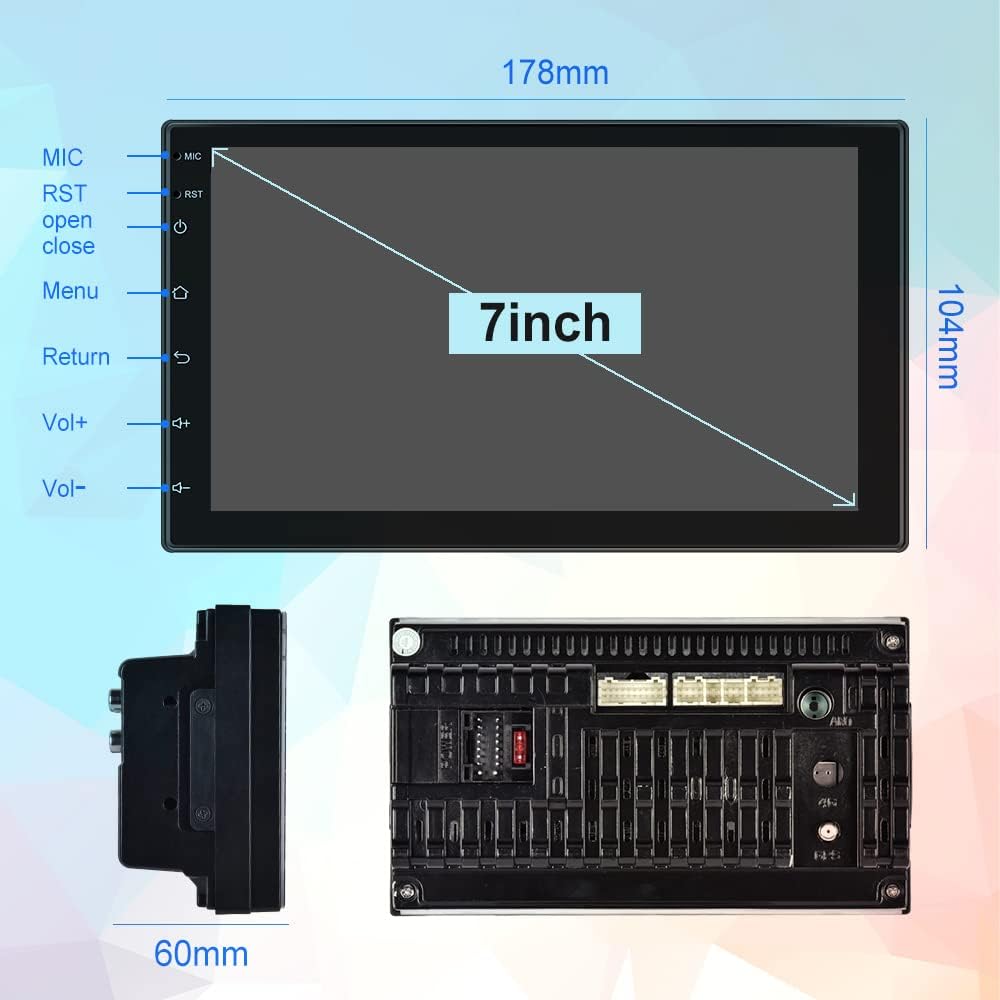
Image: Physical dimensions of the head unit.
2.3 વાયરિંગ ડાયાગ્રામ
Refer to the following diagram for correct wiring connections. Incorrect wiring can damage the unit or your vehicle's electrical system. If you are unsure, consult a professional installer.
- Yellow (B+): Constant Power Supply (+12V)
- Red (ACC): Ignition Switch (+12V)
- કાળો (GND): ગ્રાઉન્ડ વાયર
- Orange (ILL): Illumination Backlight
- Blue (ANT CONT): Auto Antenna Power
- Brown (SW1) & Pink (SW2): Steering Wheel Control (connect to vehicle's steering wheel control wires)
- White/White-Black: Front Left Speaker (+/-)
- Gray/Gray-Black: Front Right Speaker (+/-)
- Green/Green-Black: Rear Left Speaker (+/-)
- Purple/Purple-Black: Rear Right Speaker (+/-)
- રિવર્સ ઇનપુટ: Connect to vehicle's reverse light signal for backup camera activation.
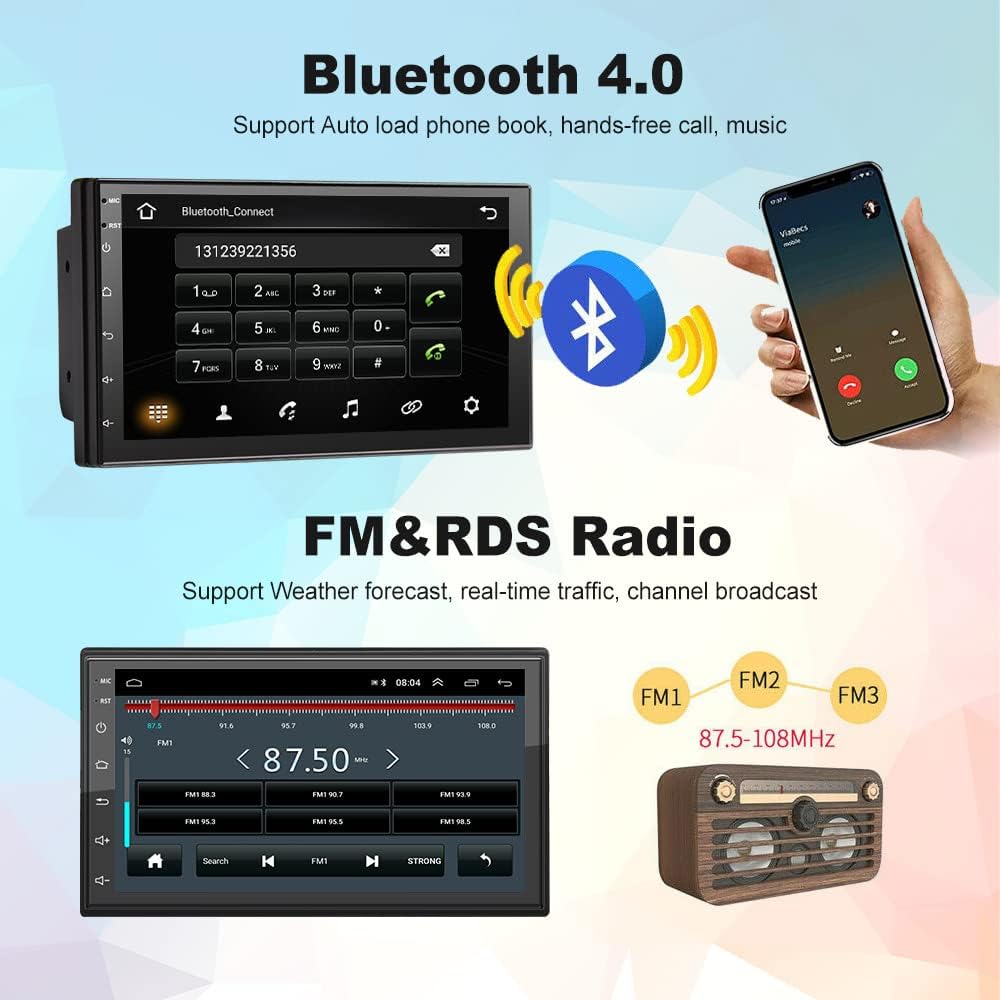
Image: Comprehensive wiring diagram for the car stereo.
2.4 પ્રારંભિક પાવર ચાલુ
After completing all wiring, turn on your vehicle's ignition. The unit should power on automatically. Follow any on-screen prompts for initial setup.
3. ઓપરેટિંગ સૂચનાઓ
3.1 Wireless Apple CarPlay / Wired Android Auto
This unit supports both wireless Apple CarPlay and wired Android Auto. Connect your smartphone to access navigation, music, calls, and more directly on the stereo's screen.
- વાયરલેસ કારપ્લે કનેક્શન:
- Ensure Bluetooth is enabled on your iPhone and the car stereo.
- Pair your iPhone with the car stereo via Bluetooth (device name: CarBT, PIN: 0000).
- Open the 'ZLINK' application on the car stereo.
- If the connection is not successful, manually connect your iPhone to the car stereo's WiFi hotspot. Go to Car Settings > Android Settings > Network & Internet > Hotspot & tethering > Wi-Fi hotspot. Turn on the hotspot and note the network name (e.g., AndroidAP_B442). Connect your iPhone to this WiFi network.
- Once connected via WiFi, the ZLINK app should prompt you to use CarPlay. Confirm the connection.
- After manually connecting to the WiFi of the vehicle, delete the history record in the ZLINK app and then click ZLINK again to connect.
- વાયર્ડ એન્ડ્રોઇડ ઓટો કનેક્શન: Connect your Android phone to the stereo via a USB cable. Follow the on-screen prompts to enable Android Auto.
Video: Demonstrates the steps to connect an Android Double Din Car Stereo, including Bluetooth and ZLINK connections for smartphone integration.

Image: Wireless Apple CarPlay and Android Auto interfaces.
૪.૩ બ્લૂટૂથ કનેક્ટિવિટી
The unit features Bluetooth 4.2 for hands-free calling, music streaming, and automatic phonebook loading. To connect:
- Go to the Bluetooth application on the stereo.
- Enable Bluetooth on your smartphone and search for 'CarBT'.
- Pair the devices using the default PIN '0000' if prompted.
- Once connected, you can make/receive calls and play audio through the stereo.
Image: Bluetooth connection interface on the car stereo.
3.3 GPS Navigation & WiFi
The stereo includes built-in GPS navigation and WiFi connectivity.
- GPS નેવિગેશન: Supports online and offline maps. You can download offline maps directly from the Play Store.
- WiFi: Connect to your phone's hotspot or a local WiFi network to browse websites and download apps like Chrome, Waze, IGO, Sygic, etc.
૬.૩ એફએમ/આરડીએસ રેડિયો
Access FM radio stations and receive RDS (Radio Data System) information, which displays station names, program content, and other relevant data.
Image: FM radio interface with RDS display.
૬.૮ સ્ટીયરીંગ વ્હીલ કંટ્રોલ (SWC)
The unit supports learning functions for your original car's steering wheel controls. This allows you to control the stereo's functions (e.g., volume, track skip) directly from your steering wheel for convenience and safety.
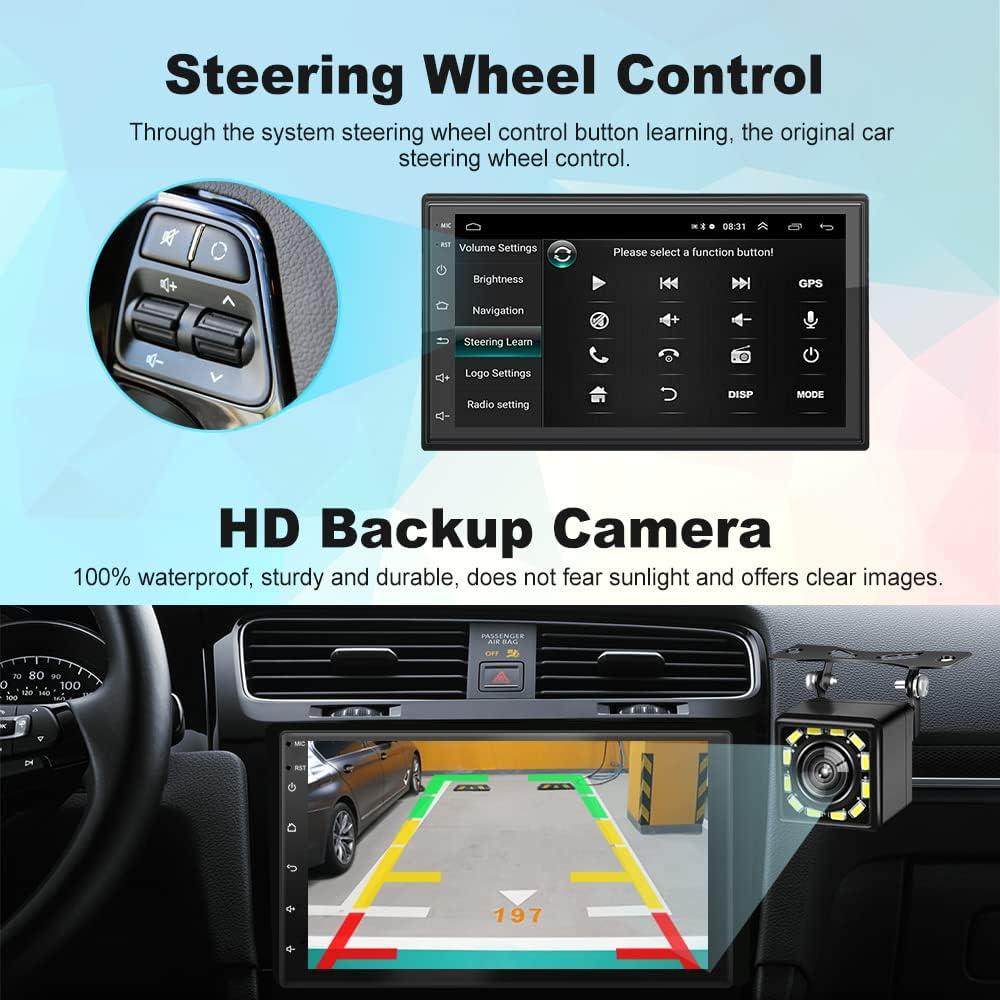
Image: Steering Wheel Control setup interface.
3.6 HD Backup Camera
The included 12-light HD backup camera is waterproof and provides high-definition night vision. When reversing, the stereo automatically switches to display the camera's feed, showing the area behind your vehicle.
Image: Backup camera view on the car stereo display.
૪.૬ સ્પ્લિટ સ્ક્રીન ફંક્શન
The split-screen feature allows you to run two applications simultaneously, such as navigation and music playback, without performance issues.

Image: Split Screen functionality displaying two applications simultaneously.
3.8 10-Band EQ Settings
Adjust the audio output to your preference with the integrated 10-band equalizer. This allows for fine-tuning of sound effects for each seat in the car.
Image: 10-band EQ settings interface.
4. જાળવણી
તમારા કાર સ્ટીરિયોના લાંબા સમય સુધી ઉપયોગ અને શ્રેષ્ઠ કામગીરીની ખાતરી કરવા માટે, આ જાળવણી માર્ગદર્શિકા અનુસરો:
- સફાઈ: ટચસ્ક્રીન અને યુનિટના બાહ્ય ભાગને સાફ કરવા માટે નરમ, સૂકા કપડાનો ઉપયોગ કરો. ઘર્ષક ક્લીનર્સ અથવા સોલવન્ટ્સ ટાળો.
- સૉફ્ટવેર અપડેટ્સ: સમયાંતરે ઉત્પાદકની તપાસ કરો website or the unit's settings for available software updates to improve performance and add new features.
- તાપમાન: યુનિટને અતિશય તાપમાન, લાંબા સમય સુધી સીધો સૂર્યપ્રકાશ અથવા વધુ પડતા ભેજના સંપર્કમાં રાખવાનું ટાળો.
5. મુશ્કેલીનિવારણ
If you encounter issues with your Podofo Car Stereo, refer to the following common problems and solutions:
- કોઈ શક્તિ નથી:
- Check the yellow (B+) and red (ACC) power wires for proper connection to a constant 12V and ignition 12V source, respectively.
- Ensure the black (GND) wire is securely connected to a vehicle ground.
- Verify that the fuse on the power cable is intact. Replace if blown.
- કોઈ અવાજ નથી:
- Check all speaker wire connections (White, Gray, Green, Purple and their black-striped counterparts) to ensure they are correctly connected to your vehicle's speakers.
- ખાતરી કરો કે વોલ્યુમ મ્યૂટ નથી અથવા ન્યૂનતમ પર સેટ નથી.
- ખાતરી કરો કે સાચો ઓડિયો સ્ત્રોત પસંદ થયેલ છે.
- Wireless CarPlay/Android Auto Connection Issues:
- Ensure Bluetooth is on and paired correctly.
- If using wireless CarPlay, ensure your iPhone is connected to the stereo's WiFi hotspot as described in section 3.1.
- તમારા ફોન અને કાર સ્ટીરિયો બંનેને ફરીથી શરૂ કરો.
- Delete any existing Bluetooth/WiFi connections on both devices and attempt to reconnect.
- સ્ટીયરીંગ વ્હીલ કંટ્રોલ કામ ન કરતા:
- Ensure the SW1 and SW2 wires are correctly connected to your vehicle's steering wheel control wires.
- Access the 'Steering Learn' function in the stereo's settings and follow the on-screen instructions to program the controls.
- બેકઅપ કેમેરા દેખાતો નથી:
- Check the camera input cable connection to the stereo.
- Ensure the reverse input wire is correctly connected to your vehicle's reverse light signal.
- ખાતરી કરો કે કેમેરા પોતે જ સંચાલિત અને કાર્યરત છે.
If problems persist after attempting these solutions, please contact Podofo customer support.
6. સ્પષ્ટીકરણો
| લક્ષણ | સ્પષ્ટીકરણ |
|---|---|
| બ્રાન્ડ | પોડોફો |
| મોડલ | B09C2ZQLDW |
| સ્ક્રીન માપ | 7 ઇંચ |
| ઓપરેટિંગ સિસ્ટમ | એન્ડ્રોઇડ 10.1 |
| CPU | 8227L, 4-core 1.3GHz processor |
| સ્મૃતિ | 1GB RAM + 16GB ROM |
| ઠરાવ | 1024 x 600 |
| કનેક્ટિવિટી ટેકનોલોજી | USB, Bluetooth, WiFi |
| બ્લૂટૂથ સંસ્કરણ | 4.2 |
| ખાસ લક્ષણો | Wireless Apple CarPlay, Wired Android Auto, GPS Navigation, FM RDS, Backup Camera, Split Screen, Steering Wheel Control |
| ઓડિયો આઉટપુટ મોડ | APE/FLAC/WAV/MP3/WMA etc. |
| માઉન્ટિંગ પ્રકાર | ડેશબોર્ડ માઉન્ટ (ડબલ ડીન) |
| વસ્તુનું વજન | 941 ગ્રામ |
7. વોરંટી અને સપોર્ટ
Your Podofo Double Din Car Stereo comes with a 2 વર્ષની વોરંટી ખરીદીની તારીખથી. આ વોરંટી સામાન્ય ઉપયોગ હેઠળ ઉત્પાદન ખામીઓ અને ખામીઓને આવરી લે છે.
For technical support, warranty claims, or any questions not covered in this manual, please contact Podofo customer service through the retailer where you purchased the product or visit the official Podofo webસંપર્ક માહિતી માટે સાઇટ.
વોરંટી હેતુઓ માટે કૃપા કરીને તમારી ખરીદીનો પુરાવો રાખો.