
1. પરિચય
This manual provides essential information for setting up, operating, maintaining, and troubleshooting your Alienware X17 R1 Gaming Laptop. Please read this manual thoroughly to ensure optimal performance and longevity of your device.

Figure 1: Alienware X17 R1 Gaming Laptop
2. પેકેજ સામગ્રી
Ensure all items are present in your Alienware X17 R1 package:
- Alienware X17 R1 Notebook
- પાવર એડેપ્ટર
- પાવર કોર્ડ
- વપરાશકર્તા માર્ગદર્શિકા (આ દસ્તાવેજ)
3. ઉત્પાદન ઓવરview
૨.૧ ડિઝાઇન અને પરિમાણો
The Alienware X17 R1 features a sleek, thin design in Lunar Light (white) with Dark Side of the Moon (black) accents for the keyboard and deck. Its dimensions are approximately 11.79 x 15.72 x 0.82 inches (LxWxH) and it weighs around 7.05 pounds.

Figure 2: Alienware X17 R1 Side Profile
3.2 પોર્ટ્સ અને કનેક્ટર્સ
The Alienware X17 R1 is equipped with a comprehensive set of ports, primarily located at the rear for efficient cable management and thermal performance.
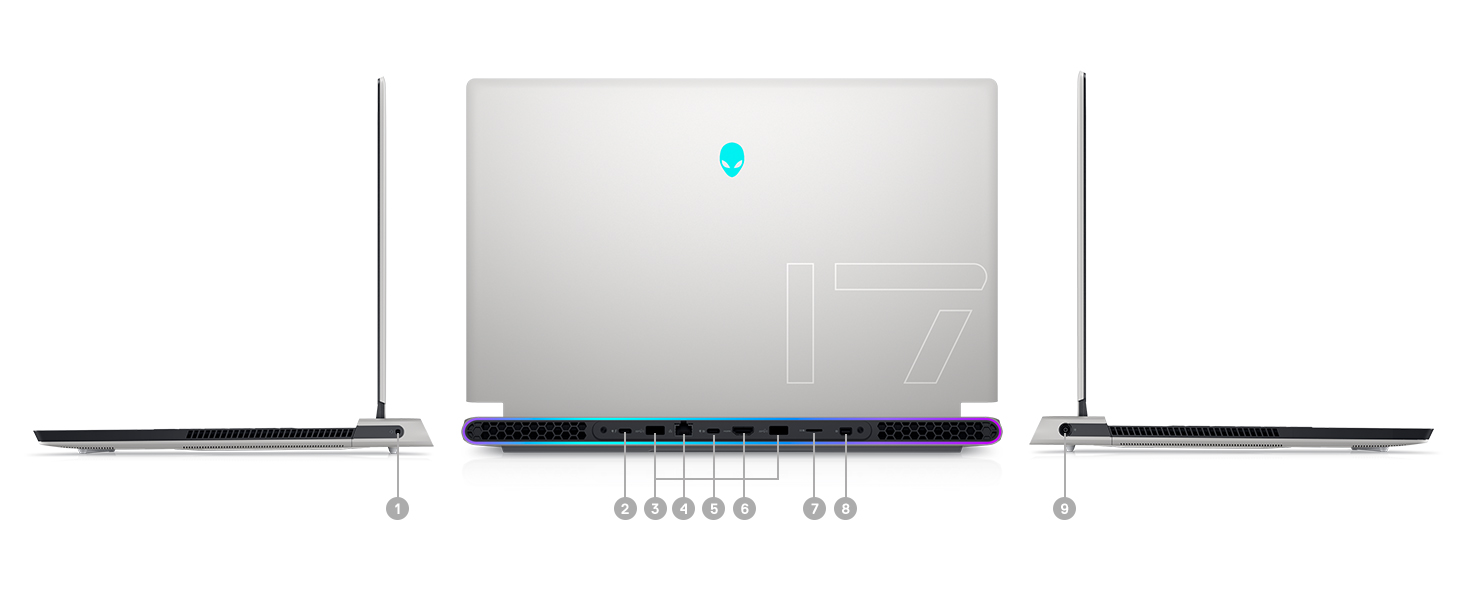
Figure 3: Rear Ports and Connectors
- Power/DC-in Port
- Mini Display Port 1.4
- HDMI 2.1 (for up to 4K/120Hz output)
- Type-C USB 3.2 Gen 2 Port with Power Delivery (5V/3A)
- Killer E3100 RJ-45 2.5G Ethernet
- માઇક્રો એસડી કાર્ડ રીડર
- USB 3.2 Gen 1 Type-A with Powershare
- Type-C Thunderbolt™ 4/USB 3.2 Gen 2 Port with Power Delivery (5V/3A)
- Global Headset Jack
૪.૩ કીબોર્ડ અને ટચપેડ
The laptop features an AlienFX keyboard with per-key RGB lighting and an AlienFX Lighting design supporting 16.8 million colors. The touchpad is glass, offering solid tracking and responsive gestures.

Figure 4: AlienFX Keyboard and Touchpad
3.4 ડિસ્પ્લે
The 17.3-inch Full HD (1920 x 1080) display boasts a 360Hz refresh rate and 1ms response time, enhanced with ComfortView Plus, NVIDIA G-SYNC, and Advanced Optimus for a smooth visual experience.

આકૃતિ 5: 360Hz ડિસ્પ્લે
3.5 કૂલિંગ સિસ્ટમ
The Alienware X17 R1 incorporates advanced thermal management with its Cryo-Tech™ Technologies. This includes an exclusive Quad Fan design and Element 31, an encapsulated gallium-silicone thermal interface material, to ensure efficient heat dissipation during intensive use.

Figure 6: Cryo-Tech Cooling System
Video 1: Official Alienware X17 R1 Product Overview, highlighting key features including the cooling system.
4. સેટઅપ
4.1 પ્રારંભિક પાવર-ઓન
- Unpack your Alienware X17 R1 laptop and all accessories.
- Connect the power adapter to the laptop's power port and then to a power outlet.
- Open the laptop lid and press the power button (Alienware head logo) to turn on the device.
- Follow the on-screen instructions to complete the Windows 11 setup process.
4.2 કનેક્ટિંગ પેરિફેરલ્સ
Utilize the various ports on the rear and sides of the laptop to connect external monitors, keyboards, mice, and other accessories. For optimal display performance, use the HDMI 2.1 or Mini Display Port 1.4 for external monitors.

Figure 7: Connecting External Peripherals
5. તમારા લેપટોપનું સંચાલન
5.1 પાવર મેનેજમેન્ટ
The Alienware X17 R1 offers tailored power states to optimize performance or battery life. These can be managed through the Alienware Command Center software:
- શાંત મોડ: Reduces fan noise and power consumption.
- સંતુલિત સ્થિતિ: Offers a balance between performance and acoustics.
- પૂર્ણ ગતિ મોડ: Maximizes fan speed for peak performance.
- બેટરી સેવર મોડ: Optimizes settings for extended battery life.
- પ્રદર્શન મોડ: Prioritizes performance for demanding tasks.
5.2 Windows Hello
The laptop supports Windows Hello for secure and convenient login using facial recognition via the integrated webકamમ.
5.3 Alienware Command Center
This software allows you to customize various aspects of your laptop, including RGB lighting, power profiles, and overclocking settings. It is recommended to keep the software updated for the best experience.

Figure 8: Alienware Command Center
6. જાળવણી
6.1 સફાઈ
- સ્ક્રીન અને બાહ્ય સપાટીઓ સાફ કરવા માટે નરમ, લિન્ટ-ફ્રી કાપડનો ઉપયોગ કરો.
- હઠીલા ગુણ માટે, થોડું ડીampપાણી અથવા સ્ક્રીન-સેફ ક્લીનરથી કપડાને સાફ કરો.
- Regularly clean the air vents to prevent dust buildup, which can affect cooling performance.
6.2 સોફ્ટવેર અપડેટ્સ
Keep your operating system, drivers, and Alienware Command Center software updated to ensure optimal performance, security, and compatibility. Use the Alienware Update utility or visit the Dell support webનવીનતમ અપડેટ્સ માટે સાઇટ.
6.3 Upgradable Components
The Alienware X17 R1 offers upgradable slots for memory and storage:
- 2 x RAM Slots (DDR4)
- 1 x M.2 PCIe Gen 4 SSD Slot
- 1 x M.2 PCIe Gen 3 SSD Slot
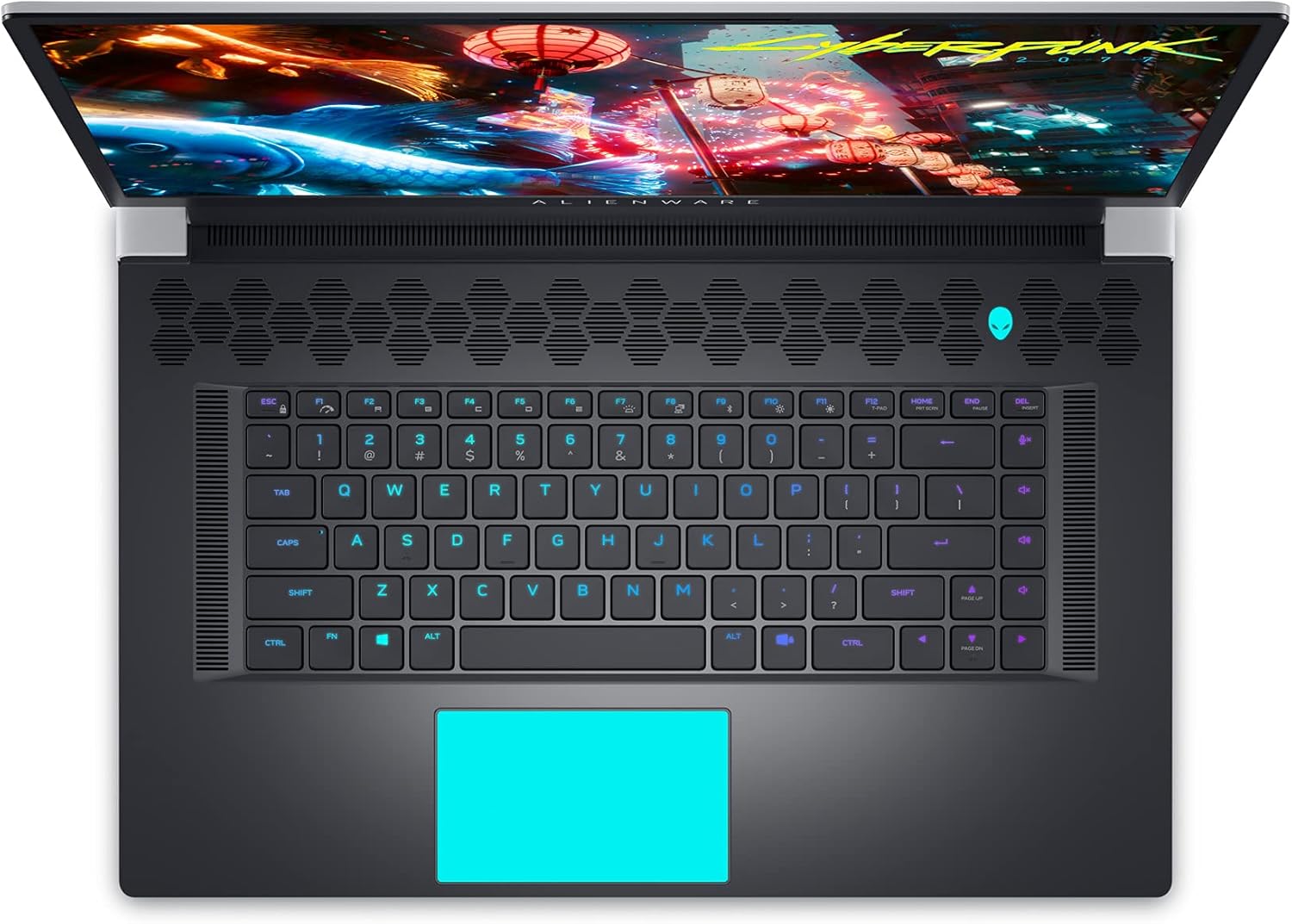
Figure 9: Internal Components and Upgradable Slots
7. મુશ્કેલીનિવારણ
If you encounter issues with your Alienware X17 R1, try the following basic troubleshooting steps:
- કોઈ શક્તિ નથી: ખાતરી કરો કે પાવર એડેપ્ટર લેપટોપ અને પાવર આઉટલેટ બંને સાથે સુરક્ષિત રીતે જોડાયેલ છે. અલગ આઉટલેટ અજમાવી જુઓ.
- ડિસ્પ્લે સમસ્યાઓ: If the screen is blank, try connecting an external monitor to verify if the issue is with the laptop's display or the graphics card. Update graphics drivers.
- પ્રદર્શન લેગ: Check your power management settings in Alienware Command Center. Ensure all drivers are up to date. Monitor temperatures to prevent thermal throttling.
- કનેક્ટિવિટી સમસ્યાઓ: For Wi-Fi or Ethernet issues, restart your router and the laptop. Check network adapter drivers.
- સૉફ્ટવેર ગ્લિચ્સ: Restart the application or the laptop. Ensure your operating system and applications are updated.
For more advanced troubleshooting or persistent issues, refer to the Dell support webસાઇટ અથવા ગ્રાહક સેવાનો સંપર્ક કરો.
8. સ્પષ્ટીકરણો
| લક્ષણ | સ્પષ્ટીકરણ |
|---|---|
| મોડેલનું નામ | એલિયનવેર x17 R1 |
| પ્રોસેસર | 11th Generation Intel Core i7-11800H (8 Cores, up to 4.6 GHz) |
| રેમ | ૬૪ જીબી ડીડીઆર૪ ૨૬૬૬ મેગાહર્ટ્ઝ |
| સંગ્રહ | 1 TB M.2 PCIe NVMe Solid State Drive |
| ગ્રાફિક્સ કાર્ડ | NVIDIA GeForce RTX 3080 16GB GDDR6 |
| ડિસ્પ્લે | 17.3-inch FHD (1920 x 1080) 360Hz 1ms with ComfortView Plus, NVIDIA G-SYNC and Advanced Optimus |
| ઓપરેટિંગ સિસ્ટમ | વિન્ડોઝ 11 હોમ |
| વાયરલેસ કનેક્ટિવિટી | Killer AX 1675 + Bluetooth 5.2 |
| બંદરો | 3x USB 3.0, 2x Type-C (Thunderbolt 4/USB 3.2 Gen 2), HDMI 2.1, Mini DisplayPort 1.4, Ethernet, Micro SD, Headset Jack |
| વસ્તુનું વજન | 7.05 પાઉન્ડ |
| ઉત્પાદન પરિમાણો | 11.79 x 15.72 x 0.82 ઇંચ |
| રંગ | ચંદ્ર પ્રકાશ (સફેદ) |
9. વોરંટી અને સપોર્ટ
Your Alienware X17 R1 laptop is covered by Dell's standard warranty. For detailed warranty information, technical support, or service requests, please visit the official Dell support website or contact their customer service. Keep your purchase receipt and product serial number handy for faster assistance.
ડેલ સપોર્ટ Webસાઇટ: www.dell.com/support