
શરૂઆત કરવી
પેકેજ સામગ્રી
Upon opening the MAXTOP Smart Watch T5 package, you should find the following items:
- MAXTOP Smart Watch T5 device
- Silicone watch strap (black)
- યુએસબી ચાર્જિંગ કેબલ
- વપરાશકર્તા માર્ગદર્શિકા

Image: MAXTOP Smart Watch T5 package contents, showing the watch, a black silicone strap, a USB charging cable, and the user manual.
ઉપકરણ ચાર્જ કરી રહ્યું છે
Before first use, fully charge your smart watch. Connect the magnetic charging cable to the charging points on the back of the watch and plug the USB end into a standard USB power adapter (not included) or a computer's USB port. The watch display will indicate charging status.
નોંધ:
- Ensure the charging contacts are clean and dry.
- Use a 5V/1A charger for optimal charging.
પાવરિંગ ચાલુ/બંધ
- પાવર ચાલુ કરવા માટે: Press and hold the side button for a few seconds until the MAXTOP logo appears.
- પાવર ઓફ કરવા માટે: From the watch face, swipe down to access quick settings, or navigate to the "Settings" menu. Select the power icon and confirm to shut down the device.
એપ્લિકેશન ઇન્સ્ટોલેશન અને પેરિંગ
To unlock the full functionality of your MAXTOP Smart Watch T5, you need to install the companion app on your smartphone.
- એપ ડાઉનલોડ કરો: માટે શોધો the "MAXTOP" app (or specified companion app in the included manual) in the Apple App Store (for iOS) or Google Play Store (for Android).
- એકાઉન્ટ બનાવો: Open the app and follow the on-screen instructions to create an account and set up your profile.
- ઘડિયાળ જોડો:
- ખાતરી કરો કે તમારા સ્માર્ટફોન પર બ્લૂટૂથ સક્ષમ છે.
- Open the app and navigate to the device pairing section.
- Select "Add Device" or similar option. The app will search for nearby devices.
- Select "MAXTOP T5" from the list of found devices.
- જો પૂછવામાં આવે તો તમારા ફોન અને ઘડિયાળ બંને પર જોડી બનાવવાની વિનંતીની પુષ્ટિ કરો.
મહત્વપૂર્ણ:
- Keep the watch close to your phone during the pairing process.
- Allow all requested permissions for the app to function correctly.
લક્ષણો અને કામગીરી
ઇન્ટરફેસ નેવિગેટ કરી રહ્યા છીએ
The MAXTOP Smart Watch T5 features a 1.54-inch full touch screen for easy navigation.
- ઉપર/નીચે સ્વાઇપ કરો: મેનુઓ અથવા સૂચનાઓ દ્વારા સ્ક્રોલ કરો.
- ડાબે/જમણે સ્વાઇપ કરો: Access different feature screens or quick views.
- ટૅપ કરો: કોઈ વસ્તુ પસંદ કરો અથવા ક્રિયાની પુષ્ટિ કરો.
- સાઇડ બટન: Press to return to the main watch face or wake the screen.

Image: The MAXTOP Smart Watch T5 display showcasing multiple functions including heart rate, blood pressure, music control, and various sports modes.
દૈનિક પ્રવૃત્તિ ટ્રેકિંગ
Your smart watch automatically tracks your daily activities, including steps, distance, and calories burned. You can view detailed summaries in the companion app.

Image: The MAXTOP Smart Watch T5 tracking daily activities such as steps, calories, and distance, alongside icons representing various sports modes like hiking, cycling, and running.
રમતગમત સ્થિતિઓ
The watch supports 10 different sport modes to accurately track your workouts. To start a sport mode:
- Swipe on the watch face to find the "Sport" icon or menu.
- Tap to select your desired activity (e.g., Outdoor Run, Indoor Walk, Cycling).
- The watch will begin tracking your activity. Tap to pause or end the workout.

Image: The MAXTOP Smart Watch T5 interface showing 10 distinct sport modes, such as hiking, outdoor cycling, indoor running, and elliptical training.
Heart Rate and Blood Pressure Monitoring
The watch can monitor your heart rate (HR) and blood pressure (BP). For accurate readings:
- Wear the watch snugly on your wrist, about one finger's width from your wrist bone.
- માપન દરમિયાન હજી પણ રહો.
- To measure: Navigate to the HR or BP icon on the watch and tap to start.

Image: The MAXTOP Smart Watch T5 displaying heart rate in beats per minute (BPM) and illustrating different sleep stages (awake, light, deep sleep).
સ્લીપ મોનિટરિંગ
The watch automatically tracks your sleep patterns, including awake time, light sleep, and deep sleep. View your sleep quality report in the companion app.

Image: The MAXTOP Smart Watch T5's sleep monitoring feature, displaying sleep duration and a detailed sleep quality analysis within the companion application.
સંદેશ સૂચનાઓ
Receive notifications from your smartphone directly on your watch. Ensure the watch is paired and app notifications are enabled in your phone's settings and the companion app.
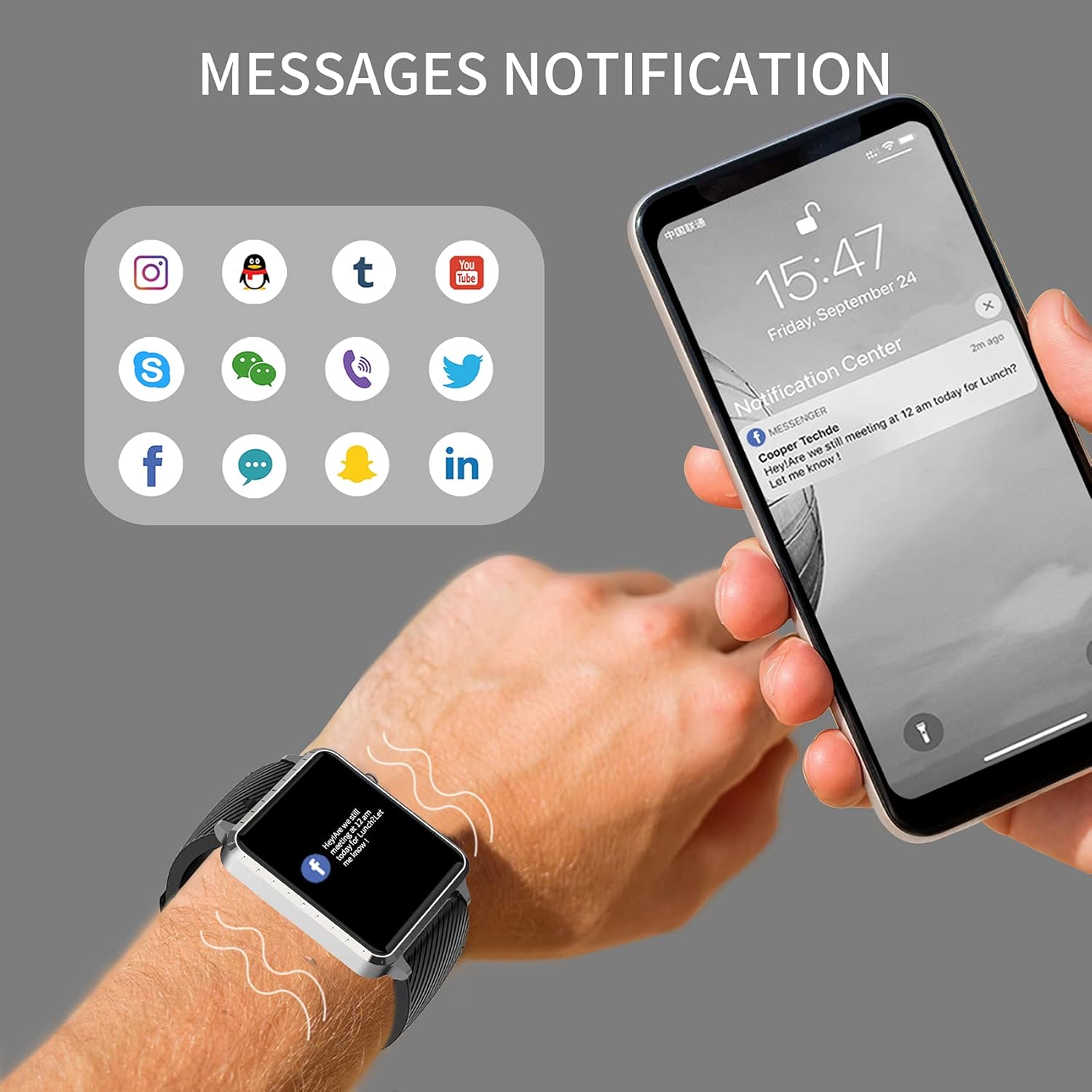
Image: The MAXTOP Smart Watch T5 showing incoming message notifications from popular social media and communication applications on its screen.
સંગીત નિયંત્રણ
Control music playback on your smartphone directly from your watch. This feature allows you to play, pause, skip tracks, and adjust volume without taking out your phone.

Image: The MAXTOP Smart Watch T5 demonstrating various features including music control, message notifications, sedentary reminders, and the 'find phone' function.
અન્ય કાર્યો
- બેઠાડુ રીમાઇન્ડર્સ: નિષ્ક્રિયતાના સમયગાળા પછી હલનચલનને પ્રોત્સાહન આપવા માટે એપ્લિકેશનમાં રીમાઇન્ડર્સ સેટ કરો.
- ફોન શોધો: Use this feature on your watch to make your paired phone ring, helping you locate it.
- સ્ટોપવોચ અને કાઉન્ટડાઉન: Access these tools from the watch's menu for timing activities.
જાળવણી અને સંભાળ
પાણી પ્રતિકાર
The MAXTOP Smart Watch T5 is rated IP67 waterproof. This means it is resistant to splashes, rain, and brief immersion in water. It is suitable for daily use and can withstand hand washing or light rain.
સાવધાન:
- Do not use the watch for swimming, diving, or showering with hot water.
- Avoid exposing the watch to high-pressure water or steam.
- Water resistance is not a permanent condition and may decrease over time with normal wear.
સફાઈ
Regularly clean your watch and strap to maintain hygiene and prevent skin irritation.
- Wipe the watch screen and body with a soft, damp, લિન્ટ-ફ્રી કાપડ.
- For the silicone strap, you can wash it with mild soap and water, then rinse thoroughly and dry completely before reattaching to your wrist.
- કઠોર રસાયણો અથવા ઘર્ષક સામગ્રીનો ઉપયોગ કરવાનું ટાળો.
બેટરી કેર
બેટરી જીવન વધારવા માટે:
- પહેલા ઉપયોગ કરતા પહેલા ઘડિયાળને સંપૂર્ણપણે ચાર્જ કરો.
- અતિશય તાપમાન ટાળો.
- If not using the watch for an extended period, charge it to about 50% before storing.
મુશ્કેલીનિવારણ
ઘડિયાળ ચાલુ નથી થઈ રહી
- ખાતરી કરો કે ઘડિયાળ સંપૂર્ણપણે ચાર્જ થયેલ છે. તેને ઓછામાં ઓછા 30 મિનિટ માટે ચાર્જર સાથે કનેક્ટ કરો.
- બળજબરીથી પુનઃપ્રારંભ કરવા માટે બાજુના બટનને 10-15 સેકન્ડ માટે દબાવી રાખો.
ફોન સાથે જોડી બનાવી શકાતી નથી
- ખાતરી કરો કે તમારા ફોનમાં બ્લૂટૂથ સક્ષમ છે અને ઘડિયાળ રેન્જમાં છે.
- તમારા ફોન અને ઘડિયાળ બંનેને રીસ્ટાર્ટ કરો.
- Ensure the companion app is installed and updated to the latest version.
- Forget the device from your phone's Bluetooth settings and try pairing again through the app.
- ઘડિયાળ પહેલાથી જ બીજા ઉપકરણ સાથે જોડાયેલી છે કે નહીં તે તપાસો.
Inaccurate Readings (HR/BP/Sleep)
- Ensure the watch is worn correctly: snug on the wrist, not too tight or too loose.
- Remain still during measurements.
- Note that smart watch readings are for reference only and should not be used for medical diagnosis.
સૂચનાઓ દેખાતી નથી
- ખાતરી કરો કે ઘડિયાળ તમારા ફોન સાથે સફળતાપૂર્વક જોડાયેલ છે.
- Check app notification settings on your phone and within the companion app.
- Ensure the app is running in the background and not being closed by your phone's power-saving features.
વિશિષ્ટતાઓ
| લક્ષણ | વિગત |
|---|---|
| બ્રાન્ડ | MAXTOP |
| મોડલ | T5 |
| સ્ક્રીન માપ | 1.54 ઇંચ |
| ઉત્પાદન પરિમાણો | 1.46 x 1.57 x 0.28 ઇંચ |
| વસ્તુનું વજન | ૬.૭ ઔંસ (૧૮૮.૮ ગ્રામ) |
| ઓપરેટિંગ સિસ્ટમ | એન્ડ્રોઇડ, iOS સુસંગત |
| વાયરલેસ કોમ્યુનિકેશન | બ્લૂટૂથ |
| બેટરીનો પ્રકાર | લિથિયમ પોલિમર (1 શામેલ) |
| બેટરી જીવન | 10 દિવસ સુધી |
| પાણી પ્રતિકાર સ્તર | વોટરપ્રૂફ (IP67) |
| પ્રથમ ઉપલબ્ધ તારીખ | જુલાઈ 6, 2022 |

Image: Detailed physical dimensions of the MAXTOP Smart Watch T5, including the watch face width, height, and the adjustable strap length.
વોરંટી અને આધાર
For warranty information and customer support, please refer to the official MAXTOP website or contact their customer service directly. Details are typically provided in the packaging or on the manufacturer's webસાઇટ
કોઈપણ વોરંટી દાવા માટે ખરીદીના પુરાવા તરીકે તમારી ખરીદી રસીદ રાખો.