
BLAUX 30888
BLX Earbuds - Wireless Bluetooth 5.1 Earbuds User Manual
Model: 30888 | Brand: BLAUX
1. પરિચય
Thank you for choosing BLX Earbuds. These True Wireless Stereo (TWS) earbuds are designed to provide a seamless and high-quality audio experience with the convenience of Bluetooth 5.1 technology. This manual will guide you through the setup, operation, and maintenance of your new earbuds to ensure optimal performance and longevity.
2. બોક્સમાં શું છે
બધી વસ્તુઓ હાજર છે તેની ખાતરી કરવા માટે કૃપા કરીને પેકેજની સામગ્રી તપાસો:
- BLX Wireless Earbuds (Left and Right)
- વાયરલેસ ચાર્જિંગ કેસ
- માઇક્રો યુએસબી ચાર્જિંગ કેબલ
- સિલિકોન ઇયર ટિપ્સ (નાના, મધ્યમ, મોટા)
- વપરાશકર્તા માર્ગદર્શિકા
3. ઉત્પાદન ઓવરview
The BLX Earbuds offer a compact and ergonomic design for comfortable, all-day wear. The included charging case provides extended battery life and convenient storage.
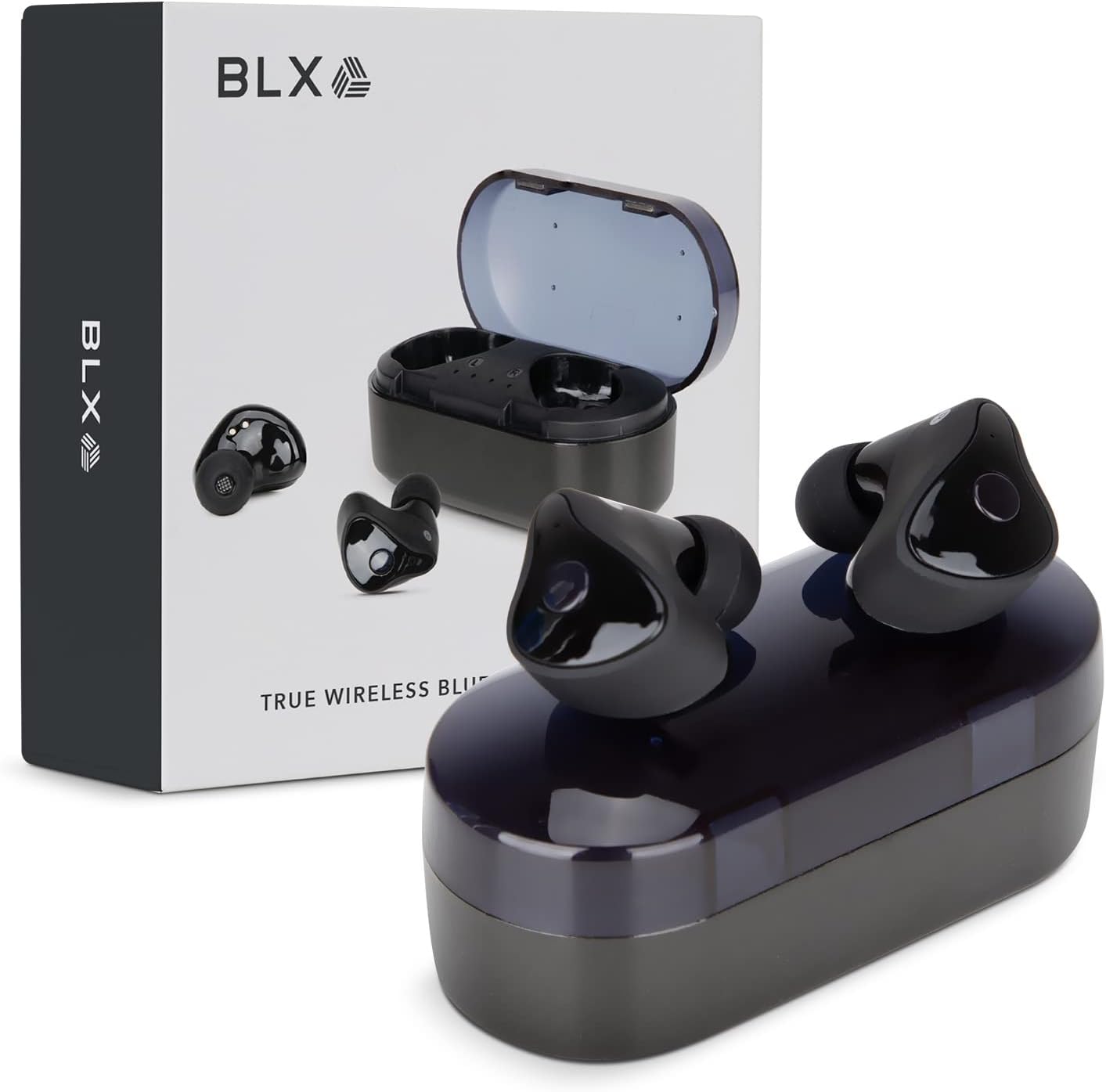
Image: BLX Earbuds, charging case, and product packaging.
3.1 મુખ્ય લક્ષણો
- ટ્રુ વાયરલેસ સ્ટીરિયો (TWS): Enjoy a completely wireless audio experience with independent earbuds.
- બ્લૂટૂથ 5.1 ટેકનોલોજી: Provides a stable and efficient wireless connection with a range of up to 10 meters.
- ઝડપી જોડી: Earbuds automatically connect to your device once removed from the charging case.
- સાહજિક ટચ નિયંત્રણો: Manage music playback, calls, and voice assistants with simple taps.
- IPX4 પાણી પ્રતિકાર: Designed to withstand sweat and splashes, making them suitable for workouts and outdoor activities.
- બિલ્ટ-ઇન માઇક્રોફોન: Enables hands-free calling and voice assistant interaction.

Image: BLX Earbuds demonstrating true wireless freedom with Bluetooth 5.1, fast pairing, and a 10-meter range.

છબી: વિગતવાર view of a BLX Earbud highlighting its smart touch control capabilities for various functions.

Image: A person running while wearing BLX Earbuds, emphasizing their IPX4 water resistance for sweat and splashes, and the portability of the compact charging case.

Image: A woman wearing a BLX Earbud, with an illustration of the three included silicone ear tip sizes (11mm, 12mm, 13mm) to help users find their perfect fit.

Image: A woman enjoying music with BLX Earbuds, illustrating the battery performance: 4.5 hours of listening time, up to 18 hours with the charging case, and a 1-hour full charge time for the case.

Image: A close-up of a BLX Earbud, emphasizing its clear immersive audio quality with a frequency response range of 20Hz to 20KHz.

Image: BLX Earbuds depicted with icons for Google Assistant and Siri, along with a built-in microphone icon, indicating hands-free voice assistant capabilities.
4. સેટઅપ
૫.૧ ઇયરબડ્સ અને કેસ ચાર્જ કરવા
Before first use, fully charge the BLX Earbuds and their charging case.
- ઇયરબડ્સને ચાર્જિંગ કેસમાં મૂકો. ખાતરી કરો કે તેઓ તેમના સંબંધિત સ્લોટમાં યોગ્ય રીતે બેઠેલા છે (ડાબે માટે L, જમણે માટે R).
- Connect the Micro USB charging cable to the charging port on the case and the other end to a USB power source (e.g., computer, wall adapter).
- The indicator lights on the charging case will illuminate to show charging status. A full charge for the case takes approximately 1 hour.
- Once fully charged, disconnect the charging cable. The earbuds will charge automatically when placed in the powered case.
૧.૩ તમારા ઉપકરણ સાથે જોડી બનાવવી
BLX Earbuds feature auto-pairing technology for quick and easy connection.
- Ensure the charging case is charged and your device's Bluetooth is enabled.
- ચાર્જિંગ કેસ ખોલો. ઇયરબડ્સ આપમેળે ચાલુ થશે અને પેરિંગ મોડમાં પ્રવેશ કરશે.
- On your device (smartphone, tablet, laptop), go to the Bluetooth settings and search for available devices.
- Select "BLX Earbuds" from the list of found devices.
- Once connected, your device will confirm the pairing, and the earbuds will be ready for use.
- પછીના ઉપયોગો માટે, કેસમાંથી દૂર કર્યા પછી, ઇયરબડ્સ આપમેળે છેલ્લા જોડીવાળા ઉપકરણ સાથે કનેક્ટ થઈ જશે.
4.3 Finding the Perfect Fit
A proper fit is crucial for sound quality and comfort. Experiment with the included silicone ear tips (Small, Medium, Large) to find the size that best seals your ear canal.
- તમારી કાનની નહેરમાં ધીમેધીમે ઇયરબડ દાખલ કરો.
- Twist slightly to secure it in place. The earbud should feel snug and comfortable without causing pressure.
- If the sound quality is poor or the earbuds feel loose, try a different size ear tip.
5. Operating Your BLX Earbuds
The BLX Earbuds utilize touch controls for easy management of audio and calls.
5.1 પાવર ચાલુ/બંધ
- પાવર ચાલુ: ચાર્જિંગ કેસ ખોલો અને ઇયરબડ ઑટોમૅટિક રીતે ચાલુ થઈ જશે.
- પાવર બંધ: ઇયરબડ્સને પાછા ચાર્જિંગ કેસમાં મૂકો અને ઢાંકણ બંધ કરો. તે આપમેળે બંધ થઈ જશે અને ચાર્જ થવાનું શરૂ કરશે.
5.2 સંગીત પ્લેબેક
| ક્રિયા | નિયંત્રણ |
|---|---|
| ચલાવો/થોભો | કોઈપણ ઇયરબડ પર સિંગલ ટૅપ કરો |
| નેક્સ્ટ ટ્રૅક | જમણા ઇયરબડ પર બે વાર ટેપ કરો |
| પાછલો ટ્રેક | ડાબા ઇયરબડ પર બે વાર ટેપ કરો |
૫.૨ કોલ મેનેજમેન્ટ
| ક્રિયા | નિયંત્રણ |
|---|---|
| કૉલનો જવાબ આપો/સમાપ્ત કરો | કોઈપણ ઇયરબડ પર સિંગલ ટૅપ કરો |
| કૉલ નકારો | કોઈપણ ઇયરબડને 2 સેકન્ડ માટે દબાવી રાખો |
Voice. Voice અવાજ સહાયક
| ક્રિયા | નિયંત્રણ |
|---|---|
| વોઇસ આસિસ્ટન્ટ (સિરી, ગૂગલ આસિસ્ટન્ટ, વગેરે) સક્રિય કરો. | બેમાંથી કોઈ પણ ઇયરબડ પર ત્રણ વાર ટૅપ કરો |
5.5 વોલ્યુમ નિયંત્રણ
Volume control is managed directly through your connected device (phone, tablet, laptop).
6. જાળવણી
Proper care and maintenance will extend the life of your BLX Earbuds.
6.1 સફાઈ
- ઇયરબડ્સ અને ચાર્જિંગ કેસ સાફ કરવા માટે નરમ, સૂકા, લિન્ટ-ફ્રી કાપડનો ઉપયોગ કરો.
- For ear tips, remove them from the earbuds and clean with a mild soap solution if necessary, then rinse thoroughly and dry completely before reattaching.
- ઘર્ષક ક્લીનર્સ, આલ્કોહોલ અથવા રાસાયણિક દ્રાવકોનો ઉપયોગ કરશો નહીં.
- ખાતરી કરો કે ઇયરબડ અને કેસ બંને પર ચાર્જિંગ કોન્ટેક્ટ સ્વચ્છ અને કચરો મુક્ત છે.
6.2 સંગ્રહ
જ્યારે ઉપયોગમાં ન હોય, ત્યારે ઇયરબડ્સને ધૂળ, નુકસાનથી બચાવવા અને ચાર્જ રાખવા માટે હંમેશા તેમના ચાર્જિંગ કેસમાં રાખો.
૫.૪ પાણી પ્રતિકાર (IPX4)
Your BLX Earbuds are rated IPX4, meaning they are resistant to splashing water from any direction. This makes them suitable for:
- Sweaty workouts
- Light rain or splashes
મહત્વપૂર્ણ નોંધ:
- IPX4 rating does NOT mean the earbuds are waterproof. Do not submerge them in water.
- Do not wear them while swimming, showering, or in heavy rain.
- If the earbuds get wet, wipe them dry immediately before placing them back in the charging case.
7. મુશ્કેલીનિવારણ
If you encounter issues with your BLX Earbuds, try the following solutions:
૫.૧ ઇયરબડ્સ જોડી કે કનેક્ટ થતા નથી
- ખાતરી કરો કે બંને ઇયરબડ ચાર્જ થયા છે.
- ખાતરી કરો કે તમારા ઉપકરણ પર બ્લૂટૂથ સક્ષમ છે.
- ઇયરબડ્સને કેસમાં પાછા મૂકો, ઢાંકણ બંધ કરો, થોડીવાર રાહ જુઓ, પછી પેરિંગ મોડમાં ફરીથી પ્રવેશવા માટે ઢાંકણ ફરીથી ખોલો.
- Forget/delete "BLX Earbuds" from your device's Bluetooth list and try pairing again.
- Move the earbuds closer to your device (within 10 meters).
૫.૨ અવાજ નહીં અથવા ઓછો અવાજ
- તમારા કનેક્ટેડ ડિવાઇસ પર વોલ્યુમ લેવલ તપાસો.
- ખાતરી કરો કે ઇયરબડ્સ તમારા ઉપકરણ સાથે યોગ્ય રીતે જોડાયેલા છે.
- ઇયરબડ સ્પીકર મેશમાંથી કોઈપણ કચરો સાફ કરો.
- કોઈ અલગ એપ્લિકેશન અથવા સ્ત્રોતમાંથી ઑડિઓ ચલાવવાનો પ્રયાસ કરો.
7.3 One Earbud Not Working
- બંને ઇયરબડ્સને ચાર્જિંગ કેસમાં પાછા મૂકો, ઢાંકણ બંધ કરો અને પછી તેને ફરીથી ખોલો.
- ખાતરી કરો કે બંને ઇયરબડ ચાર્જ થયા છે.
- ઇયરબડ્સ રીસેટ કરવાનો પ્રયાસ કરો (ઉત્પાદકના website or support for specific reset instructions if needed).
૭.૪ ચાર્જિંગ કેસ ચાર્જ થતો નથી
- ખાતરી કરો કે ચાર્જિંગ કેબલ કેસ અને પાવર સ્ત્રોત બંને સાથે સુરક્ષિત રીતે જોડાયેલ છે.
- કોઈ અલગ USB પોર્ટ અથવા વોલ એડેપ્ટર અજમાવી જુઓ.
- ખાતરી કરો કે ચાર્જિંગ કેબલ ક્ષતિગ્રસ્ત નથી.
8. સ્પષ્ટીકરણો
| લક્ષણ | વિગત |
|---|---|
| મોડેલનું નામ | 30888 |
| કનેક્ટિવિટી ટેકનોલોજી | વાયરલેસ (બ્લુટુથ 5.1) |
| વાયરલેસ રેંજ | 10 મીટર સુધી |
| આવર્તન પ્રતિભાવ | ૨૦ હર્ટ્ઝ - ૨૦,૦૦૦ હર્ટ્ઝ |
| બેટરી લાઇફ (ઇયરબડ્સ) | Approx. 4.5 Hours (listening time) |
| બેટરી લાઇફ (ચાર્જિંગ કેસ સાથે) | Approx. 18 Hours total |
| ચાર્જિંગ સમય (કેસ) | આશરે. 1 કલાક |
| પાણી પ્રતિકાર સ્તર | IPX4 (પાણી પ્રતિરોધક) |
| માઇક્રોફોન | Built-In, Bidirectional |
| નિયંત્રણ પ્રકાર | નિયંત્રણને ટચ કરો |
| સુસંગત ઉપકરણો | Cellphones, Tablets, Laptops (iOS, Android, PC) |
| સામગ્રી | પ્લાસ્ટિક |
| વસ્તુનું વજન | 44 ગ્રામ |
| ઉત્પાદન પરિમાણો | 9.9 x 9.9 x 3.8 સેમી |
9. વોરંટી અને સપોર્ટ
BLAUX products are manufactured to high standards and undergo rigorous testing. For information regarding warranty coverage, technical support, or service inquiries, please visit the official BLAUX webસાઇટ પર જાઓ અથવા તેમની ગ્રાહક સેવાનો સીધો સંપર્ક કરો.
તમને વધુ માહિતી અને સપોર્ટ અહીં મળી શકે છે BLAUX Store on Amazon.
Ask a question about this manual
Ask about setup, troubleshooting, compatibility, parts, safety, or missing instructions. Manuals+ will review the question and use this page’s manual context to help answer it.