
1. પરિચય
This manual provides instructions for the HCDZ Replacement Remote Control, designed for use with various Epson 3LCD 4K Large Venue Laser Projectors. This remote offers direct functionality without the need for programming.
પેકેજ સામગ્રી:
- ૧ x HCDZ રિપ્લેસમેન્ટ રિમોટ કંટ્રોલ
નોંધ: બેટરી અને વધારાની સૂચનાઓ પેકેજમાં શામેલ નથી.
2. સેટઅપ
2.1 બેટરી ઇન્સ્ટોલેશન
રિમોટ કંટ્રોલ માટે બે AAA બેટરીની જરૂર છે (શામેલ નથી). તેમને ઇન્સ્ટોલ કરવા માટે આ પગલાં અનુસરો:
- રિમોટ કંટ્રોલની પાછળના ભાગમાં બેટરી કમ્પાર્ટમેન્ટ કવર શોધો.
- કવરને નીચે તરફ સ્લાઇડ કરો અથવા લેચ દબાવો અને કમ્પાર્ટમેન્ટ ખોલવા માટે ઉપાડો.
- બે AAA બેટરી દાખલ કરો, ખાતરી કરો કે ધન (+) અને ઋણ (-) ટર્મિનલ્સ કમ્પાર્ટમેન્ટની અંદરના નિશાનો સાથે યોગ્ય રીતે ગોઠવાય છે.
- બેટરી કમ્પાર્ટમેન્ટ કવર બદલો, જ્યાં સુધી તે સુરક્ષિત રીતે ક્લિક ન થાય ત્યાં સુધી તેને પાછું સ્થાને સ્લાઇડ કરો.

Image: Back of the remote control with the battery compartment open, illustrating correct AAA battery placement.
2.2 પ્રારંભિક ઉપયોગ
Once batteries are correctly installed, the remote control is ready for immediate use. No programming or pairing is required. Point the remote directly at your Epson projector's infrared (IR) sensor.
3. રીમોટ કંટ્રોલનું સંચાલન
This remote control provides full functionality for your compatible Epson projector. Refer to your projector's original user manual for specific functions of each button.
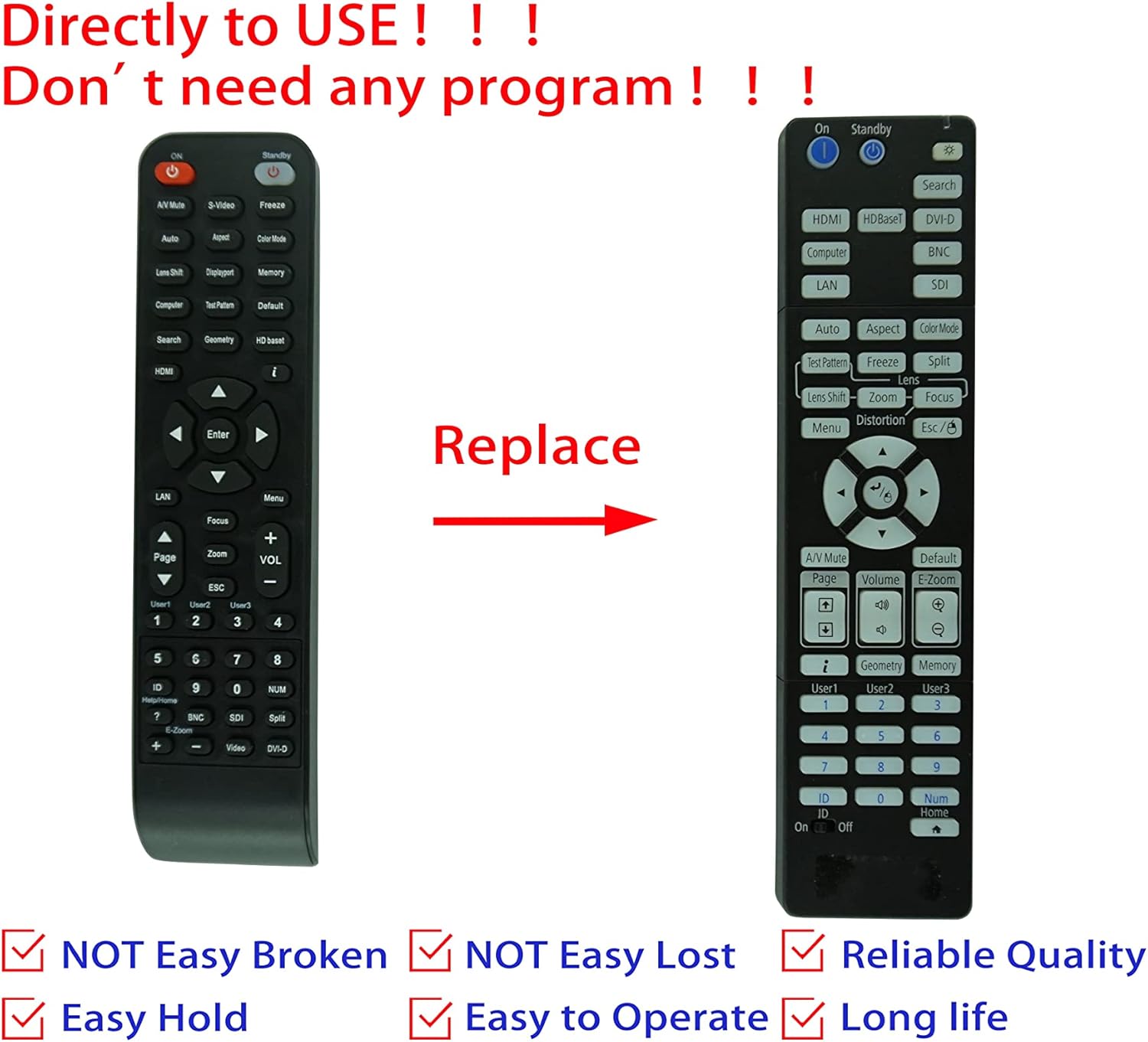
Image: Comparison of an original Epson remote (left) and the HCDZ replacement remote (right), highlighting the replacement functionality.
3.1 Key Functions (General)
- પાવર ચાલુ/બંધ: Typically a dedicated button, often red or clearly marked.
- ઇનપુટ પસંદગી: Buttons for HDMI, Computer, Video, etc., to switch input sources.
- નેવિગેશન: Arrow keys (Up, Down, Left, Right) and an Enter/OK button for menu navigation.
- મેનુ: Accesses the projector's on-screen display (OSD) menu.
- વોલ્યુમ: Adjusts audio output if the projector has built-in speakers or audio pass-through.
- ઝૂમ/ફોકસ: Adjusts the projected image size and clarity.
- સંખ્યાત્મક કીપેડ: For direct input or selecting specific functions.
4. જાળવણી અને સંભાળ
To ensure the longevity and proper functioning of your remote control, observe the following guidelines:
- સફાઈ: રિમોટને નરમ, સૂકા કપડાથી સાફ કરો. પ્રવાહી ક્લીનર્સ અથવા ઘર્ષક સામગ્રીનો ઉપયોગ કરશો નહીં.
- પર્યાવરણ: Avoid exposing the remote to extreme temperatures, high humidity, or direct sunlight.
- બેટરી રિપ્લેસમેન્ટ: Replace both batteries simultaneously. Do not mix new and old batteries, or different types of batteries.
- સંગ્રહ: જો રિમોટનો લાંબા સમય સુધી ઉપયોગ ન થાય, તો લીકેજ અને સંભવિત નુકસાનને રોકવા માટે બેટરીઓ દૂર કરો.
- અસર: રિમોટ છોડવાનું કે તેને જોરદાર ફટકો મારવાનું ટાળો.

છબી: પાછળનો ભાગ view of the HCDZ remote control, illustrating its design.
5. મુશ્કેલીનિવારણ
જો તમને તમારા રિમોટ કંટ્રોલમાં સમસ્યા આવે, તો નીચેના મુશ્કેલીનિવારણ પગલાં અજમાવી જુઓ:
- રિમોટ પ્રતિસાદ આપતું નથી:
- ખાતરી કરો કે બેટરીઓ યોગ્ય ધ્રુવીયતા સાથે યોગ્ય રીતે દાખલ કરવામાં આવી છે.
- જૂની બેટરીઓને નવી AAA બેટરીથી બદલો.
- Check for any obstructions between the remote and the projector's IR sensor.
- Ensure you are within the effective range and pointing the remote directly at the projector.
- તૂટક તૂટક કાર્યક્ષમતા:
- Strong light sources (e.g., direct sunlight, fluorescent lights) can interfere with IR signals. Try operating the remote in a different lighting condition.
- ખાતરી કરો કે બેટરી સંપર્કો સ્વચ્છ અને કાટ મુક્ત છે.
6. સ્પષ્ટીકરણો
| લક્ષણ | વિગત |
|---|---|
| બ્રાન્ડ | HCDZ |
| સુસંગતતા | Epson EB-PU2010B, EB-PU1007B, EB-PU2010W, EB-PU1007W, EB-PU1008B, EB-PU1006W, EB-PU1008W Projectors |
| કનેક્ટિવિટી ટેકનોલોજી | ઇન્ફ્રારેડ (IR) |
| પાવર સ્ત્રોત | 2 x AAA બેટરી (શામેલ નથી) |
| પ્રોગ્રામિંગ જરૂરી | ના |
| રંગ | કાળો |
7. વોરંટી અને સપોર્ટ
This HCDZ replacement remote control comes with a 90-day warranty from the date of purchase. This warranty covers manufacturing defects under normal use.
For warranty claims or technical support, please contact your retailer or the HCDZ customer service department with your purchase details.
વોરંટી હેતુઓ માટે કૃપા કરીને તમારી ખરીદીનો પુરાવો રાખો.