
1. પરિચય
Thank you for choosing the UrbanX Q63 Wireless Earbuds. These earbuds are designed to provide an immersive audio experience with true Bluetooth 5.0 connectivity, touch controls, and IPX7 waterproofing, making them ideal for sports and active lifestyles. This manual will guide you through the setup, operation, and maintenance of your new earbuds.
2. ઉત્પાદન ઓવરview
પેકેજ સામગ્રી
- UrbanX Q63 Wireless Earbuds (Left and Right)
- ચાર્જિંગ કેસ
- યુએસબી ચાર્જિંગ કેબલ
- કાનની ટીપ્સના બહુવિધ કદ
- વપરાશકર્તા માર્ગદર્શિકા
મુખ્ય લક્ષણો
- બ્લૂટૂથ 5.0: Ensures stable and quick connection.
- IPX7 વોટરપ્રૂફ: Protects against sweat and rain, suitable for various activities.
- ટચ કંટ્રોલ: Manage music, calls, and volume with simple taps.
- Over-Ear Design with Flexible Earhooks: Provides a secure and comfortable fit, especially during sports.
- Charging Case with LED Display: Shows battery capacity for both earbuds and the case.

આકૃતિ 2.1: UrbanX Q63 Earbuds with flexible earhooks and button control, designed for a secure fit during sports. Includes various ear tip sizes for customization.
3. સેટઅપ
૫.૧ ઇયરબડ્સ અને કેસ ચાર્જ કરવા
Before first use, fully charge the earbuds and the charging case. Connect the provided USB charging cable to the charging port on the case and a power source. The LED digital display on the charging case will indicate the charging status and battery levels.
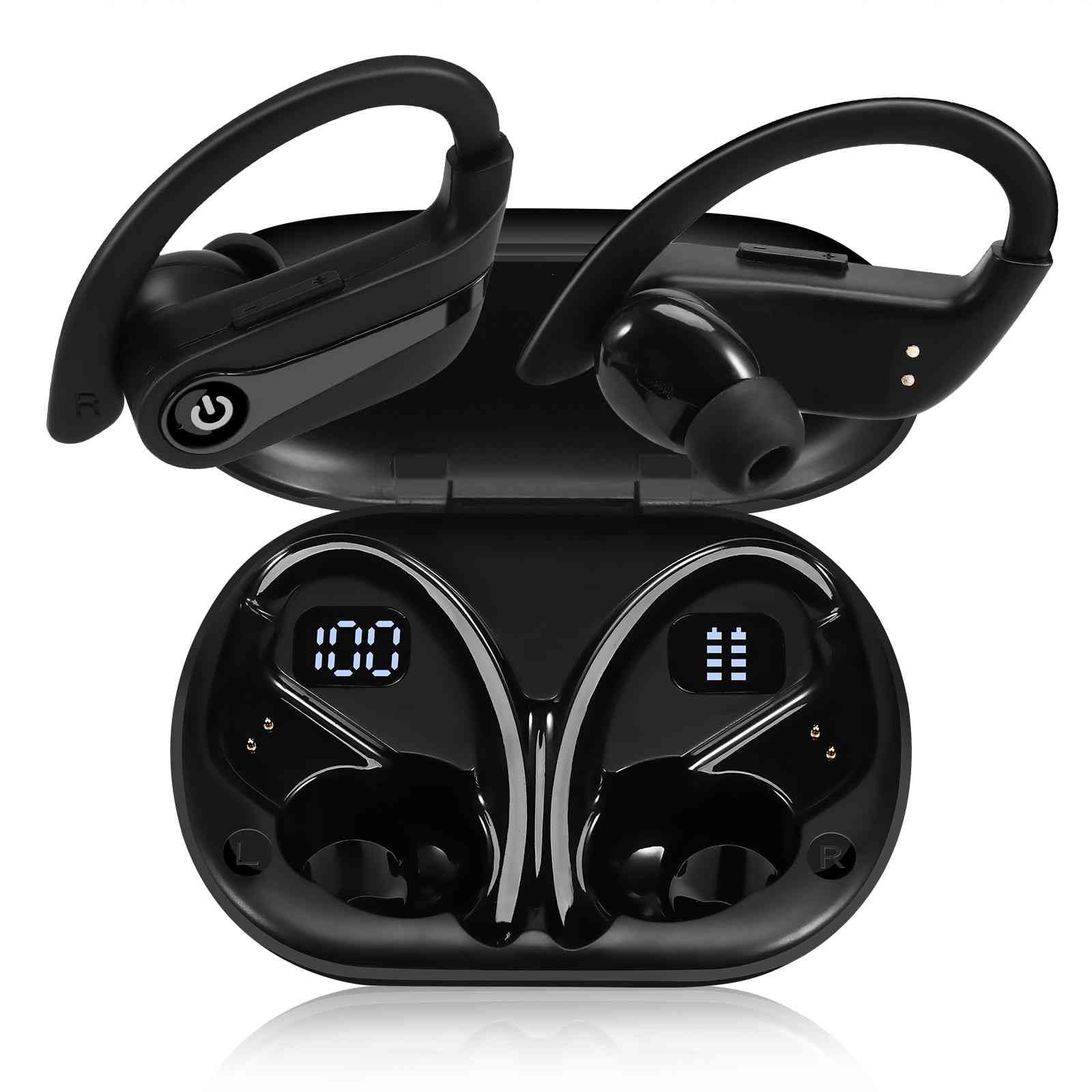
આકૃતિ 3.1: The charging case features a dual LED digital display, showing the charging case capacity and individual earbud power levels.

આકૃતિ 3.2: The earbuds offer approximately 20 hours of playback on a single charge, with the charging case providing an additional 200 hours of battery life.
3.2 બ્લૂટૂથ પેરિંગ
The UrbanX Q63 earbuds feature one-step pairing for convenience.
- પાવર ચાલુ: બંને ઇયરબડને ચાર્જિંગ કેસમાંથી બહાર કાઢો. તે આપમેળે ચાલુ થશે અને પેરિંગ મોડમાં પ્રવેશ કરશે.
- બ્લૂટૂથ સક્રિય કરો: તમારા ઉપકરણ (સ્માર્ટફોન, ટેબ્લેટ, વગેરે) પર, બ્લૂટૂથ સેટિંગ્સ પર જાઓ અને બ્લૂટૂથ સક્ષમ કરો.
- ઉપકરણ પસંદ કરો: માટે જુઓ "YYK-Q63" in the list of available devices and select it to connect.
- પુષ્ટિ: Once connected, you will hear an audio prompt, and the earbuds will be ready for use. The earbuds will automatically reconnect to the last paired device when taken out of the case.
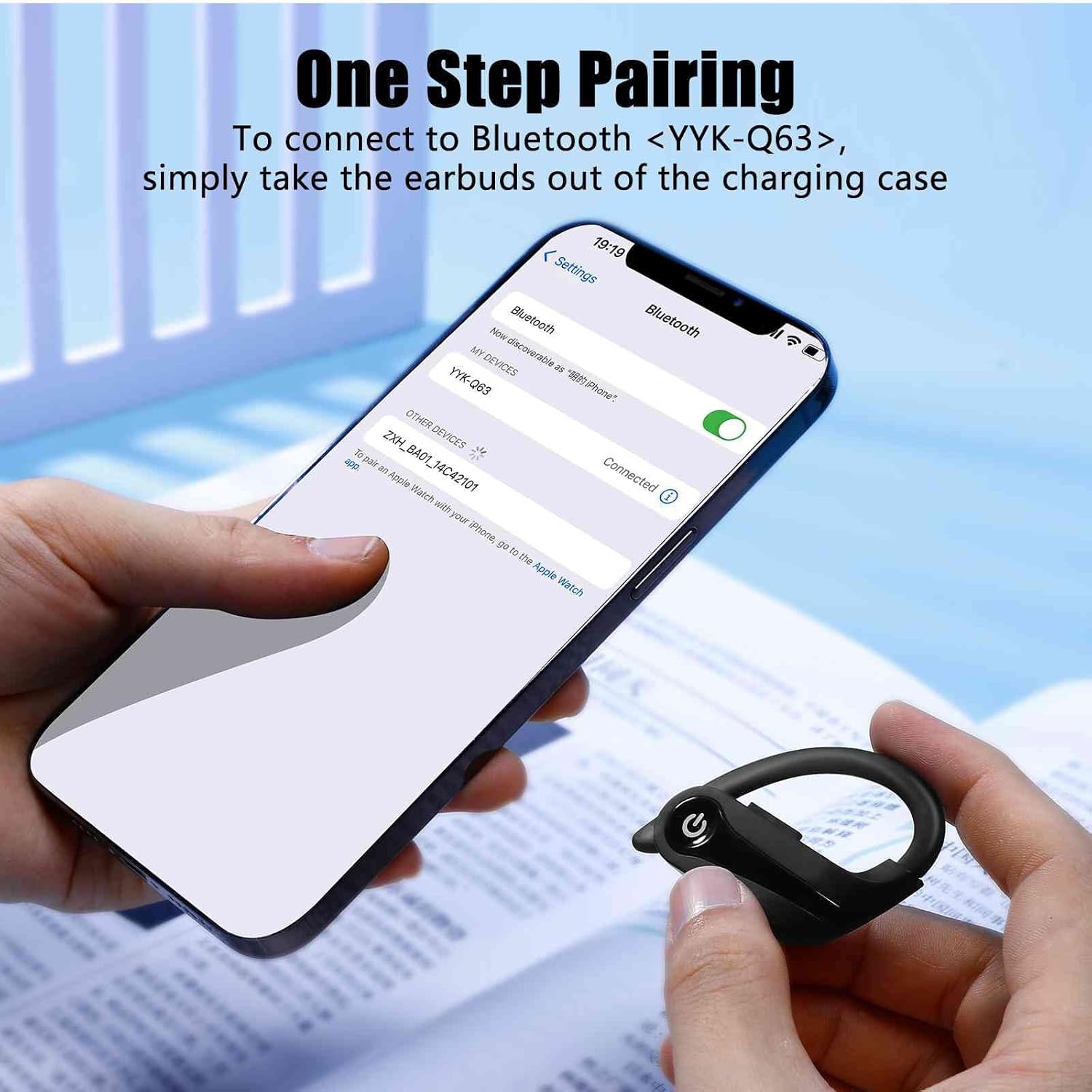
આકૃતિ 3.3: To connect, simply remove the earbuds from the charging case and select "YYK-Q63" from your device's Bluetooth settings.
4. ઓપરેટિંગ સૂચનાઓ
4.1 ટચ કંટ્રોલ્સ
The UrbanX Q63 earbuds feature intuitive touch controls on each earbud. Refer to the table below for specific functions:

આકૃતિ 4.1: Diagram illustrating the touch control functions on the UrbanX Q63 earbuds.
| ક્રિયા | કાર્ય |
|---|---|
| One click (either earbud) | સંગીત વગાડો/થોભાવો, કૉલનો જવાબ આપો/હેંગ અપ કરો |
| Twice click (either earbud) | કૉલ નકારો |
| Long press (2 seconds) on Right Earbud | Next Song, Volume Up (+) |
| Long press (2 seconds) on Left Earbud | Previous Song, Volume Down (-) |
| લાંબા સમય સુધી દબાવો (3 સેકન્ડ) | પાવર ચાલુ |
| લાંબા સમય સુધી દબાવો (5 સેકન્ડ) | પાવર બંધ |
૫.૧ ઇયરબડ્સ પહેરવા
For optimal sound quality and a secure fit, choose the ear tips that best suit your ears. The flexible earhooks are designed to provide stability during physical activity. Adjust the earhook over your ear until the earbud sits comfortably and securely in your ear canal.
5. જાળવણી
To ensure the longevity and performance of your UrbanX Q63 Wireless Earbuds, follow these maintenance guidelines:
- સફાઈ: ઇયરબડ્સ અને ચાર્જિંગ કેસને નિયમિતપણે નરમ, સૂકા, લિન્ટ-ફ્રી કપડાથી સાફ કરો. કઠોર રસાયણો અથવા ઘર્ષક સામગ્રીનો ઉપયોગ કરશો નહીં.
- કાનની ટીપ્સ: Remove and clean the ear tips periodically with water and mild soap. Ensure they are completely dry before reattaching them to the earbuds.
- પાણી પ્રતિકાર: The earbuds are IPX7 waterproof, meaning they can withstand submersion in up to 1 meter of water for 30 minutes. However, it is recommended to dry them thoroughly after exposure to water or sweat to prevent damage to the charging contacts. The charging case is not waterproof.
- સંગ્રહ: જ્યારે ઉપયોગમાં ન હોય, ત્યારે ઇયરબડ્સને ધૂળ અને નુકસાનથી બચાવવા માટે તેમના ચાર્જિંગ કેસમાં સંગ્રહિત કરો. અતિશય તાપમાનથી દૂર ઠંડી, સૂકી જગ્યાએ સંગ્રહિત કરો.
- ચાર્જિંગ સંપર્કો: યોગ્ય ચાર્જિંગ જાળવવા માટે ખાતરી કરો કે ઇયરબડ્સ અને કેસની અંદરના ચાર્જિંગ કોન્ટેક્ટ્સ સ્વચ્છ અને કાટમાળથી મુક્ત છે.
6. મુશ્કેલીનિવારણ
If you encounter issues with your UrbanX Q63 earbuds, refer to the following common solutions:
| સમસ્યા | શક્ય ઉકેલ |
|---|---|
| ઇયરબડ્સ ચાલુ નથી | ખાતરી કરો કે ઇયરબડ્સ ચાર્જ થયા છે. તેમને ચાર્જિંગ કેસમાં થોડીવાર માટે મૂકો, પછી કાઢી નાખો. |
| ઇયરબડ્સ ડિવાઇસ સાથે જોડી બનાવી રહ્યા નથી | Make sure Bluetooth is enabled on your device. Forget "YYK-Q63" from your device's Bluetooth list and try pairing again. Ensure earbuds are out of the case and in pairing mode. |
| માત્ર એક ઇયરબડ કામ કરે છે | Place both earbuds back into the charging case, close the lid, then open and remove them simultaneously. This often re-syncs them. Check battery level of both earbuds. |
| નબળી અવાજ ગુણવત્તા અથવા ડિસ્કનેક્શન | Ensure earbuds are fully charged. Move closer to your device to avoid interference. Check for obstructions between earbuds and device. Try resetting the earbuds (refer to manual for specific reset instructions if available, otherwise try re-pairing). |
| ચાર્જિંગ કેસ ચાર્જિંગ નથી | Check the USB cable and power adapter. Ensure the charging port is clean and free of debris. |
| ટચ નિયંત્રણો પ્રતિસાદ આપતા નથી | ખાતરી કરો કે તમારી આંગળીઓ સ્વચ્છ અને સૂકી છે. ઇયરબડ્સને કેસમાં મૂકીને ફરીથી બહાર કાઢીને ફરી શરૂ કરવાનો પ્રયાસ કરો. |
7. સ્પષ્ટીકરણો
| લક્ષણ | વિગત |
|---|---|
| મોડલ નંબર | YYK-Q63 |
| બ્રાન્ડ | અર્બનએક્સ |
| કનેક્ટિવિટી ટેકનોલોજી | વાયરલેસ (બ્લુટુથ) |
| બ્લૂટૂથ સંસ્કરણ | 5.0 |
| ઇયર પ્લેસમેન્ટ | In Ear / Over Ear (with hooks) |
| ફોર્મ ફેક્ટર | કાન ઉપર |
| નિયંત્રણ પદ્ધતિ | સ્પર્શ |
| પાણી પ્રતિકાર સ્તર | IPX7 (ફક્ત ઇયરબડ્સ) |
| અવબાધ | 32 ઓહ્મ |
| બિલ્ટ-ઇન મીડિયા | ચાર્જિંગ કેસ |
| વધારાની સુવિધાઓ | Lightweight, Sweatproof |
| સુસંગત ઉપકરણો | Smartphones, Tablets, Computers, Smart Speakers |
8. વોરંટી અને સપોર્ટ
UrbanX products are designed for reliability and performance. For warranty information, technical support, or customer service inquiries, please refer to the contact details provided with your purchase documentation or visit the official UrbanX webસાઇટ. વોરંટી દાવાઓ માટે કૃપા કરીને તમારી ખરીદીનો પુરાવો રાખો.