
1. પરિચય
This manual provides essential information for the safe and efficient operation of your Reloop RP-7000 MK2 Direct Drive High Torque Turntable. Please read these instructions thoroughly before using the product to ensure proper setup, optimal performance, and longevity of your equipment. Keep this manual for future reference.
2. સલામતી સૂચનાઓ
- પાવર સપ્લાય: Connect the unit only to an AC outlet of the specified voltage. ખાતરી કરો કે પાવર કોર્ડ ક્ષતિગ્રસ્ત કે પિંચ થયેલ નથી.
- ભેજ: Do not expose the unit to rain, moisture, or excessive humidity. Avoid placing liquid-filled objects on the turntable.
- વેન્ટિલેશન: યુનિટની આસપાસ પૂરતું વેન્ટિલેશન સુનિશ્ચિત કરો. વેન્ટિલેશનના છિદ્રોને અવરોધશો નહીં.
- પ્લેસમેન્ટ: Place the turntable on a stable, level surface away from direct sunlight, heat sources, and strong magnetic fields.
- સફાઈ: સફાઈ કરતા પહેલા પાવર ડિસ્કનેક્ટ કરો. નરમ, સૂકા કપડાનો ઉપયોગ કરો. પ્રવાહી ક્લીનર્સ અથવા સોલવન્ટ્સ ટાળો.
- સર્વિસિંગ: યુનિટની જાતે સર્વિસ કરવાનો પ્રયાસ કરશો નહીં. બધી સર્વિસિંગ લાયક કર્મચારીઓને સોંપો.
3. પેકેજ સામગ્રી
ખાતરી કરો કે નીચે સૂચિબદ્ધ બધી વસ્તુઓ તમારા પેકેજમાં શામેલ છે. જો કોઈ વસ્તુ ખૂટે છે અથવા ક્ષતિગ્રસ્ત છે, તો તાત્કાલિક તમારા ડીલરનો સંપર્ક કરો.
- Reloop RP-7000 MK2 Direct Drive High Torque Turntable (x2)
- ડસ્ટ કવર (x2)
- Digital Turntable Stylus Scale
- Record Care Solution
- પાવર કેબલ
- આરસીએ કેબલ
- ગ્રાઉન્ડ વાયર
- સ્લિપમેટ
- કાઉન્ટરવેઇટ
- Headshell with Cartridge (pre-mounted or separate, depending on region/bundle)

આકૃતિ 1: ઉપરview of the Reloop RP-7000 MK2 turntable bundle components.
4. સેટઅપ
4.1 અનપેકિંગ અને પ્લેસમેન્ટ
- Carefully remove all components from the packaging. Retain packaging for future transport.
- Place the turntable on a flat, stable, and vibration-free surface. Ensure there is enough space for the dust cover to open fully.
- Attach the dust cover by aligning its hinges with the slots on the turntable's rear.

આકૃતિ 2: Turntable with the dust cover in place.
4.2 Platter and Slipmat Installation
- Carefully place the platter onto the center spindle. Ensure it sits flush.
- Place the slipmat on top of the platter.
4.3 Tonearm and Cartridge Setup
- If not pre-mounted, attach the headshell with the cartridge to the tonearm. Secure it by turning the locking ring.
- Screw the counterweight onto the rear of the tonearm.
- ટોનઆર્મને સંતુલિત કરો: Tonearm cl છોડોamp. Adjust the counterweight until the tonearm is perfectly balanced and floats horizontally.
- ટ્રેકિંગ ફોર્સ સેટ કરો: Return the tonearm to its rest and clamp it. Rotate the numbered ring on the counterweight to '0' without moving the counterweight itself. Then, rotate the entire counterweight to the recommended tracking force for your cartridge (typically 2-4 grams for DJ cartridges).
- Set Anti-Skate: Adjust the anti-skate dial to match the tracking force setting.
4.4 Using the Digital Stylus Scale
The included digital stylus scale allows for precise measurement of your cartridge's tracking force, ensuring optimal sound quality and minimizing record wear.
- Place the stylus scale on the platter.
- પાવર બટનનો ઉપયોગ કરીને સ્કેલ ચાલુ કરો.
- Carefully lower the stylus onto the designated measuring point on the scale.
- Read the tracking force displayed. Adjust the tonearm's counterweight as needed until the desired force is achieved.

આકૃતિ 3: Digital Stylus Scale for precise tracking force measurement.
4.5 જોડાણો
- ઓડિયો આઉટપુટ: Connect the RCA cables from the turntable's audio output to the PHONO input of your mixer or amplifier. If your mixer/amplifier does not have a PHONO input, you will need an external phono preampજીવંત
- ગ્રાઉન્ડ વાયર: Connect the ground wire from the turntable to the ground terminal on your mixer or amplifier to reduce hum.
- શક્તિ: Connect the power cable to the turntable and then to a suitable AC power outlet.
5. ઓપરેટિંગ સૂચનાઓ
૪.૧ મૂળભૂત પ્લેબેક
- Place a record on the slipmat.
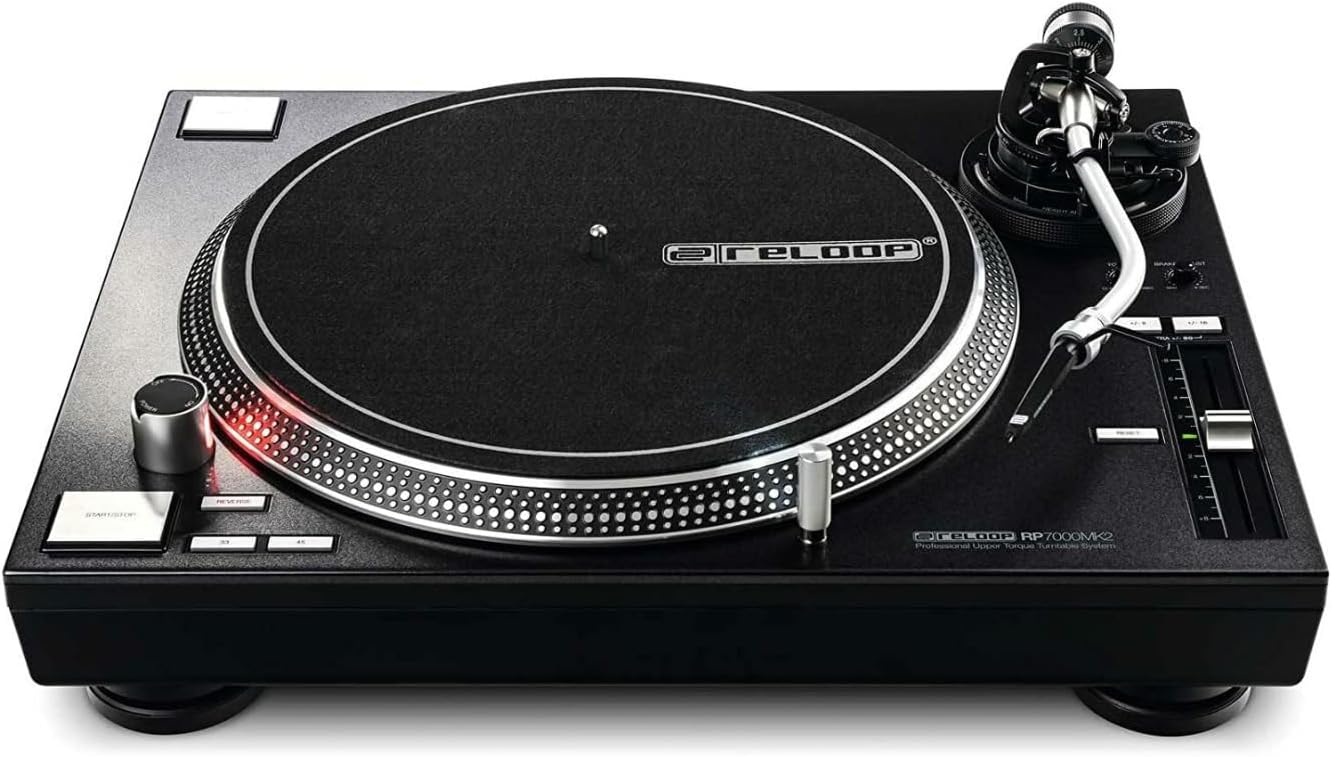
- સ્પીડ સિલેક્ટર બટનોનો ઉપયોગ કરીને યોગ્ય સ્પીડ (33, 45, અથવા 78 RPM) પસંદ કરો.
- દબાવો સ્ટાર્ટ/સ્ટોપ button to begin platter rotation.
- Carefully lift the tonearm using the cueing lever and position the stylus over the desired groove on the record.
- રેકોર્ડ પર સ્ટાઇલસને હળવેથી મૂકવા માટે ક્યુઇંગ લિવર નીચે કરો.
- To stop playback, lift the tonearm using the cueing lever, return it to the tonearm rest, and press the સ્ટાર્ટ/સ્ટોપ બટન
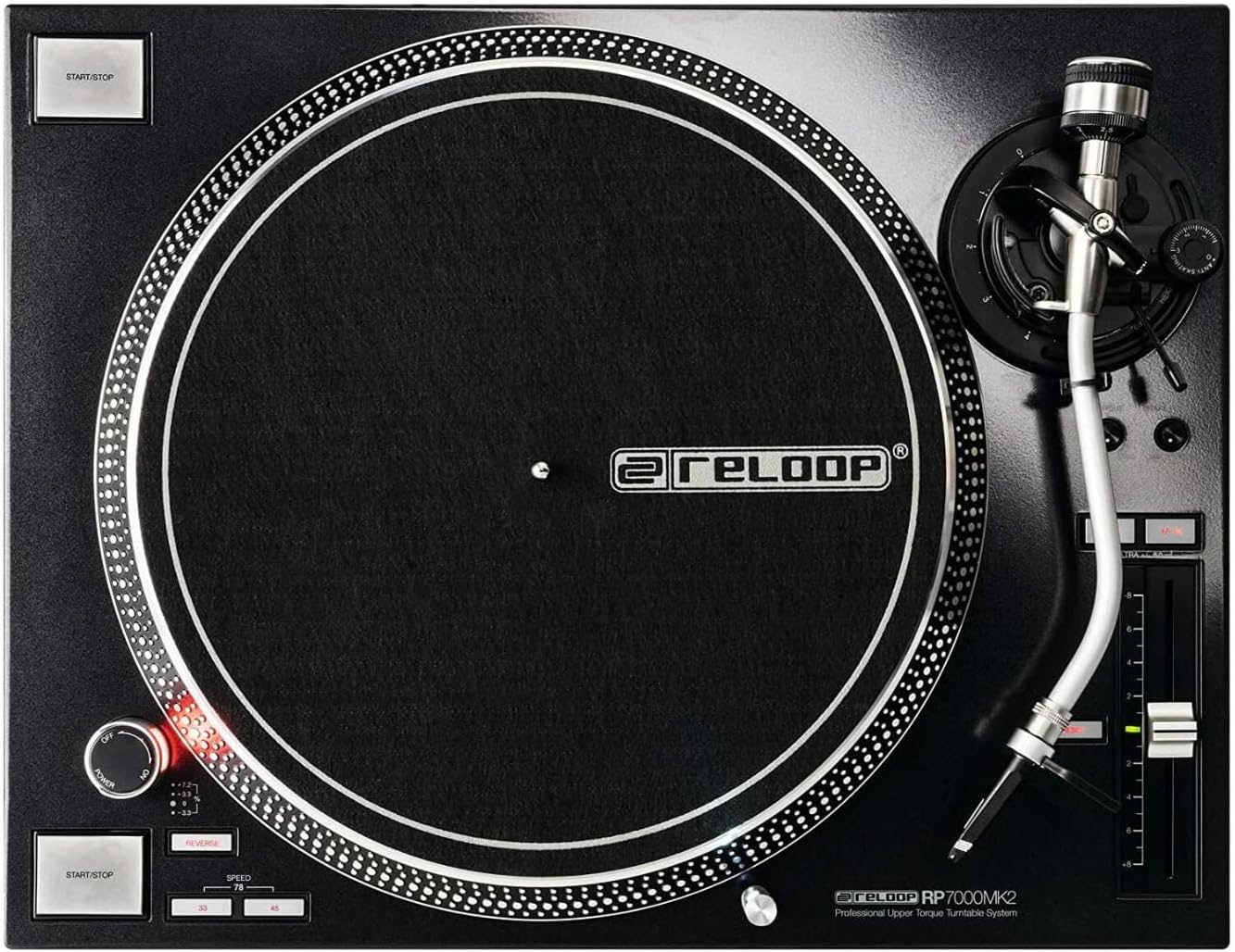
આકૃતિ 4: Turntable platter and control layout.
5.2 Pitch Control
The pitch fader allows you to adjust the playback speed (BPM) of the record. Move the fader up or down to increase or decrease the pitch. The pitch range can be selected using the range buttons (e.g., +/- 8%, 16%, 50%).
5.3 Reverse Function
The RP-7000 MK2 features a reverse playback function. Press the રિવર્સ button to change the direction of platter rotation. Press it again to return to normal playback.
6. જાળવણી
૭.૧ ટર્નટેબલ સાફ કરવું
- સફાઈ કરતા પહેલા હંમેશા પાવરને ડિસ્કનેક્ટ કરો.
- Use a soft, dry, lint-free cloth to wipe the surface of the turntable and dust cover.
- Avoid using abrasive cleaners, solvents, or chemical sprays, as these can damage the finish.
૭.૨ સ્ટાઇલસ કેર
- Gently brush the stylus from back to front using a soft stylus brush to remove dust and debris.
- તમારી આંગળીઓથી સ્ટાઇલસને સ્પર્શ કરવાનું ટાળો.
૭.૩ રેકોર્ડ કેર
The included record care solution helps maintain the quality of your vinyl records and prolong their lifespan.
- Apply a small amount of record care solution to a clean, soft, lint-free cloth or a dedicated record cleaning brush.
- Gently wipe the record surface in a circular motion, following the grooves.
- Allow the record to dry completely before playing.
આકૃતિ 5: Record Care Solution for maintaining vinyl quality.
7. મુશ્કેલીનિવારણ
| સમસ્યા | સંભવિત કારણ | ઉકેલ |
|---|---|---|
| કોઈ શક્તિ નથી | Power cable not connected; outlet not active | Check power cable connection; test outlet with another device |
| અવાજ અથવા નીચો અવાજ નથી | RCA cables incorrect; no PHONO input; amplifier/mixer settings | Ensure RCA cables are connected to PHONO input; check amplifier/mixer input selection and volume |
| ગુંજારવનો અવાજ | Ground wire not connected; interference | Connect ground wire; move turntable away from other electronic devices |
| અવાજ છોડવો અથવા વિકૃત થવો | Incorrect tracking force; dirty stylus/record; damaged stylus | Adjust tracking force using stylus scale; clean stylus and record; replace stylus if damaged |
| થાળી ફરતી નથી | START/STOP button not pressed; motor issue | Press START/STOP; if problem persists, contact support |
8. સ્પષ્ટીકરણો
| લક્ષણ | વિગત |
|---|---|
| મોડેલનું નામ | આરપી-7000 MK2 |
| બ્રાન્ડ | ફરીથી લૂપ કરો |
| મોટરનો પ્રકાર | Direct Drive DC Motor |
| ખાસ લક્ષણ | ઉચ્ચ ટોર્ક |
| ઉત્પાદન પરિમાણો | 27.9 x 20 x 18.6 ઇંચ |
| સામગ્રી | ધાતુ |
| રંગ | કાળો |
| સુસંગત ઉપકરણો | Speaker, Headphone, Personal Computer, MP3 Player, Laptop |
| સિગ્નલ ફોર્મેટ | ડિજિટલ |
9. વોરંટી અને સપોર્ટ
Reloop products are designed for reliability and performance. For warranty information, please refer to the warranty card included with your product or visit the official Reloop website. For technical support or service inquiries, please contact your authorized Reloop dealer or distributor.
ઉત્પાદક: ફરીથી લૂપ કરો
પ્રથમ ઉપલબ્ધ તારીખ: જુલાઈ 8, 2022