
1. પરિચય
This manual provides detailed instructions for the BoxWave SlimKeys Bluetooth Keyboard with Trackpad, designed for use with the Apple iPhone 13 mini. Please read this manual thoroughly before using the product to ensure proper operation and to maximize its lifespan.
The SlimKeys Bluetooth Keyboard integrates responsive chiclet-style keys and a full-functioning trackpad, transforming your iPhone 13 mini into a portable workstation. Its ultra-thin and lightweight design makes it an ideal travel companion.
2. પેકેજ સામગ્રી
- BoxWave SlimKeys Bluetooth Keyboard with Trackpad
- યુએસબી ચાર્જિંગ કેબલ
- વપરાશકર્તા માર્ગદર્શિકા
3. ઉત્પાદન સુવિધાઓ
- Integrated Keyboard and Trackpad: Combines a full QWERTY keyboard with a responsive trackpad for enhanced navigation.
- પાતળી અને હલકી ડિઝાઇન: At approximately 3/16 inch thick, it is highly portable without compromising key size for comfortable typing.
- Bluetooth Version 3.0: Ensures fast pairing and seamless wireless communication with your device.
- બેટરી સંરક્ષણ: Features an on/off switch to extend battery life when not in use.
- પોર્ટેબલ: Designed for easy transport in bags or luggage.

આકૃતિ 3.1: ઉપરથી નીચે view of the SlimKeys Bluetooth Keyboard, showing the full keyboard layout and integrated trackpad.
4. સેટઅપ
૪.૧ કીબોર્ડ ચાર્જ કરવું
- કીબોર્ડની બાજુમાં ચાર્જિંગ પોર્ટ શોધો.
- Connect the small end of the provided USB charging cable to the keyboard's charging port.
- Connect the larger end of the USB cable to a USB power source (e.g., computer USB port, USB wall adapter).
- The charging indicator light will illuminate. Once fully charged, the light will typically change color or turn off.
4.2 પાવરિંગ ચાલુ/બંધ
- To power on the keyboard, slide the 'ON/OFF' switch, usually located on the side or back, to the 'ON' position. A power indicator light will briefly illuminate.
- To power off the keyboard, slide the 'ON/OFF' switch to the 'OFF' position. This conserves battery life when the keyboard is not in use.
4.3 બ્લૂટૂથ પેરિંગ
Follow these steps to pair your BoxWave SlimKeys Bluetooth Keyboard with your Apple iPhone 13 mini:
- Ensure the keyboard is fully charged and powered on.
- On your iPhone 13 mini, go to સેટિંગ્સ > બ્લૂટૂથ.
- Turn on Bluetooth. Your iPhone will begin searching for nearby Bluetooth devices.
- On the keyboard, press the Bluetooth pairing button (often labeled 'Connect' or with a Bluetooth symbol). The Bluetooth indicator light on the keyboard will start blinking, indicating it is in pairing mode.
- On your iPhone, locate 'BoxWave Keyboard' or a similar name in the list of 'Other Devices' and tap on it.
- If prompted, enter the pairing code displayed on your iPhone screen using the keyboard, then press Enter.
- Once paired, the Bluetooth indicator light on the keyboard will stop blinking and remain solid or turn off, and your iPhone will show the keyboard as 'Connected'.

Figure 4.1: Keyboard with highlighted power switch and Bluetooth pairing button locations.
5. ઓપરેટિંગ સૂચનાઓ
૩.૩ કીબોર્ડનો ઉપયોગ
Once paired, the keyboard functions like a standard computer keyboard. Simply open any application on your iPhone that requires text input (e.g., Messages, Notes, Safari) and begin typing. The on-screen keyboard will automatically disappear, allowing you to use the physical keyboard.
૩.૨ ટ્રેકપેડનો ઉપયોગ
The integrated trackpad allows for precise cursor control and navigation on your iPhone 13 mini. Basic gestures include:
- સિંગલ ફિંગર ટેપ: Functions as a left-click to select items or activate buttons.
- બે આંગળીઓથી સ્ક્રોલ: Drag two fingers up or down on the trackpad to scroll through content.
- કર્સર ચળવળ: Move a single finger across the trackpad to move the cursor on your iPhone screen.
૪.૪ ખાસ કાર્ય કી
The keyboard may include function keys (F1-F12) or dedicated media control keys. These keys often require pressing the 'Fn' key simultaneously with the desired function key to activate their secondary functions (e.g., volume control, play/pause, screen lock).
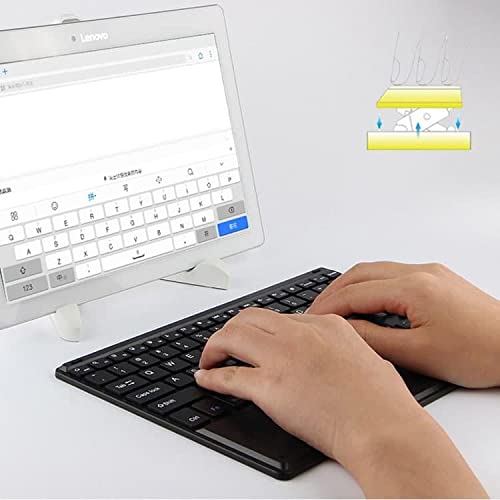
Figure 5.1: User demonstrating typing on the SlimKeys Bluetooth Keyboard.
6. જાળવણી
6.1 સફાઈ
- સફાઈ કરતા પહેલા ખાતરી કરો કે કીબોર્ડ બંધ છે.
- નરમ, લિન્ટ-ફ્રી કાપડનો ઉપયોગ કરોampened with water or a mild electronics cleaner to wipe the surface.
- કઠોર રસાયણો, ઘર્ષક ક્લીનર્સ અથવા વધુ પડતા ભેજનો ઉપયોગ કરવાનું ટાળો, કારણ કે આ કીબોર્ડને નુકસાન પહોંચાડી શકે છે.
- For dust or debris between keys, use compressed air.
6.2 બેટરી કેર
- To prolong battery life, power off the keyboard when not in use.
- Avoid fully discharging the battery frequently. Recharge when the low battery indicator appears.
- જો લાંબા સમય સુધી ઉપયોગ ન કરવામાં આવે તો કીબોર્ડને ઠંડી, સૂકી જગ્યાએ સંગ્રહિત કરો.
7. મુશ્કેલીનિવારણ
If you encounter issues with your BoxWave SlimKeys Bluetooth Keyboard, refer to the following common solutions:
- Keyboard not powering on: Ensure the battery is charged. Connect the charging cable and allow it to charge for at least 30 minutes before attempting to power on again.
- કીબોર્ડ જોડી રહ્યું નથી:
- Ensure the keyboard is in pairing mode (Bluetooth indicator blinking).
- Make sure Bluetooth is enabled on your iPhone 13 mini.
- Move the keyboard closer to your iPhone.
- Forget the device from your iPhone's Bluetooth settings and attempt to pair again.
- Restart both the keyboard and your iPhone.
- કીઝ જવાબ આપી રહી નથી:
- Check if the keyboard is still connected via Bluetooth.
- Ensure the battery is not critically low.
- Try reconnecting the keyboard by turning it off and on, or by re-pairing.
- ટ્રેકપેડ કામ કરતું નથી:
- Ensure the keyboard is connected.
- Check for any settings on your iPhone that might disable external trackpads.
- Clean the trackpad surface to remove any debris.
8. સ્પષ્ટીકરણો
| લક્ષણ | સ્પષ્ટીકરણ |
|---|---|
| બ્રાન્ડ | બોક્સવેવ |
| મોડલ નંબર | bw-1977-29861-11782 |
| હાર્ડવેર ઇંટરફેસ | બ્લૂટૂથ |
| બ્લૂટૂથ સંસ્કરણ | 3.0 |
| સુસંગત ઉપકરણો | Apple iPhone 13 mini, Smartphones, Laptops |
| કીબોર્ડ વર્ણન | વાયરલેસ |
| ખાસ લક્ષણો | Portable, Integrated Trackpad |
| પાવર સ્ત્રોત | બેટરી સંચાલિત |
| પરિમાણો (અંદાજે) | 257mm x 172mm x 5mm |

Figure 8.1: Dimensions and operating system compatibility of the SlimKeys Bluetooth Keyboard.
9. વોરંટી અને સપોર્ટ
9.1 વોરંટી માહિતી
For specific warranty details, please refer to the warranty card included with your product or visit the official BoxWave webસાઇટ. કોઈપણ વોરંટી દાવા માટે તમારી ખરીદીનો પુરાવો રાખો.
9.2 ગ્રાહક સપોર્ટ
If you require further assistance or have questions not covered in this manual, please contact BoxWave customer support through their official webસાઇટ અથવા તમારા ખરીદી દસ્તાવેજો સાથે પૂરી પાડવામાં આવેલ સંપર્ક માહિતી.