
પરિચય
This manual provides essential instructions for the safe and efficient use of your Juice Jumbo Marshmallow Portable Bluetooth Speaker. Please read this manual thoroughly before operating the device and retain it for future reference.
સલામતી માહિતી
- સ્પીકરને અતિશય તાપમાન, સીધો સૂર્યપ્રકાશ અથવા ઉચ્ચ ભેજના સંપર્કમાં ન લાવો.
- સ્પીકરને મજબૂત અસરમાં મૂકવા અથવા તેને આધીન કરવાનું ટાળો.
- Keep the speaker away from water and other liquids. If it gets wet, power it off immediately and allow it to dry completely before reuse.
- સ્પીકરને ડિસએસેમ્બલ કરવાનો, રિપેર કરવાનો કે સુધારવાનો પ્રયાસ કરશો નહીં. આ વોરંટી રદ કરશે અને નુકસાન અથવા ઈજા પહોંચાડી શકે છે.
- ફક્ત આપેલ ચાર્જિંગ કેબલ અથવા પ્રમાણિત સમકક્ષનો ઉપયોગ કરો.
- બાળકોની પહોંચથી દૂર રાખો.
- સ્થાનિક નિયમો અનુસાર બેટરી અને સ્પીકરને નિકાલ કરો.
પેકેજ સામગ્રી
ખાતરી કરો કે બધી વસ્તુઓ પેકેજમાં હાજર છે:
- Juice Jumbo Marshmallow Portable Bluetooth Speaker
- યુએસબી ચાર્જિંગ કેબલ
- વપરાશકર્તા માર્ગદર્શિકા
ઉત્પાદન ઓવરview
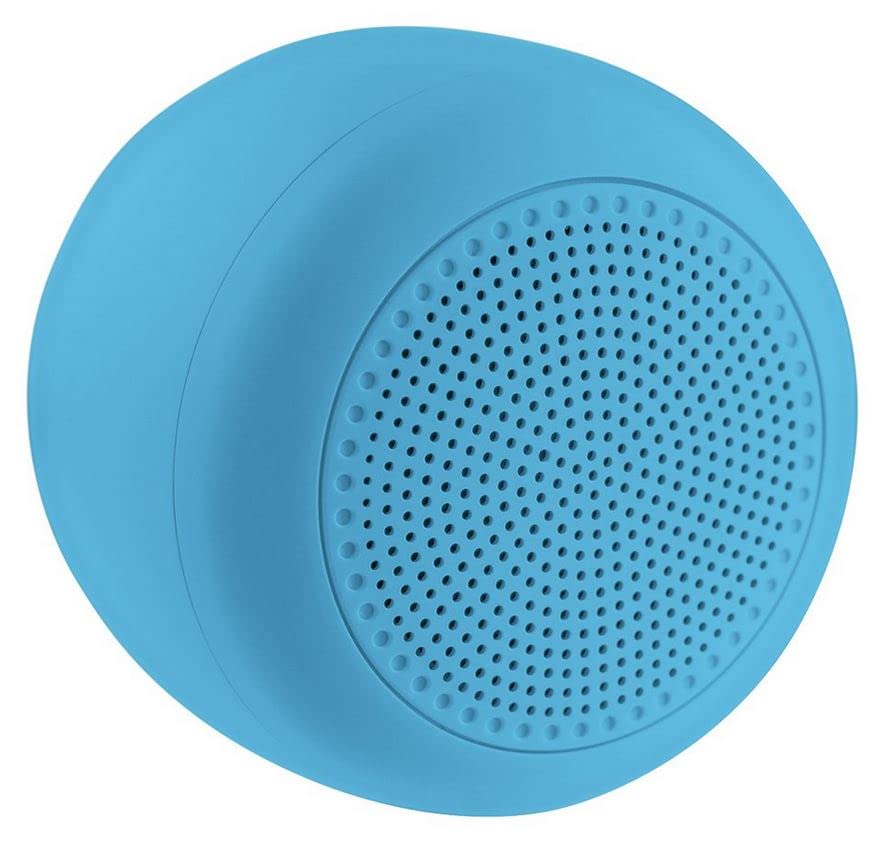
Image: The Juice Jumbo Marshmallow Portable Bluetooth Speaker. This image displays the speaker's compact, cylindrical design in blue, highlighting its fabric grille and the location of its control panel.
- પાવર બટન: સ્પીકર ચાલુ અથવા બંધ કરવા માટે વપરાય છે.
- વોલ્યુમ વધારો/આગલો ટ્રેક બટન: Increases volume with a short press, skips to the next track with a long press.
- વોલ્યુમ ડાઉન/પાછલું ટ્રેક બટન: Decreases volume with a short press, goes to the previous track with a long press.
- પ્લે/પોઝ બટન: ઓડિયો પ્લેબેકને નિયંત્રિત કરે છે.
- ચાર્જિંગ પોર્ટ: USB ચાર્જિંગ કેબલને કનેક્ટ કરવા માટે.
- એલઇડી સૂચક: Displays charging status and Bluetooth connection status.
સેટઅપ
1. સ્પીકરને ચાર્જ કરવો
- USB ચાર્જિંગ કેબલના નાના છેડાને સ્પીકર પરના ચાર્જિંગ પોર્ટ સાથે જોડો.
- USB ચાર્જિંગ કેબલના મોટા છેડાને USB પાવર એડેપ્ટર (શામેલ નથી) અથવા કમ્પ્યુટરના USB પોર્ટ સાથે કનેક્ટ કરો.
- The LED indicator will illuminate to show charging status. It will typically turn off or change color when fully charged.
- સંપૂર્ણ ચાર્જ કરવામાં લગભગ 2-3 કલાકનો સમય લાગે છે.
2. બ્લૂટૂથ જોડી
- ખાતરી કરો કે સ્પીકર સંપૂર્ણપણે ચાર્જ થયેલ છે.
- દબાવો અને પકડી રાખો પાવર બટન for a few seconds to turn on the speaker. The LED indicator will flash, indicating it is in pairing mode.
- તમારા સ્માર્ટફોન અથવા ટેબ્લેટ પર, બ્લૂટૂથ સેટિંગ્સ પર નેવિગેટ કરો.
- બ્લૂટૂથ સક્ષમ કરો અને ઉપલબ્ધ ઉપકરણો માટે શોધો.
- Select "Juice Jumbo Marshmallow" from the list of devices.
- એકવાર જોડી થઈ ગયા પછી, LED સૂચક ફ્લેશ થવાનું બંધ કરશે અને મજબૂત રહેશે, અને તમને પુષ્ટિકરણ સ્વર સંભળાશે.
- The speaker will automatically connect to the last paired device when powered on, if that device's Bluetooth is active and within range.
ઓપરેટિંગ સૂચનાઓ
- પાવર ચાલુ/બંધ: દબાવો અને પકડી રાખો પાવર બટન લગભગ 3 સેકન્ડ માટે.
- ચલાવો/થોભો: દબાવો પ્લે/પોઝ બટન એકવાર ઓડિયો ચલાવવા અથવા થોભાવવા માટે.
- વોલ્યુમ નિયંત્રણ:
- ટૂંકા દબાવો વોલ્યુમ અપ બટન વોલ્યુમ વધારવા માટે.
- ટૂંકા દબાવો વોલ્યુમ ડાઉન બટન વોલ્યુમ ઘટાડવા માટે.
- ટ્રેક નિયંત્રણ:
- લાંબા સમય સુધી દબાવો વોલ્યુમ અપ બટન આગલા ટ્રેક પર જવા માટે.
- લાંબા સમય સુધી દબાવો વોલ્યુમ ડાઉન બટન પાછલા ટ્રેક પર જવા માટે.
જાળવણી
- સફાઈ: Use a soft, dry cloth to wipe the speaker. Do not use abrasive cleaners or solvents.
- સંગ્રહ: લાંબા સમય સુધી ઉપયોગમાં ન હોય ત્યારે સ્પીકરને સીધા સૂર્યપ્રકાશ અને અતિશય તાપમાનથી દૂર ઠંડી, સૂકી જગ્યાએ સંગ્રહિત કરો.
- બેટરી સંભાળ: બેટરી લાઇફ વધારવા માટે, સ્પીકરને વારંવાર સંપૂર્ણપણે ડિસ્ચાર્જ કરવાનું ટાળો. ઉપયોગમાં ન હોય તો પણ તેને નિયમિતપણે ચાર્જ કરો.
મુશ્કેલીનિવારણ
| સમસ્યા | સંભવિત કારણ | ઉકેલ |
|---|---|---|
| સ્પીકર ચાલુ થતું નથી. | ઓછી બેટરી. | સ્પીકરને સંપૂર્ણ ચાર્જ કરો. |
| બ્લૂટૂથ ઉપકરણ સાથે જોડી શકાતી નથી. | Bluetooth is off on the device; speaker is not in pairing mode; device is too far. | Ensure Bluetooth is enabled on your device. Turn the speaker off and on again to re-enter pairing mode. Move the device closer to the speaker (within 10 meters). |
| કોઈ અવાજ નથી કે ઓછો અવાજ નથી. | સ્પીકર અથવા ડિવાઇસ પર વૉલ્યૂમ ખૂબ ઓછો છે; સ્પીકર કનેક્ટેડ નથી. | Increase volume on both the speaker and your connected device. Ensure the speaker is successfully paired. |
| ધ્વનિ વિકૃતિ. | અવાજ ખૂબ વધારે છે; ઉપકરણ સ્પીકરથી ખૂબ દૂર છે. | Reduce volume on both the speaker and your connected device. Move the device closer to the speaker. |
વિશિષ્ટતાઓ
| મોડલ નંબર | JUI-SPKER-JMBMALOW |
| બ્રાન્ડ | રસ |
| કનેક્ટિવિટી ટેકનોલોજી | બ્લૂટૂથ |
| મહત્તમ સ્પીકર આઉટપુટ પાવર | 6 વોટ્સ |
| બેટરીનો પ્રકાર | 1 Lithium-ion (required) |
| વસ્તુનું વજન | 222.2 ગ્રામ |
| પેકેજ પરિમાણો | 13.8 x 8.2 x 6.5 સેમી |
| ભલામણ કરેલ ઉપયોગ | સ્માર્ટફોન અથવા ટેબ્લેટ માટે |
વોરંટી અને આધાર
This product comes with a standard manufacturer's warranty. For detailed warranty information, please refer to the warranty card included in your package or visit the official Juice website. For technical support or customer service inquiries, please contact Juice customer support through their official channels.
નોંધ: વોરંટીના નિયમો અને શરતો પ્રદેશ પ્રમાણે બદલાઈ શકે છે.