
1. પરિચય
This manual provides detailed instructions for the operation and maintenance of your Jectse Bluetooth Speaker Alarm Clock. Please read this manual thoroughly before using the product to ensure proper function and longevity.
The Jectse Bluetooth Speaker Alarm Clock is a multi-functional device featuring a digital clock, dual alarm capabilities, an LED mirror display, FM radio, and Bluetooth connectivity for audio playback. It also supports music playback via a memory card.
2. ઉત્પાદન ઓવરview
2.1. મુખ્ય લક્ષણો
- બ્લૂટૂથ 5.0 કનેક્ટિવિટી: Wirelessly stream audio from compatible devices.
- ડ્યુઅલ એલાર્મ ઘડિયાળ: જાગવાના અલગ અલગ સમય માટે બે સ્વતંત્ર એલાર્મ સેટ કરો.
- LED Mirror Display: Clear digital time display that also functions as a mirror.
- એફએમ રેડિયો: Digitally tuned FM radio (87.5MHz-108MHz) for news, music, and weather.
- મેમરી કાર્ડ પ્લેબેક: Supports music playback from a memory card (up to 32GB, not included).
- બિલ્ટ-ઇન રિચાર્જેબલ બેટરી: 1600mAh lithium battery for portable use.
- કોમ્પેક્ટ ડિઝાઇન: Product dimensions are approximately 116 x 51 x 33mm (4.6 x 2 x 1.3 inches).
2.2. પેકેજ સામગ્રી
- 1 x Jectse Alarm Clock Speaker
- 1 x માઇક્રો યુએસબી ચાર્જિંગ કેબલ
- ૧ x વપરાશકર્તા માર્ગદર્શિકા (આ દસ્તાવેજ)
2.3. પ્રોડક્ટ ડાયાગ્રામ
Refer to the image below for an overview of the device's components and controls.
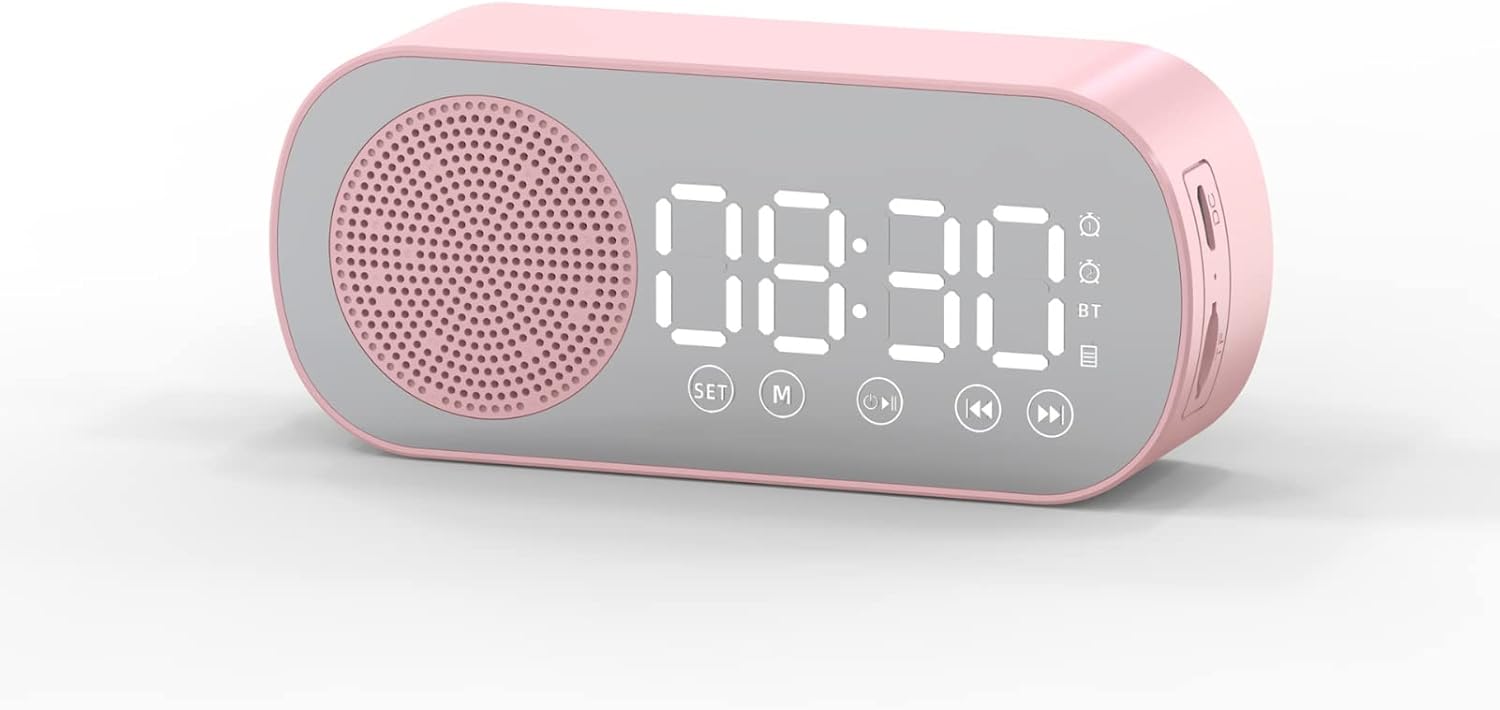
આકૃતિ 1: આગળ view of the Jectse Bluetooth Speaker Alarm Clock, showing the speaker grille, LED display, and control buttons (SET, M, Play/Pause, Previous, Next).

આકૃતિ 2: બાજુ view of the alarm clock with dimensions: 116mm (4.6in) length, 51mm (2in) height, and 33mm (1.3in) depth.
3. સેટઅપ
૪.૩. પ્રારંભિક ચાર્જિંગ
Before first use, fully charge the device. Connect the provided Micro USB charging cable to the charging port on the side of the alarm clock and the other end to a standard USB power adapter (not included).

આકૃતિ 3: The alarm clock and its Micro USB charging cable.
The battery indicator on the LED display will show charging status. A full charge typically takes a few hours.
4. ઓપરેટિંગ સૂચનાઓ
4.1. પાવર ચાલુ/બંધ
દબાવો અને પકડી રાખો પાવર/મોડ (M) ઉપકરણને ચાલુ અથવા બંધ કરવા માટેનું બટન.
4.2. સમય સુયોજિત
- ઘડિયાળ મોડમાં, દબાવો અને પકડી રાખો સેટ કલાકના અંકો ફ્લેશ થવા લાગે ત્યાં સુધી બટન.
- નો ઉપયોગ કરો Previous (◀◀) અને Next (▶▶) કલાક સમાયોજિત કરવા માટે બટનો.
- દબાવો સેટ button again to switch to minute adjustment. Use the Previous (◀◀) અને Next (▶▶) મિનિટ સમાયોજિત કરવા માટે બટનો.
- દબાવો સેટ button a third time to confirm and exit time setting mode.
4.3. Setting Alarms (Dual Alarm Function)
The device supports two independent alarms. Follow these steps for each alarm:

આકૃતિ 4: The alarm clock illustrating the dual alarm feature with two distinct alarm settings.
- In clock mode, short press the સેટ button once to enter Alarm 1 setting mode. The alarm icon and hour digits will flash.
- નો ઉપયોગ કરો Previous (◀◀) અને Next (▶▶) કલાક સમાયોજિત કરવા માટે બટનો.
- દબાવો સેટ again to adjust minutes. Use Previous (◀◀) અને Next (▶▶) સંતુલિત કરવા માટે.
- દબાવો સેટ a third time to select the alarm sound (e.g., buzzer, FM radio). Use Previous (◀◀) અને Next (▶▶) વિકલ્પોમાંથી પસાર થવા માટે.
- દબાવો સેટ a fourth time to confirm Alarm 1 settings.
- To set Alarm 2, repeat steps 1-5, but short press the સેટ button twice to enter Alarm 2 setting mode.
- To enable/disable an alarm, short press the સેટ button until the desired alarm icon flashes, then press the Play/Pause (▶▌▌) તેને ચાલુ અથવા બંધ કરવા માટે બટન.
Note: The alarm volume is independent of the main speaker volume and may be fixed or adjustable within the alarm settings. If the alarm sound is too loud, check if there's an option to adjust it during the alarm setup process.
4.4. બ્લૂટૂથ મોડ
- દબાવો પાવર/મોડ (M) button repeatedly until "BT" appears on the display, indicating Bluetooth mode.
- On your mobile device, enable Bluetooth and search for "Jectse Speaker" or a similar device name.
- Select the device to pair. A confirmation sound will indicate successful pairing.
- You can now play audio from your device through the speaker. Use the Play/Pause (▶▌▌), Previous (◀◀), અને Next (▶▶) પ્લેબેકને નિયંત્રિત કરવા માટેના બટનો.
4.5. FM રેડિયો મોડ

આકૃતિ 5: The alarm clock functioning as an FM radio on a bedside table.
- દબાવો પાવર/મોડ (M) ડિસ્પ્લે પર "FM" દેખાય ત્યાં સુધી વારંવાર બટન દબાવો.
- દબાવો Play/Pause (▶▌▌) ઉપલબ્ધ FM સ્ટેશનોને આપમેળે સ્કેન કરવા અને સાચવવા માટે બટન.
- નો ઉપયોગ કરો Previous (◀◀) અને Next (▶▶) સાચવેલા સ્ટેશનો વચ્ચે સ્વિચ કરવા માટે બટનો.
- For better reception, ensure the device is not obstructed and try repositioning it.
૪. મેમરી કાર્ડ પ્લેબેક
Insert a memory card (Micro SD card, up to 32GB, not included) into the designated slot on the device. The device will automatically switch to memory card mode and begin playing audio files નો ઉપયોગ કરો Play/Pause (▶▌▌), Previous (◀◀), અને Next (▶▶) પ્લેબેકને નિયંત્રિત કરવા માટેના બટનો.
4.7. વોલ્યુમ ગોઠવણ
In any audio playback mode (Bluetooth, FM, Memory Card), press and hold the Previous (◀◀) button to decrease volume or the Next (▶▶) વોલ્યુમ વધારવા માટે બટન.
4.8. LED Mirror Display

આકૃતિ 6: The alarm clock's LED display also functions as a mirror.
The front panel of the device features an LED display that shows the time and other information. When not actively displaying information, the surface can be used as a mirror.

આકૃતિ 7: The LED display showing multiple functions and indicators, including time, battery level, and Bluetooth status.
5. જાળવણી
- સફાઈ: ઉપકરણને સાફ કરવા માટે નરમ, સૂકા કપડાનો ઉપયોગ કરો. ઘર્ષક ક્લીનર્સ અથવા સોલવન્ટનો ઉપયોગ કરશો નહીં.
- સંગ્રહ: ઉપકરણને સીધા સૂર્યપ્રકાશ અને અતિશય તાપમાનથી દૂર ઠંડી, સૂકી જગ્યાએ સંગ્રહિત કરો.
- બેટરી સંભાળ: બેટરીનું આયુષ્ય વધારવા માટે, વારંવાર બેટરી સંપૂર્ણપણે ડિસ્ચાર્જ કરવાનું ટાળો. ઉપકરણને નિયમિતપણે ચાર્જ કરો, ભલે તે લાંબા સમય સુધી ઉપયોગમાં ન હોય.
- પાણીનો સંપર્ક: This device is not waterproof. Avoid exposure to water or high humidity.
6. મુશ્કેલીનિવારણ
| સમસ્યા | સંભવિત કારણ | ઉકેલ |
|---|---|---|
| ઉપકરણ પાવર ચાલુ કરતું નથી. | ઓછી બેટરી. | પ્રદાન કરેલ USB કેબલનો ઉપયોગ કરીને ઉપકરણને ચાર્જ કરો. |
| બ્લૂટૂથ દ્વારા જોડી બનાવી શકાતી નથી. | Bluetooth not enabled on device or phone; device not in pairing mode. | Ensure the alarm clock is in Bluetooth mode ("BT" displayed) and your phone's Bluetooth is on and searching. Move devices closer. |
| એફએમ રેડિયો રિસેપ્શન નબળું છે. | નબળો સંકેત; દખલગીરી. | Reposition the device. Avoid placing near other electronic devices that may cause interference. |
| Alarm is too loud/quiet. | Alarm volume not adjusted during setup. | Re-enter alarm setting mode and check if there is an option to adjust alarm volume. Some models may have a fixed alarm volume. |
| ડિસ્પ્લે વાંચવું મુશ્કેલ છે. | Lighting conditions; display brightness setting. | Adjust ambient lighting. Check if there is a display brightness setting (refer to specific model instructions if available, not detailed in general description). |
7. સ્પષ્ટીકરણો
| લક્ષણ | વિગત |
|---|---|
| મોડલ | Jectsesb81t679n01182 |
| સામગ્રી | એબીએસ (એક્રિલોનિટ્રિલ બ્યુટાડીન સ્ટાયરીન) |
| ઉત્પાદન કદ | Approx. 116 x 51 x 33mm (4.6 x 2 x 1.3 inches) |
| બેટરીનો પ્રકાર | Lithium Battery (Built-in) |
| બેટરી ક્ષમતા | 1600mAh |
| બ્લૂટૂથ સંસ્કરણ | 5.0 |
| સ્થિતિઓ ચલાવો | Bluetooth, Memory Card (Max 32G, not included) |
| ઘડિયાળ મોડ્સ | Digital Clock, Dual Alarm Clock, FM Radio |
| એફએમ રેડિયો આવર્તન | 87.5MHz-108MHz |
| કનેક્ટિવિટી ટેકનોલોજી | બ્લૂટૂથ, યુએસબી |
| વસ્તુનું વજન | 5.3 ઔંસ |
8. વોરંટી અને સપોર્ટ
વોરંટી માહિતી અને ગ્રાહક સપોર્ટ માટે, કૃપા કરીને ખરીદી સમયે આપેલા દસ્તાવેજોનો સંદર્ભ લો અથવા તમારા રિટેલરનો સંપર્ક કરો. ખરીદીના પુરાવા તરીકે તમારી ખરીદી રસીદ રાખો.