
પરિચય
This instruction manual provides essential information for the safe and efficient use of your tectake Electric Height Adjustable Desk Stand, Model 404315. This versatile desk stand is designed to offer a smooth transition between sitting and standing positions, promoting a healthier work environment. It features a sturdy metal frame, an electric height adjustment mechanism, and an intelligent anti-collision system for enhanced safety.
Please read this manual thoroughly before assembly and operation to ensure proper installation and to maximize the lifespan of your product.
સલામતી ચેતવણીઓ
આ સલામતી સૂચનાઓનું પાલન કરવામાં નિષ્ફળતા ઉત્પાદનને ઈજા અથવા નુકસાન પહોંચાડી શકે છે.
- Ensure the desk stand is properly assembled according to the provided instructions.
- Do not exceed the maximum weight limit of 100 kg (220 lbs) on the desk stand.
- Exercise caution with sharp edges during assembly and handling.
- Properly adjust the height-adjustable plastic feet to ensure the desk's stability on uneven surfaces.
- Avoid touching electrical components or motors during operation.
- Ensure the desktop is firmly grounded to prevent electrical hazards.
- ઊંચાઈ ગોઠવણ દરમિયાન બાળકો અને પાલતુ પ્રાણીઓને ડેસ્કથી દૂર રાખો.
પેકેજ સામગ્રી
એસેમ્બલી શરૂ કરતા પહેલા ખાતરી કરો કે બધા ઘટકો હાજર છે. જો કોઈ ભાગો ખૂટે છે અથવા ક્ષતિગ્રસ્ત છે, તો કૃપા કરીને ગ્રાહક સપોર્ટનો સંપર્ક કરો.
- Electric Height Adjustable Desk Stand Frame
- Mounting Material (screws, tools, etc.)
- એસેમ્બલી સૂચનાઓ
Note: A tabletop is not included with this desk stand and must be purchased separately.
સેટઅપ અને એસેમ્બલી
Follow the detailed assembly instructions provided in the package. The general steps are outlined below:
- અનપૅક ઘટકો: પેકેજિંગમાંથી બધા ભાગોને કાળજીપૂર્વક દૂર કરો અને સ્ક્રેચમુદ્દે અટકાવવા માટે તેમને સ્વચ્છ, નરમ સપાટી પર મૂકો.
- ફ્રેમ એસેમ્બલ કરો: Connect the lifting columns, crossbars, and feet according to the assembly manual. Ensure all screws are tightened securely.
- ટેબલટોપ જોડો: Place your chosen tabletop onto the assembled frame. Secure the tabletop to the frame using the provided mounting hardware. Ensure the tabletop is centered and stable.
- પાવર કનેક્ટ કરો: Plug the power cable into the control box, and then plug the control box into a standard electrical outlet. Ensure the cable is routed safely to avoid tripping hazards.
- ફીટ એડજસ્ટ કરો: Level the desk by adjusting the plastic feet at the bottom of the stand. This ensures stability and prevents wobbling.
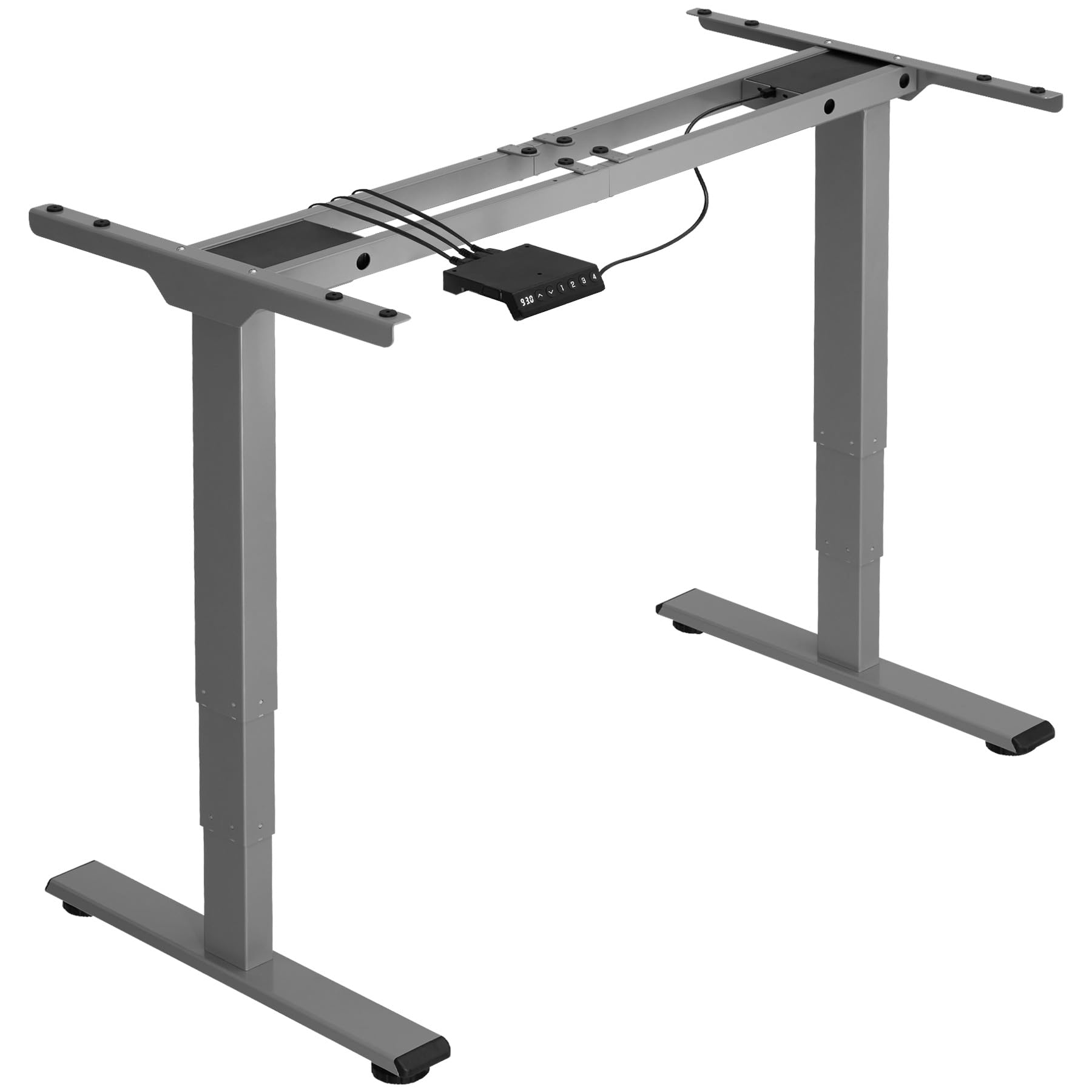
Image: An assembled tectake electric height adjustable desk stand in grey, ready for use. This image illustrates the sturdy metal frame and the overall structure of the product.
ઓપરેટિંગ સૂચનાઓ
Your tectake Electric Height Adjustable Desk Stand is designed for intuitive operation.
- ઊંચાઈ ગોઠવણ: Use the control panel (usually located on the front edge of the tabletop) to raise or lower the desk. Typically, there are 'Up' and 'Down' buttons. Press and hold the desired button until the desk reaches your preferred height. The electric motor operates quietly and smoothly.
- Anti-Collision System: The desk stand is equipped with an intelligent anti-collision system. If the desk encounters an obstacle (e.g., a chair, cabinet, or wall) during height adjustment, the motor will automatically stop and slightly reverse direction to prevent damage.
- Memory Presets (if applicable): Some models may include memory preset buttons. Refer to your specific control panel instructions for programming and using these presets to save your favorite sitting and standing heights.
Regularly changing between sitting and standing positions can help reduce strain and improve comfort during long working hours.
જાળવણી
Proper maintenance ensures the longevity and optimal performance of your desk stand.
- સફાઈ: Wipe the metal frame and tabletop (if applicable) with a soft, damp કાપડ. ઘર્ષક ક્લીનર્સ અથવા સોલવન્ટ્સનો ઉપયોગ કરવાનું ટાળો જે ફિનિશને નુકસાન પહોંચાડી શકે છે.
- કનેક્શન્સ તપાસો: સમયાંતરે બધા સ્ક્રૂ અને બોલ્ટ કડક રહે તેની ખાતરી કરવા માટે તેનું નિરીક્ષણ કરો. જો જરૂરી હોય તો ફરીથી કડક કરો.
- કેબલ મેનેજમેન્ટ: Ensure all power cables are neatly organized and not pinched or strained.
- વજન મર્યાદા: Always adhere to the maximum load capacity of 100 kg. Overloading can damage the motor and frame.
મુશ્કેલીનિવારણ
If you encounter any issues with your desk stand, refer to the following common solutions:
| સમસ્યા | સંભવિત કારણ | ઉકેલ |
|---|---|---|
| ડેસ્ક ખસતું નથી. | Power cable disconnected, motor overload, control panel issue. | Check power connections. Unplug and replug the power cord. Reduce load if overloaded. Contact support if problem persists. |
| અથડામણ વિરોધી સિસ્ટમ વારંવાર ટ્રિગર થાય છે. | Obstruction, sensitive setting. | Ensure no objects are in the path of the desk. Refer to control panel manual for sensitivity adjustment (if available). |
| ઓપરેશન દરમિયાન અસામાન્ય અવાજ. | Loose components, motor issue. | Check all screws and bolts for tightness. Ensure the desk is level. If noise persists, contact customer support. |
| Desk wobbles. | Uneven floor, loose connections. | Adjust the leveling feet at the bottom of the stand. Ensure all frame connections are tight. |
વિશિષ્ટતાઓ
Key technical details for the tectake Electric Height Adjustable Desk Stand, Model 404315:
- મોડલ નંબર: 404315
- Maximum Total Dimensions (WxDxH): આશરે 168 x 60 x 125 સે.મી
- Minimum Total Dimensions (WxDxH): આશરે 110 x 60 x 60 સે.મી
- Suitable for Table Tops (WxD): Approximately 120 x 60 cm to 180 x 80 cm
- Lifting Columns per Side: 3
- Main Column (WxD): આશરે ૪૮.૫ x ૨૮.૫ સે.મી.
- Table Top Support (WxD): આશરે ૪૮.૫ x ૨૮.૫ સે.મી.
- Adjustable Area of Plastic Feet: આશરે 1.2 સે.મી
- Sound from Electric Motors: <50 ડીબી
- લિફ્ટિંગ સ્પીડ: 25 mm/s
- Power per Motor: 52.2 ડબ્લ્યુ
- ઇનપુટ વોલ્યુમtage: 100-240 વી
- કેબલ લંબાઈ: આશરે 150 સે.મી
- લોડ ક્ષમતા: 100 કિગ્રા
- વજન: અંદાજે 23 કિ.ગ્રા
- સામગ્રી: Powder-coated steel, ABS plastic
વોરંટી અને આધાર
For warranty information, please refer to the documentation included with your purchase or visit the official tectake website. If you require technical assistance, have questions about assembly, or need to report a missing/damaged part, please contact tectake customer support directly. Contact details can typically be found on the manufacturer's webસાઇટ અથવા તમારા ખરીદી દસ્તાવેજોમાં.
સપોર્ટનો સંપર્ક કરતી વખતે, કૃપા કરીને તમારો મોડેલ નંબર (404315) અને ખરીદી તારીખ ઉપલબ્ધ રાખો.