
1. પરિચય
Thank you for choosing the Awei TC-7 Wired Earphones. These in-ear earphones are designed for clear audio and convenient communication, featuring a Type-C connector for modern devices and an inline microphone with control buttons. Please read this manual carefully to ensure proper use and maintenance of your earphones.
2. પેકેજ સામગ્રી
- Awei TC-7 Wired Earphones
- Multiple sizes of Ear Cushions (Small, Medium, Large)

આકૃતિ 2.1: The Awei TC-7 earphones include ear caps in various sizes to ensure a comfortable and secure fit for different users.
3. ઉત્પાદન ઓવરview
The Awei TC-7 earphones feature a durable design with a Type-C plug for direct connection to compatible devices. The inline remote control allows for easy management of audio playback and calls.

આકૃતિ 3.1: A close view of the Awei TC-7 earphones, showcasing their in-ear design for optimal sound delivery.

આકૃતિ 3.2: The inline remote control features multi-function buttons for managing audio and calls.

આકૃતિ 3.3: The integrated HD microphone is designed to pick up clear audio, even in noisy environments.
4. સેટઅપ
- કાનના ગાદી પસંદ કરો: Choose the ear cushion size (Small, Medium, or Large) that provides the most comfortable and secure fit for your ears. A proper fit enhances sound quality and noise isolation.
- ઉપકરણ સાથે કનેક્ટ કરો: Insert the USB-C plug of the earphones into the Type-C port of your smartphone, tablet, laptop, or other compatible device.
- ઓડિયો આઉટપુટ: Ensure your device's audio output is set to the connected earphones. This is usually automatic upon connection.
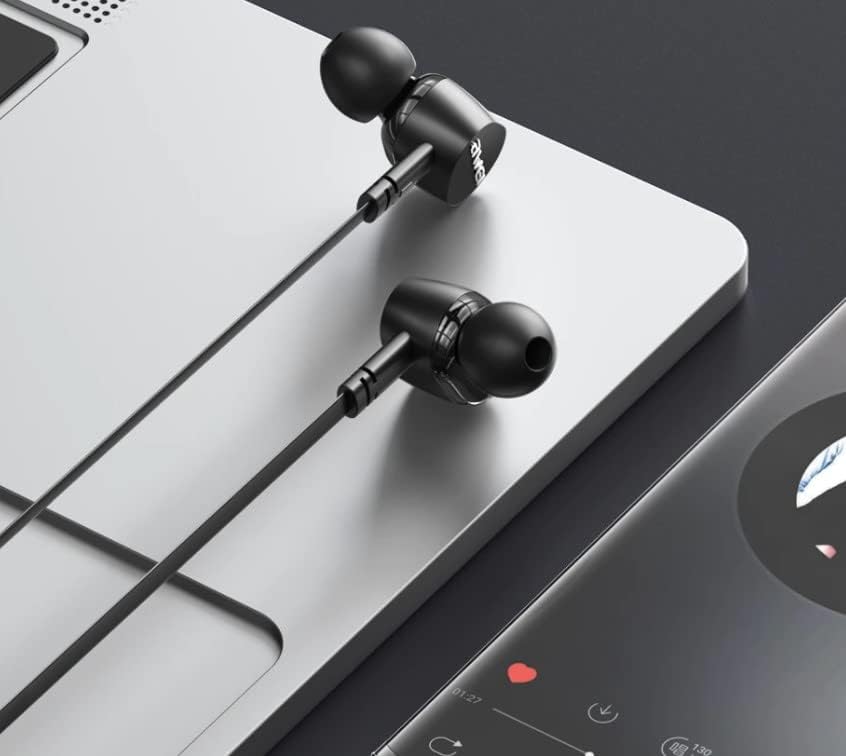
આકૃતિ 4.1: The earphones are compatible with various devices featuring a USB-C port, such as laptops and smartphones.
5. ઓપરેટિંગ સૂચનાઓ
The Awei TC-7 earphones feature an inline remote with buttons for convenient control of your audio and calls.
5.1. સંગીત પ્લેબેક નિયંત્રણ
- ચલાવો/થોભો: કેન્દ્રનું બટન એકવાર દબાવો.
- આગળનો ટ્રેક: કેન્દ્ર બટનને ઝડપથી બે વાર દબાવો.
- પાછલો ટ્રેક: કેન્દ્ર બટનને ત્રણ વખત ઝડપથી દબાવો.
- અવાજ વધારો: '+' બટન દબાવો.
- અવાજ ધીમો: '-' બટન દબાવો.
5.2. કૉલ મેનેજમેન્ટ
- જવાબ/કૉલ સમાપ્ત કરો: Press the center button once during an incoming call or an active call.
- કૉલ નકારો: Press and hold the center button for approximately 2 seconds during an incoming call.
6. જાળવણી
Proper care will extend the lifespan of your Awei TC-7 earphones.
- કાનના ગાદી સાફ કરવા: Regularly remove the ear cushions and clean them with a soft, damp કાપડ. ફરીથી જોડતા પહેલા ખાતરી કરો કે તે સંપૂર્ણપણે સુકાઈ ગયા છે.
- કેબલ કેર: The cable is designed to be tangle-free. Avoid excessive pulling or sharp bending to prevent internal damage.
- સંગ્રહ: When not in use, store the earphones in a clean, dry place, away from extreme temperatures.
- પાણી પ્રતિકાર: The earphones are rated as waterproof. However, avoid prolonged submersion and ensure the USB-C port is dry before connecting to a device after exposure to water.
7. મુશ્કેલીનિવારણ
If you encounter issues with your Awei TC-7 earphones, please refer to the following common solutions:
| સમસ્યા | સંભવિત કારણ | ઉકેલ |
|---|---|---|
| ઇયરફોનમાંથી અવાજ નથી આવતો | Earphones not properly connected; device volume too low; incorrect audio output setting on device. | Ensure the USB-C plug is fully inserted. Increase device volume. Check device audio settings to confirm output is set to earphones. |
| માઇક્રોફોન કામ કરતું નથી | Microphone port blocked; incorrect input setting on device; application permissions. | Ensure the microphone area is clear. Check device sound settings for microphone input. Verify application permissions for microphone access. |
| બટનો પ્રતિસાદ આપતા નથી | Loose connection; device incompatibility; software glitch. | Reconnect the earphones. Test with another compatible device if possible. Restart your device. |
8. સ્પષ્ટીકરણો
| લક્ષણ | વિગત |
|---|---|
| મોડેલનું નામ | ટીસી- 7 |
| કનેક્ટિવિટી ટેકનોલોજી | વાયર્ડ |
| હેડફોન જેક | યુએસબી-સી |
| ઇયર પ્લેસમેન્ટ | કાન માં |
| આવર્તન શ્રેણી | 20 હર્ટ્ઝ - 20 કિલોહર્ટ્ઝ |
| વધારાની સુવિધાઓ | Microphone Included, Inline Control |
| સામગ્રી | પ્લાસ્ટિક |
| પાણી પ્રતિકાર સ્તર | વોટરપ્રૂફ |
| કેબલ સુવિધાઓ | ગૂંચ મુક્ત |
| સુસંગત ઉપકરણો | Smartphones, Laptops, Tablets, Desktops with USB-C |
9. વોરંટી અને સપોર્ટ
વોરંટી માહિતી અને ગ્રાહક સપોર્ટ માટે, કૃપા કરીને ખરીદીના સ્થળે આપેલા દસ્તાવેજોનો સંદર્ભ લો અથવા તમારા રિટેલરનો સંપર્ક કરો. કોઈપણ વોરંટી દાવા માટે ખરીદીનો પુરાવો રાખો.