
1. પરિચય
This manual provides detailed instructions for the setup, operation, maintenance, and troubleshooting of your Rampage KB-R29 GRAND Series RGB LED Mechanical Gaming Keyboard. Please read this manual thoroughly before using the product to ensure proper functionality and longevity.
2. પેકેજ સામગ્રી
ખાતરી કરો કે બધી વસ્તુઓ પેકેજમાં હાજર છે:
- Rampage KB-R29 GRAND Series RGB LED Mechanical Gaming Keyboard
- વપરાશકર્તા માર્ગદર્શિકા
3. ઉત્પાદન ઓવરview
આ આરampage KB-R29 GRAND is a high-performance mechanical gaming keyboard featuring RGB LED backlighting and durable Blue Optical Switches. It is designed for gaming and general computer use, offering a responsive and tactile typing experience.
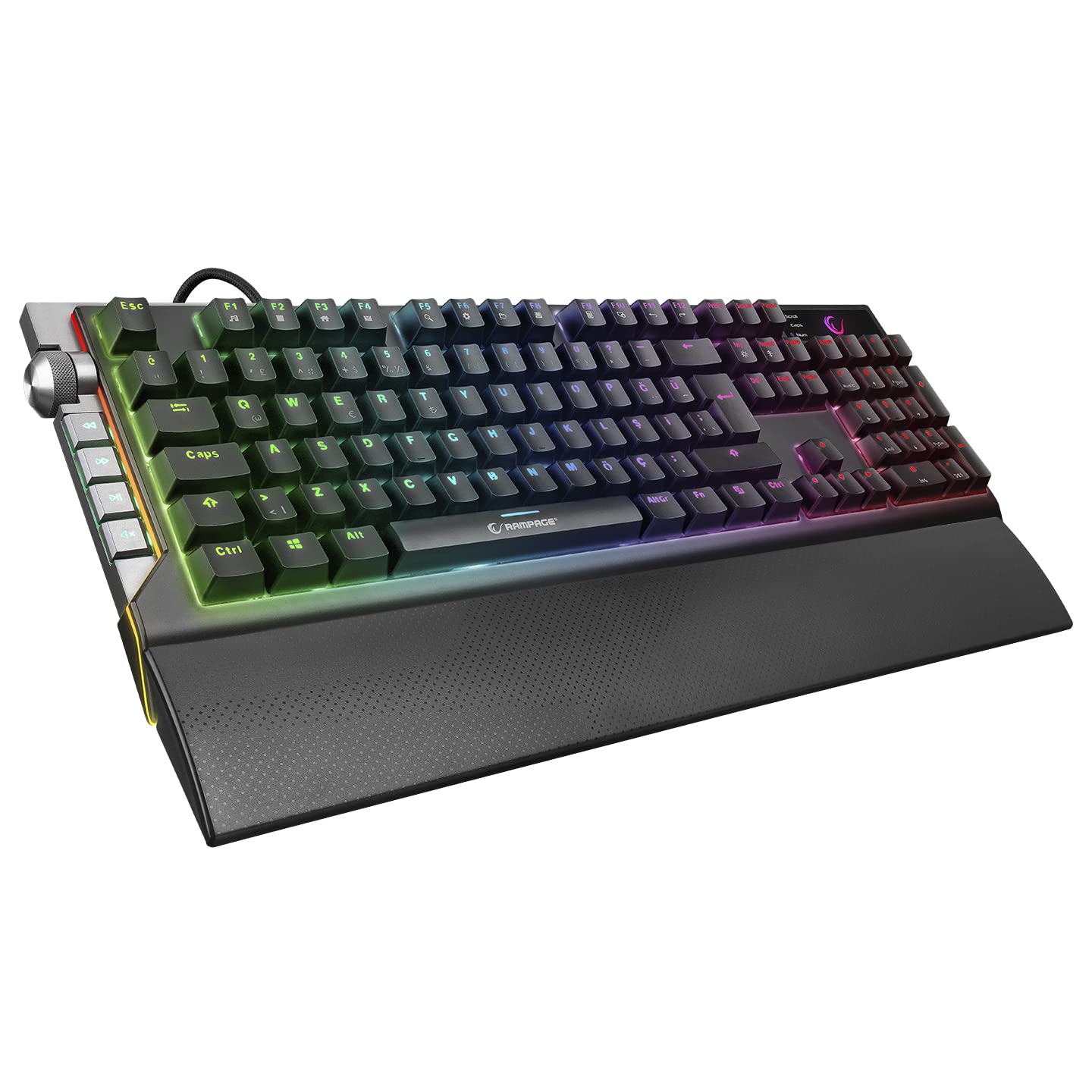
છબી: ક્લોઝ-અપ view of the Rampage KB-R29 GRAND keyboard, highlighting the Blue Optical Switches beneath removed keycaps. This illustrates the mechanical switch design.
મુખ્ય લક્ષણો:
- સ્વિચ પ્રકાર: Blue Optical Switches for tactile feedback and durability.
- લેઆઉટ: Turkish-Q (87 keys).
- બેકલાઇટિંગ: RGB LED customizable lighting.
- કનેક્ટિવિટી: Wired USB.
- પરિમાણો: Approximately 445mm x 212.8mm x 33mm.
4. સેટઅપ સૂચનાઓ
- કીબોર્ડ ખોલો: કીબોર્ડને તેના પેકેજિંગમાંથી કાળજીપૂર્વક દૂર કરો.
- કમ્પ્યુટરથી કનેક્ટ કરો: કીબોર્ડના USB કનેક્ટરને તમારા કમ્પ્યુટર પર ઉપલબ્ધ USB પોર્ટમાં પ્લગ કરો.
- ડ્રાઇવર ઇન્સ્ટોલેશન: The keyboard is typically plug-and-play. Your operating system should automatically detect and install the necessary drivers. No additional software installation is usually required for basic functionality.
- પ્લેસમેન્ટ: Place the keyboard on a stable, flat surface. Ensure comfortable wrist positioning.
5. ઓપરેટિંગ સૂચનાઓ
મૂળભૂત કીબોર્ડ કાર્યો:
- ટાઈપિંગ: Use the keys for standard text input.
- ફંક્શન કી (Fn): The keyboard features an Fn key. Combine the Fn key with other keys (e.g., F1-F12) to access multimedia controls or other special functions. Refer to the keycap legends for specific combinations.
RGB LED Backlighting Control:
આ આરampage KB-R29 GRAND keyboard offers various RGB lighting effects and customization options. Specific key combinations are used to cycle through modes, adjust brightness, and change colors.
- લાઇટિંગ મોડ્સ બદલવું: Typically, a combination of the Fn key and specific function keys (e.g., Fn + F9, Fn + F10) or dedicated lighting keys will cycle through different RGB effects.
- તેજને સમાયોજિત કરવી: Use Fn + Up/Down arrow keys or similar combinations to increase or decrease LED brightness.
- ગતિ/દિશા ગોઠવવી: Some lighting effects allow adjustment of speed or direction using Fn key combinations.
નોંધ: Refer to the keycap legends on your specific keyboard for the exact key combinations for lighting control, as these can vary slightly.
6. જાળવણી અને સંભાળ
- સફાઈ:
- સાફ કરતા પહેલા તમારા કમ્પ્યુટરથી કીબોર્ડ ડિસ્કનેક્ટ કરો.
- સોફ્ટનો ઉપયોગ કરો, ડીamp cloth to wipe the surface of the keyboard. Avoid harsh chemicals or abrasive materials.
- ચાવીઓ વચ્ચે ધૂળ અને કચરો હોય તો, સંકુચિત હવાનો ઉપયોગ કરો.
- Keycaps can be carefully removed for deeper cleaning, but exercise caution to avoid damaging the switches.
- સંગ્રહ: કીબોર્ડને સીધા સૂર્યપ્રકાશ અને અતિશય તાપમાનથી દૂર સૂકા, ઠંડા વાતાવરણમાં સંગ્રહિત કરો.
- પ્રવાહી ટાળો: Do not expose the keyboard to liquids. Liquid damage can void the warranty.
- કાળજી સાથે હેન્ડલ કરો: Avoid dropping the keyboard or subjecting it to strong impacts.
7. મુશ્કેલીનિવારણ
| સમસ્યા | સંભવિત કારણ | ઉકેલ |
|---|---|---|
| કીબોર્ડ પ્રતિસાદ આપતું નથી | ઢીલું USB કનેક્શન, ખામીયુક્ત USB પોર્ટ, ડ્રાઇવરમાં સમસ્યા. |
|
| કી રજીસ્ટર થતી નથી | Dust/debris under keycap, switch malfunction. |
|
| RGB લાઇટિંગ કામ કરતું નથી | Lighting mode off, brightness set to minimum, software conflict. |
|
8. સ્પષ્ટીકરણો
| બ્રાન્ડ | Rampઉંમર |
| મોડલ નંબર | KB-R29 GRAND |
| સ્વિચ પ્રકાર | Blue Optical Switch |
| કીની સંખ્યા | 87 |
| લેઆઉટ | ટર્કિશ-Q |
| કનેક્ટિવિટી | વાયર્ડ યુએસબી |
| સુસંગત ઉપકરણો | લેપટોપ, ડેસ્કટોપ પીસી |
| પરિમાણો (LxWxH) | 445mm x 212.8mm x 33mm |
| રંગ | કાળો |
9. વોરંટી માહિતી
This product comes with a manufacturer's warranty. Please refer to the warranty card included with your product or contact Rampage customer support for detailed warranty terms and conditions. Keep your purchase receipt as proof of purchase for warranty claims.
10. આધાર
For technical assistance, troubleshooting, or product inquiries, please contact Rampage customer support. Contact information can typically be found on the manufacturer's official webસાઇટ પર અથવા ઉત્પાદન પેકેજિંગ પર.
ઑનલાઇન સંસાધનો: Visit the official Rampઉંમર website for updated drivers, FAQs, and additional support resources.