
1. ઉત્પાદન ઓવરview
The CNCTOPBAOS CNC 5 Axis MPG Pendant Handwheel is a manual pulse generator designed for precise control of CNC machines. It features a 15-pin connector, an emergency stop function, and supports 5 axes with selectable pulse ratios. This device provides manual control for axis movement, enhancing precision and operational flexibility for various CNC applications.
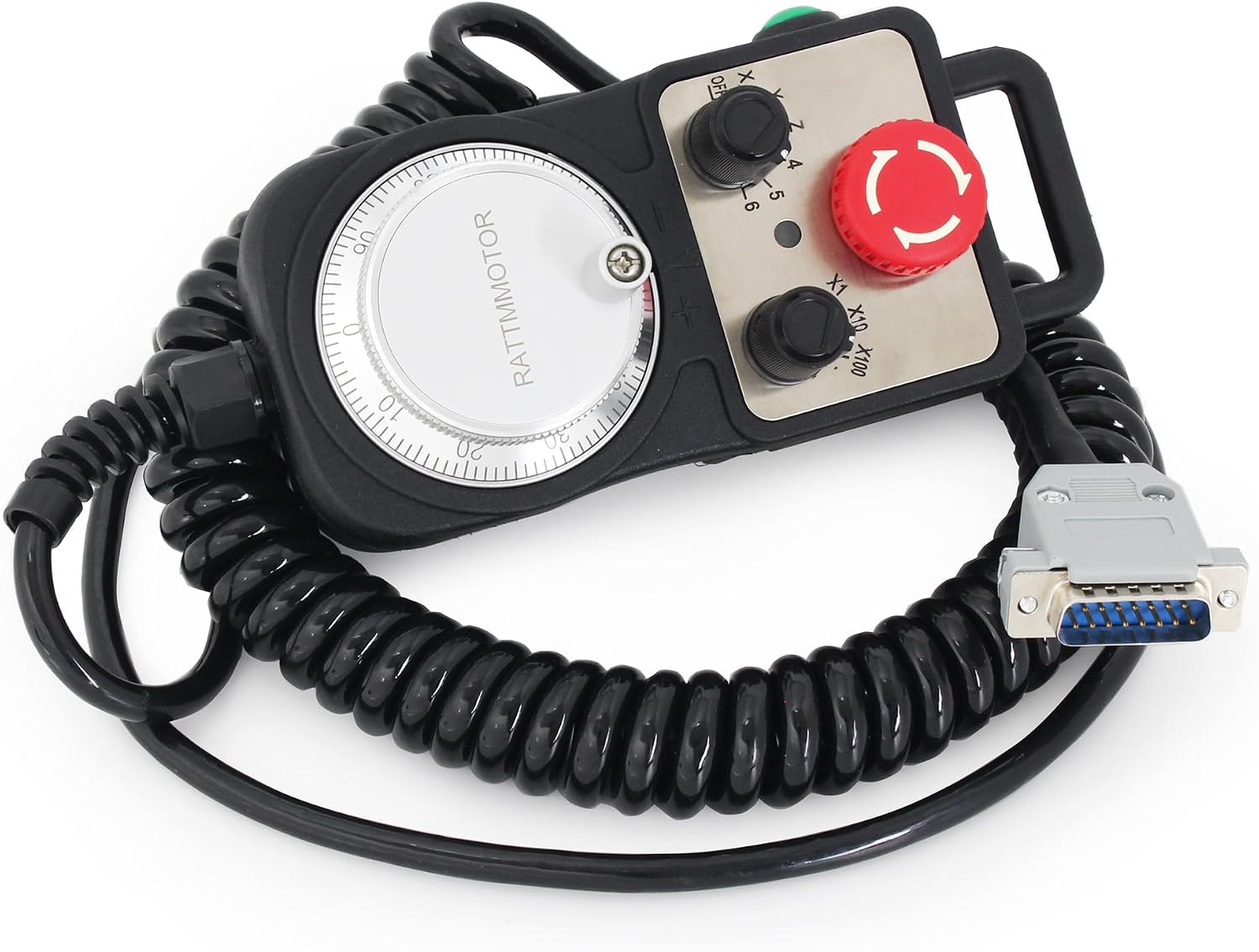
છબી 1.1: ઓવરview of the CNCTOPBAOS CNC 5 Axis MPG Pendant Handwheel.
2. લક્ષણો
- ઉત્પાદન પ્રકાર: 5 Axis Pendant Handwheel with Emergency Stop.
- સ્વિચ: Includes x1, x10, x100 selectable pulse ratio switches.
- Axis Selection: Dedicated switches for OFF, X, Y, Z, 4, 5 axes.
- પ્રતિભાવ આવર્તન: 0-10KHz
- પાવર આવશ્યકતાઓ: DC5V +/- 5% supply voltage; <=80 mA supply current.
- આઉટપુટ વિશિષ્ટતાઓ: આઉટપુટ વોલ્યુમtage >=2.5V and <=0.4V; Output current <40 mA; Drop/rise time <=5 ns.
- બાંધકામ: Features a high-precision metal code disc with clear fine-tuning dial scale and stable rotation.
- સુસંગતતા: Compatible with DDCS V4.1, DDCS-Expert Offline Controller, Taiwan Pou Yuen M600 M500 M520i T300 series, Higerman, HANUC, GSK, opened NC, KND, Siemens, NUM, Spain FAGOR, and similar CNC systems.
- કનેક્ટિવિટી: Equipped with a 15-pin plug for direct, plug-and-play connection to compatible controllers.
3. સેટઅપ અને ઇન્સ્ટોલેશન
The CNCTOPBAOS MPG Pendant Handwheel is designed for straightforward installation. Follow these steps to connect the device to your CNC controller:
- પાવર બંધ: Ensure your CNC controller and associated machinery are completely powered off before making any connections.
- Connect 15-Pin Plug: Locate the 15-pin D-sub connector on the handwheel cable. Connect this plug securely to the corresponding 15-pin port on your compatible CNC controller (e.g., DDCS V4.1, DDCS-Expert).
- સુરક્ષિત કનેક્શન: Tighten any screws on the D-sub connector to prevent accidental disconnection during operation.
- પાવર ચાલુ: Once the connection is secure, power on your CNC controller. The handwheel should be recognized by the system.

Image 3.1: The handwheel connected to a CNC controller.
4. ઓપરેટિંગ સૂચનાઓ
The handwheel provides intuitive control over your CNC machine's axes. Familiarize yourself with the controls:

Image 4.1: Key components and controls of the MPG handwheel.
- Manual Pulse Generator (MPG) Dial: The large rotary dial on the front is used for precise manual movement of the selected axis. Turning the dial generates pulses that translate into axis motion on the CNC machine.
- Axis Selector Switch: This switch allows you to select which axis (X, Y, Z, 4, 5) the MPG dial will control. Set it to 'OFF' when not in use.
- Pulse Ratio Switches (x1, x10, x100): These switches determine the sensitivity of the MPG dial.
- x1: Provides the finest movement (e.g., 1 pulse = 0.001mm).
- x10: Provides medium movement (e.g., 1 pulse = 0.01mm).
- x100: Provides coarser movement (e.g., 1 pulse = 0.1mm).
- ઇમરજન્સી સ્ટોપ બટન: The large red button immediately halts all machine operations when pressed. To reset, twist the button clockwise until it pops out.
- Enable Switch: The green button typically activates or enables the handwheel's functions. Press and hold or toggle as required by your CNC system.
- Hanging Beam: Use this handle for convenient carrying and positioning of the handwheel.
૬.૬. કાર્યકારી પ્રદર્શન
Video 4.1: A demonstration of the MPG handwheel in operation with a DDCS offline controller, showing axis movement and control.
5. વાયરિંગ ડાયાગ્રામ
The following table details the pin definitions for the 15-pin connector. It is crucial to ensure correct wiring for proper functionality and to avoid damage to the handwheel or CNC controller. Always cross-reference with your specific CNC controller's documentation.

Image 5.1: 15-pin connector wiring definition table.
| પિન નંબર | માર્ક | વ્યાખ્યા | નોંધો |
|---|---|---|---|
| 1 | +5 વી | પાવર સપ્લાય + | MPG Power supply input positive terminal |
| 2 | A+ | Encoder A Phase + | MPG A phase differential input positive terminal |
| 3 | B+ | Encoder B Phase + | MPG B differential input positive terminal |
| 4 | XIN | Select X Axis | Connect with GND, then X axis is selected |
| 5 | ZIN | Select Z Axis | Connect with GND, then Z axis is selected |
| 6 | X100 | X100 Ratio | Connect with GND, then X100 ratio is selected |
| 7 | 5 | Select 5th Axis | Connect with GND, then 5th axis is selected |
| 8 | COM- | Input signal COMMON | The switch signal common terminal. |
| 9 | જીએનડી | MPG power supply ground | |
| 10 | A- | Encoder A Phase - | MPG A phase differential input negative terminal |
| 11 | B- | Encoder B Phase - | MPG B differential input negative terminal |
| 12 | YIN | Select Y Axis | Connect with GND, then Y axis is selected |
| 13 | 4 | Select 4th Axis | Connect with GND, then the 4th axis is selected |
| 14 | X10 | X10 Ratio | Connect with GND, then X10 ratio is selected |
| 15 | EP | ESTOP Input | Connect with GND, then Estop is active |
Important: Never short connect the COM- and GND pins.
6. સ્પષ્ટીકરણો
Detailed technical specifications for the CNCTOPBAOS CNC 5 Axis MPG Pendant Handwheel:
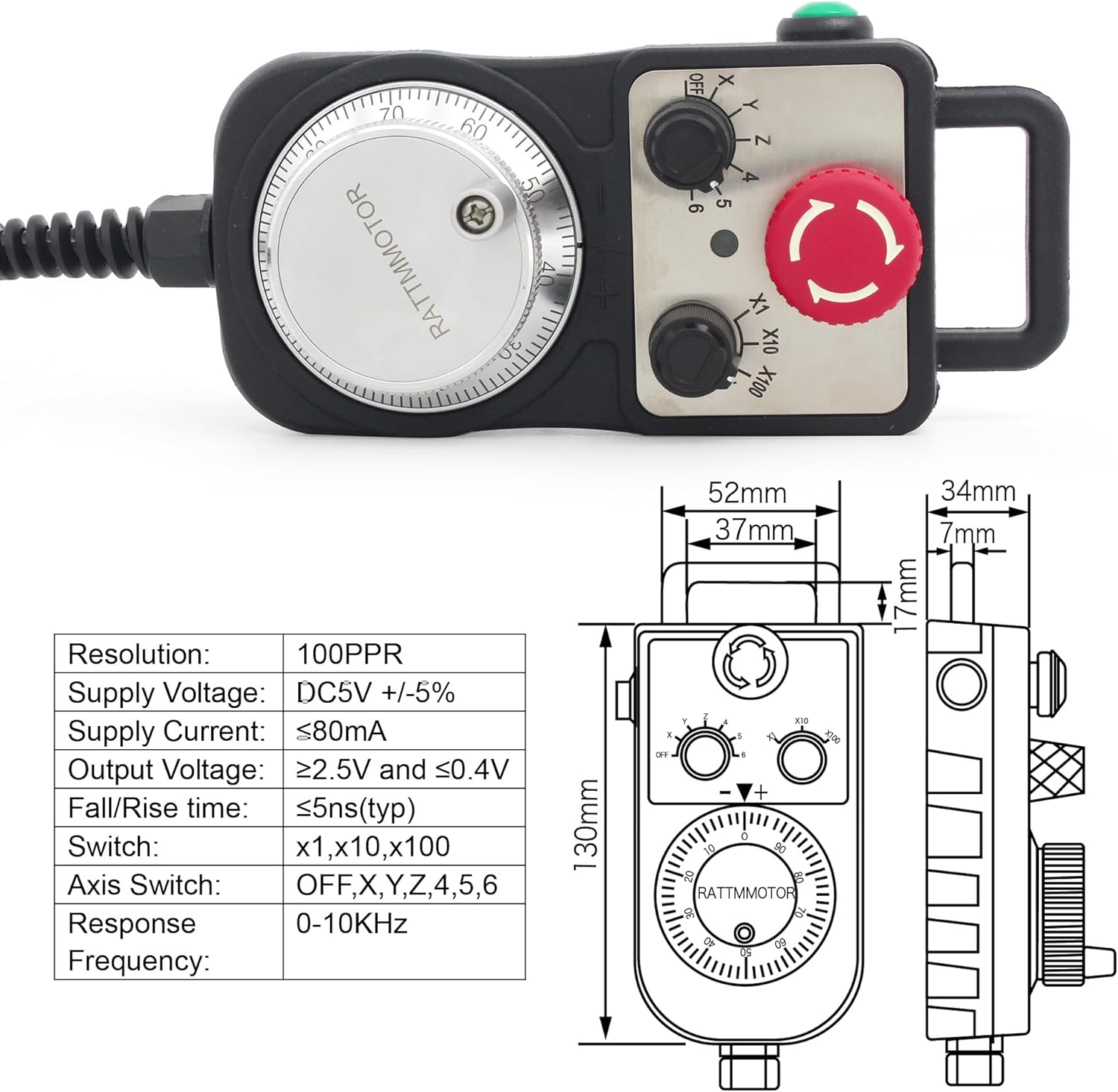
Image 6.1: Dimensions and key specifications of the handwheel.
- મોડલ નંબર: PLCHANDWHEEL
- ઠરાવ: 100PPR (Pulses Per Revolution)
- પુરવઠો ભાગtage: ડીસી 5 વી +/- 5%
- વર્તમાન પુરવઠો: ≤80 mA
- આઉટપુટ વોલ્યુમtage: ≥2.5V (High) and ≤0.4V (Low)
- આઉટપુટ વર્તમાન: <40 mA
- Drop/Rise Time: ≤5 ns (typical)
- Switch Ratios: x1, x10, x100 selectable
- Axis Selection: OFF, X, Y, Z, 4, 5
- પ્રતિભાવ આવર્તન: 0-10KHz
- સામગ્રી: પ્લાસ્ટિક
- વસ્તુનું વજન: આશરે 1.57 પાઉન્ડ (0.71 કિગ્રા)
- પેકેજ પરિમાણો: આશરે 9.76 x 5.16 x 3.43 ઇંચ (24.8 x 13.1 x 8.7 સેમી)
- ઉત્પાદક: Changzhou Rattm Motor Co.,Ltd
7. જાળવણી
To ensure the longevity and reliable performance of your MPG Pendant Handwheel, adhere to the following maintenance guidelines:
- સફાઈ: Keep the handwheel clean and free from dust, metal shavings, and other debris. Use a soft, dry cloth for cleaning. Avoid abrasive cleaners or solvents.
- પર્યાવરણીય પરિસ્થિતિઓ: Avoid exposing the device to excessive moisture, high humidity, or extreme temperatures. Operate within recommended environmental specifications.
- કેબલ અને કનેક્ટર નિરીક્ષણ: Regularly inspect the coiled cable and the 15-pin connector for any signs of wear, cuts, kinks, or damage. Replace if necessary to prevent intermittent connections or electrical issues.
- સંગ્રહ: When not in use, store the handwheel in a clean, dry environment, away from direct sunlight and corrosive materials.
8. મુશ્કેલીનિવારણ
If you encounter issues with your MPG Pendant Handwheel, consider the following troubleshooting steps:
- Handwheel Not Responding:
- કનેક્શન્સ તપાસો: Ensure the 15-pin connector is firmly seated in the CNC controller's port and any retaining screws are tightened.
- પાવર વેરિફિકેશન: Confirm that the CNC controller is powered on and receiving power.
- Enable Switch: Ensure the 'Enable' switch on the handwheel is activated.
- તત્કાલીન બંધ: Check if the emergency stop button is pressed. If so, twist it clockwise to release and reset.
- Incorrect Axis Movement or No Movement:
- Axis Selection: Verify that the correct axis (X, Y, Z, 4, or 5) is selected on the handwheel's axis selector switch.
- Pulse Ratio: Experiment with different pulse ratio settings (x1, x10, x100) to see if the sensitivity is affecting movement.
- Wiring Discrepancies: નો સંદર્ભ લો Wiring Diagram (Section 5) and your CNC controller's manual. Some controllers may have variations in pin assignments. Incorrect wiring is a common cause of non-functionality or erratic behavior.
- Erratic or Unstable Movement:
- હસ્તક્ષેપ: Ensure the handwheel and its cable are not exposed to strong electromagnetic interference from other machinery.
- કેબલ અખંડિતતા: Inspect the cable for any damage that might cause signal loss or interference.
9. વોરંટી અને સપોર્ટ
For information regarding product warranty, technical support, or service, please refer to the documentation provided with your purchase or contact CNCTOPBAOS customer service directly. Ensure you have your product model number (PLCHANDWHEEL) and purchase details available when seeking support.