
1. પરિચય
This manual provides detailed instructions for the setup, operation, maintenance, and troubleshooting of your YiBiChin Universal Replacement Remote Control, Model RU-12. This remote is designed to work seamlessly with various Roku Built-in TV models.
2. ઉત્પાદન ઓવરview
The YiBiChin RU-12 is a dedicated infrared (IR) replacement remote control for Roku Built-in TVs. It offers direct access to popular streaming services through its 12 shortcut buttons.
2.1 મુખ્ય લક્ષણો
- No programming or pairing required.
- Compatible with a wide range of Roku Built-in TVs.
- 12 dedicated shortcut buttons for popular streaming apps: NETFLIX, Prime Video, Roku Channel, Disney+, Sling, Hulu, VUDU, YouTube, ESPN+, Fan-NOW, Google Play, and Spotify.
- Infrared (IR) technology for reliable control.
2.2 સુસંગતતા
This remote is compatible with the following Roku Built-in TV brands:
- ટીસીએલ રોકુ ટીવી
- હાઈસેન્સ રોકુ ટીવી
- ONN રોકુ ટીવી
- INSIGNIA Roku TV
- SHARP Roku TV
- Hitachi Roku TV
- ફિલિપ્સ રોકુ ટીવી
- વેસ્ટિંગહાઉસ રોકુ ટીવી
- એલિમેન્ટ રોકુ ટીવી
- And other Roku Built-in TV models.
2.3 Important Incompatibilities
This remote is NOT compatible with:
- Roku Stick devices.
- Roku Player devices without an IR receiver.
- Any Roku player/box that does not have an IR receiver.
- This is an infrared (IR) remote; it does not feature a pairing button, microphone for voice control, or a headphone jack. It is not an RF (Radio Frequency) model.

છબી ૩.૧: આગળ, બાજુ અને પાછળ views of the YiBiChin RU-12 remote control. The remote is black with blue navigation buttons and various colored shortcut buttons.

Image 2: Visual guide indicating that the remote is compatible with Roku players/boxes that have an IR receiver (labeled 'YES') and incompatible with Roku Built-in TVs, Roku Sticks, and Roku Players without an IR receiver (labeled 'NO').
3. સેટઅપ
Setting up your YiBiChin RU-12 remote control is straightforward and requires no complex programming.
3.1 બેટરી ઇન્સ્ટોલેશન
- રિમોટ કંટ્રોલની પાછળના ભાગમાં બેટરીનો ડબ્બો શોધો.
- બેટરી કમ્પાર્ટમેન્ટનું કવર સ્લાઇડ કરો.
- કમ્પાર્ટમેન્ટની અંદર દર્શાવેલ યોગ્ય ધ્રુવીયતા (+ અને -) સુનિશ્ચિત કરીને, બે (2) AAA બેટરી દાખલ કરો.
- બેટરી કમ્પાર્ટમેન્ટ કવર સુરક્ષિત રીતે બંધ કરો.
નોંધ: રિમોટ કંટ્રોલ સાથે બેટરીઓ શામેલ નથી.
3.2 પ્રારંભિક ઉપયોગ
Once batteries are installed, the remote is ready for immediate use. No programming or pairing is necessary. Simply point the remote at your Roku Built-in TV and begin operating it.

Image 3: The remote control being used with a television, highlighting that no setup or programming is required after battery installation.
4. ઓપરેટિંગ સૂચનાઓ
Familiarize yourself with the buttons on your YiBiChin RU-12 remote control for optimal use.
4.1 Standard Controls
- Power (N/P buttons): તમારા ટીવીને ચાલુ અથવા બંધ કરે છે.
- Navigation Pad (Up, Down, Left, Right arrows): મેનુઓ અને પસંદગીઓ દ્વારા નેવિગેટ કરે છે.
- ઓકે બટન: પસંદગીની પુષ્ટિ કરે છે.
- પાછળનું બટન: પાછલી સ્ક્રીન અથવા મેનૂ પર પાછા ફરે છે.
- હોમ બટન: રોકુ હોમ સ્ક્રીન પર પાછા ફરે છે.
- Play/Pause, Fast Forward, Rewind: મીડિયા પ્લેબેકને નિયંત્રિત કરે છે.
- Asterisk (*) Button: Accesses options or settings within certain apps.
- Refresh/Replay Button: Replays the last few seconds of content.
4.2 શૉર્ટકટ બટનો
The remote features 12 dedicated shortcut buttons for quick access to popular streaming applications:
- NETFLIX
- પ્રાઇમ વિડિયો
- રોકુ ચેનલ
- ડિઝની+
- સ્લિંગ
- હુલુ
- VUDU
- YouTube
- ESPN+
- Fan-NOW
- Google Play
- Spotify
Simply press the desired shortcut button to launch the corresponding application directly.

Image 4: Visual confirmation that the remote does not include features such as voice search, an earphone jack, or a pairing button.
5. જાળવણી
યોગ્ય કાળજી અને જાળવણી તમારા રિમોટ કંટ્રોલના લાંબા સમય સુધી ચાલવાની ખાતરી કરશે.
5.1 સફાઈ
રિમોટ સાફ કરવા માટે, તેને નરમ, સૂકા કપડાથી હળવેથી સાફ કરો. પ્રવાહી ક્લીનર્સ, સોલવન્ટ્સ અથવા ઘર્ષક સામગ્રીનો ઉપયોગ કરવાનું ટાળો, કારણ કે આ રિમોટની સપાટી અથવા આંતરિક ઘટકોને નુકસાન પહોંચાડી શકે છે.
5.2 બેટરી રિપ્લેસમેન્ટ
Replace batteries when the remote's response becomes sluggish or stops working. Always replace both AAA batteries at the same time with new ones. Do not mix old and new batteries, or different types of batteries.
5.3 સંગ્રહ
When not in use for extended periods, it is recommended to remove the batteries to prevent leakage and potential damage to the remote.
6. મુશ્કેલીનિવારણ
If you encounter issues with your remote control, please refer to the following troubleshooting steps:
- રિમોટ પ્રતિસાદ આપતું નથી:
- ખાતરી કરો કે બેટરીઓ યોગ્ય ધ્રુવીયતા સાથે યોગ્ય રીતે ઇન્સ્ટોલ કરેલી છે.
- જૂની બેટરીઓને નવી AAA બેટરીથી બદલો.
- Check for any obstructions between the remote and your TV's IR receiver. Ensure a clear line of sight.
- Confirm that your TV is a Roku Built-in TV and not a Roku Stick or a Roku Player without an IR receiver.
- No voice control/headphone jack: This remote is an IR remote and does not support voice control, a headphone jack, or a pairing function. These are not malfunctions but inherent design characteristics.
- Shortcut buttons not working: Ensure your TV is powered on and connected to the internet for streaming apps to function correctly.
If problems persist after following these steps, please contact customer support.
7. સ્પષ્ટીકરણો
| બ્રાન્ડ | YiBiChin |
| મોડલ નંબર | આરયુ-12 |
| રંગ | કાળો |
| કનેક્ટિવિટી ટેકનોલોજી | ઇન્ફ્રારેડ (IR) |
| ખાસ લક્ષણો | No programming or setup required |
| સુસંગત ઉપકરણો | Roku Built-in TVs |
| બેટરી જરૂરી છે | 2 x AAA (શામેલ નથી) |
| મહત્તમ શ્રેણી | 10 મીટર |
| બટનોની સંખ્યા | Standard controls + 12 shortcut buttons |
| પરિમાણો (અંદાજે) | લંબાઈ: 13.9 સેમી (5.5 ઇંચ) પહોળાઈ: 4.1 સેમી (1.6 ઇંચ) Thickness: 2.1 cm (0.8 inches) |
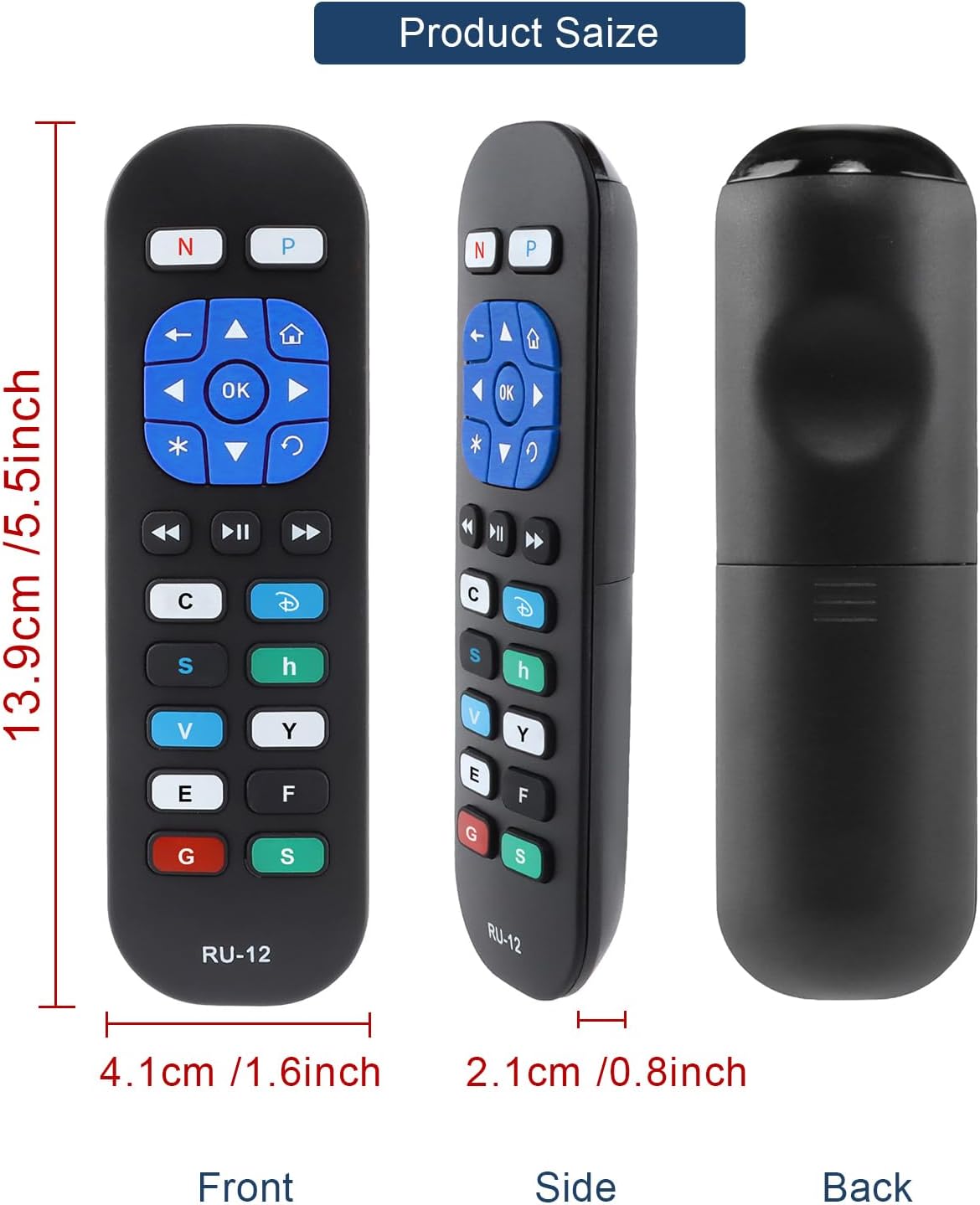
Image 5: Detailed dimensions of the remote control, indicating its length, width, and thickness.
8. વોરંટી માહિતી
Specific warranty details for the YiBiChin RU-12 Universal Replacement Remote Control are not provided in the product information. Please refer to your purchase documentation or contact the seller for any warranty-related inquiries.
9. આધાર
For any questions regarding your YiBiChin RU-12 remote control, whether before purchase or during use, please do not hesitate to contact our customer support team. We aim to respond to all inquiries within 24 hours.
સંપર્ક માહિતી: Please refer to the seller's contact details on your purchase platform or documentation.