
1. પરિચય
ખરીદી બદલ આભારasing the Blaupunkt PB10DB Bluetooth Karaoke Speaker. This manual provides essential information for the safe and efficient operation of your device. Please read it thoroughly before use and keep it for future reference. The PB10DB is a portable party speaker designed for high-quality audio playback and karaoke, featuring Bluetooth connectivity, USB, and AUX inputs.
2. સલામતી માહિતી
સલામત કામગીરી સુનિશ્ચિત કરવા અને નુકસાન અટકાવવા માટે, કૃપા કરીને નીચેની સાવચેતીઓનું પાલન કરો:
- ઉપકરણને અતિશય તાપમાન, સીધો સૂર્યપ્રકાશ અથવા ઉચ્ચ ભેજના સંપર્કમાં ન લાવો.
- Keep the speaker away from water and other liquids. The product is indicated as waterproof, but avoid submerging it.
- Do not attempt to disassemble or modify the speaker. Repairs should only be performed by qualified personnel.
- ફક્ત ઉલ્લેખિત ચાર્જિંગ એસેસરીઝનો જ ઉપયોગ કરો.
- Ensure proper ventilation around the speaker during use.
- શ્રવણશક્તિને નુકસાન થતું અટકાવવા માટે લાંબા સમય સુધી વધુ પડતા ઊંચા અવાજમાં સાંભળવાનું ટાળો.
3. પેકેજ સામગ્રી
કૃપા કરીને તપાસો કે બધી વસ્તુઓ પેકેજમાં હાજર છે:
- Blaupunkt PB10DB Bluetooth Karaoke Speaker
- પાવર એડેપ્ટર/ચાર્જિંગ કેબલ
- વપરાશકર્તા માર્ગદર્શિકા (આ દસ્તાવેજ)
- Microphone (if included in your specific package)
4. ઉત્પાદન ઓવરview
Familiarize yourself with the various parts of your Blaupunkt PB10DB speaker.
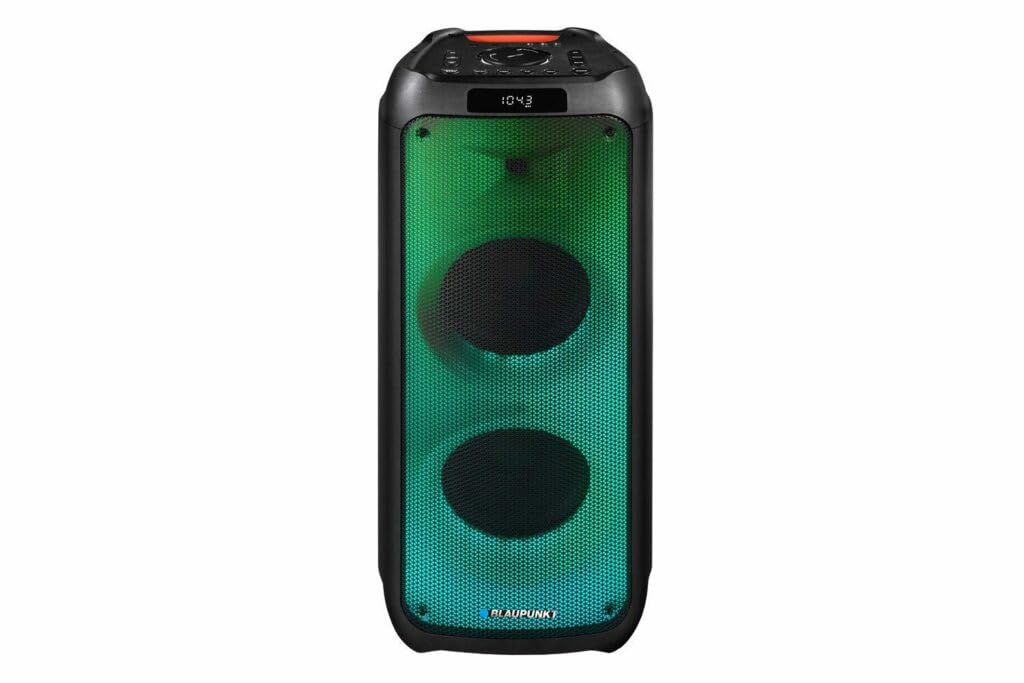
આકૃતિ 1: આગળ view of the Blaupunkt PB10DB speaker, showcasing the dual speaker grilles and dynamic LED lighting. The top panel features a display and control buttons.

આકૃતિ 2: કોણીય view of the Blaupunkt PB10DB speaker, highlighting its portable design and the side profile.
Controls and Ports (Typical Layout)
- પાવર બટન: સ્પીકરને ચાલુ/બંધ કરે છે.
- મોડ બટન: બ્લૂટૂથ, USB, AUX અને FM રેડિયો મોડ્સ વચ્ચે સ્વિચ કરે છે.
- વોલ્યુમ નિયંત્રણ: માસ્ટર વોલ્યુમ સમાયોજિત કરે છે.
- પ્લે/પોઝ બટન: મીડિયા પ્લેબેકને નિયંત્રિત કરે છે.
- પાછલા/આગલા ટ્રેક બટનો: ટ્રેક્સ દ્વારા નેવિગેટ કરે છે.
- Microphone Input (MIC IN): For connecting a wired microphone for karaoke.
- યુએસબી પોર્ટ: For playing music from a USB drive or charging external devices.
- AUX ઇનપુટ (3.5mm): For connecting external audio devices via an audio cable.
- ચાર્જિંગ પોર્ટ: સ્પીકરને ચાર્જ કરવા માટે પાવર એડેપ્ટરને કનેક્ટ કરવા માટે.
5. સેટઅપ
૩.૧ સ્પીકરને ચાર્જ કરવું
- Connect the provided power adapter to the charging port on the speaker.
- એડેપ્ટરને યોગ્ય પાવર આઉટલેટમાં પ્લગ કરો.
- સ્પીકર ચાર્જ થઈ રહ્યું છે તે બતાવવા માટે ચાર્જિંગ સૂચક લાઇટ પ્રકાશિત થશે (રંગ અલગ અલગ હોઈ શકે છે).
- Once fully charged, the indicator light may change color or turn off. Disconnect the charger.
A full charge typically takes several hours and provides approximately 8 hours of playback time.
5.2 પાવરિંગ ચાલુ/બંધ
- પાવર ચાલુ કરવા માટે: Press and hold the Power button for a few seconds until the display lights up and you hear an audible prompt.
- પાવર ઓફ કરવા માટે: Press and hold the Power button again for a few seconds until the display turns off and you hear an audible prompt.
6. ઓપરેટિંગ સૂચનાઓ
6.1 બ્લૂટૂથ પેરિંગ
- Ensure the speaker is powered on and in Bluetooth mode. If not, press the Mode button until "Bluetooth" or a similar indicator appears on the display. The speaker will enter pairing mode, indicated by a flashing Bluetooth icon or LED.
- તમારા મોબાઇલ ઉપકરણ (સ્માર્ટફોન, ટેબ્લેટ, વગેરે) પર, બ્લૂટૂથ સક્ષમ કરો અને ઉપલબ્ધ ઉપકરણો શોધો.
- Select "Blaupunkt PB10DB" from the list of found devices.
- Once paired, the speaker will emit an audible confirmation, and the Bluetooth indicator will stop flashing.
- હવે તમે સ્પીકર દ્વારા તમારા ઉપકરણમાંથી ઓડિયો ચલાવી શકો છો.
જ્યારે ચાલુ થશે ત્યારે સ્પીકર આપમેળે છેલ્લા જોડીવાળા ઉપકરણ સાથે ફરીથી કનેક્ટ થવાનો પ્રયાસ કરશે.
૩.૪ કરાઓકે ફંક્શન
- Connect a wired microphone (not always included) to the MIC IN port on the speaker.
- Ensure the microphone is switched on (if it has a power switch).
- Play your desired karaoke track via Bluetooth, USB, or AUX.
- Adjust the microphone volume and echo effects (if available on the speaker) using the dedicated controls.
૬.૪ યુએસબી પ્લેબેક
- MP3 ઑડિઓ ધરાવતો USB ફ્લેશ ડ્રાઇવ દાખલ કરો fileયુએસબી પોર્ટમાં એસ.
- Press the Mode button to switch to USB mode. The speaker will automatically begin playing music from the USB drive.
- પ્લેબેકને નિયંત્રિત કરવા માટે પ્લે/પોઝ અને પાછલું/આગલું ટ્રેક બટનોનો ઉપયોગ કરો.
6.4 AUX ઇનપુટ
- Connect one end of a 3.5mm audio cable (not included) to the AUX IN port on the speaker.
- Connect the other end of the cable to the headphone jack or audio output of your external audio device.
- AUX મોડ પર સ્વિચ કરવા માટે મોડ બટન દબાવો.
- Control playback and volume from your external audio device.
7. જાળવણી
7.1 સફાઈ
- સ્પીકરને હંમેશા બંધ કરો અને સાફ કરતા પહેલા તેને પાવર સ્ત્રોતથી ડિસ્કનેક્ટ કરો.
- સ્પીકરના બાહ્ય ભાગને સાફ કરવા માટે નરમ, સૂકા કપડાનો ઉપયોગ કરો.
- ઘર્ષક ક્લીનર્સ, મીણ અથવા સોલવન્ટનો ઉપયોગ કરશો નહીં, કારણ કે આ ફિનિશને નુકસાન પહોંચાડી શકે છે.
7.2 સંગ્રહ
- સ્પીકરને સીધા સૂર્યપ્રકાશ અને અતિશય તાપમાનથી દૂર ઠંડી, સૂકી જગ્યાએ સંગ્રહિત કરો.
- If storing for an extended period, charge the battery periodically (e.g., every 3 months) to maintain battery health.
8. મુશ્કેલીનિવારણ
| સમસ્યા | સંભવિત કારણ | ઉકેલ |
|---|---|---|
| સ્પીકર ચાલુ થતો નથી. | બેટરી ખતમ થઈ ગઈ છે. | આપેલા પાવર એડેપ્ટરનો ઉપયોગ કરીને સ્પીકરને ચાર્જ કરો. |
| સ્પીકરમાંથી કોઈ અવાજ નથી. | વૉલ્યૂમ ખૂબ ઓછું અથવા મ્યૂટ છે. ખોટો ઇનપુટ મોડ. | Increase volume. Press the Mode button to select the correct input (Bluetooth, USB, AUX). |
| બ્લૂટૂથ જોડી નિષ્ફળ. | સ્પીકર પેરિંગ મોડમાં નથી. ડિવાઇસ ખૂબ દૂર છે. દખલગીરી. | Ensure speaker is in Bluetooth pairing mode. Move device closer to speaker. Turn off other Bluetooth devices. |
| માઇક્રોફોન કામ કરી રહ્યો નથી. | Microphone not connected properly or switched off. Microphone volume too low. | Check microphone connection. Ensure microphone is powered on. Adjust microphone volume. |
| USB પ્લેબેક કામ કરતું નથી. | USB drive not formatted correctly or unsupported file પ્રકારો | Ensure USB drive is formatted to FAT32 and contains MP3 files. Try a different USB drive. |
9. સ્પષ્ટીકરણો
| મોડલ નામ: | પીબી10 ડીબી |
| બ્રાન્ડ: | BLAUPUNKT |
| કનેક્ટિવિટી ટેકનોલોજી: | સહાયક, બ્લૂટૂથ, યુએસબી |
| મહત્તમ સ્પીકર આઉટપુટ પાવર: | 1000 વોટ્સ |
| ઓડિયો આઉટપુટ મોડ: | સ્ટીરિયો |
| માઉન્ટ કરવાનો પ્રકાર: | ટેબલ માઉન્ટ |
| સામગ્રી: | મેટલ અને પ્લાસ્ટિક |
| સ્પીકરનો પ્રકાર: | ટ્વિટર |
| વિશેષ લક્ષણ: | સંગીત |
| ભલામણ કરેલ ઉપયોગો: | For music player |
| રંગ: | વાદળી |
| જળરોધક: | સાચું |
| નિયંત્રણ પદ્ધતિ: | સ્પર્શ |
| ટ્વિટર વ્યાસ: | 4 સેન્ટિમીટર |
| સરેરાશ બેટરી જીવન: | 8 કલાક |
| સુસંગત ઉપકરણો: | લેપટોપ, સ્માર્ટફોન |
| પાવર સ્ત્રોત: | બેટરી સંચાલિત |
| વસ્તુનું વજન: | 105 ગ્રામ |
| ઉત્પાદનના પરિમાણો (L x W x H): | 24 x 69 x 2.5 સેમી |
10. વોરંટી અને સપોર્ટ
Blaupunkt products are designed and manufactured to the highest quality standards. For detailed warranty information, please refer to the warranty card included with your product or visit the official Blaupunkt webસાઇટ
For technical support, troubleshooting assistance, or service inquiries, please contact Blaupunkt customer support through their official channels.
- સત્તાવાર Webસાઇટ: www.blaupunkt.com
- ગ્રાહક સેવા: Refer to your regional Blaupunkt webસંપર્ક વિગતો માટે સાઇટ.