
1. ઉત્પાદન ઓવરview
The Khadas VIM4 is a high-performance single board computer featuring the Amlogic A311D2 SoC. It supports 4K UI, HDMI input, and offers multiple display interfaces, along with integrated Wi-Fi 6 and Bluetooth 5.1. This kit includes an active cooling solution to ensure optimal performance.
બૉક્સમાં શું છે:
- VIM4 Single Board Computer
- એન્ટેના x2
- New VIM Heatsink
- 3705 કૂલિંગ ફેન
- વપરાશકર્તા માર્ગદર્શિકા
- ઝડપી શરૂઆત માર્ગદર્શન
2. સેટઅપ માર્ગદર્શિકા
2.1 બોર્ડ લેઆઉટ
Familiarize yourself with the various ports and components on your Khadas VIM4 board.
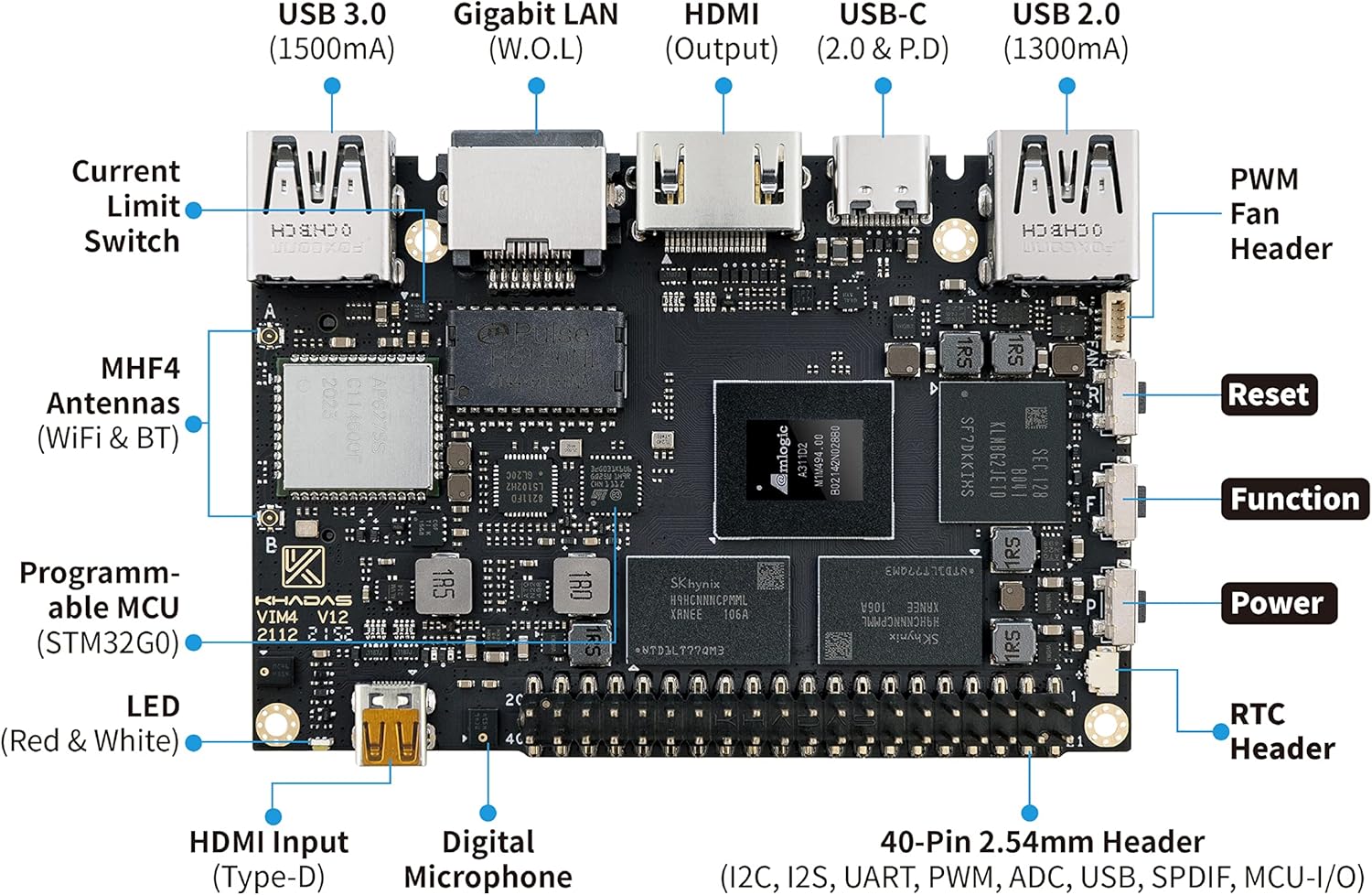
છબી વર્ણન: ટોચ view of the Khadas VIM4 board, highlighting various ports and headers including USB 3.0, Gigabit LAN, HDMI Output, USB-C, USB 2.0, PWM Fan Header, MHF4 Antennas (WiFi & BT), Programmable MCU, LED, HDMI Input (Type-D), Digital Microphone, 40-Pin 2.54mm Header, Reset, Function, Power, and RTC Header.

છબી વર્ણન: તળિયે view of the Khadas VIM4 board, showing components such as G-Sensor, VIN Input (9-20V), Micro-SD (SDXC) slot, Current Limit Switch, SPI Flash, XPWR Pads, V-by-One (eDP), MIPI-DSI & TP, MIPI-CSI, and M.2 Slot (PCI-Ex1 Lane, USB 2.0, I2S, I2C, GPIO, MCU-I/O).
2.2 કનેક્ટિંગ એન્ટેના
Proper installation of the Wi-Fi and Bluetooth antennas is crucial for wireless connectivity.
વિડિઓ વર્ણન: This video demonstrates the step-by-step process of installing the Wi-Fi and Bluetooth antennas onto the Khadas VIM4 board. It shows how to carefully connect the small antenna connectors to the designated ports on the board.
2.3 Initial Power-Up and Peripherals
- Connect a compatible power supply (DC 5.5x2.1mm or USB-C PD) to the VIM4.
- Connect a display to one of the available display interfaces (HDMI, MIPI-DSI, V-by-One, or eDP).
- કીબોર્ડ અને માઉસને USB પોર્ટ સાથે કનેક્ટ કરો.
- The VIM4 will typically power on automatically or can be powered on using the dedicated power button.
3. ઓપરેટિંગ સૂચનાઓ
3.1 Operating System Installation (OOWOW)
The VIM4 features OOWOW, an embedded service for seamless online OS delivery. If the device storage is empty, OOWOW will start automatically, allowing you to download and install your preferred operating system (e.g., Android 11, Ubuntu, CoreELEC) directly from the Cloud.
૫.૨ મુખ્ય લાક્ષણિકતાઓ અને ઉપયોગ
- 4K UI Support: Enjoy a high-resolution user interface for various applications.
- Multiple Display Interfaces: Utilize HDMI, MIPI-DSI, V-by-One, and eDP to connect up to 3 independent displays simultaneously.
- HDMI ઇનપુટ: The onboard micro HDMI input port is ideal for smart display and video conferencing applications.
- High-Performance Computing: The Amlogic A311D2 SoC with 8GB LPDDR4X RAM provides robust performance for memory-intensive software.
- વાયરલેસ કનેક્ટિવિટી: Integrated AP6275S Wi-Fi 6 module with 802.11a/b/g/n/ac/ax, 2X2 MIMO, and RSDB, along with Bluetooth 5.1.
વિડિઓ વર્ણન: This video showcases the process of building a mini PC using the Khadas VIM4, demonstrating its versatility and potential applications as a compact computing solution.
વિડિઓ વર્ણન: This video illustrates how to integrate and use a 5G module with the Khadas VIM4, expanding its connectivity options for various projects and applications.
4. જાળવણી
4.1 Active Cooling Kit
The VIM4 Active Cooling Kit includes a heatsink and a 3705 cooling fan to manage thermal performance, especially during demanding tasks. Ensure the fan is clear of obstructions for efficient cooling.

છબી વર્ણન: The Khadas VIM4 single board computer with the active cooling kit installed, showing the heatsink and fan assembly on top of the main board.
4.2 સોફ્ટવેર અને ફર્મવેર અપડેટ્સ
Regularly update the VIM4's software and firmware to ensure optimal performance, stability, and access to new features. Updates for the operating system, BIOS, and EC (Embedded Controller) firmware are available via the OOWOW service or the Khadas webસાઇટ
વિડિઓ વર્ણન: This video provides instructions on the first-time setup for graphics, which often includes driver installation and configuration, essential for maintaining the VIM4's display capabilities.
5. મુશ્કેલીનિવારણ
- HDMI Audio Issues (Ubuntu): Ensure you have the latest Ubuntu image (220620 or later) installed via OOWOW, as this issue has been fixed in recent updates.
- CSI Camera Compatibility: The Khadas CSI camera OS08A10 MIPI camera is supported. Third-party CSI cameras may not be compatible due to hardware and software limitations.
- Display Resolution Limitations: Official software releases may have limitations on supported monitor resolutions (e.g., primarily 1080p and 4K). Check for updated drivers or community support for specific resolutions.
- Bootloader Issues: If the device fails to boot the installed OS after a power cycle, verify the OS installation via OOWOW.
6. સ્પષ્ટીકરણો
| લક્ષણ | વિગત |
|---|---|
| CPU | Amlogic A311D2 (2.2GHz quad-core ARM Cortex-A73, 2.0GHz quad-core Cortex-A53) |
| GPU | Mali G52MP8 (8EE) 800Mhz, supports 4K UI, H.264/H.265 encoding at 4K 50fps |
| રેમ | 8GB 64bit LPDDR4X 2016MHz |
| ડિસ્પ્લે ઇન્ટરફેસ | HDMI, MIPI-DSI, V-by-One, eDP (supports 3 independent displays) |
| HDMI ઇનપુટ | Yes, for smart display & video conferencing |
| વાયરલેસ કનેક્ટિવિટી | AP6275S Wi-Fi 6 (802.11a/b/g/n/ac/ax, 2X2 MIMO, RSDB), Bluetooth 5.1 |
| યુએસબી પોર્ટ્સ | 3 Total USB Ports (Type-A, Type-C) |
| ઈથરનેટ | 1 Gigabit LAN port |
| પરિમાણો | ૧૧"લિ x ૪"પગ x ૧૩"કલો |
7. વોરંટી અને સપોર્ટ
7.1 વોરંટી માહિતી
The Khadas VIM4 comes with a manufacturer's warranty. Please refer to the warranty card included in your package for specific terms and conditions.
7.2 ટેકનિકલ સપોર્ટ
For further assistance, technical support, and the latest software/firmware updates, please visit the official Khadas website or refer to the OOWOW embedded service on your device. You can also find helpful resources and community forums on the Khadas support pages.
Official Khadas Store: Visit the Khadas Store