
1. પરિચય
This manual provides detailed instructions for the safe and effective use of your Generic Electric Callus Remover and Foot Polisher. Please read this manual thoroughly before first use and retain it for future reference. This device is designed to remove calluses and polish feet, offering a comprehensive pedicure experience.
2. પેકેજ સામગ્રી
તમારા પેકેજમાં નીચેની વસ્તુઓ શામેલ છે:
- 1x Electric Callus Remover Device
- 1x Coarse Quartz Roller Head (for overgrown calluses)
- 1x Regular Quartz Roller Head (for exfoliating)
- 1x Fine Quartz Roller Head (for smooth skin)
- 1x યુએસબી ચાર્જિંગ કોર્ડ
- 1x Cuticle and Callus Remover Tool
- 1x Callus Scraper
- 1x Nail File
- 1x Callus Shaver
- 1x Sandpaper
- 1x Nail Brush
- 1x V-shaped Push Stick
- 1x સફાઈ બ્રશ
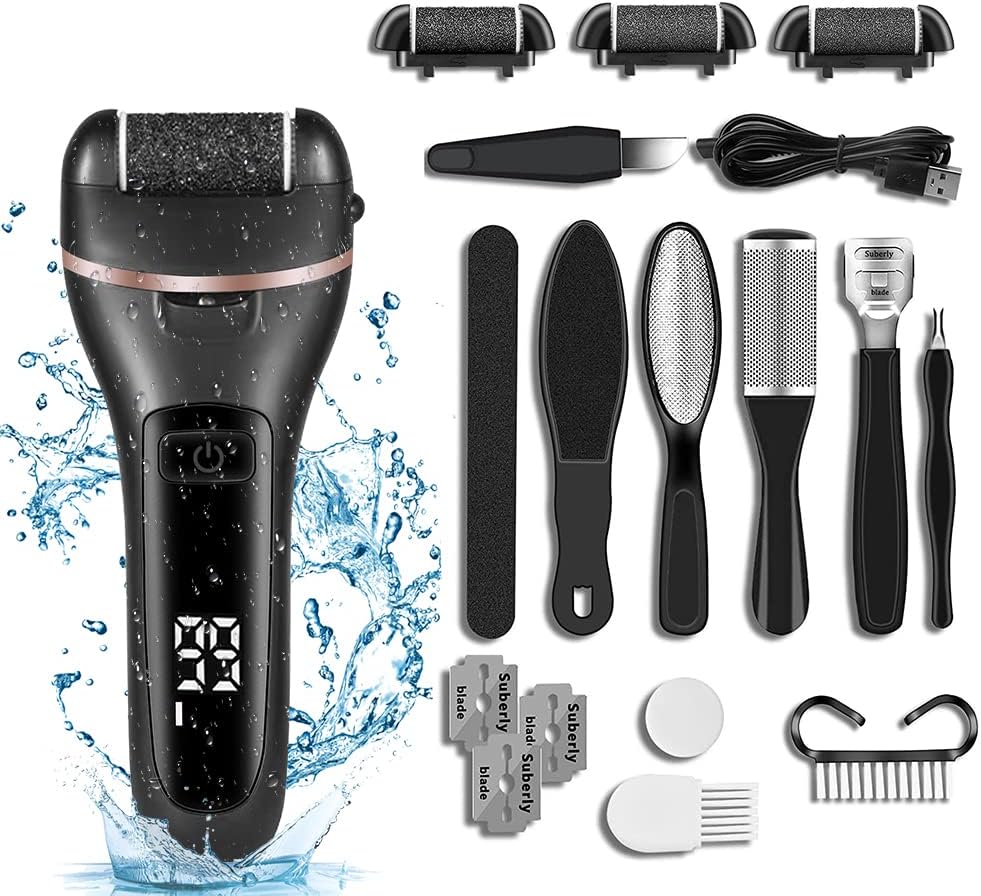
Image 2.1: Contents of the Electric Callus Remover and Pedicure Set.
3. ઉત્પાદન સુવિધાઓ
- Dual Speed Settings: The device operates at two speeds: 1700 rotations per minute (low) and 2000 rotations per minute (high), allowing for customized callus removal.
- USB રિચાર્જ કરવા યોગ્ય: Equipped with a USB cord for convenient charging at home or while traveling.
- વોટરપ્રૂફ ડિઝાઇન (IPX7): The device features an IPX7 waterproof rating, allowing for easy cleaning under running water.
- લાંબા સમય સુધી ચાલતી બેટરી: A 1200mAh rechargeable battery provides up to 2 hours of continuous use. The LED display indicates 5 battery levels.
- સંકલિત એલઇડી લાઇટ: An LED light illuminates the treatment area during use, enhancing visibility.
- Interchangeable Quartz Roller Heads: Includes Coarse, Regular, and Fine roller heads to address various callus thicknesses and skin conditions.

Image 3.1: Key components of the Electric Callus Remover, including the microdermabrasion roller, grinding head removal key, flashlight, switch, power display, gear display, and charging interface.

Image 3.2: Illustration of the three types of quartz roller heads: Fine for daily care, Regular for new dead skin, and Coarse for adult calluses.
4. સલામતી માહિતી
મહત્વપૂર્ણ સલામતી સાવચેતીઓ:
- તૂટેલી ત્વચા પર ઉપયોગ કરશો નહીં.
- ઈજાને રોકવા માટે વધુ પડતા બળનો ઉપયોગ કરવાનું ટાળો.
- Keep away from water when not in use.
- This device is intended for personal use only. Consult a healthcare professional if you have diabetes, poor circulation, or any foot conditions before use.
- બાળકોની પહોંચથી દૂર રાખો.
5. સેટઅપ
5.1 ઉપકરણને ચાર્જ કરવું
- ખાતરી કરો કે ઉપકરણ બંધ છે.
- Connect the USB charging cord to the charging interface on the device.
- Plug the other end of the USB cord into a compatible USB power source (e.g., computer, power bank, wall adapter, car charger).
- The power display will show charging progress. Ensure the device is fully charged before first use. A full charge can take approximately 2-3 hours.
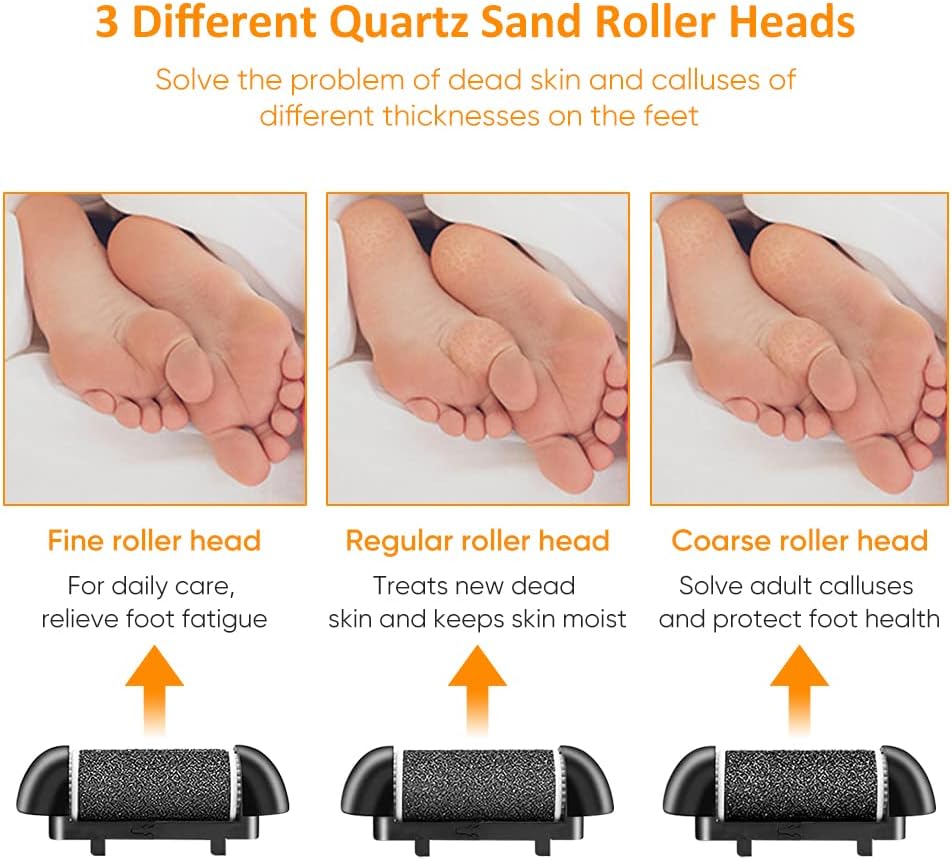
Image 5.1: Various methods for charging the device using the convenient USB port.
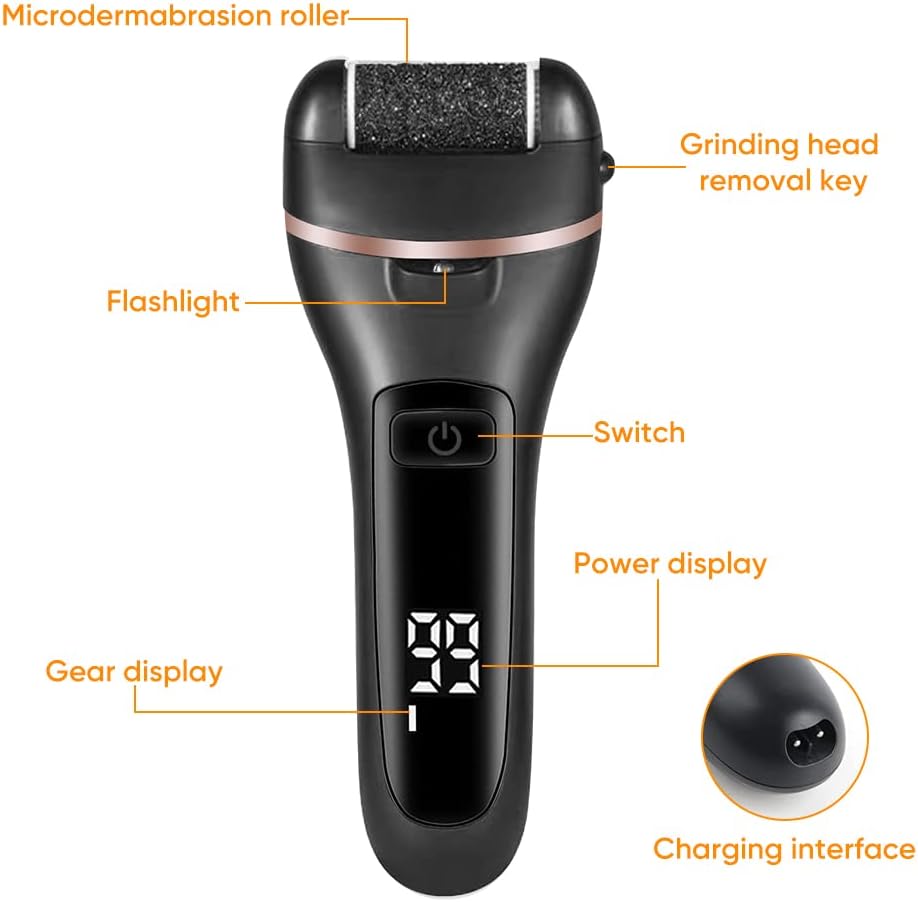
Image 5.2: The device features a durable 1200mAh battery for extended use.
5.2 Attaching a Roller Head
- ખાતરી કરો કે ઉપકરણ બંધ છે.
- Select the desired quartz roller head (Coarse, Regular, or Fine) based on your needs.
- Align the roller head with the device and gently press it into place until it clicks securely.
6. ઓપરેટિંગ સૂચનાઓ
શ્રેષ્ઠ ઉપયોગ માટે આ પગલાં અનુસરો:
- ખાતરી કરો કે ઉપયોગ કરતા પહેલા ઉપકરણ સંપૂર્ણપણે ચાર્જ થયેલ છે.
- Wet your feet to soften the skin.
- Select the appropriate quartz head for your needs (Coarse for tough calluses, Regular for exfoliation, Fine for smoothing).
- Press the power button (switch) to turn on the device. The LED light will activate.
- Press the power button again to switch between low and high speed settings.
- Gently move the device over the desired area, applying light to moderate pressure. Do not press too hard or stay in one spot for too long to avoid irritation.
- Continue until the skin feels smooth.
- Rinse your feet and the device after use.
- પાવર બટન દબાવીને અને હોલ્ડ કરીને ઉપકરણને બંધ કરો.
7. જાળવણી
7.1 ઉપકરણની સફાઈ
Due to its IPX7 waterproof design, the electric callus remover is easy to clean:
- Ensure the device is turned off and disconnected from the charging cable.
- Remove the roller head by pressing the grinding head removal key.
- Rinse the roller head and the device body under running water to remove skin debris.
- Use the included cleaning brush to remove any stubborn particles from the roller head.
- ફરીથી એસેમ્બલ કરતા પહેલા અથવા સ્ટોર કરતા પહેલા બધા ભાગોને હવામાં સંપૂર્ણપણે સૂકવવા દો.

Image 7.1: The device is IPX7 waterproof and can be washed directly under water for thorough cleaning.
7.2 Replacing Roller Heads
Roller heads should be replaced when they show signs of wear or become less effective.
- ખાતરી કરો કે ઉપકરણ બંધ છે.
- Press the grinding head removal key to detach the old roller head.
- Dispose of the old roller head responsibly.
- Align a new roller head with the device and press it firmly until it clicks into place.
8. મુશ્કેલીનિવારણ
જો તમને તમારા ઉપકરણમાં સમસ્યાઓ આવે, તો નીચેની સામાન્ય સમસ્યાઓ અને ઉકેલોનો સંદર્ભ લો:
| સમસ્યા | સંભવિત કારણ | ઉકેલ |
|---|---|---|
| ઉપકરણ ચાલુ થતું નથી | Low battery; Device not properly assembled | Charge the device fully; Ensure roller head is securely attached. |
| Roller head stops spinning or slows down significantly | Excessive pressure applied; Roller head clogged with skin debris; Worn out roller head | Reduce pressure; Clean the roller head; Replace the roller head. |
| ઉપકરણ ચાર્જ થઈ રહ્યું નથી | Faulty USB cable or power source; Charging port obstruction | Try a different USB cable or power source; Check charging port for debris. |
| ઉપયોગ કર્યા પછી ત્વચાની બળતરા | Excessive use or pressure; Using on broken skin | Reduce usage time and pressure; Do not use on broken or irritated skin. |
9. સ્પષ્ટીકરણો
| લક્ષણ | વિગત |
|---|---|
| બ્રાન્ડ | સામાન્ય |
| મોડલ નંબર | B0B1W4CSWX |
| રંગ | કાળો |
| વસ્તુનું વજન | 0.36 કિલોગ્રામ |
| પાવર સ્ત્રોત | રિચાર્જેબલ બેટરી (USB) |
| બેટરી ક્ષમતા | 1200mAh |
| ઓપરેટિંગ ઝડપ | 1700x/min (low), 2000x/min (high) |
| વોટરપ્રૂફ રેટિંગ | IPX7 |
| વસ્તુઓની સંખ્યા | 10 (including device and accessories) |
| જીટીઆઇએન/યુપીસી | 792264181198 |
10. વોરંટી અને સપોર્ટ
For warranty information and customer support, please refer to the documentation provided at the time of purchase or contact your retailer. Specific warranty terms may vary. Keep your proof of purchase for any warranty claims.
If you require further assistance or have questions not covered in this manual, please reach out to the manufacturer or the point of purchase for support.