
1. પરિચય
Thank you for choosing the NUBWO USB C Headset, Model HW02. This headset is designed for clear communication and comfortable use in various environments, including office, home, and call centers. It features a noise-cancelling microphone, in-line controls, and broad compatibility with USB-C enabled devices. This manual provides essential information for setting up, operating, maintaining, and troubleshooting your headset to ensure optimal performance.
2. પેકેજ સામગ્રી
કૃપા કરીને ચકાસો કે તમારા પેકેજમાં બધી વસ્તુઓ હાજર છે:
- NUBWO USB C Headset (Model HW02)
- USB-C Cable (integrated with in-line control)
- વપરાશકર્તા માર્ગદર્શિકા (આ દસ્તાવેજ)
3. સેટઅપ સૂચનાઓ
Follow these steps to set up your NUBWO USB C Headset:
- હેડસેટ કનેક્ટ કરો: Plug the USB-C connector of the headset directly into an available USB-C port on your laptop, phone, or computer. The headset is plug-and-play, requiring no additional drivers for most operating systems (Windows 7/8/10, Android, iOS).

Image: NUBWO USB C Headset connected to a laptop, illustrating its wide compatibility with PC, laptop, tablet, and smartphone devices running Android, iOS, Windows 7, Windows 8, and Windows 10.
- આરામ માટે એડજસ્ટ કરો: Adjust the headband to fit comfortably on your head. The headset features an adjustable headband and breathable ear muffs for extended wear.

Image: Diagram highlighting the comfortable design elements of the headset, including a 180-degree rotatable microphone, breathable earmuffs, and an adjustable headband for personalized fit.
- માઇક્રોફોનને સ્થાન આપો: Rotate the microphone boom to position it optimally near your mouth for clear voice capture. The microphone is 180-degree rotatable.
પ્રદર્શન વિડિઓ સેટઅપ કરો
વિડિઓ: વિગતવાર સમીક્ષાview of the NUBWO USB C Headset, demonstrating its lightweight design, in-line controls, and overall comfort for various uses. This video is provided by a seller and offers practical insights into the product's features.
4. ઓપરેટિંગ સૂચનાઓ
The NUBWO HW02 headset features convenient in-line controls for easy management of audio and microphone functions:
- વોલ્યુમ નિયંત્રણ: Use the '+' and '-' buttons on the in-line control unit to adjust the speaker volume.
- માઇક્રોફોન મ્યૂટ: Press the microphone icon button to mute or unmute the microphone. A red indicator light will typically show when the microphone is muted.
- સ્પીકર મ્યૂટ: Press the speaker icon button to mute or unmute the headset speakers. A red indicator light will typically show when the speakers are muted.
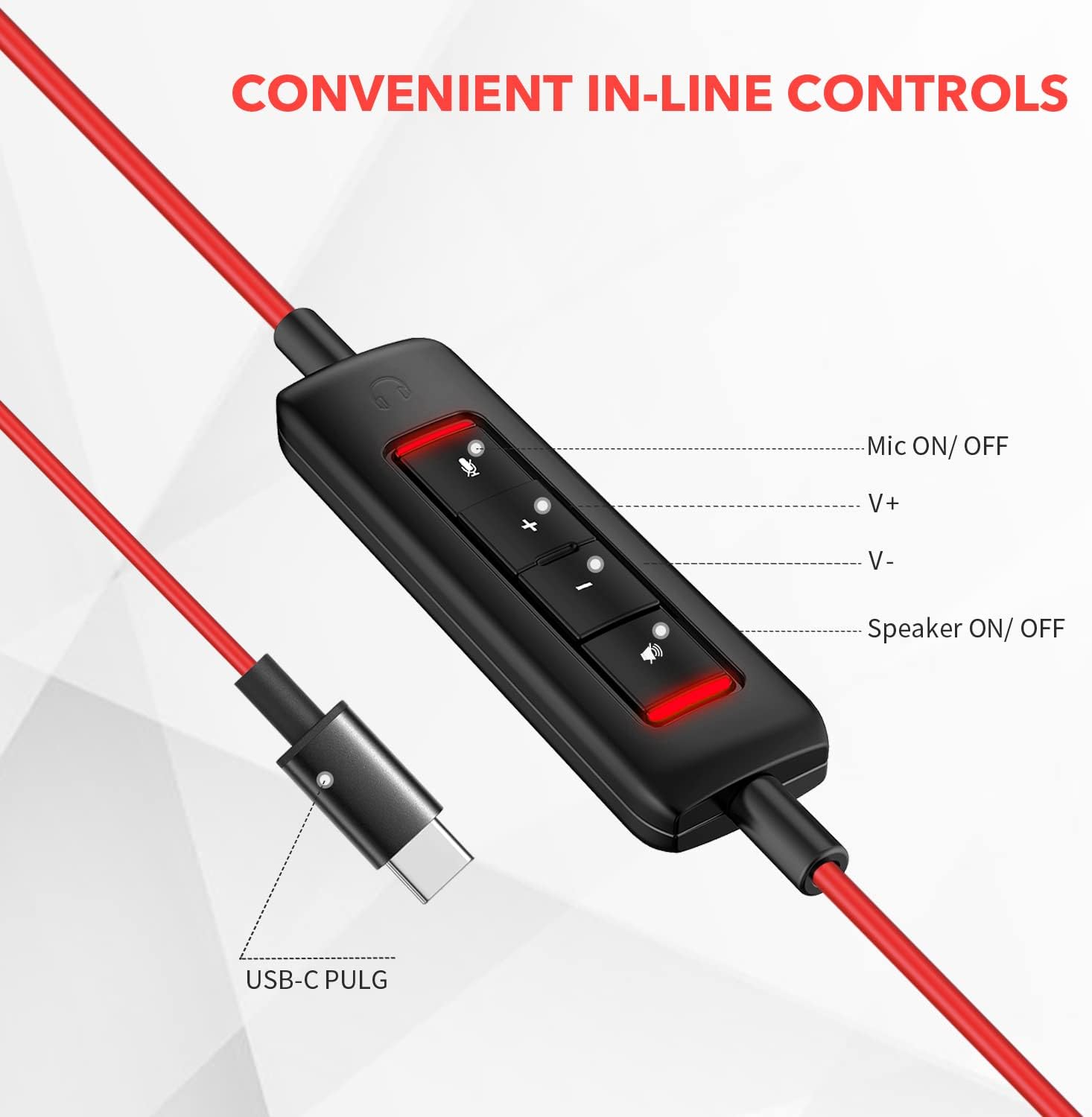
છબી: ક્લોઝ-અપ view of the in-line control unit, detailing the buttons for microphone mute/unmute, volume up, volume down, and speaker mute/unmute. The USB-C plug is also shown.
5. જાળવણી
To ensure the longevity and optimal performance of your NUBWO USB C Headset, follow these maintenance guidelines:
- સફાઈ: Use a soft, dry cloth to wipe down the headset and cable. Avoid using harsh chemicals or abrasive materials.
- સંગ્રહ: When not in use, store the headset in a clean, dry place, preferably in the provided velvet bag, to protect it from dust and damage.
- કેબલ કેર: Avoid sharp bends or excessive pulling on the cable to prevent internal wire damage.
- પર્યાવરણીય પરિસ્થિતિઓ: Do not expose the headset to extreme temperatures, humidity, or direct sunlight. The headset is not water resistant.
6. મુશ્કેલીનિવારણ
If you encounter issues with your NUBWO USB C Headset, refer to the following common solutions:
- હેડસેટમાંથી કોઈ અવાજ નથી:
- Ensure the USB-C connector is fully inserted into the device's port.
- Check the in-line control unit to ensure the speaker is not muted (red indicator light off).
- Increase the volume using the '+' button on the in-line control and your device's system volume settings.
- ખાતરી કરો કે હેડસેટ તમારા કમ્પ્યુટરની સાઉન્ડ સેટિંગ્સમાં ડિફોલ્ટ ઓડિયો આઉટપુટ ડિવાઇસ તરીકે પસંદ થયેલ છે.
- માઇક્રોફોન કામ કરતું નથી:
- Ensure the microphone is not muted on the in-line control unit (red indicator light off).
- Check that the microphone boom is correctly positioned.
- Verify that the headset microphone is selected as the default input device in your device's sound settings or communication application settings.
- Test the microphone with another application or device to rule out software-specific issues.
- નબળી ઓડિયો ગુણવત્તા:
- ખાતરી કરો કે કનેક્શન સુરક્ષિત અને કાટમાળથી મુક્ત છે.
- Avoid using the headset in environments with high electromagnetic interference.
- Adjust the audio settings on your device.
7. સ્પષ્ટીકરણો
| લક્ષણ | સ્પષ્ટીકરણ |
|---|---|
| બ્રાન્ડ | NUBWO |
| મોડલ નંબર | HW02 |
| કનેક્ટિવિટી ટેકનોલોજી | વાયર્ડ (USB-C) |
| ઇયર પ્લેસમેન્ટ | કાન પર |
| અવબાધ | 32 ઓહ્મ |
| આવર્તન શ્રેણી | ૨૦ હર્ટ્ઝ - ૨૦,૦૦૦ હર્ટ્ઝ |
| નિયંત્રણ પ્રકાર | Volume Control, Microphone Mute, Speaker Mute (in-line) |
| અવાજ નિયંત્રણ | સક્રિય અવાજ રદ (માઈક્રોફોન) |
| વસ્તુનું વજન | 0.17 કિલોગ્રામ |
| સામગ્રી | પ્લાસ્ટિક |
| વધારાની સુવિધાઓ | Adjustable Headband, Lightweight, Microphone Included |
| સુસંગત ઉપકરણો | Laptops, Phones, Computers (with USB-C) |
8. વોરંટી માહિતી
The NUBWO USB C Headset (Model HW02) comes with a 2-વર્ષ ઉત્પાદક વોરંટી. For details regarding warranty claims and coverage, please refer to the official NUBWO webસાઇટ અથવા ગ્રાહક સપોર્ટનો સંપર્ક કરો.
Additionally, products purchased through Amazon may be eligible for a 30-day refund/replacement return policy, subject to Amazon's terms and conditions.
9. આધાર
For further assistance, technical support, or inquiries regarding your NUBWO USB C Headset, please visit the official NUBWO webસાઇટ પર અથવા તેમના ગ્રાહક સેવા વિભાગનો સંપર્ક કરો. સંપર્ક માહિતી સામાન્ય રીતે ઉત્પાદન પેકેજિંગ અથવા બ્રાન્ડની સત્તાવાર ઓનલાઇન હાજરી પર મળી શકે છે.