
Zunate KX-T2035CID Wired Landline Phone User Manual
Model: KX-T2035CID
પરિચય
Welcome to your new Zunate KX-T2035CID wired landline phone. This manual provides comprehensive instructions for the setup, operation, maintenance, and troubleshooting of your device to ensure optimal performance and a clear communication experience.
પેકેજ સામગ્રી
કૃપા કરીને ખાતરી કરો કે નીચે સૂચિબદ્ધ બધી વસ્તુઓ તમારા પેકેજમાં શામેલ છે:
- 1 x Wired Landline Phone Base
- 1 x હેન્ડસેટ
- ૧ x કોઇલ્ડ હેન્ડસેટ કોર્ડ
- 1 x RJ11 Telephone Line Cord (Standard)
- 1 x RJ11 Telephone Line Cord (UK Plug, if applicable)
- 1 x વપરાશકર્તા માર્ગદર્શિકા

This image displays all items included in the package: the phone base, handset, coiled cord, standard telephone line cord, and a UK-specific telephone line cord.
સેટઅપ
ફોન કનેક્ટ કરી રહ્યું છે
- Connect one end of the coiled cord to the handset and the other end to the handset port on the phone base.
- Connect one end of the telephone line cord to the લાઇન port on the phone base.
- ટેલિફોન લાઇન કોર્ડના બીજા છેડાને તમારા વોલ ટેલિફોન જેક સાથે જોડો.
- If using the dual port feature, connect a second device (e.g., fax machine, another phone) to the EXT port on the phone base using an additional telephone line cord.

This image shows the side of the phone base with two RJ11 ports labeled "LINE" and "EXT" for connecting to the wall jack and an additional device, respectively.
વોલ માઉન્ટિંગ (વૈકલ્પિક)
The phone base is designed with keyholes on the bottom for optional wall mounting.
- Install two screws (not included) into the wall, spaced appropriately for the keyholes on the phone's base.
- Align the keyholes with the screw heads and slide the phone downwards to secure it.
- Ensure the handset cradle is reversed to hold the handset securely when wall-mounted.
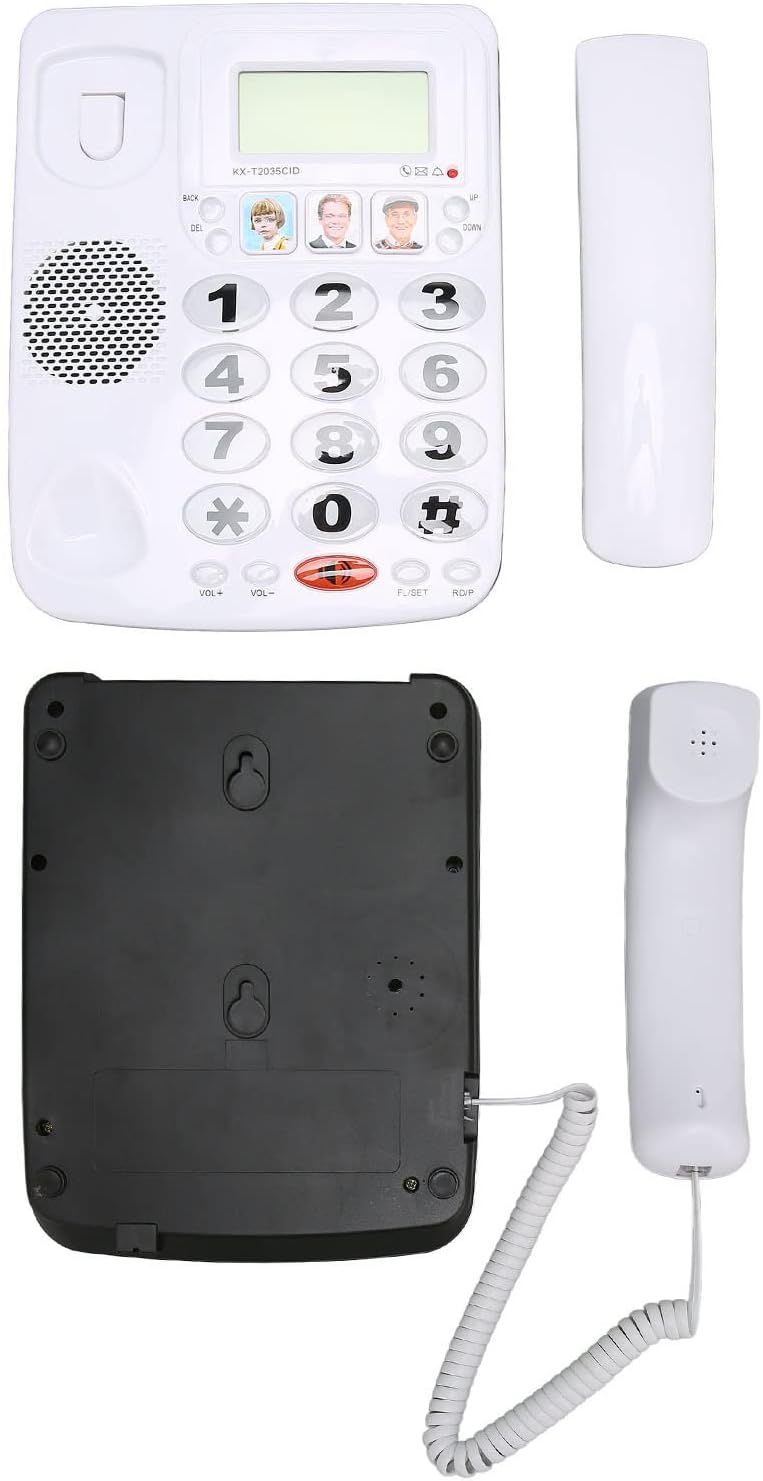
This image displays the underside of the phone base, highlighting the keyhole slots for wall mounting and the overall construction.
ઓપરેટિંગ સૂચનાઓ
કૉલ કરી રહ્યાં છીએ
- હેન્ડસેટ ઉપાડો.
- કીપેડનો ઉપયોગ કરીને ઇચ્છિત ફોન નંબર ડાયલ કરો.
- કૉલ કનેક્ટ થવા માટે રાહ જુઓ.
- To end the call, place the handset back on the cradle.
કૉલ પ્રાપ્ત કરી રહ્યાં છીએ
- જ્યારે ફોન વાગે, ત્યારે ફોન ઉપાડવા માટે હેન્ડસેટ ઉંચો કરો.
- To end the call, place the handset back on the cradle.
રીડાયલ ફંક્શન
To redial the last number called:
- હેન્ડસેટ ઉપાડો.
- Press the "RDP" (Redial) button. The phone will automatically dial the last number.
મ્યૂટ ફંક્શન
During a call, you can temporarily mute your microphone:
- Press the "MUTE" button. The other party will not hear you, but you can still hear them.
- Press the "MUTE" button again to unmute your microphone.
વોલ્યુમ એડજસ્ટમેન્ટ
To adjust the handset volume during a call:
- Use the "VOL+" and "VOL-" buttons located on the phone base.

This close-up image shows the large, easy-to-read buttons on the phone's keypad, including the "VOL+", "VOL-", "MUTE", and "RDP" (Redial) buttons.
Speed Dial / Memory Dial
The phone allows you to store up to 3 frequently used numbers for quick dialing using the dedicated memory buttons.
- નંબર સ્ટોર કરવા માટે: Lift the handset, dial the number, then press and hold one of the three picture memory buttons until a confirmation tone is heard.
- સંગ્રહિત નંબર ડાયલ કરવા માટે: Lift the handset, then press the desired picture memory button. The phone will automatically dial the stored number.

This image shows the phone's main interface, highlighting the large numeric keypad and the three dedicated memory buttons, which can be customized with pictures for quick dialing.
મુખ્ય લક્ષણો
ક્લિયર સાઉન્ડ ટેકનોલોજી
This phone incorporates noise reduction technology to ensure clear audio quality during calls, minimizing background interference for enhanced communication.

A person is shown using the Zunate KX-T2035CID phone in a professional environment, illustrating its use for clear communication.
Dual Port Design
The phone features a dual RJ11 port design, allowing you to connect both the phone line from the wall and an additional device (such as a fax machine, answering machine, or another telephone) simultaneously.
This image highlights the two RJ11 ports on the side of the phone, enabling connection to both the main telephone line and an extension device.
જાળવણી
To ensure the longevity and proper functioning of your Zunate KX-T2035CID phone, follow these simple maintenance guidelines:
- Clean the phone's surface regularly with a soft, damp કાપડ. ઘર્ષક ક્લીનર્સ અથવા સોલવન્ટ્સ ટાળો.
- Keep the phone away from excessive moisture, dust, and direct sunlight.
- ફોનને ડિસએસેમ્બલ કરવાનો પ્રયાસ કરશો નહીં. સમારકામ માટે લાયક સેવા કર્મચારીઓનો સંપર્ક કરો.
- નુકસાન અટકાવવા માટે ખાતરી કરો કે દોરીઓ ગુંચવાયેલી કે પિંચ કરેલી નથી.
મુશ્કેલીનિવારણ
If you encounter any issues with your phone, please refer to the table below for common problems and their solutions.
| સમસ્યા | ઉકેલ |
|---|---|
| કોઈ ડાયલ ટોન નથી | Check all cable connections. Ensure the telephone line cord is securely plugged into both the phone and the wall jack. Test with another phone if possible to rule out line issues. |
| કોલર સાંભળી શકતો નથી / કોલર મને સાંભળી શકતો નથી | Adjust the volume using the "VOL+" and "VOL-" buttons. Ensure the "MUTE" function is not active. Check handset cord connection. |
| ફોન રણકતો નથી | Ensure the ringer volume is not set to minimum or off (if applicable). Check line connection. |
| Last number redial not working | Ensure a number was successfully dialed prior to attempting redial. |
વિશિષ્ટતાઓ
| લક્ષણ | વિગત |
|---|---|
| બ્રાન્ડ | ઝુનાટે |
| મોડલ | KX-T2035CID |
| પ્રકાર | Wired Landline Phone |
| સામગ્રી | એક્રેલોનિટ્રિલ બ્યુટાડીન સ્ટાયરીન (ABS) |
| રંગ | સફેદ |
| કૉલર ID | હા |
| મલ્ટી-લાઇન ઓપરેશન | હા |
| અવાજ ઘટાડો | હા |
| ઉત્પાદક ભાગ નંબર | Zunateizbc48u9mx1404-12 |
વોરંટી અને આધાર
For warranty information and technical support, please refer to the documentation provided with your purchase or contact Zunate customer service directly. Specific warranty details are not available in this manual.
For further assistance, please visit the Zunate official webસાઇટ પર જાઓ અથવા તેમની સપોર્ટ ચેનલોનો સંપર્ક કરો.