
1. પરિચય
This manual provides instructions for the installation, operation, and maintenance of your 10.4 Inch Embedded Resistive Touch Industrial All-in-one Computer. This device features resistive touchscreen technology, offering single-touch, pressure-sensing control with a theoretical lifespan of over 50 million clicks. It is equipped with Mohs grade 7 explosion-proof glass and is designed to operate within a temperature range of -20°C to 60°C.
The computer's display offers a brightness of 250-350 cd/m² and a contrast ratio of 1000:1. It comes with a power adapter (Input: 100-250VAC, Output: DC 12V 5A) and supports various plug types (AU, EU, USA, UK). The default operating system is Windows 10 Pro, with Windows 7 or Linux available as optional installations.

આકૃતિ 1: ફ્રન્ટ view of the computer showcasing its slim design and embedded installation capability, with Windows 10 operating system.
2. બોક્સમાં શું છે
અનપેક કરતી વખતે, કૃપા કરીને ચકાસો કે બધા ઘટકો હાજર છે અને તેમને કોઈ નુકસાન થયું નથી. પેકેજમાં આ હોવું જોઈએ:
- 1 x 10.4 Inch Embedded Resistive Touch Industrial All-in-one Computer
- 1 x Power Adapter (with appropriate regional plug)
- Mounting hardware (for embedded or wall mount installation)
3. સેટઅપ
Follow these steps to set up your industrial all-in-one computer:
- અનપેકીંગ: Carefully remove the computer and all accessories from the packaging. Retain packaging for future transport or storage.
- માઉન્ટ કરવાનું: Determine your preferred installation method. The unit supports embedded and wall-mount installations. Use the provided mounting hardware to secure the computer in place. Ensure the mounting surface is stable and can support the device's weight.

Figure 2: Reference for installation methods, demonstrating how the unit can be embedded or secured with screws.
- કનેક્ટિંગ પેરિફેરલ્સ: Connect necessary peripherals such as a keyboard, mouse, or external display to the available ports. The unit features multiple interfaces including HDMI, USB (USB1, USB2), VGA, LAN, and Audio ports.

આકૃતિ 3: ઓવરview of the multiple interfaces available on the rear panel for various connectivity requirements.
- પાવર કનેક્શન: Connect the provided DC 12V 5A power adapter to the DC12V input port on the computer, then plug the adapter into a suitable power outlet.
4. ઓપરેટિંગ સૂચનાઓ
This section outlines the basic operation of your industrial all-in-one computer.
- પાવર ચાલુ/બંધ: Locate the power button, typically on the side or rear panel. Press it once to power on the device. To power off, use the operating system's shutdown function. For a forced shutdown, press and hold the power button for several seconds.
- ટચસ્ક્રીન કામગીરી: The resistive touchscreen supports single-point touch input. Apply gentle pressure with your finger or a stylus to interact with the display.

Figure 4: User interacting with the resistive touchscreen display.
- ઓપરેટિંગ સિસ્ટમ: The computer comes pre-installed with Windows 10 Pro. Familiarize yourself with the operating system's interface and functions.
5. જાળવણી
Proper maintenance ensures the longevity and optimal performance of your industrial computer.
- સફાઈ: સોફ્ટનો ઉપયોગ કરો, ડીamp cloth to clean the screen and exterior surfaces. Avoid abrasive cleaners or solvents that could damage the display or finish. Ensure the device is powered off and unplugged before cleaning.
- વેન્ટિલેશન: The unit is designed with ventilation to dissipate heat. Ensure that the ventilation openings on the back panel are not obstructed to prevent overheating.

Figure 5: Rear panel with ventilation design for efficient heat management.
- પર્યાવરણીય પરિસ્થિતિઓ: Operate the computer within the specified temperature range of -20°C to 60°C. Avoid exposing the device to extreme humidity or direct sunlight.
6. મુશ્કેલીનિવારણ
If you encounter issues with your industrial computer, refer to the following common troubleshooting steps:
- કોઈ શક્તિ નથી:
- Check if the power adapter is securely connected to both the computer and the power outlet.
- બીજા ઉપકરણને પ્લગ ઇન કરીને ખાતરી કરો કે પાવર આઉટલેટ કાર્યરત છે.
- કોઈ ડિસ્પ્લે નથી:
- ખાતરી કરો કે કમ્પ્યુટર ચાલુ છે.
- If an external monitor is connected, check its power and cable connections.
- ટચસ્ક્રીન પ્રતિભાવવિહીન:
- કમ્પ્યુટર પુનઃપ્રારંભ કરો.
- ખાતરી કરો કે સ્ક્રીન સ્વચ્છ અને કચરોથી મુક્ત છે.
- સિસ્ટમ સ્લોડાઉન:
- બિનજરૂરી એપ્લિકેશનો બંધ કરો.
- Check for sufficient free space on the SSD.
7. સ્પષ્ટીકરણો
Detailed technical specifications for the 10.4 Inch Embedded Resistive Touch Industrial All-in-one Computer (Model YTKK104DZ).
| લક્ષણ | સ્પષ્ટીકરણ |
|---|---|
| બ્રાન્ડ | સામાન્ય |
| મોડલ નંબર | YTKK104DZ |
| ઓપરેટિંગ સિસ્ટમ | Windows 10 Pro (Win7/Linux optional) |
| CPU મોડલ | કોર i7-7500U |
| CPU ઝડપ | 2.7 GHz |
| RAM મેમરી ઇન્સ્ટોલ કરેલ છે | 4 GB DDR3 |
| મેમરી સ્ટોરેજ ક્ષમતા | 64 GB SSD |
| સ્ક્રીન માપ | 10.4 ઇંચ |
| ઠરાવ | 1024 x 768 |
| ડિસ્પ્લે પ્રકાર | એલસીડી |
| પાસા રેશિયો | 4:3 |
| માનવ-ઇન્ટરફેસ ઇનપુટ | Touchscreen (Resistive) |
| તેજ | 250-350 cd/m² |
| કોન્ટ્રાસ્ટ રેશિયો | 1000:1 |
| Explosion-Proof Glass | Mohs grade 7 |
| ઓપરેટિંગ તાપમાન | -20°C થી 60°C |
| હાર્ડવેર ઇંટરફેસ | Ethernet, USB (4 Total), HDMI (1 Total) |
| વાયરલેસ ટેકનોલોજી | Wi-Fi |
| આઇટમ પરિમાણો | 10.67 x 2.28 x 8.58 ઇંચ |
| વસ્તુનું વજન | 4 કિલોગ્રામ |
| પાવર પ્લગનો પ્રકાર | Type A - 2 pin (North American) |
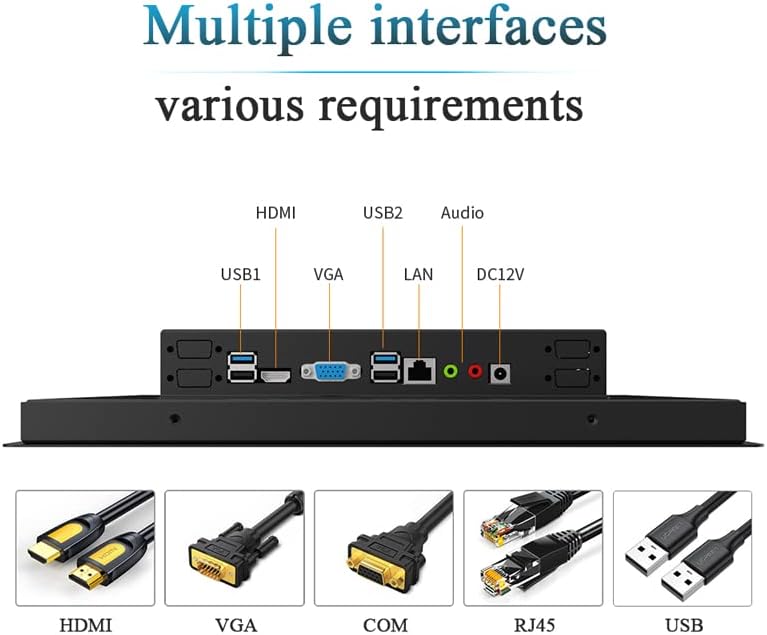
Figure 6: Detailed dimensional drawing of the 10.4-inch industrial computer.
8. વોરંટી અને સપોર્ટ
વોરંટી: આ ઉત્પાદન એ સાથે આવે છે 1 વર્ષની વોરંટી ખરીદીની તારીખથી. વોરંટી દાવાઓ માટે કૃપા કરીને ખરીદીનો પુરાવો રાખો.
આધાર: For technical assistance, troubleshooting, or inquiries regarding customization options (such as screen size, interface type, power supply, or installation methods), please contact the manufacturer. Customization inquiries can be sent via email to: Slubee-zzl@outlook.com.