
1. પરિચય
This manual provides detailed instructions for the proper use and maintenance of your CAMMHD D1 Body Camera. Please read this manual thoroughly before operating the device to ensure correct functionality and to prevent damage.
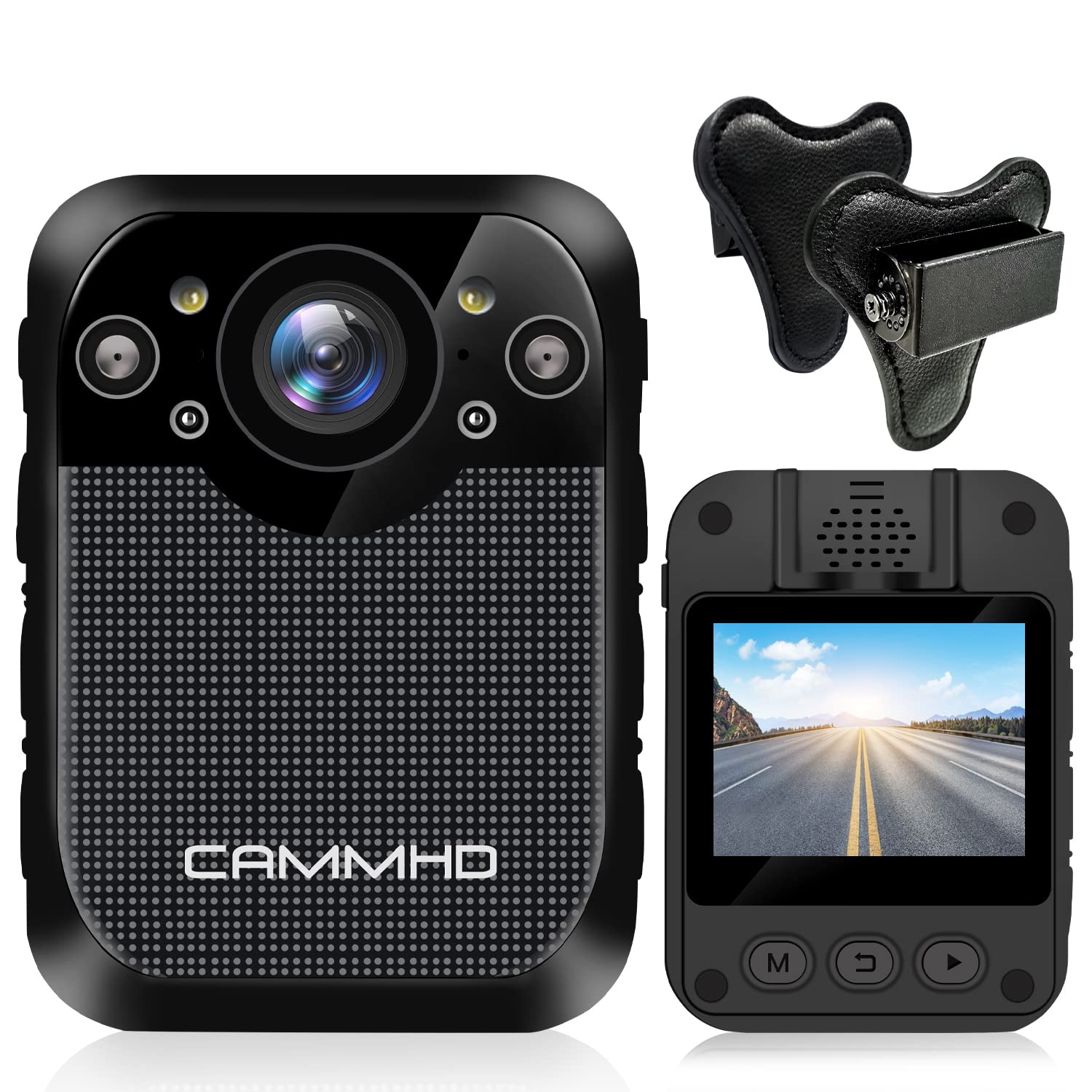
છબી: આગળ view of the CAMMHD D1 Body Camera.
2. પેકેજ સામગ્રી
ખાતરી કરો કે નીચે સૂચિબદ્ધ બધી વસ્તુઓ તમારા પેકેજમાં શામેલ છે. જો કોઈ વસ્તુ ખૂટે છે અથવા ક્ષતિગ્રસ્ત છે, તો કૃપા કરીને ગ્રાહક સપોર્ટનો સંપર્ક કરો.
- CAMMHD D1 Body Camera
- ચુંબક માઉન્ટ
- યુએસબી ચાર્જર
- યુએસબી કેબલ
- 360° Rotating Shoulder Clip
- વપરાશકર્તા માર્ગદર્શિકા

Image: All components included in the CAMMHD D1 Body Camera package.
3. ઉત્પાદન ઓવરview
Familiarize yourself with the camera's buttons and ports.

Image: Labeled diagram of the CAMMHD D1 Body Camera's external features and controls.
- એલાર્મ બટન
- લાલ અને વાદળી ફ્લેશ
- વિડિઓ બટન
- Night Vision Indicator
- એલઇડી લાઇટ
- યુએસબી ઈન્ટરફેસ
- ફોટો બટન
- Audioડિઓ બટન
- પાવર ઓન/ઓફ બટન
4. સેટઅપ
4.1 બેટરી ચાર્જ કરી રહી છે
Before first use, fully charge the camera's built-in 3000mAh lithium battery. Connect the camera to the USB charger using the provided USB cable. A full charge typically takes approximately 3 hours. The camera can record for up to 8 hours (at 1080p resolution) on a full charge.

Image: Visual representation of the camera's 3000mAh battery, 8-hour recording capability, and 3-hour charging time.
4.2 કેમેરા માઉન્ટ કરી રહ્યા છીએ
The CAMMHD D1 Body Camera comes with a magnet mount and a 360° rotating shoulder clip for secure attachment.
Using the Magnet Mount:
The magnet mount allows for flexible positioning and angle adjustment.
Image: The adjustable 45-degree angle clips for the body camera mount.
Attaching with the Shoulder Clip:
Follow these steps to attach the camera using the shoulder clip:
- Separate the two parts of the clip.
- Insert the body camera into the 'outside' clip.
- Place the 'inside' clip under your clothing.
- Adjust the screw to set the desired recording angle.

Image: Step-by-step instructions for attaching the body camera with the shoulder clip.
5. ઓપરેટિંગ સૂચનાઓ
5.1 પાવર ચાલુ/બંધ
- પાવર ચાલુ: Press and hold the Power On/Off button (9) until the screen illuminates.
- પાવર બંધ: Press and hold the Power On/Off button (9) until the device shuts down.
5.2 વિડિઓ રેકોર્ડિંગ
The camera supports 1296P HD video resolution with a 160° wide-angle lens.
- રેકોર્ડિંગ શરૂ કરો: Press the Video button (3) once to begin video recording. A red indicator light will typically flash.
- રેકોર્ડિંગ રોકો: Press the Video button (3) again to stop recording.

Image: The camera's display indicating 1296P Full HD video recording capability.
૭.૧ ફોટો કેપ્ચર
- ફોટો લો: Press the Photo button (7) once to capture a still image.
5.4 ઓડિયો રેકોર્ડિંગ
- Start Audio Recording: Press the Audio button (8) once to begin audio-only recording.
- Stop Audio Recording: Press the Audio button (8) again to stop audio recording.
5.5 નાઇટ વિઝન
The camera features automatic infrared night vision with 4 infrared lamps, capable of capturing clear footage up to 10 meters (32 feet) in low-light conditions.
- સ્વચાલિત સક્રિયકરણ: Night vision activates automatically in low light.
- મેન્યુઅલ સક્રિયકરણ: You can also press the Night Vision button (4) to manually toggle infrared night vision.

Image: Demonstration of the camera's automatic infrared night vision capability.
5.6 લૂપ રેકોર્ડિંગ
The camera includes 32GB of internal memory. When the memory capacity is reached, the camera automatically overwrites the oldest files to continue recording.

Image: Explanation of loop recording and the camera's 32GB internal storage.
5.7 પ્લેબેક અને File ટ્રાન્સફર
- ઉપકરણ પર પ્લેબેક: Use the camera's 2-inch display and navigation buttons to review રેકોર્ડ કરેલા વીડિયો અને ફોટા.
- Computer Playback/Transfer: USB કેબલનો ઉપયોગ કરીને કેમેરાને કમ્પ્યુટર સાથે કનેક્ટ કરો. કેમેરા દૂર કરી શકાય તેવી ડિસ્ક તરીકે દેખાશે, જે તમને ટ્રાન્સફર કરવાની મંજૂરી આપશે. files.
6. જાળવણી
- સફાઈ: Use a soft, dry cloth to clean the camera body. For the lens, use a specialized lens cleaning cloth. Do not use harsh chemicals or abrasive materials.
- સંગ્રહ: કેમેરાને સીધા સૂર્યપ્રકાશ અને અતિશય તાપમાનથી દૂર ઠંડી, સૂકી જગ્યાએ રાખો.
- બેટરી સંભાળ: બેટરીનું આયુષ્ય વધારવા માટે, વારંવાર બેટરી સંપૂર્ણપણે ડિસ્ચાર્જ કરવાનું ટાળો. કેમેરા નિયમિતપણે ચાર્જ કરો, ભલે લાંબા સમય સુધી ઉપયોગમાં ન હોય.
7. મુશ્કેલીનિવારણ
| સમસ્યા | સંભવિત કારણ | ઉકેલ |
|---|---|---|
| કેમેરા ચાલુ થતો નથી. | Low battery or faulty battery. | Charge the camera for at least 3 hours. If the issue persists, contact support. |
| Cannot record video/photo. | Memory full or recording error. | Ensure loop recording is enabled or transfer files to free up space. Restart the camera. |
| રાત્રે ખરાબ વિડિઓ ગુણવત્તા. | Night vision not active or insufficient ambient light for IR. | Ensure night vision is enabled (auto or manual). Ensure no obstructions block the IR lamps. |
| કેમેરા પ્રતિભાવહીન છે. | સોફ્ટવેર ખામી. | Press and hold the Power On/Off button for 10-15 seconds to force a restart. |
8. સ્પષ્ટીકરણો
| લક્ષણ | વિગત |
|---|---|
| મોડલ | D1 |
| વિડિઓ કેપ્ચર રિઝોલ્યુશન | 1296p, 1080p, 720p |
| ફોટો પિક્સેલ | 34 મિલિયન પિક્સેલ્સ |
| વાઈડ એંગલ લેન્સ | 160° |
| બેટરી ક્ષમતા | 3000mAh લિથિયમ બેટરી |
| રેકોર્ડિંગ સમય | Up to 8 hours (1080p) |
| ચાર્જિંગ સમય | આશરે. 3 કલાક |
| આંતરિક મેમરી | 32GB (બિલ્ટ-ઇન) |
| નાઇટ વિઝન રેન્જ | 10 મીટર (32 ફૂટ) સુધી |
| સ્ક્રીન માપ | 2 ઇંચ |
| પાણી પ્રતિકાર સ્તર | વોટરપ્રૂફ |
| ખાસ લક્ષણો | Motion Detection, Night Vision, Portable |
| કનેક્ટિવિટી ટેકનોલોજી | વાયરલેસ |
| છબી સ્થિરીકરણ | ગતિશીલ |
| ફોકસ પ્રકાર | મેન્યુઅલ ફોકસ |
9. વોરંટી અને સપોર્ટ
For warranty information or technical support, please refer to the contact details provided with your purchase documentation or visit the official CAMMHD webસાઇટ. વોરંટી દાવાઓ માટે કૃપા કરીને તમારી ખરીદીનો પુરાવો રાખો.