
પરિચય
The Docooler Bone Conduction Speaker is a compact, portable audio device designed to transform various surfaces into sound-producing diaphragms. Utilizing bone conduction technology, it offers a unique audio experience with enhanced bass and volume depending on the surface it is placed upon. This manual provides essential information for the safe and effective use of your speaker.
સલામતી માહિતી
Please read and follow these safety guidelines to prevent damage to the device or personal injury:
- સ્પીકરને અતિશય તાપમાન અથવા સીધા સૂર્યપ્રકાશમાં ન મૂકો.
- ઉપકરણને મજબૂત અસરમાં મૂકવા અથવા આધીન કરવાનું ટાળો.
- Keep the speaker away from water and liquids, as it is not waterproof.
- ઉપકરણને ડિસએસેમ્બલ કરવાનો, રિપેર કરવાનો અથવા સુધારવાનો પ્રયાસ કરશો નહીં. આ વોરંટી રદ કરશે.
- ફક્ત આપેલ ચાર્જિંગ કેબલ અને સુસંગત પાવર એડેપ્ટરનો ઉપયોગ કરો.
- શ્રવણશક્તિને નુકસાન થતું અટકાવવા માટે ઊંચા અવાજે લાંબા સમય સુધી સાંભળવાનું ટાળો.
પેકેજ સામગ્રી
ખાતરી કરો કે બધી વસ્તુઓ તમારા પેકેજમાં હાજર છે:
- Docooler Bone Conduction Speaker (1 unit)
- USB ટાઇપ-સી ચાર્જિંગ કેબલ (1 યુનિટ)
- વપરાશકર્તા માર્ગદર્શિકા (આ દસ્તાવેજ)
- Adhesive Pads / Suction Cup (for mounting)
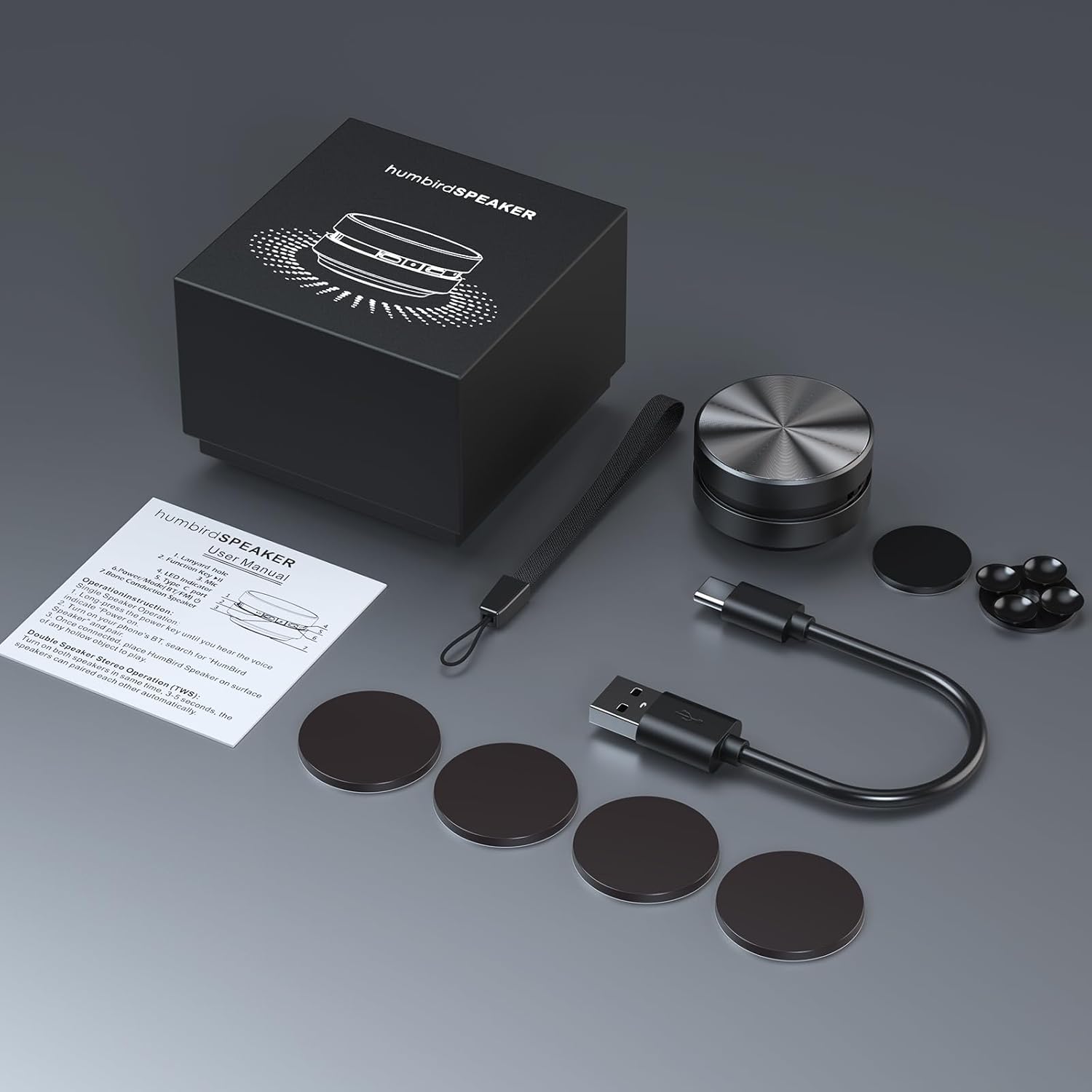
Image: Contents of the Docooler Bone Conduction Speaker package, showing the speaker, charging cable, and various adhesive pads for mounting.
ઉત્પાદન ઓવરview
The Docooler Bone Conduction Speaker is a compact device with a minimalist design. It features a durable aluminum alloy casing and a Type-C charging port. The speaker utilizes Bluetooth 5.0 for wireless connectivity and supports True Wireless Stereo (TWS) pairing for an enhanced audio experience.

છબી: આગળ view of the Docooler Bone Conduction Speaker, highlighting its key features such as Bone Conduction technology, Bluetooth 5.0, TWS, Type-C Charging Port, Fast Charge, and Aviation Aluminum Alloy construction.
સેટઅપ
1. સ્પીકરને ચાર્જ કરવો
- આપેલા USB Type-C કેબલને સ્પીકરના ચાર્જિંગ પોર્ટ સાથે કનેક્ટ કરો.
- કેબલના બીજા છેડાને સુસંગત USB પાવર સ્ત્રોત (દા.ત., વોલ એડેપ્ટર, કમ્પ્યુટર USB પોર્ટ) માં પ્લગ કરો.
- સૂચક લાઇટ ચાર્જિંગ સ્થિતિ બતાવશે (વિગતો માટે LED સૂચક વિભાગનો સંદર્ભ લો).
- સંપૂર્ણ ચાર્જ થવામાં સામાન્ય રીતે લગભગ 1-2 કલાક લાગે છે.
૩. બ્લૂટૂથ પેરિંગ (સિંગલ સ્પીકર)
- Press and hold the power button on the speaker until the indicator light flashes, indicating pairing mode.
- તમારા સ્માર્ટફોન અથવા અન્ય બ્લૂટૂથ-સક્ષમ ઉપકરણ પર, બ્લૂટૂથ સક્ષમ કરો અને ઉપલબ્ધ ઉપકરણો શોધો.
- Select "Humbird Speaker" (or similar name) from the list of devices.
- Once connected, the indicator light will remain solid, and you will hear a confirmation tone.
3. True Wireless Stereo (TWS) Pairing (Two Speakers)
For a stereo sound experience, you can pair two Docooler Bone Conduction Speakers together:
- Ensure both speakers are fully charged and powered off.
- Power on both speakers simultaneously. They will automatically attempt to pair with each other within 3-5 seconds.
- Once successfully paired, one speaker will act as the master (left channel) and the other as the slave (right channel). The indicator lights will reflect their connected status.
- Now, connect your smartphone or Bluetooth device to the master speaker as described in the "Bluetooth Pairing (Single Speaker)" section.

Image: Two Docooler Bone Conduction Speakers positioned for True Wireless Stereo (TWS) pairing, demonstrating their ability to create a wider soundstage.
ઓપરેટિંગ સૂચનાઓ
1. પાવર ચાલુ/બંધ
- પાવર ચાલુ: લગભગ 3 સેકન્ડ માટે પાવર બટન દબાવી રાખો.
- પાવર બંધ: લગભગ 3 સેકન્ડ માટે પાવર બટન દબાવી રાખો.
2. પ્લેબેક નિયંત્રણ
- ચલાવો/થોભો: એકવાર પાવર બટનને ટૂંકું દબાવો.
- આગળનો ટ્રેક: પાવર બટન બે વાર દબાવો.
- પાછલો ટ્રેક: Triple-press the power button.
3. વોલ્યુમ ગોઠવણ
Volume is primarily controlled via your connected Bluetooth device (smartphone, tablet, etc.). The speaker itself does not have dedicated volume buttons.
4. Using with Different Surfaces
The unique feature of this bone conduction speaker is its ability to use various surfaces as sound amplifiers. Experiment with different materials to discover unique sound profiles:
- Hollow Objects: Cardboard boxes, plastic containers, or hollow wooden surfaces often produce a fuller sound with enhanced bass.
- કાચની સપાટીઓ: Windows or glass tables can create a clear, crisp sound.
- Wooden Surfaces: Desks, guitars, or wooden panels can offer a warm, resonant tone.
- Car Dashboards: Can provide an immersive in-car audio experience.
Use the included adhesive pads or suction cup to securely attach the speaker to your chosen surface. The sound quality will vary significantly based on the material, size, and hollowness of the surface.

Image: The bone conduction speaker demonstrated on different surfaces, including a guitar, a kitchen countertop, a mirror, and a car dashboard, illustrating its versatility in sound production.
જાળવણી
To ensure the longevity and optimal performance of your Docooler Bone Conduction Speaker, follow these maintenance tips:
- સફાઈ: Wipe the speaker with a soft, dry cloth. Do not use abrasive cleaners, alcohol, or solvents.
- સંગ્રહ: ઉપયોગમાં ન હોય ત્યારે સ્પીકરને સીધા સૂર્યપ્રકાશ અને અતિશય તાપમાનથી દૂર ઠંડી, સૂકી જગ્યાએ સંગ્રહિત કરો.
- બેટરી સંભાળ: For best battery life, avoid fully discharging the speaker frequently. Charge it regularly, even if not used for extended periods.
મુશ્કેલીનિવારણ
| સમસ્યા | શક્ય ઉકેલ |
|---|---|
| સ્પીકર ચાલુ થતો નથી. | ખાતરી કરો કે સ્પીકર સંપૂર્ણપણે ચાર્જ થયેલ છે. તેને પાવર સ્ત્રોત સાથે કનેક્ટ કરો અને ફરી પ્રયાસ કરો. |
| બ્લૂટૂથ દ્વારા જોડી બનાવી શકાતી નથી. | Make sure the speaker is in pairing mode (flashing indicator light). Turn off and on Bluetooth on your device. Ensure the speaker is within range (up to 10 meters). |
| કોઈ અવાજ નથી કે ઓછો અવાજ નથી. | Increase the volume on your connected device. Ensure the speaker is placed on a suitable surface. Try a different surface. Check if the speaker is properly connected. |
| TWS જોડી નિષ્ફળ ગઈ. | Ensure both speakers are powered off before attempting TWS pairing. Power them on simultaneously and wait for automatic pairing. Disconnect any existing Bluetooth connections before TWS pairing. |
| અવાજની ગુણવત્તા નબળી છે. | Experiment with different surfaces. Hollow and resonant surfaces generally yield better results. Ensure the speaker is securely attached to the surface. |
વિશિષ્ટતાઓ
| લક્ષણ | વિગત |
|---|---|
| મોડેલનું નામ | અસ્થિ વહન સ્પીકર |
| મોડલ નંબર | RM |
| બ્રાન્ડ | ડોકુલર |
| સામગ્રી | એલ્યુમિનિયમ |
| ઉત્પાદન પરિમાણો | 2.76"D x 2.76"W x 1.97"H |
| વસ્તુનું વજન | 4.6 ઔંસ (0.13 કિલોગ્રામ) |
| કનેક્ટિવિટી ટેકનોલોજી | બ્લૂટૂથ |
| બ્લૂટૂથ રેન્જ | 10 મીટર |
| ઓડિયો આઉટપુટ મોડ | સ્ટીરિયો (TWS પેરિંગ સાથે) |
| સ્પીકર મહત્તમ આઉટપુટ પાવર | 3 વોટ્સ |
| આવર્તન પ્રતિભાવ | 20 KHz |
| સિગ્નલ ટુ-અવાજ ગુણોત્તર | 70 ડીબી |
| પાવર સ્ત્રોત | બેટરી સંચાલિત |
| બેટરી ક્ષમતા | 400 મિલીamp કલાક |
| નિયંત્રણ પદ્ધતિ | App (implied by product data, but primary control is physical buttons) |
| વોટરપ્રૂફ છે | ખોટું |
વોરંટી અને આધાર
The Docooler Bone Conduction Speaker comes with a limited warranty. For specific warranty details, please refer to the documentation included with your purchase or contact Docooler customer service.
If you encounter any issues or have questions not covered in this manual, please contact Docooler customer support through their official channels. Contact information can typically be found on the product packaging or the official Docooler webસાઇટ