
OTL Technologies PK0980
OTL Technologies Pokemon Pikachu Wireless Bluetooth Kids Headphones PK0980 Instruction Manual
Model: PK0980
1. પરિચય
This manual provides essential information for the safe and effective use of your OTL Technologies Pokemon Pikachu Wireless Bluetooth Kids Headphones, model PK0980. Please read this manual thoroughly before using the product and retain it for future reference.
2. સલામતી માહિતી
સલામત કામગીરી સુનિશ્ચિત કરવા અને નુકસાન અટકાવવા માટે, નીચેની સાવચેતીઓનું પાલન કરો:
- ઉંમર યોગ્યતા: These headphones are suitable for children aged 3 years and above.
- વોલ્યુમ નિયંત્રણ: The headphones feature two safe volume settings: 85 dB and 95 dB. Always select the appropriate volume level for the listening environment to protect hearing. Prolonged exposure to loud noise may cause hearing damage.
- પાણી પ્રતિકાર: આ ઉત્પાદન છે પાણી પ્રતિરોધક નથી. Avoid exposure to water or moisture to prevent damage.
- સફાઈ: Do not use harsh chemicals or strong detergents to clean the headphones. Use a soft, dry cloth.
- છૂટા પાડવા: Do not attempt to disassemble, repair, or modify the headphones. This will void the warranty and may cause damage or injury.
- પર્યાવરણીય જાગૃતિ: Do not use headphones in situations where an inability to hear surrounding noise may present a danger (e.g., while cycling, driving, or near operating machinery).
- બેટરી સલામતી: The headphones contain a Lithium-ion battery. Do not expose to extreme temperatures or dispose of in fire.
3. પેકેજ સામગ્રી
ખાતરી કરો કે બધી વસ્તુઓ પેકેજમાં હાજર છે:
- 1x OTL Technologies Pokemon Pikachu Wireless Bluetooth Kids Headphones
- 1x USB Type-C ચાર્જિંગ કેબલ
- 1x 3.5mm Audio Sharing Cable
- 1x Instruction Leaflet (this manual)

Image: Headphones and accessories neatly packaged in the box.
4. ઉત્પાદન ઓવરview
તમારા હેડફોનના ઘટકો અને નિયંત્રણોથી પરિચિત થાઓ.
4.1 Headphone Structure

છબી: આગળ view of the headphones, showcasing the Pikachu design on the earcups and the adjustable headband.

છબી: ટોચ view of the headphones, showing the foldable design and the headband's cushioning.
૨.૨ નિયંત્રણો અને બંદરો

Image: Close-up of the right earcup, displaying the power button, volume controls, and charging port.

છબી: વિગતવાર view of the volume limit switch, allowing selection between 85 dB and 95 dB.
- પાવર બટન: હેડફોન ચાલુ/બંધ કરવા અને બ્લૂટૂથ પેરિંગ માટે વપરાય છે.
- વોલ્યુમ બટનો: સાંભળવાની માત્રાને સમાયોજિત કરો.
- Volume Limit Switch: Toggle between 85 dB and 95 dB maximum volume levels.
- યુએસબી ટાઇપ-સી પોર્ટ: હેડફોન ચાર્જ કરવા માટે.
- 3.5mm ઓડિયો જેક: For wired connection using the included audio cable.
- માઇક્રોફોન: હેન્ડ્સ-ફ્રી કોલ્સ માટે સંકલિત.
4.3 Adjustable Headband

Image: Close-up of the extendable headband, showing numbered adjustment points for a customized fit.
The headband is extendable to provide a flexible and customized fit for various head sizes. Adjust both sides evenly for optimal comfort.
5. સેટઅપ
૨.૧ હેડફોન ચાર્જ કરવા
પ્રથમ ઉપયોગ કરતા પહેલા, હેડફોનને સંપૂર્ણપણે ચાર્જ કરો.
- હેડફોન પરના ચાર્જિંગ પોર્ટ સાથે USB Type-C ચાર્જિંગ કેબલ કનેક્ટ કરો.
- USB કેબલના બીજા છેડાને સુસંગત USB પાવર સ્ત્રોત (દા.ત., કમ્પ્યુટર USB પોર્ટ, USB વોલ એડેપ્ટર) સાથે કનેક્ટ કરો.
- LED સૂચક ચાર્જિંગ સ્થિતિ બતાવશે. સંપૂર્ણ ચાર્જ થવામાં લગભગ 2 કલાક લાગે છે.
- Once fully charged, the LED indicator will change (refer to the instruction leaflet for specific LED behavior) and the headphones will provide up to 24 hours of playback time.
5.2 બ્લૂટૂથ પેરિંગ
તમારા હેડફોનને વાયરલેસ રીતે ઉપકરણ સાથે કનેક્ટ કરવા માટે:
- ખાતરી કરો કે હેડફોન ચાર્જ થયા છે.
- પાવર બટન દબાવો અને પકડી રાખો જ્યાં સુધી LED સૂચક ફ્લેશ ન થાય, જે પેરિંગ મોડ સૂચવે છે.
- On your device (e.g., smartphone, tablet, laptop), enable Bluetooth and search for available devices.
- Select "OTL Pikachu" or a similar name from the list of found devices.
- Once connected, the LED indicator will change (e.g., solid blue) and a confirmation tone may sound.
- The headphones have a working distance of up to 10 meters from the paired device.
૪.૩ વાયર્ડ કનેક્શન (વૈકલ્પિક)
You can use the headphones with the included 3.5mm audio cable for devices without Bluetooth or when the battery is depleted.
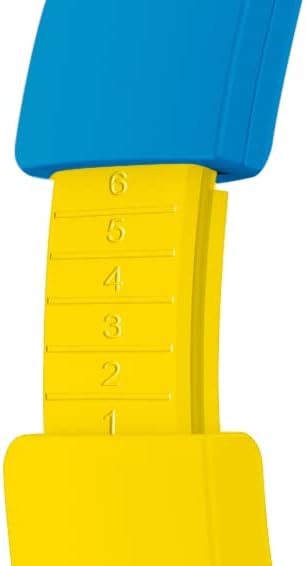
Image: The included 3.5mm audio cable for direct connection to devices.
- Plug one end of the 3.5mm audio cable into the audio jack on the headphones.
- Plug the other end into the 3.5mm audio output of your device.
- The headphones will operate in passive mode, and Bluetooth functionality will be disabled.
૫. હેડફોન ચલાવવું
6.1 પાવર ચાલુ/બંધ
- પાવર ચાલુ કરવા માટે: Press and hold the Power button for approximately 3 seconds. The LED indicator will light up.
- પાવર ઓફ કરવા માટે: Press and hold the Power button for approximately 3 seconds. The LED indicator will turn off.
૫.૩ વોલ્યુમ ગોઠવવું
- અવાજ વધારો: '+' બટન દબાવો.
- અવાજ ધીમો: '-' બટન દબાવો.
- Setting Maximum Volume: Use the volume limit switch (85 dB / 95 dB) located on the earcup to set the desired maximum safe listening level.
૫.૪ સંગીત પ્લેબેક અને કોલ્સ
- ચલાવો/થોભો: Press the Power button once during music playback.
- આગળનો ટ્રેક: '+' બટન દબાવો અને પકડી રાખો.
- પાછલો ટ્રેક: '-' બટન દબાવો અને પકડી રાખો.
- જવાબ/કૉલ સમાપ્ત કરો: Press the Power button once during an incoming call or to end an active call.
- કૉલ નકારો: Press and hold the Power button during an incoming call.
6.4 Using the Sharing Cable
The included sharing cable allows two pairs of headphones to listen to the same audio source simultaneously.
- Connect the main 3.5mm audio cable from your audio source to the first pair of headphones.
- Connect one end of the sharing cable to the available 3.5mm audio jack on the first pair of headphones.
- Connect the other end of the sharing cable to the 3.5mm audio jack on the second pair of headphones.
- Both headphones will now receive audio from the same source.
7. જાળવણી
- સફાઈ: Wipe the headphones with a soft, dry, lint-free cloth. Do not use liquid cleaners or aerosols.
- સંગ્રહ: જ્યારે ઉપયોગમાં ન હોય, ત્યારે હેડફોનને સીધા સૂર્યપ્રકાશ અને અતિશય તાપમાનથી દૂર ઠંડી, સૂકી જગ્યાએ રાખો. ફોલ્ડેબલ ડિઝાઇન કોમ્પેક્ટ સ્ટોરેજ માટે પરવાનગી આપે છે.
- બેટરી સંભાળ: To prolong battery life, avoid fully discharging the battery frequently. Charge the headphones regularly, even if not in constant use.
8. મુશ્કેલીનિવારણ
| સમસ્યા | સંભવિત કારણ | ઉકેલ |
|---|---|---|
| હેડફોન ચાલુ થતા નથી. | બેટરી ખતમ થઈ ગઈ છે. | Charge the headphones using the provided USB Type-C cable. |
| બ્લૂટૂથ દ્વારા જોડી બનાવી શકાતી નથી. | હેડફોન પેરિંગ મોડમાં નથી; ડિવાઇસ બ્લૂટૂથ બંધ છે; ડિવાઇસથી ખૂબ દૂર છે. | Ensure headphones are in pairing mode (flashing LED). Turn Bluetooth on your device. Move headphones closer to the device (within 10 meters). Try restarting both devices. |
| No sound when connected. | Volume too low; incorrect audio source selected; wired cable not fully inserted. | Increase headphone and device volume. Check if the correct audio output is selected on your device. Ensure the 3.5mm cable is fully inserted if using wired mode. Check the volume limit switch. |
| Sound is distorted or cuts out. | Low battery; interference; too far from device. | Charge the headphones. Move away from other wireless devices. Reduce distance to the paired device. |
9. સ્પષ્ટીકરણો
| મોડલ નંબર | PK0980 |
| કનેક્ટિવિટી ટેકનોલોજી | વાયરલેસ (બ્લુટુથ) |
| વાયરલેસ કોમ્યુનિકેશન ટેકનોલોજી | બ્લૂટૂથ |
| વય શ્રેણી (વર્ણન) | Children (3+ years) |
| સામગ્રી | પ્લાસ્ટિક |
| ચાર્જિંગ સમય | લગભગ 2 કલાક |
| ભલામણ કરેલ ઉપયોગ | Personal Audio |
| સુસંગત ઉપકરણો | Laptop, Smartphones, Tablets (Bluetooth enabled) |
| નિયંત્રણ પ્રકાર | વોલ્યુમ નિયંત્રણ, રિમોટ |
| વસ્તુનું વજન | 160 ગ્રામ |
| પાણી પ્રતિકાર સ્તર | પાણી પ્રતિરોધક નથી |
| વધારાની સુવિધાઓ | Microphone included, Foldable design |
| સરેરાશ બેટરી જીવન | 24 કલાક |
| બેટરી સેલ કમ્પોઝિશન | લિથિયમ-આયન |
| રંગ | પીળો |
| ઇયર પ્લેસમેન્ટ | કાન પર |
| ફોર્મ ફેક્ટર | ઓવર-કાન |
| અવબાધ | 32 ઓહ્મ |
| અવાજ નિયંત્રણ | અવાજ અલગતા |
| આવર્તન પ્રતિભાવ | 20000 હર્ટ્ઝ |
| સંવેદનશીલતા | 85 ડીબી |
| હેડફોન જેક | 3.5 મીમી જેક |
| ઉત્પાદન પરિમાણો | 16 x 7 x 17 સેમી |
Ask a question about this manual
Ask about setup, troubleshooting, compatibility, parts, safety, or missing instructions. Manuals+ will review the question and use this page’s manual context to help answer it.