
1. પરિચય
This manual provides instructions for the Generic RC-799M infrared replacement remote control. This remote is designed to operate various Onkyo A/V receivers and components. It offers a straightforward, ready-to-use solution without complex programming.
મહત્વપૂર્ણ નોંધ: This is a replacement remote and may not offer all functions of your original Onkyo remote. Please review the compatibility section carefully.
2. સુસંગતતા
The Generic RC-799M remote control is compatible with a range of Onkyo A/V receivers. Please ensure your specific model is listed below before use. If your model is not listed, this remote may not be compatible.
Compatible Onkyo Models include:
- RC-717M
- RC-763M
- TX-NR906
- TX-NR626
- એચટી-આર 520
- RC-687M
- RC-690M
- RC-649M
- RC-807M
- TX-NR1008
- TX-SR502
- TX-SR706
- HT-S5600
- TX-SR502S
- TX-SR706S
This remote is designed to control Onkyo and INTEGRA components only. It cannot be programmed to control other brands of televisions or devices.
3. સેટઅપ
The Generic RC-799M remote control requires two AA batteries (not included) for operation. No programming is required; simply insert the batteries, and the remote will be ready to use with compatible Onkyo A/V receivers.
3.1. બેટરી સ્થાપિત કરી રહ્યા છીએ
- રિમોટ કંટ્રોલની પાછળના ભાગમાં બેટરી કમ્પાર્ટમેન્ટ કવર શોધો.
- કવરને નીચે તરફ સ્લાઇડ કરો અથવા તેને ખોલવા માટે લેચ દબાવો.
- બે નવી AA બેટરીઓ દાખલ કરો, ખાતરી કરો કે પોઝિટિવ (+) અને નેગેટિવ (-) ટર્મિનલ્સ કમ્પાર્ટમેન્ટની અંદરના નિશાનો સાથે યોગ્ય રીતે ગોઠવાય છે.
- બેટરી કમ્પાર્ટમેન્ટ કવરને ફરીથી સ્થાને સ્લાઇડ કરીને બદલો જ્યાં સુધી તે સુરક્ષિત રીતે ક્લિક ન થાય.

છબી ૨.૧: પાછળ view રિમોટ કંટ્રોલનું, બેટરી કમ્પાર્ટમેન્ટ દર્શાવે છે.
Once batteries are installed, the remote is ready for immediate use with your compatible Onkyo A/V receiver.
4. રીમોટ કંટ્રોલનું સંચાલન
This remote control operates using infrared (IR) technology. Point the remote directly at your Onkyo A/V receiver and ensure there are no obstructions between the remote and the receiver's IR sensor.
4.1. મૂળભૂત કાર્યો
The remote features standard buttons for common A/V receiver functions. While the exact layout may vary slightly from your original remote, the functions are generally intuitive.
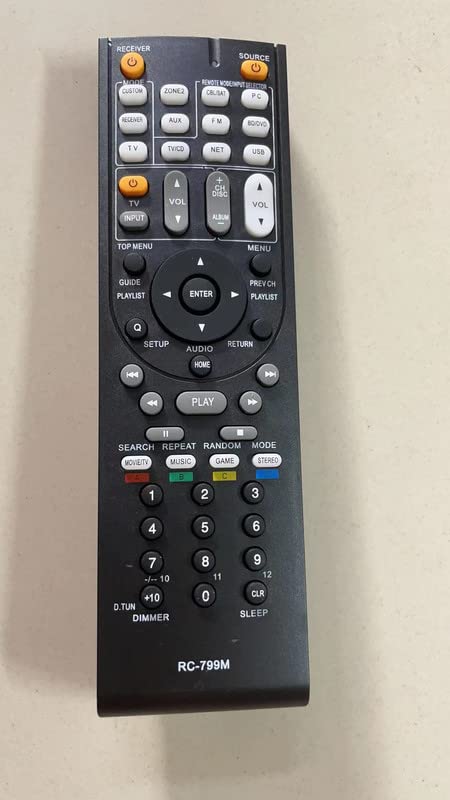
છબી 2: આગળ view રિમોટ કંટ્રોલનું, તેના બટન લેઆઉટને પ્રદર્શિત કરે છે.
- શક્તિ: રીસીવર ચાલુ અથવા બંધ કરે છે.
- વોલ્યુમ અપ/ડાઉન: ઓડિયો વોલ્યુમ સમાયોજિત કરે છે.
- ઇનપુટ પસંદગીકાર: Cycles through available audio/video inputs.
- નેવિગેશન બટનો: For menu navigation (if supported by your receiver).
- પ્લેબેક નિયંત્રણો: Play, Pause, Stop, Fast Forward, Rewind (for connected media devices, if supported).
Refer to your Onkyo A/V receiver's original manual for specific button functions and their corresponding operations.
5. જાળવણી
To ensure optimal performance and longevity of your remote control, follow these simple maintenance guidelines:
- સફાઈ: રિમોટ કંટ્રોલને નરમ, સૂકા કપડાથી સાફ કરો. પ્રવાહી ક્લીનર્સ, સોલવન્ટ્સ અથવા ઘર્ષક સામગ્રીનો ઉપયોગ કરશો નહીં, કારણ કે આ સપાટી અથવા આંતરિક ઘટકોને નુકસાન પહોંચાડી શકે છે.
- બેટરી રિપ્લેસમેન્ટ: Replace batteries when the remote's response becomes sluggish or stops working. Always replace both batteries at the same time with new AA batteries. Do not mix old and new batteries, or different types of batteries.
- સંગ્રહ: If the remote will not be used for an extended period, remove the batteries to prevent leakage, which can damage the remote. Store the remote in a cool, dry place away from direct sunlight and extreme temperatures.
- ટીપાં ટાળો: Protect the remote from drops and impacts, which can damage its internal circuitry.
6. મુશ્કેલીનિવારણ
જો તમને તમારા રિમોટ કંટ્રોલમાં સમસ્યા આવે, તો નીચેના મુશ્કેલીનિવારણ પગલાં અજમાવી જુઓ:
- રિમોટ પ્રતિસાદ આપતું નથી:
- Ensure the remote has fresh AA batteries installed correctly.
- Check for any obstructions between the remote and the A/V receiver's IR sensor.
- Make sure you are pointing the remote directly at the receiver.
- Verify that your Onkyo A/V receiver model is listed in the compatibility section of this manual.
- કેટલાક કાર્યો કામ કરતા નથી:
- As a replacement remote, it may not support all advanced or specific functions of your original Onkyo remote. This is normal.
- Confirm that the function you are trying to use is supported by your specific Onkyo A/V receiver model.
- Remote controls other devices unintentionally:
- This remote is designed for Onkyo and INTEGRA components only. It cannot be programmed for other brands. Ensure you are not attempting to control non-compatible devices.
7. સ્પષ્ટીકરણો
| લક્ષણ | વિગત |
|---|---|
| મોડેલનું નામ | RC-799M |
| બ્રાન્ડ | સામાન્ય |
| કનેક્ટિવિટી ટેકનોલોજી | ઇન્ફ્રારેડ (IR) |
| સુસંગત ઉપકરણો | Various Onkyo A/V Receivers (see Compatibility section) |
| પાવર સ્ત્રોત | 2 x AA બેટરી (શામેલ નથી) |
| બટનોની સંખ્યા | 10 |
| ખાસ લક્ષણો | Cannot be programmed; controls Onkyo & INTEGRA components only; no mute button. |
8. વોરંટી માહિતી
આ ઉત્પાદન એ સાથે આવે છે 90-દિવસની વોરંટી from the date of purchase. This warranty covers manufacturing defects. It does not cover damage caused by misuse, accidents, unauthorized modifications, or battery leakage. Please retain your proof of purchase for warranty claims.
9. આધાર
For further assistance or inquiries regarding this product, please contact the seller directly through the platform where the purchase was made. Provide your order number and a detailed description of the issue for prompt support.