પરિચય
This user manual provides comprehensive instructions for the assembly, operation, maintenance, and troubleshooting of your SAMSUNG Auto Rotating TV Stand. Designed for 55-inch televisions, this stand offers the flexibility to view content both vertically and horizontally, enhancing your viewing experience. It is compatible with specific Samsung TV models, including the QN95B and QN700B Series.
મહત્વપૂર્ણ સલામતી માહિતી
Please read all safety warnings and instructions carefully before assembling and using the product. Failure to follow these instructions may result in property damage, injury, or death. Keep this manual for future reference.
- એસેમ્બલી પહેલાં ખાતરી કરો કે બધા ઘટકો હાજર છે અને તેમને કોઈ નુકસાન થયું નથી.
- Do not exceed the maximum weight capacity or screen size specified for this stand.
- Always use two or more people to lift and position the television onto the stand.
- ટીપિંગ અટકાવવા માટે સ્ટેન્ડને સ્થિર, સમતલ સપાટી પર મૂકો.
- Keep children and pets away from the stand during assembly and operation.
- Do not attach any accessories (e.g., webcam) to the TV when using the auto-rotating feature, as this may interfere with rotation.
બૉક્સમાં શું છે
ખાતરી કરો કે નીચેના બધા ઘટકો તમારા પેકેજમાં શામેલ છે:
- 55in Auto Rotating Stand (2022)
- વપરાશકર્તા માર્ગદર્શિકા
- (Additional assembly hardware such as screws, bolts, and tools are typically included but not explicitly listed in the provided data.)
સેટઅપ અને એસેમ્બલી
Follow these steps to correctly assemble your SAMSUNG Auto Rotating TV Stand and mount your television.
1. અનપેકિંગ અને ઘટક ઓળખ
Carefully remove all components from the packaging. Lay them out on a soft, clean surface to prevent scratches. Identify all parts against the packing list.

આકૃતિ 1: ફ્રન્ટ view of the assembled Auto Rotating TV Stand.
2. Assembling the Stand Base
Attach the three tripod legs to the central column of the stand. Ensure they are securely fastened according to the included hardware instructions. The legs provide stability for the television.

આકૃતિ 2: બાજુ view illustrating the stand's structure.
3. Attaching the TV Mounting Plate
The stand features a VESA compatible mounting plate (400x300 VESA compatible). Secure the mounting plate to the top of the stand's central column. Ensure all screws are tightened to prevent wobbling.

આકૃતિ 3: પાછળ view of the mounting plate with VESA holes.
4. Mounting the Television
This stand is designed for 55-inch televisions and is compatible with SAMSUNG QN95B and QN700B Series models. Carefully align the VESA mounting holes on your television with the corresponding holes on the stand's mounting plate. Use the appropriate screws provided with your TV or stand to secure the television. It is highly recommended to have at least two people for this step to prevent injury or damage to the TV.
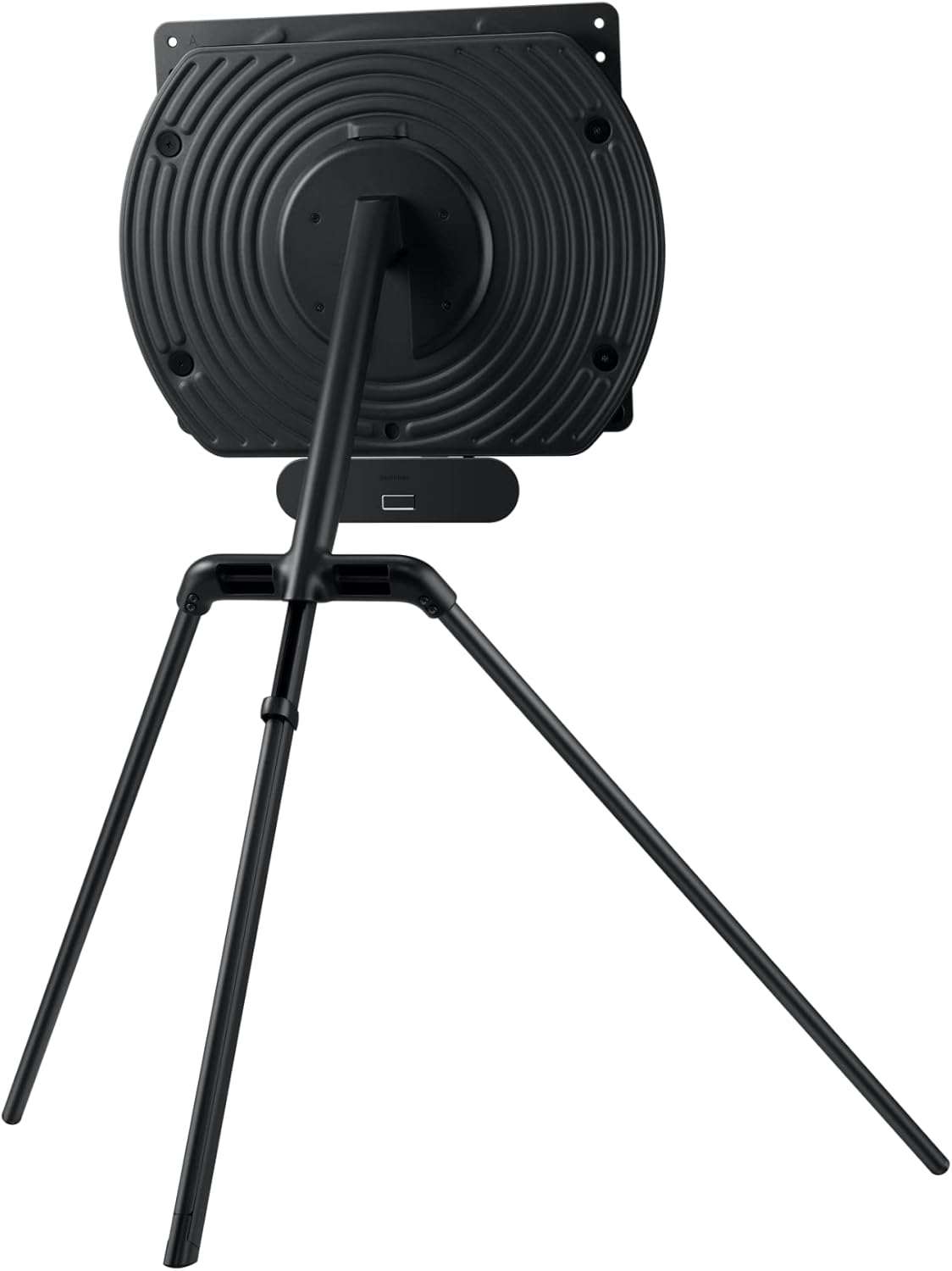
આકૃતિ 4: બાજુ view of the stand with a mounted television.
ઓપરેટિંગ સૂચનાઓ
The SAMSUNG Auto Rotating TV Stand allows for dynamic content viewing by rotating your television between horizontal and vertical orientations.
1. Auto-Rotation Function
To rotate your television, use the dedicated auto-rotate button on your compatible Samsung TV remote control. Pressing this button will initiate a smooth 90-degree rotation of the screen, allowing you to switch between landscape and portrait modes. Ensure no obstacles are in the path of the TV during rotation.

Figure 5: Auto-rotation in action, controlled by remote.
2. Mobile Content Mirroring
Enhance your mobile viewing experience by mirroring content from your Samsung mobile device directly to the large screen. This feature is supported on Samsung mobile devices running Android version 10 or higher. When mirroring vertical content, the stand will automatically adjust the TV to a vertical orientation, utilizing the full screen without black bars.

Figure 6: Mobile mirroring to the Auto Rotating TV Stand.

આકૃતિ 7: ઉદાample of vertical content display.

આકૃતિ 8: ઉદાample of horizontal content display.
જાળવણી અને સંભાળ
Proper care will ensure the longevity and optimal performance of your Auto Rotating TV Stand.
- સફાઈ: Use a soft, dry cloth to wipe down the stand. For stubborn marks, a slightly damp cloth with mild detergent can be used, followed by drying thoroughly. Avoid abrasive cleaners or solvents.
- નિરીક્ષણ: Periodically check all screws and connections to ensure they remain tight. Loose connections can affect stability and rotation.
- પર્યાવરણ: Keep the stand in a dry environment, away from direct sunlight and extreme temperatures.
મુશ્કેલીનિવારણ
If you encounter issues with your SAMSUNG Auto Rotating TV Stand, refer to the following common problems and solutions.
| સમસ્યા | સંભવિત કારણ | ઉકેલ |
|---|---|---|
| Stand does not rotate. |
|
|
| TV appears unstable on the stand. |
|
|
| Mobile mirroring not working. |
|
|
જો આ ઉકેલો અજમાવ્યા પછી પણ સમસ્યા ચાલુ રહે, તો વધુ સહાય માટે કૃપા કરીને સેમસંગ ગ્રાહક સપોર્ટનો સંપર્ક કરો.
વિશિષ્ટતાઓ
| લક્ષણ | વિગત |
|---|---|
| મોડલ નંબર | VG-ARAB43STD/ZA |
| બ્રાન્ડ | સેમસંગ |
| ઉત્પાદન પરિમાણો | 29.98 x 37.65 x 41.37 ઇંચ |
| વસ્તુનું વજન | 26.8 પાઉન્ડ |
| માઉન્ટિંગ પ્રકાર | ફ્લોર માઉન્ટ |
| ચળવળનો પ્રકાર | ફેરવો |
| સામગ્રી | ધાતુ |
| રંગ | કાળો |
| મહત્તમ સુસંગત કદ | 55 ઇંચ |
| ન્યૂનતમ સુસંગત કદ | 55 ઇંચ |
| સુસંગત ઉપકરણો | Television (Samsung QN95B and QN700B Series) |
| VESA સુસંગતતા | 400x300 |
| યુપીસી | 887276651811 |
વોરંટી અને આધાર
For warranty information, please refer to the documentation included with your purchase or visit the official Samsung website. For technical support, product registration, or service inquiries, please contact Samsung customer service through their official channels.
Supportનલાઇન સપોર્ટ: www.samsung.com/us/support/


