
1. ઉત્પાદન ઓવરview
The COTX-X3 is a versatile indoor device designed to function as a Full Helium Hotspot, a LoRaWAN Gateway, and a FlexiMining compatible unit. It enables users to participate in decentralized networks, contributing to and earning from various blockchain and Web૩ સેવાઓ.
મુખ્ય લાક્ષણિકતાઓમાં શામેલ છે:
- Helium Full Hotspot for HNT crypto mining with low power consumption (approximately 10W).
- Standard LoRaWAN IoT Gateway supporting various frequency plans (US915, EU868, CN470, AS923-1/2/3/4, IN865, KR920, AU915).
- COTX FlexiMining compatibility, allowing installation of multiple mining applications for diverse crypto rewards.
- Integration with Home Assistant for smart home automation.
- Remote management of FlexiMining applications via COTX Hotspot Cloud Service.
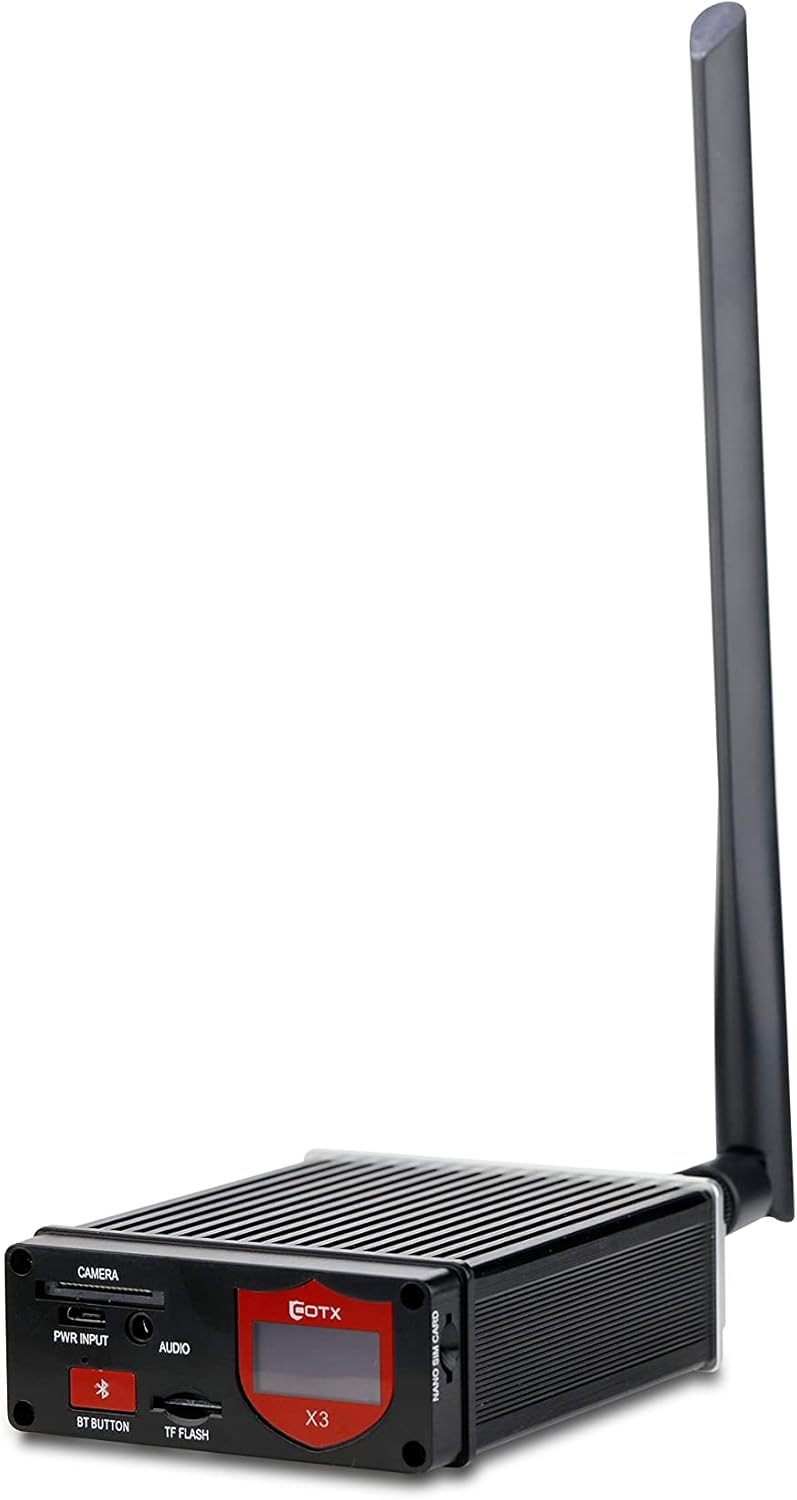
આકૃતિ 1: ફ્રન્ટ view of the COTX-X3 Indoor Full Helium Hotspot with its external LoRa antenna.
2. પેકેજ સામગ્રી
ખાતરી કરો કે નીચે સૂચિબદ્ધ બધી વસ્તુઓ તમારા પેકેજમાં શામેલ છે:
- 1 x COTX X3 Hotspot Device
- 1 x External 3.5dBi LoRa Antenna (SMA interface)
- 1 x પાવર એડેપ્ટર
- Ethernet Cable (may vary by region/package)
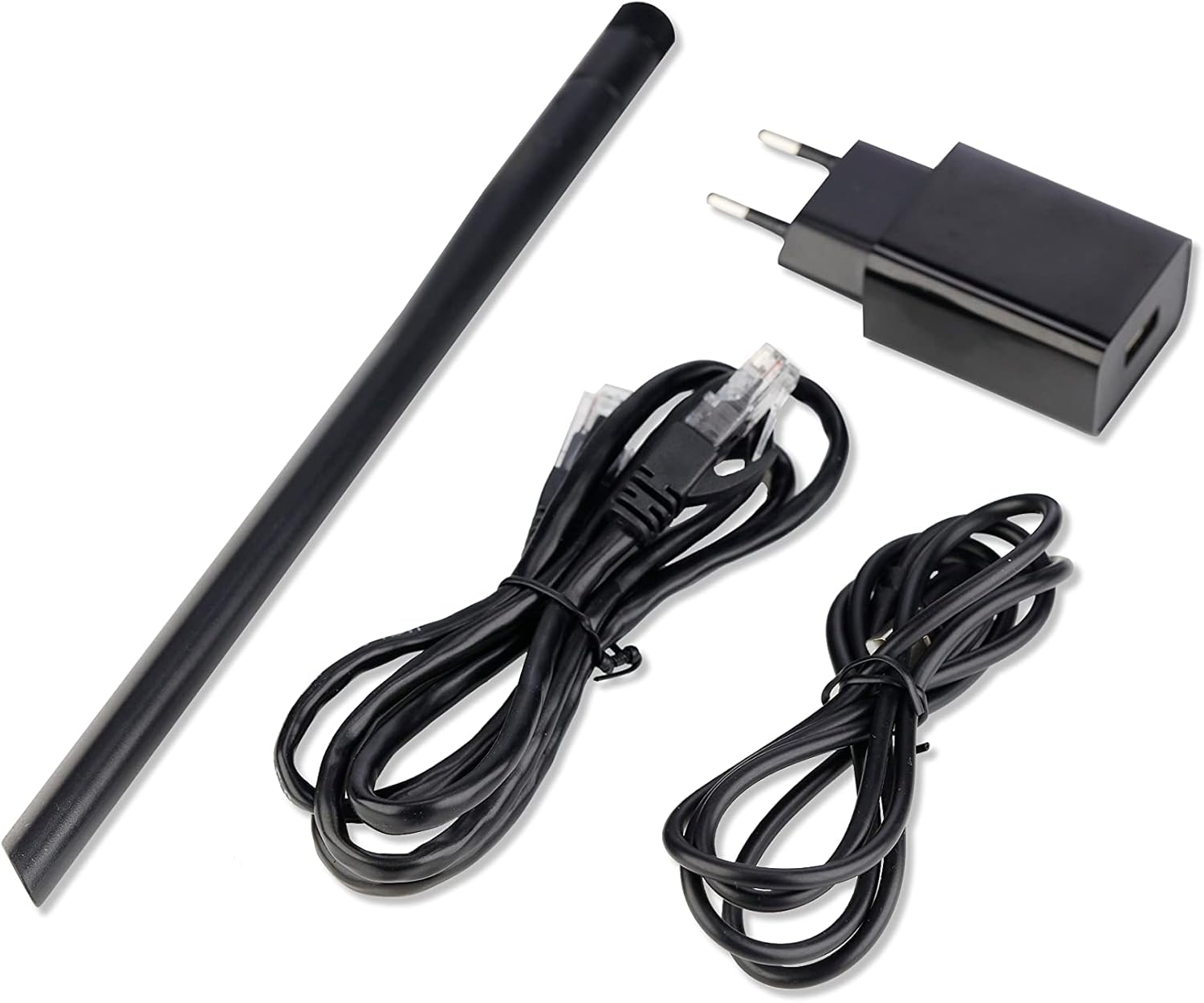
Figure 2: Included accessories: LoRa antenna, power adapter, and Ethernet cables.
3. Physical Components and Ports
3.1 ફ્રન્ટ પેનલ
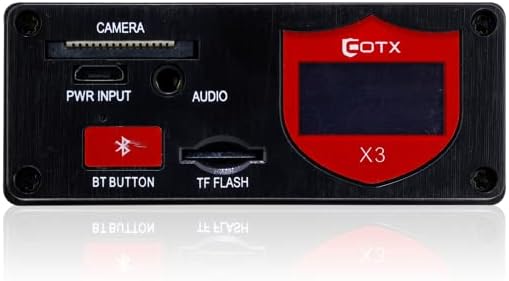
આકૃતિ 3: વિગતવાર view of the COTX-X3 front panel.
- કૅમેરા: આરક્ષિત બંદર.
- PWR INPUT: Power input port (5V AC).
- ઓડિયો: Reserved audio port.
- BT BUTTON: Press and hold for 5 seconds to activate Bluetooth.
- TF FLASH: માઇક્રો SD કાર્ડ સ્લોટ.
- એલઇડી ડિસ્પ્લે સ્ક્રીન: Displays IP address and status of BLE, Internet, Ethernet, and Wi-Fi.
- સિસ્ટમ એલઇડી: Indicates device status (OFF: Non Power, Blinking: System Bootup, On: Operating).
3.2 રીઅર પેનલ
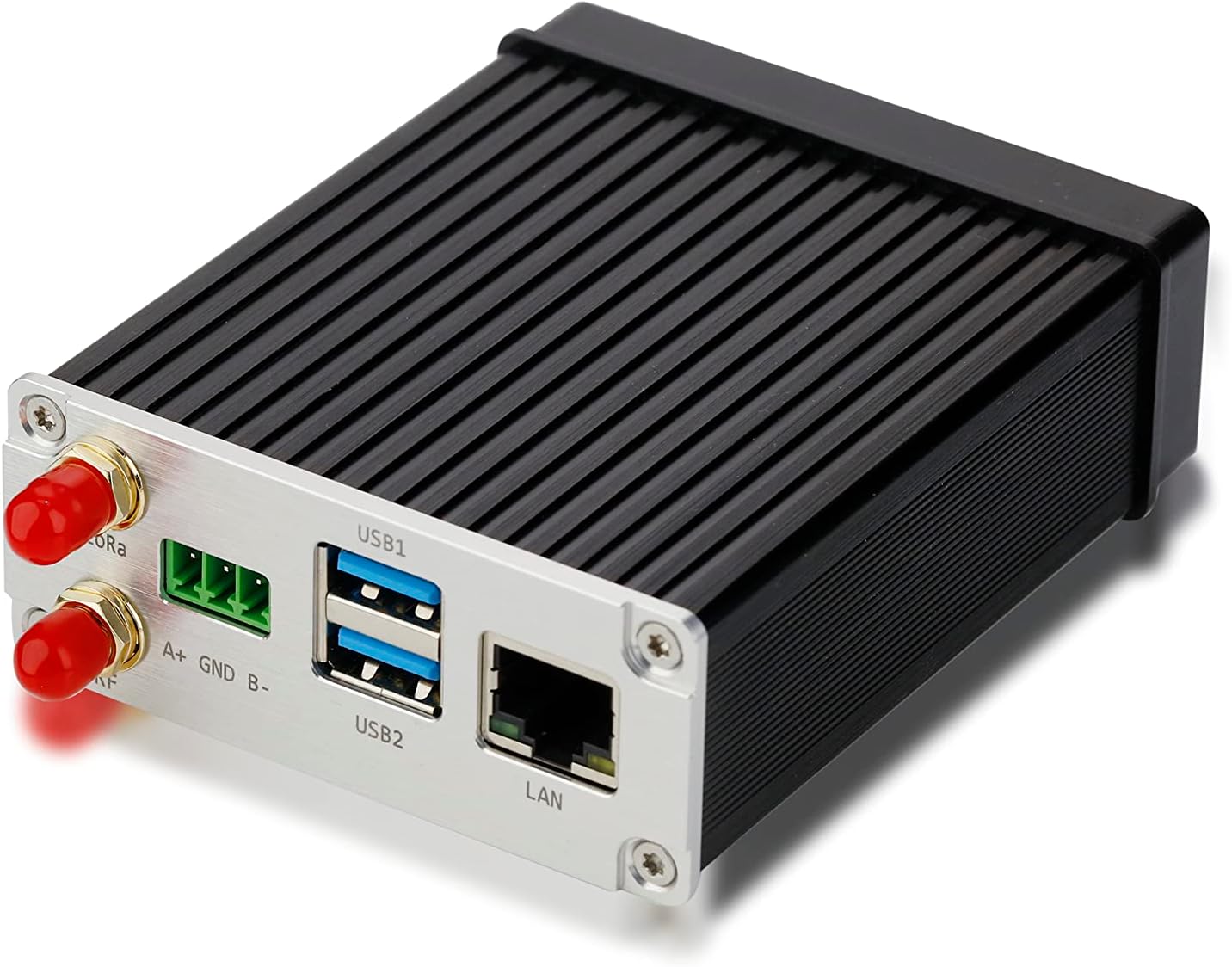
આકૃતિ 4: પાછળ view of the COTX-X3 showing connectivity options.
- LoRa Antenna Ports: Connect the external LoRa antenna here.
- USB1 / USB2: પેરિફેરલ કનેક્શન માટે USB પોર્ટ.
- લ LANન: 10/100/1000M Ethernet interface (RJ-45) for wired network connection.
4. સેટઅપ માર્ગદર્શિકા
- માઇક્રો એસડી કાર્ડ દાખલ કરો: Ensure the 32GB Micro SD card (standard configuration) is properly inserted into the TF FLASH slot on the front panel.
- Attach LoRa Antenna: Carefully screw the external 3.5dBi LoRa antenna into the designated SMA interface port on the rear panel. Ensure it is securely fastened but do not overtighten.
- નેટવર્કથી કનેક્ટ કરો:
- વાયર્ડ કનેક્શન: Connect an Ethernet cable from your router or network switch to the LAN port on the rear panel of the COTX-X3.
- વાયરલેસ કનેક્શન: The device supports 2.4 / 5GHz 802.11AC Wi-Fi. Initial setup may require a wired connection for configuration, or you can use the Bluetooth pairing process.
- પાવર કનેક્ટ કરો: Plug the power adapter into the PWR INPUT port on the front panel, then connect the adapter to a power outlet.
- પ્રારંભિક બુટ-અપ: The System LED will blink during boot-up. Once the device is operating, the LED will remain solid. The LED Display Screen will show the IP address and network status.
5. ઓપરેટિંગ સૂચનાઓ
5.1 Helium Miner Operation
The COTX-X3 functions as a Helium Full Hotspot, participating in the Helium network to provide LoRaWAN coverage and earn HNT cryptocurrency. Once connected to the internet and powered on, the device will begin its operation as a Helium miner. Specific Helium network configurations and wallet setup are typically managed through the Helium application or associated tools.
5.2 LoRaWAN Gateway Functionality
As a standard LoRaWAN IoT Gateway, the COTX-X3 facilitates communication for LoRaWAN-enabled devices. It supports various global frequency plans, which can be adjusted online:
- US915
- EU868
- CN470
- AS923-1, AS923-2, AS923-3, AS923-4
- IN865
- KR920
- AU915
Refer to the COTX Knowledge Base for detailed instructions on changing frequency plans.
5.3 FlexiMining Applications
The COTX-X3 is FlexiMining compatible, allowing users to install and run multiple decentralized applications to earn various crypto rewards. Supported FlexiMining applications include:
- computecoin
- મિસ્ટરિયમ
- EarnApp
- storj
- ScPrime
- PreSearch
- honeygain
- Peer2Profit
- IPRoyal
- Meson Network
- TRAFFMONETIZER
All FlexiMining applications can be managed remotely through the COTX Hotspot Cloud Service (cotx-sg.io). The device includes a 1-year FlexiMining Package Service for installation of these apps without extra charge.
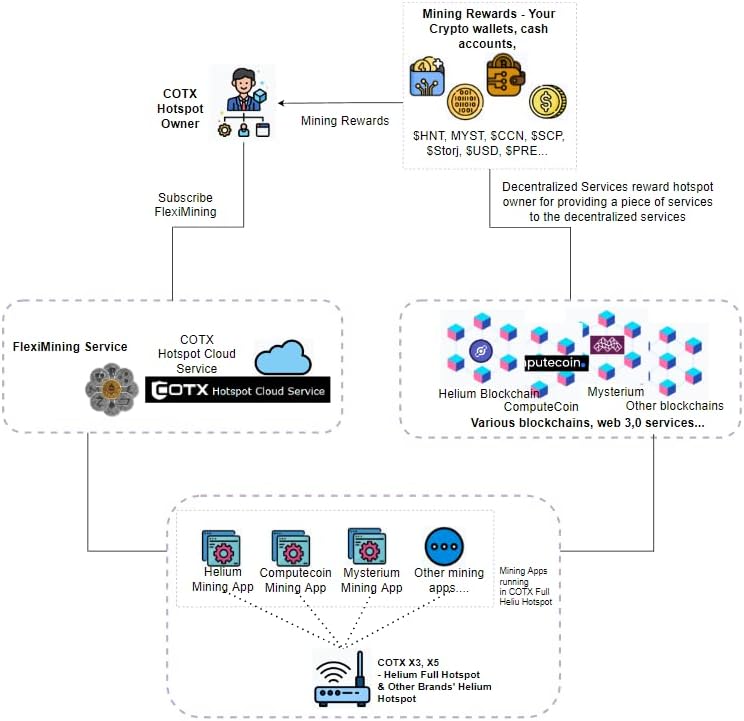
આકૃતિ 5: ઓવરview of the FlexiMining ecosystem and reward flow.
૬.૪ બ્લૂટૂથ કાર્યક્ષમતા
To activate Bluetooth 5.0 on the COTX-X3, press and hold the "BT BUTTON" on the front panel for 5 seconds. This can be used for initial setup or pairing with compatible devices.
5.5 System LED and Display Screen
Monitor the status of your device using the System LED and the integrated LED Display Screen:
- સિસ્ટમ એલઇડી:
- બંધ: ઉપકરણ સંચાલિત નથી.
- ઝબકવું: સિસ્ટમ બુટ થઈ રહી છે.
- ચાલુ (સોલિડ): ઉપકરણ સામાન્ય રીતે કાર્ય કરે છે.
- એલઇડી ડિસ્પ્લે સ્ક્રીન: Provides real-time information including the device's IP address and the current status of Bluetooth (BLE), Internet connectivity, Ethernet connection, and Wi-Fi connection.
6. જાળવણી
To ensure optimal performance and longevity of your COTX-X3, follow these maintenance guidelines:
- પ્લેસમેન્ટ: Place the device in a well-ventilated area, away from direct sunlight, excessive heat, and moisture.
- સફાઈ: ઉપકરણના બાહ્ય ભાગને સાફ કરવા માટે નરમ, સૂકા કપડાનો ઉપયોગ કરો. પ્રવાહી ક્લીનર્સ અથવા એરોસોલ્સનો ઉપયોગ કરશો નહીં.
- સૉફ્ટવેર અપડેટ્સ: Regularly check for and apply software updates. The device runs on Ubuntu 20.04, and updates are crucial for security, performance, and new features. Refer to the COTX Knowledge Base for update procedures.
- માઇક્રો એસડી કાર્ડ: While the device comes with a 32GB Micro SD card, ensure it is not removed during operation. If replacement is necessary, use a high-quality card and follow official COTX instructions for imaging.
- એન્ટેના કનેક્શન: Periodically check that the LoRa antenna is securely connected. A loose connection can impact performance.
7. મુશ્કેલીનિવારણ
This section provides solutions to common issues. For more detailed troubleshooting or complex problems, please refer to the COTX Knowledge Base or contact customer support.
| સમસ્યા | સંભવિત કારણ | ઉકેલ |
|---|---|---|
| Device does not power on (System LED OFF) | No power supply; faulty power adapter or cable. | Check power connection to the device and wall outlet. Ensure the power adapter is functioning correctly. |
| No network connectivity (Ethernet/Wi-Fi status on LED screen shows error) | Ethernet cable disconnected; Wi-Fi not configured or out of range; router issue. | Verify Ethernet cable connection. For Wi-Fi, ensure correct credentials and signal strength. Restart your router. |
| System LED blinking continuously, device not operating | Device stuck in boot-up; corrupted Micro SD card. | Power cycle the device. If issue persists, the Micro SD card may need re-imaging or replacement. Consult COTX support. |
| LoRaWAN or Helium mining performance issues | Antenna not properly connected; incorrect frequency plan; network congestion. | Ensure antenna is securely attached. Verify the correct frequency plan is selected for your region. Check network conditions. |
8. સ્પષ્ટીકરણો
| લક્ષણ | વર્ણન |
|---|---|
| ડિઝાઇન | એલ્યુમિનિયમ એલોય + પ્લાસ્ટિક |
| CPU | ક્વાડ-કોર કોર્ટેક્સ-A72 @1.5GHz |
| રેમ | 4GB LPDDR4-3200 SDRAM |
| મુખ્ય બોર્ડ | રાસ્પબેરી Pi 4B |
| ઓપરેટિંગ સિસ્ટમ | ઉબુન્ટુ 20.04 |
| માઇક્રો SD કાર્ડ સ્લોટ | 1* Micro SD card (32G capacity as standard configuration) |
| ઈથરનેટ | 1* 10/100/1000M interface (RJ-45) |
| Wi-Fi | ૨.૪ / ૫GHz ૮૦૨.૧૧AC |
| બ્લૂટૂથ | 1* Bluetooth 5.0 |
| લોરા એન્ટેના | 1* External 3.5dBi LoRa antenna, SMA interface |
| સિસ્ટમ એલ.ઈ.ડી. | OFF (Non Power) / Blinking (System Bootup) / On (Operating) |
| એલઇડી ડિસ્પ્લે સ્ક્રીન | IP address & the status of BLE, Internet, Ethernet, and Wi-Fi |
| Supported Frequency Plans | US915, EU868, CN470, AS923-1, AS923-2, AS923-3, AS923-4, IN865, KR920, AU915 |
| પાવર વપરાશ | આશરે 10W |
| વસ્તુનું વજન | 2.2 પાઉન્ડ |
| રંગ | કાળો |
| ભાગtage | 5 વોલ્ટ (AC) |
9. આધાર અને સંપર્ક માહિતી
For further assistance, technical support, or inquiries, please use the following resources:
- ગ્રાહક સેવા ઇમેઇલ: services@cotxnetworks.com
- COTX Knowledge Base: support.cotxnetworks.com/support/solutions
- Discord Community: discord.gg/cotxnetworks
- સત્તાવાર Webસાઇટ: cotx-store.com
Please have your product model number (X3-US915) and any relevant error messages ready when contacting support.