
1. ઉત્પાદન ઓવરview
The GIGABYTE G24F 2 is a 23.8-inch gaming monitor designed for an immersive visual experience. It features a Super Speed IPS panel, Full HD (1920 x 1080) resolution, and a high refresh rate for smooth gameplay.

આકૃતિ 1.1: ફ્રન્ટ view of the GIGABYTE G24F 2 gaming monitor.
મુખ્ય લક્ષણો:
- પેનલનું કદ: 23.8-inch SS IPS display
- ઠરાવ: 1920 x 1080 (FHD)
- પ્રતિભાવ સમય: 1ms MPRT
- તાજું દર: ૧૬૫ હર્ટ્ઝ (૧૮૦ હર્ટ્ઝ સુધી ઓવરક્લોકેબલ)
- રંગ સંતૃપ્તિ: ૧૦૧% DCI-P3, ૧૩૬.૭% sRGB
- તેજ: 300 cd/m2 (TYP)
- કોન્ટ્રાસ્ટ રેશિયો: 1100:1
- કનેક્ટિવિટી: 2 x HDMI 2.0, 1 x DisplayPort 1.2 (HDR capable), 2 x USB 3.2 Gen 1 Downstream, 1 x USB 3.2 Gen 1 Upstream, 1 x Earphone Jack
- ખાસ લક્ષણો: OSD Sidekick, Aim Stabilizer, Black Equalizer, Dashboard, Crosshair, Timer, Counter, Auto-Update, Smart OD, HDR Ready, Flicker-free, Kensington lock
2. સલામતી માહિતી
મોનિટરનો ઉપયોગ કરતા પહેલા કૃપા કરીને બધી સૂચનાઓ કાળજીપૂર્વક વાંચો. ભવિષ્યના સંદર્ભ માટે આ માર્ગદર્શિકા રાખો.
- આગ કે આંચકાના જોખમોથી બચવા માટે મોનિટરને વરસાદ કે ભેજના સંપર્કમાં ન લાવો.
- મોનિટર ખોલશો નહીં casing. અંદર કોઈ ઉપયોગ કરી શકાય તેવા ભાગો નથી. બધી સર્વિસિંગ લાયક કર્મચારીઓને સોંપો.
- મોનિટરને પડવાથી બચાવવા માટે તેને સ્થિર, સપાટ સપાટી પર મૂકો.
- મોનિટરની આસપાસ યોગ્ય વેન્ટિલેશનની ખાતરી કરો. વેન્ટિલેશનના છિદ્રોને અવરોધશો નહીં.
- ઉત્પાદક દ્વારા પૂરા પાડવામાં આવેલ પાવર એડેપ્ટર અને કેબલનો જ ઉપયોગ કરો.
- વીજળીના તોફાન દરમિયાન અથવા લાંબા સમય સુધી ઉપયોગ ન કરવામાં આવે ત્યારે મોનિટરને પાવર આઉટલેટમાંથી અનપ્લગ કરો.
- Clean the screen with a soft, lint-free cloth. Avoid using liquid cleaners directly on the screen.
3. પેકેજ સામગ્રી
ખાતરી કરો કે બધી વસ્તુઓ તમારા પેકેજમાં હાજર છે:
- GIGABYTE G24F 2 Monitor
- મોનિટર સ્ટેન્ડ (બેઝ અને નેક)
- પાવર કેબલ
- HDMI કેબલ
- USB Cable (Upstream)
- ક્વિક સ્ટાર્ટ ગાઇડ (QSG)
- વોરંટી કાર્ડ

આકૃતિ 3.1: પાછળ view of the monitor, illustrating the stand attachment area.
4. સેટઅપ
૧.૨ સ્ટેન્ડ એસેમ્બલ કરવું
- પેકેજિંગમાંથી મોનિટર અને સ્ટેન્ડના ઘટકો કાળજીપૂર્વક દૂર કરો.
- Attach the stand neck to the monitor panel. Ensure it clicks securely into place or is fastened with screws if provided.
- Attach the stand base to the stand neck. Tighten the thumb screw or screws at the bottom of the base.
- એસેમ્બલ કરેલા મોનિટરને સ્થિર, સપાટ સપાટી પર મૂકો.
4.2 મોનિટરને કનેક્ટ કરવું
યોગ્ય કેબલનો ઉપયોગ કરીને મોનિટરને તમારા કમ્પ્યુટર અને અન્ય ઉપકરણો સાથે કનેક્ટ કરો.

આકૃતિ 4.1: કનેક્ટિવિટી પોર્ટ્સનું નિરીક્ષણ કરો.
- પાવર કનેક્શન: પાવર કેબલને મોનિટરના પાવર ઇનપુટ સાથે અને પછી પાવર આઉટલેટ સાથે જોડો.
- વિડિઓ કનેક્શન:
- For optimal performance, use the DisplayPort 1.2 cable to connect to your computer's graphics card.
- Alternatively, use one of the two HDMI 2.0 ports.
- USB Upstream Connection: Connect the provided USB 3.2 Gen 1 Upstream cable from your computer to the monitor's upstream USB port to enable the monitor's downstream USB ports.
- USB Downstream Connections: Connect USB devices (e.g., keyboard, mouse) to the monitor's two USB 3.2 Gen 1 Downstream ports.
- ઓડિયો આઉટપુટ: હેડફોન અથવા બાહ્ય સ્પીકર્સને ઇયરફોન જેક સાથે કનેક્ટ કરો.
5. મોનિટરનું સંચાલન
5.1 પાવર ચાલુ/બંધ
Press the power button, usually located on the bottom or rear of the monitor, to turn the monitor on or off. The power indicator light will show the monitor's status.
૪.૧ ઓન-સ્ક્રીન ડિસ્પ્લે (OSD) મેનુ
The OSD menu allows you to adjust various monitor settings. Navigate the OSD using the joystick or buttons typically found on the rear of the monitor.

Figure 5.1: OSD Sidekick software for convenient monitor control.
For advanced control, install the OSD Sidekick software on your PC. This utility allows you to adjust monitor settings directly from your desktop.
૬.૨ ગેમિંગ સુવિધાઓ
The GIGABYTE G24F 2 includes several features to enhance your gaming experience:
- લક્ષ્ય સ્ટેબિલાઇઝર: Reduces motion blur and improves visual clarity in fast-paced games.
- બ્લેક ઇક્વિલાઇઝર: Enhances visibility in dark areas of the game without overexposing bright areas.

આકૃતિ 5.2: બ્લેક ઇક્વેલાઇઝર ક્રિયામાં.
- ડેશબોર્ડ: Displays real-time hardware information (e.g., CPU/GPU temperature, usage) directly on the screen.

Figure 5.3: Dashboard displaying system metrics.
- ક્રોસશેર: Provides a customizable on-screen crosshair to assist with aiming.

Figure 5.4: On-screen Crosshair.
- Timer/Counter: On-screen timers and counters for in-game tracking.
- Smart OD: Optimizes overdrive settings for the best response time.
- સ્વતઃ-અપડેટ: Ensures the monitor's firmware and OSD Sidekick software are up-to-date.
5.4 ડિસ્પ્લે સેટિંગ્સ
- તાજું દર: The monitor supports up to 165Hz, with an overclock option to 180Hz, for fluid motion.
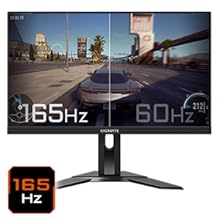
Figure 5.5: Visual comparison of 165Hz vs. 60Hz refresh rate.
- પ્રતિભાવ સમય: Enjoy a 1ms MPRT (Moving Picture Response Time) for minimal ghosting.
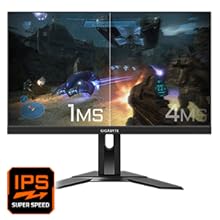
Figure 5.6: Visual comparison of 1ms vs. 4ms response time.
- રંગ ગામટ: The monitor covers 95% DCI-P3 and 125% sRGB for vibrant and accurate colors.
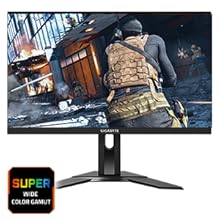
Figure 5.7: Wide color gamut for rich visuals.
- ઓછો વાદળી પ્રકાશ: Reduces blue light emissions to protect your eyes during extended use.
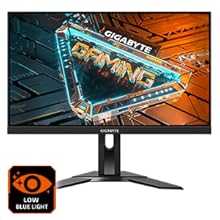
Figure 5.8: Low Blue Light feature for reduced eye strain.
- ફ્લિકર-ફ્રી: વધુ આરામદાયક બનાવવા માટે સ્ક્રીન ફ્લિકરિંગ દૂર કરે છે viewઅનુભવ.

Figure 5.9: Flicker-Free technology for comfortable viewing
5.5 Product Feature Video
વિડિઓ ૧: એક ઓવરview of the GIGABYTE G24F 2 monitor's features and specifications.
6. જાળવણી
યોગ્ય જાળવણી તમારા મોનિટરની આયુષ્ય સુનિશ્ચિત કરે છે.
- સ્ક્રીનની સફાઈ: નરમ, સૂકા, લિન્ટ-ફ્રી કપડાથી સ્ક્રીનને હળવેથી સાફ કરો. હઠીલા નિશાનો માટે, હળવા હાથે ડીampપાણી અથવા વિશિષ્ટ સ્ક્રીન ક્લીનરથી કાપડને ઢાંકી દો (કાપડા પર લગાવો, સીધા સ્ક્રીન પર નહીં).
- સી સાફ કરવુંasing: મોનિટર સાફ કરવા માટે નરમ, સૂકા કપડાનો ઉપયોગ કરો casing. ઘર્ષક ક્લીનર્સ ટાળો.
- વેન્ટિલેશન: Ensure the ventilation openings on the monitor are clear of dust and obstructions.
- પાવર બંધ: Turn off and unplug the monitor when not in use for extended periods.
7. મુશ્કેલીનિવારણ
If you encounter issues with your monitor, refer to the following table for common problems and solutions.
| સમસ્યા | સંભવિત કારણ | ઉકેલ |
|---|---|---|
| સ્ક્રીન પર કોઈ છબી નથી | Power cable not connected; Video cable not connected; Incorrect input source selected | પાવર અને વિડીયો કેબલ કનેક્શન તપાસો; OSD દ્વારા યોગ્ય ઇનપુટ સ્ત્રોત પસંદ કરો. |
| છબી ઝાંખી અથવા વિકૃત છે | Incorrect resolution; Loose video cable | ડિસ્પ્લે રિઝોલ્યુશન 1920x1080 પર સેટ કરો; ખાતરી કરો કે વિડિઓ કેબલ સુરક્ષિત રીતે જોડાયેલ છે. |
| હેડફોન/સ્પીકર્સમાંથી કોઈ અવાજ નથી | Audio cable not connected; Volume too low; Incorrect audio output selected on PC | Check audio cable connection; Adjust volume; Select monitor as audio output on PC. |
| યુએસબી પોર્ટ કામ કરતા નથી | USB upstream cable not connected | Connect the USB 3.2 Gen 1 Upstream cable from the monitor to your PC. |
| ટમટમતી સ્ક્રીન | Refresh rate issue; Faulty cable | Ensure refresh rate is set correctly; Try a different video cable. |
8. સ્પષ્ટીકરણો
Detailed technical specifications for the GIGABYTE G24F 2 monitor.

આકૃતિ 8.1: મોનિટરના પરિમાણો.
| લક્ષણ | વિગત |
|---|---|
| બ્રાન્ડ | GIGABYTE |
| મોડેલનું નામ | G24F 2 |
| મોડલ નંબર | 9DG24F2-00-1ABIN |
| સ્ક્રીન માપ | 23.8 ઇંચ |
| ઠરાવ | ૧૯૨૦ x ૧૦૮૦ પિક્સેલ્સ (FHD ૧૦૮૦p) |
| પાસા રેશિયો | 16:9 |
| ડિસ્પ્લે પ્રકાર | LCD (SS IPS Panel) |
| તાજું દર | 165 Hz (180Hz OC) |
| પ્રતિભાવ સમય | 1 Milliseconds (MPRT) |
| તેજ | 300 candela_per_square_meter (TYP) |
| કોન્ટ્રાસ્ટ રેશિયો | 1100:1 |
| રંગ સંતૃપ્તિ | ૧૦૧% DCI-P3, ૧૩૬.૭% sRGB |
| Viewએન્ગલ | 178 ડિગ્રી |
| કનેક્ટિવિટી | 2 x HDMI 2.0, 1 x DisplayPort 1.2, 2 x USB 3.2 Gen 1 Downstream, 1 x USB 3.2 Gen 1 Upstream, 1 x Earphone Jack |
| અનુકૂલનશીલ સમન્વયન | ફ્રીસિંક પ્રીમિયમ |
| પાવર વપરાશ | 17.5 વોટ્સ |
| વસ્તુનું વજન | 3.2 કિલોગ્રામ |
| આઇટમના પરિમાણો (D x W x H) | ૪૦.૩ડી x ૩૧.૫વોટ x ૩૦.૭એચ સેન્ટીમીટર |
| માઉન્ટિંગ પ્રકાર | વોલ માઉન્ટ |
| ઉત્પાદન લક્ષણો | Flicker-Free, Height Adjustment, High Dynamic Range, Tilt Adjustment |
9. વોરંટી અને સપોર્ટ
The GIGABYTE G24F 2 monitor comes with a 3 વર્ષની વોરંટી ઉત્પાદક પાસેથી.
For technical support, warranty claims, or further inquiries, please contact GIGABYTE customer service:
- ઉત્પાદક: GIGABYTE Technology (India) Pvt Ltd
- સરનામું: B-808, Naman Midtown, Elphinstone Road, Mumbai – 400013 – INDIA
- ફોન: +91-22-40633222
વોરંટી સેવા માટે કૃપા કરીને તમારી ખરીદીનો પુરાવો રાખો.