
પરિચય
This manual provides instructions for the Generic replacement infrared (IR) remote control, designed for use with various Devanti 4K UHD Smart LCD LED TV models. Compatible models include, but are not limited to, STV-668-UHD-55-BK, STV-668-UHD-50-BK, STV-668-UHD-65-BK, and STV-668-UHD-43-BK. This remote operates via infrared technology and typically requires no programming; simply insert batteries to begin use.
મહત્વપૂર્ણ નોંધ: As a replacement item, this remote control may not support all functions present on the original television remote. Please verify compatibility with your specific TV model before use.
સેટઅપ
બેટરી ઇન્સ્ટોલેશન
રિમોટ કંટ્રોલને ઓપરેશન માટે બે (2) AAA બેટરી (શામેલ નથી) ની જરૂર છે. બેટરી ઇન્સ્ટોલ કરવા માટે આ પગલાં અનુસરો:
- રિમોટ કંટ્રોલની પાછળના ભાગમાં બેટરી કમ્પાર્ટમેન્ટ કવર શોધો.
- Slide the cover downwards or press the latch (if present) and lift to remove it.
- બે AAA બેટરી દાખલ કરો, ખાતરી કરો કે ધન (+) અને ઋણ (-) ટર્મિનલ્સ કમ્પાર્ટમેન્ટની અંદરના નિશાનો સાથે યોગ્ય રીતે ગોઠવાય છે.
- બેટરી કમ્પાર્ટમેન્ટ કવરને ફરીથી સ્થાને સ્લાઇડ કરીને બદલો જ્યાં સુધી તે સુરક્ષિત રીતે ક્લિક ન થાય.

છબી: રિમોટ કંટ્રોલનો પાછળનો ભાગ, જેમાં બેટરી કમ્પાર્ટમેન્ટ ખુલ્લો છે, જે AAA બેટરી દાખલ કરવા માટે યોગ્ય દિશા દર્શાવે છે.
Once batteries are installed, the remote is ready for use. No additional programming is typically required.
ઓપરેટિંગ સૂચનાઓ
To operate your television with this remote control, ensure there is a clear line of sight between the remote's infrared emitter and the TV's IR receiver. Point the remote directly at the television.
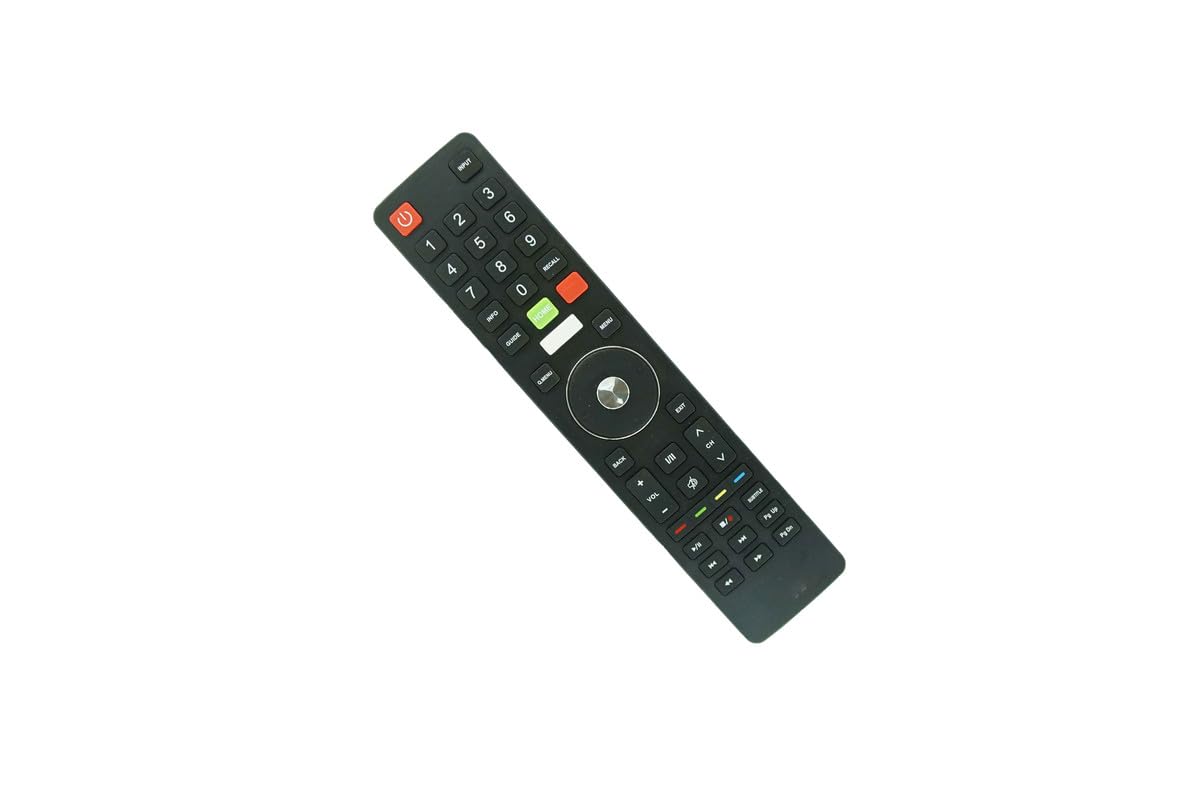
છબી: આગળ view of the remote control, displaying the layout of all functional buttons.
મૂળભૂત કાર્યો
- પાવર (લાલ બટન): ટેલિવિઝન ચાલુ અથવા બંધ કરે છે.
- ઇનપુટ: ઉપલબ્ધ ઇનપુટ સ્ત્રોતો (HDMI, AV, વગેરે) દ્વારા ચક્ર.
- નંબર કી (0-9): સીધા ચેનલો પસંદ કરો.
- VOL +/-: વોલ્યુમ સ્તરને સમાયોજિત કરે છે.
- CH ^/v: ચેનલ ઉપર અથવા નીચે બદલો.
- મ્યૂટ: ટેલિવિઝન ઓડિયોને શાંત કરે છે.
નેવિગેશન અને મેનુ કાર્યો
- મેનુ: ટેલિવિઝનના મુખ્ય મેનુને ઍક્સેસ કરે છે.
- Home (Green Button): સ્માર્ટ ટીવી હોમ સ્ક્રીન પર પાછા ફરે છે.
- નેવિગેશન પેડ (ઉપર/નીચે/ડાબે/જમણે/ઓકે): મેનુઓ નેવિગેટ કરવા અને પસંદગીઓની પુષ્ટિ કરવા માટે વપરાય છે.
- પાછળ: પાછલી સ્ક્રીન અથવા મેનૂ પર પાછા ફરે છે.
- બહાર નીકળો: Closes the current menu or application.
પ્લેબેક નિયંત્રણો
- ચલાવો/થોભો: મીડિયા પ્લેબેક શરૂ કરે છે અથવા થોભાવે છે.
- બંધ: મીડિયા પ્લેબેક બંધ કરે છે.
- ફાસ્ટ ફોરવર્ડ/રીવાઇન્ડ: Skips forward or backward in media.
- પાછલો/આગલો ટ્રેક: Navigates between tracks or chapters.
જાળવણી
- સફાઈ: રિમોટ કંટ્રોલને નરમ, સૂકા કપડાથી સાફ કરો. પ્રવાહી ક્લીનર્સ અથવા ઘર્ષક સામગ્રીનો ઉપયોગ કરશો નહીં.
- બેટરી રિપ્લેસમેન્ટ: જ્યારે રિમોટનો પ્રતિભાવ ધીમો પડી જાય અથવા કામ કરવાનું બંધ કરી દે ત્યારે બેટરી બદલો. હંમેશા બંને બેટરીઓને એક જ સમયે નવી બેટરીથી બદલો.
- સંગ્રહ: જો રિમોટનો લાંબા સમય સુધી ઉપયોગ ન થાય, તો લીકેજ અને સંભવિત નુકસાનને રોકવા માટે બેટરીઓ દૂર કરો. ઠંડી, સૂકી જગ્યાએ સ્ટોર કરો.
મુશ્કેલીનિવારણ
- રિમોટ પ્રતિસાદ આપતું નથી:
- Ensure batteries are correctly installed and not depleted. Replace with fresh batteries if necessary.
- રિમોટ અને ટીવીના IR રીસીવર વચ્ચે કોઈ અવરોધ છે કે નહીં તે તપાસો.
- Ensure you are pointing the remote directly at the television.
- કેટલાક કાર્યો કામ કરતા નથી:
- This is a replacement remote. Certain advanced or specific functions of your original TV remote may not be supported.
- Refer to your television's original manual for specific function details.
વિશિષ્ટતાઓ
- બ્રાન્ડ: સામાન્ય
- મોડલ નંબર: ઇઝીટ્રી16873
- કનેક્ટિવિટી ટેકનોલોજી: ઇન્ફ્રારેડ (IR)
- સુસંગત ઉપકરણો: Devanti 4K UHD Smart LCD LED Televisions (STV-668-UHD series)
- Maximum Number of Supported Devices: 1
- પાવર સ્ત્રોત: 2 x AAA બેટરી (શામેલ નથી)
- મહત્તમ શ્રેણી: 8 મીટર
- ઉત્પાદક: એસઝેડએચકેએચએક્સડી
વોરંટી અને આધાર
વોરંટી માહિતી
This product typically comes with a 90-day warranty from the date of purchase. Please retain your proof of purchase for any warranty claims.
ગ્રાહક આધાર
For questions regarding compatibility or if your specific TV model is not explicitly listed, please contact the seller or manufacturer for assistance. Provide your television's full model number when seeking support.