
1. ઉત્પાદન ઓવરview
The KETOTEK KT3100 is a versatile digital thermostat designed for precise temperature control in various applications. It features both heating and cooling functions, along with advanced timing modes, making it suitable for household use, heating/cooling equipment, incubators, greenhouses, and terrariums.
મુખ્ય લક્ષણો:
- તાપમાન નિયંત્રણ રેંજ: -40°C થી 120°C.
- પાવર ઇનપુટ: 100-250V, 50/60Hz.
- મહત્તમ લોડ: 16A, 3680W.
- સમય કાર્યો: F01 Cycle Timer, F02 Countdown ON, F03 Countdown OFF, F04 Countdown ON/OFF (0-99 hours, 59 minutes).
- તાપમાન માપાંકન: -9.9°C to 9.9°C adjustment.
- મેમરી કાર્ય: Retains settings after power loss.
- કાર્ય રીસેટ કરો: Allows restoration of factory settings.
- સેન્સર: NTC10K/B3950 temperature probe with a 3-meter cable.

Image 1.1: The KT3100 thermostat displaying its main features including heating/cooling, timing, calibration, memory, and reset functions.
2. સલામતી માહિતી
Please read all safety instructions before operating the device. Failure to follow these instructions may result in electric shock, fire, or personal injury.
- પાવર સપ્લાય વોલ્યુમની ખાતરી કરોtage matches the device's specifications (100-250V).
- Do not exceed the maximum load capacity of 16A / 3680W.
- Keep the device and sensor away from water or excessive moisture.
- ઉપકરણને ડિસએસેમ્બલ અથવા સુધારશો નહીં. બધી સર્વિસિંગ લાયક કર્મચારીઓને સોંપો.
- ઉપકરણની આસપાસ યોગ્ય વેન્ટિલેશનની ખાતરી કરો.
- સફાઈ કરતા પહેલા અથવા લાંબા સમય સુધી ઉપયોગમાં ન હોય ત્યારે ઉપકરણને પાવર આઉટલેટમાંથી અનપ્લગ કરો.
3. ઉત્પાદન ઘટકો
The KETOTEK KT3100 package includes the following items:
- 1 x KETOTEK KT3100 Digital Thermostat
- 1 x 3-meter NTC10K/B3950 Temperature Sensor
- ૧ x વપરાશકર્તા માર્ગદર્શિકા (આ દસ્તાવેજ)

Image 3.1: The KETOTEK KT3100 Digital Thermostat with its included 3-meter temperature sensor.
4. Device Layout and Display
Familiarize yourself with the thermostat's buttons and display indicators for effective operation.

છબી 4.1: આગળ view of the KT3100 thermostat with labeled components.
- મોડ બટન: Used to switch between temperature control and timing modes, and to confirm settings.
- સેટ બટન: Used to enter setting mode for parameters.
- યુપી બટન: Increases values or navigates up.
- ડાઉન બટન: Decreases values or navigates down.
- રીસેટ બટન: Small button for factory reset (requires a pin).
- માપેલ તાપમાન: Displays the current temperature detected by the sensor.
- Start Temperature (ON): The temperature at which the connected device turns ON.
- Stop Temperature (OFF): The temperature at which the connected device turns OFF.
- Heating/Cooling Indicator: Icon indicating active heating or cooling mode.
- Output Work Indicator: Light indicating when the output socket is active.

છબી 4.2: વિગતવાર view of the digital display showing temperature readings and set points.
5. ટેકનિકલ વિશિષ્ટતાઓ
| સ્પષ્ટીકરણ | મૂલ્ય |
|---|---|
| બ્રાન્ડ | કેટોટેક |
| મોડલ નંબર | KT3100 |
| ઇનપુટ વોલ્યુમtage | 100-250V |
| આવર્તન | 50/60Hz |
| મહત્તમ વર્તમાન | 16A |
| મેક્સ પાવર | 3680W |
| તાપમાન નિયંત્રણ શ્રેણી | -40°C ~ 120°C |
| તાપમાન સેન્સર | NTC10K/B3950, 3m cable |
| ડિસ્પ્લે પ્રકાર | એલસીડી |
| નિયંત્રણ પદ્ધતિ | ટચ બટનો |
| ખાસ લક્ષણો | Timing Function, Temperature Calibration, Memory, Reset |

Image 5.1: Physical dimensions of the KT3100 thermostat and its temperature sensor.
6. સેટઅપ
- અનપેક કરો: Carefully remove the KT3100 thermostat and its temperature sensor from the packaging.
- સેન્સર કનેક્ટ કરો: Plug the 3-meter temperature sensor into the designated port on the side of the thermostat.
- પોઝિશન સેન્સર: Place the sensor in the area where you wish to measure and control the temperature. Ensure it is not directly exposed to heat sources or drafts that could affect readings.
- Plug In Thermostat: Insert the KT3100 thermostat into a standard 230V wall outlet. The LCD display will illuminate, showing the current measured temperature.
- ઉપકરણ કનેક્ટ કરો: Plug the appliance you wish to control (e.g., heater, fan, refrigerator) into the socket on the front of the KT3100 thermostat.
7. ઓપરેટિંગ સૂચનાઓ
7.1. Temperature Control Mode
This mode allows you to set a desired temperature range for heating or cooling.
- પાવર ચાલુ: Plug in the thermostat. The display will show the current measured temperature.
- Set Start Temperature (ON): Press the 'MODE' button once. The 'Start Temperature' (ON) value will flash. Use the 'UP' and 'DOWN' buttons to adjust the desired temperature at which your appliance should turn ON.
- Set Stop Temperature (OFF): Press the 'MODE' button again. The 'Stop Temperature' (OFF) value will flash. Use the 'UP' and 'DOWN' buttons to adjust the desired temperature at which your appliance should turn OFF.
- સેટિંગ્સની પુષ્ટિ કરો: Press the 'MODE' button a third time to exit the setting mode and save your changes. The thermostat will now operate according to your set temperatures.
- Heating/Cooling Selection: The thermostat automatically detects whether to operate in heating or cooling mode based on the relationship between the Start and Stop temperatures. If Start Temp < Stop Temp, it's heating mode. If Start Temp > Stop Temp, it's cooling mode.
7.2. Timing Functions (F01-F04)
The KT3100 offers four timing modes for advanced control. To access these modes, press and hold the 'SET' button for approximately 3 seconds until 'F01' appears.
- F01: Cycle Timer Mode
This mode allows the device to cycle ON and OFF for set durations. Press 'SET' to enter F01 settings. Use 'UP'/'DOWN' to set ON hours/minutes, then 'SET' to move to OFF hours/minutes, then 'SET' to confirm. Press 'MODE' to exit.

Image 7.1: Display showing F01 Cycle Timer settings.
- F02: Countdown ON Mode
The device will remain OFF for a set countdown period, then turn ON and stay ON. Press 'UP'/'DOWN' to select F02, then 'SET' to enter settings. Set countdown hours/minutes. Press 'SET' to confirm. Press 'MODE' to exit.

Image 7.2: Display showing F02 Countdown ON settings.
- F03: Countdown OFF Mode
The device will remain ON for a set countdown period, then turn OFF and stay OFF. Press 'UP'/'DOWN' to select F03, then 'SET' to enter settings. Set countdown hours/minutes. Press 'SET' to confirm. Press 'MODE' to exit.
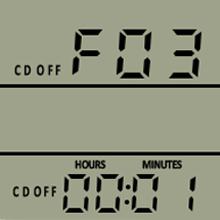
Image 7.3: Display showing F03 Countdown OFF settings.
- F04: Countdown ON/OFF Mode
The device will turn ON for a set period, then OFF for another set period, and then repeat. Press 'UP'/'DOWN' to select F04, then 'SET' to enter settings. Set ON hours/minutes, then 'SET' to move to OFF hours/minutes, then 'SET' to confirm. Press 'MODE' to exit.

Image 7.4: Display showing F04 Countdown ON/OFF settings.
7.3. તાપમાન માપાંકન
If you notice a discrepancy between the thermostat's reading and a known accurate thermometer, you can calibrate the sensor. Press and hold 'SET' for 3 seconds, then use 'UP'/'DOWN' to navigate to the calibration setting (usually indicated by 'CAL' or a similar symbol). Adjust the value between -9.9°C and 9.9°C to match the reference thermometer. Press 'SET' to confirm, then 'MODE' to exit.
7.4. મેમરી કાર્ય
The KT3100 automatically saves your settings. In case of a power outage, the device will retain its last programmed settings once power is restored.
7.5. કાર્ય રીસેટ કરો
To restore the thermostat to its factory default settings, locate the small reset button (usually a pinhole) on the device. Use a thin object (like a paperclip) to press and hold the reset button for a few seconds until the display indicates a reset has occurred.
8. અરજીઓ
The KETOTEK KT3100 Digital Thermostat is suitable for a wide range of temperature control applications:
- ઘર ગરમ કરવું/ઠંડક આપવી: Control electric heaters, fans, or portable air conditioners.
- રેફ્રિજરેશન: Maintain specific temperatures for refrigerators or freezers.
- ઇન્ક્યુબેટર્સ: Ensure stable temperatures for hatching eggs.
- ગ્રીનહાઉસ: Regulate temperature for optimal plant growth.
- સરિસૃપ ટેરેરિયમ્સ: Create a stable environment for reptiles and ampહિબિયન
- Aquaculture: Control water temperature in aquariums or fish tanks.

છબી ૪.૧: ઉદાહરણamples of common applications for the KT3100 thermostat.
9. જાળવણી
Proper maintenance ensures the longevity and accuracy of your KT3100 thermostat.
- સફાઈ: ઉપકરણને નરમ, સૂકા કપડાથી સાફ કરો. ઘર્ષક ક્લીનર્સનો ઉપયોગ કરશો નહીં અથવા ઉપકરણને પાણીમાં બોળશો નહીં.
- સેન્સર કેર: Keep the temperature sensor clean and free from debris. Avoid bending or damaging the sensor cable.
- સંગ્રહ: When not in use, store the thermostat in a cool, dry place away from direct sunlight and extreme temperatures.
10. મુશ્કેલીનિવારણ
If you encounter issues with your KT3100 thermostat, refer to the following common problems and solutions:
| સમસ્યા | સંભવિત કારણ | ઉકેલ |
|---|---|---|
| પ્રદર્શન ખાલી છે | No power; Device malfunction | Check power outlet; Ensure thermostat is properly plugged in; Try a different outlet. If still blank, contact support. |
| ખોટું તાપમાન વાંચન | Sensor dirty or damaged; Calibration needed; Sensor placed incorrectly | Clean sensor; Perform temperature calibration (Section 7.3); Reposition sensor away from direct heat/cold sources. |
| Appliance not turning ON/OFF | Incorrect temperature settings; Timing mode active; Appliance not plugged in or faulty | Verify Start/Stop temperature settings (Section 7.1); Check if a timing mode (F01-F04) is active (Section 7.2); Ensure appliance is functional and correctly plugged into the thermostat. |
| બટનો પ્રતિભાવવિહીન | કામચલાઉ સોફ્ટવેર ખામી | Unplug and replug the thermostat; Perform a factory reset (Section 7.5). |
11. વોરંટી અને સપોર્ટ
KETOTEK products are manufactured to high-quality standards. This product comes with a standard manufacturer's warranty against defects in materials and workmanship. For warranty claims, technical support, or service inquiries, please refer to the contact information provided with your purchase or visit the official KETOTEK webસાઇટ. વોરંટી માન્યતા માટે કૃપા કરીને તમારી ખરીદીનો પુરાવો રાખો.