
United LED24HS82A11
UNITED LED24HS82A11 24-inch HD Ready Smart Android TV User Manual
Model: LED24HS82A11
પરિચય
This user manual provides comprehensive instructions for the setup, operation, maintenance, and troubleshooting of your UNITED LED24HS82A11 24-inch HD Ready Smart Android TV. Please read this manual thoroughly before using your television to ensure proper and safe operation.
The UNITED LED24HS82A11 is a versatile 24-inch HD Ready Smart TV powered by Android 11, offering a wide range of entertainment options. It features pre-installed applications, built-in Chromecast and Airplay for seamless content streaming, and full internet connectivity via Wi-Fi and Ethernet. It also supports DVB/T2/S2/C, MPEG-4, and HEVC Main 10 for various broadcasting standards.
સલામતી માહિતી
આગ, ઇલેક્ટ્રિક આંચકો અથવા ઈજાથી બચવા માટે હંમેશા નીચેની સલામતી સાવચેતીઓનું પાલન કરો:
- ટીવીને વરસાદ અથવા ભેજ માટે ખુલ્લા ન કરો.
- વેન્ટિલેશનના પ્રારંભને અવરોધિત કરશો નહીં.
- ખાતરી કરો કે પાવર કોર્ડ પિંચ થયેલ નથી અથવા ચાલુ નથી.
- વીજળી પડતાં વાવાઝોડાં દરમિયાન અથવા લાંબા સમય સુધી ટીવીનો ઉપયોગ ન થાય ત્યારે ટીવીને અનપ્લગ કરો.
- તમામ સેવાનો સંદર્ભ લાયક સેવા કર્મચારીઓને આપો.
સેટઅપ
૧. અનપેકિંગ અને સ્ટેન્ડ ઇન્સ્ટોલેશન
Carefully remove the TV and all accessories from the packaging. Place the TV face down on a soft, clean surface to prevent screen damage.
Attach the two stand feet to the bottom of the TV using the provided screws. Ensure they are securely fastened.

આકૃતિ 1: બાજુ view of the UNITED LED24HS82A11 TV, illustrating its slim profile and potential port locations.
2. કનેક્ટિંગ કેબલ્સ
- શક્તિ: પાવર કોર્ડને ટીવીના પાવર ઇનપુટ સાથે અને પછી દિવાલના આઉટલેટ સાથે જોડો.
- એન્ટેના/કેબલ: Connect your antenna or cable TV coaxial cable to the "RF In" port.
- HDMI ઉપકરણો: બ્લુ-રે પ્લેયર્સ, ગેમ કન્સોલ અથવા સેટ-ટોપ બોક્સ જેવા બાહ્ય ઉપકરણોને HDMI પોર્ટ સાથે કનેક્ટ કરો.
- ઇથરનેટ (વૈકલ્પિક): વાયર્ડ ઇન્ટરનેટ કનેક્શન માટે, તમારા રાઉટરમાંથી ટીવીના LAN પોર્ટ સાથે ઇથરનેટ કેબલ કનેક્ટ કરો.
3. પ્રારંભિક સેટઅપ વિઝાર્ડ
Once powered on, the TV will guide you through the initial setup process. Follow the on-screen prompts to:
- તમારી પસંદગીની ભાષા પસંદ કરો.
- Connect to your Wi-Fi network (if not using Ethernet).
- Sign in with your Google account (optional, but recommended for full Smart TV features).
- Scan for available TV channels (Antenna/Cable).
ઓપરેટિંગ
રિમોટ કંટ્રોલ ઓવરview
Familiarize yourself with the buttons on the remote control for easy navigation and control of your TV's functions.
મૂળભૂત ટીવી કાર્યો
- પાવર ચાલુ/બંધ: રિમોટ અથવા ટીવી પર પાવર બટન દબાવો.
- વોલ્યુમ નિયંત્રણ: વોલ્યુમ અપ/ડાઉન બટનોનો ઉપયોગ કરો.
- ચેનલ પસંદગી: ચેનલ ઉપર/નીચે બટનો અથવા નંબર પેડનો ઉપયોગ કરો.
- ઇનપુટ સ્ત્રોત: Press the "Source" or "Input" button to switch between HDMI, TV, and other inputs.
Smart TV Features (Android 11)
Your TV runs on Android 11, providing access to a vast ecosystem of apps and services.

Figure 2: The UNITED LED24HS82A11 TV showcasing its Android TV home screen, featuring popular streaming applications like YouTube, Prime Video, and Netflix.
- હોમ સ્ક્રીન: Navigate the home screen to access pre-installed apps (Netflix, YouTube, Prime Video), recommended content, and settings.
- Google Play Store: Download additional apps, games, and content from the Google Play Store.
- Chromecast બિલ્ટ-ઇન: Cast content directly from your compatible smartphone, tablet, or computer to the TV. Look for the Cast icon in supported apps.
- એરપ્લે: For Apple devices, use Airplay to stream videos, photos, and music from your iPhone, iPad, or Mac to the TV.
- ઇન્ટરનેટ કનેક્ટિવિટી:
- Wi-Fi: Go to Settings > Network & Internet to connect to your wireless network.
- ઈથરનેટ: If an Ethernet cable is connected, the TV will automatically use the wired connection.
જાળવણી
ટીવી સાફ કરવું
- સફાઈ કરતા પહેલા હંમેશા ટીવીને અનપ્લગ કરો.
- Use a soft, lint-free cloth to gently wipe the screen. For stubborn marks, dampen the cloth slightly with water or a screen cleaner specifically designed for electronics.
- ટીવી સાફ કરો casinનરમ, સૂકા કપડાથી ઘર્ષક ક્લીનર્સ અથવા સોલવન્ટનો ઉપયોગ કરવાનું ટાળો.
સૉફ્ટવેર અપડેટ્સ
Your TV may receive software updates to improve performance and add new features. You can check for updates via Settings > Device Preferences > About > System update.
મુશ્કેલીનિવારણ
જો તમને તમારા ટીવીમાં સમસ્યાઓ આવે, તો નીચેની સામાન્ય સમસ્યાઓ અને ઉકેલોનો સંદર્ભ લો:
| સમસ્યા | સંભવિત કારણ / ઉકેલ |
|---|---|
| નો પાવર | પાવર કોર્ડ ટીવી અને દિવાલના આઉટલેટમાં સુરક્ષિત રીતે પ્લગ થયેલ છે કે નહીં તે તપાસો. અલગ આઉટલેટ અજમાવી જુઓ. |
| કોઈ ચિત્ર નથી / અવાજ નથી | Ensure the correct input source is selected (e.g., HDMI 1, TV). Check cable connections. For TV channels, perform a channel scan. |
| Wi-Fi થી કનેક્ટ થઈ શકતું નથી | તમારા Wi-Fi પાસવર્ડની ચકાસણી કરો. તમારા રાઉટર અને ટીવીને ફરીથી શરૂ કરો. ખાતરી કરો કે ટીવી તમારા Wi-Fi સિગ્નલની રેન્જમાં છે. |
| રીમોટ કંટ્રોલ કામ કરતું નથી | બેટરીઓ તપાસો અને બદલો. ખાતરી કરો કે રિમોટ અને ટીવીના IR સેન્સર વચ્ચે કોઈ અવરોધો નથી. |
| એપ્લિકેશનો લોડ થઈ રહી નથી / ધીમી કામગીરી | Check your internet connection speed. Clear app cache (Settings > Apps > [App Name] > Clear cache). Restart the TV. |
વિશિષ્ટતાઓ
Below are the technical specifications for the UNITED LED24HS82A11 TV:
| લક્ષણ | સ્પષ્ટીકરણ |
|---|---|
| બ્રાન્ડ | સંયુક્ત |
| મોડલ નંબર | LED24HS82A11 |
| સ્ક્રીન માપ | 24 ઇંચ |
| ડિસ્પ્લે ટેકનોલોજી | એલઇડી |
| ઠરાવ | 768p (1366 x 768 પિક્સેલ્સ) |
| તાજું દર | 60 હર્ટ્ઝ |
| ઓપરેટિંગ સિસ્ટમ | એન્ડ્રોઇડ 11 |
| કનેક્ટિવિટી | Wi-Fi, Ethernet, HDMI, RF, USB |
| ખાસ લક્ષણો | Flat Screen, Chromecast Built-in, Airplay, Pre-installed Apps (Netflix, YouTube, Prime Video) |
| પાસા રેશિયો | 16:9 |
| ઉત્પાદનના પરિમાણો (L x W x H) | 12D x 60.5W x 43.2H સેન્ટિમીટર |
| સમાવાયેલ ઘટકો | 1 mini AV adapter cable, 1 remote control with 2 AAA 1.5V batteries |
| ઉર્જા કાર્યક્ષમતા વર્ગ | F |
| પાવર વપરાશ (SDR) | 21.0 ડબ્લ્યુ |
| પાવર વપરાશ (HDR) | 21.0 ડબ્લ્યુ |
| પાવર વપરાશ (સ્ટેન્ડ-બાય) | 0.3 ડબ્લ્યુ |

Figure 3: The energy efficiency label for the UNITED LED24HS82A11 TV, indicating an 'F' energy class rating and 21 kWh per 1000 hours of operation.
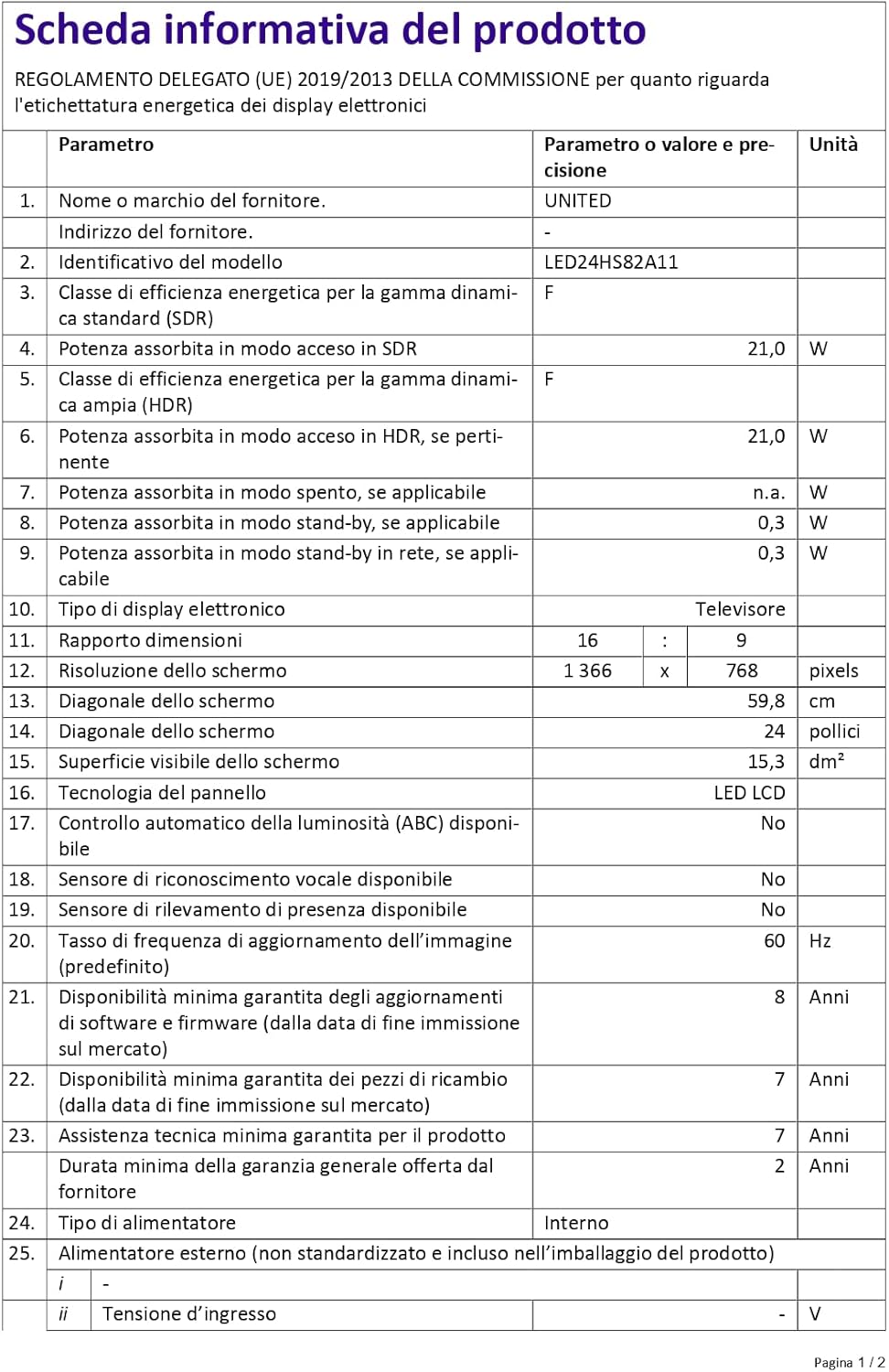
Figure 4: A detailed product information sheet for the UNITED LED24HS82A11 TV, providing comprehensive technical specifications and compliance details.
For more detailed information, please refer to the official EPREL database: https://eprel.ec.europa.eu/qr/1087921
વોરંટી અને આધાર
Your UNITED LED24HS82A11 TV comes with the following support and warranty provisions:
- Minimum General Warranty: 2 વર્ષ
- ટેકનિકલ સહાય ઉપલબ્ધતા: 7 વર્ષ
- સોફ્ટવેર અપડેટ્સની ગેરંટી નીચે મુજબ છે: 8 Years from market placement date
- સ્પેર પાર્ટ્સની ઉપલબ્ધતા: 7 Years from market placement date
For technical support or warranty claims, please contact your retailer or the manufacturer's authorized service center. Keep your proof of purchase for warranty validation.
Ask a question about this manual
Ask about setup, troubleshooting, compatibility, parts, safety, or missing instructions. Manuals+ will review the question and use this page’s manual context to help answer it.