
SOWO Shower Speaker
SOWO Small Waterproof Bluetooth Portable Wireless Speaker Instruction Manual
Model: Shower Speaker
1. પરિચય
ખરીદી બદલ આભારasing the SOWO Small Waterproof Bluetooth Portable Wireless Speaker. This manual provides essential information for the safe and efficient operation of your device. Please read it thoroughly before use and retain it for future reference.
This speaker is designed for portability and durability, featuring a waterproof design, powerful bass, colorful LED lights, and a lightweight build, making it suitable for various indoor and outdoor environments.
2. સલામતી માહિતી
- Do not expose the speaker to extreme temperatures (hot or cold).
- Keep the charging port rubber plug securely closed when using the speaker near water to maintain its waterproof rating.
- સ્પીકરને ડિસએસેમ્બલ કરવાનો કે સુધારવાનો પ્રયાસ કરશો નહીં. આ વોરંટી રદ કરી શકે છે અને નુકસાન પહોંચાડી શકે છે.
- ફક્ત આપેલ ચાર્જિંગ કેબલ અથવા પ્રમાણિત સમકક્ષનો ઉપયોગ કરો.
- સ્પીકરને મજબૂત અસરમાં મૂકવા અથવા તેને આધીન કરવાનું ટાળો.
- સ્પીકરને નરમ, સૂકા કપડાથી સાફ કરો. કઠોર રસાયણો અથવા ઘર્ષક સામગ્રીનો ઉપયોગ કરશો નહીં.
3. પેકેજ સામગ્રી
ખાતરી કરો કે બધી વસ્તુઓ પેકેજમાં હાજર છે:
- SOWO Small Waterproof Bluetooth Portable Wireless Speaker
- ચાર્જિંગ કેબલ
- Buckle (Carabiner)
- વપરાશકર્તા માર્ગદર્શિકા (આ દસ્તાવેજ)

Image: The SOWO speaker, charging cable, and carabiner buckle as included in the package.
4. ઉત્પાદન ઓવરview
સ્પીકરના ઘટકો અને નિયંત્રણોથી પરિચિત થાઓ.
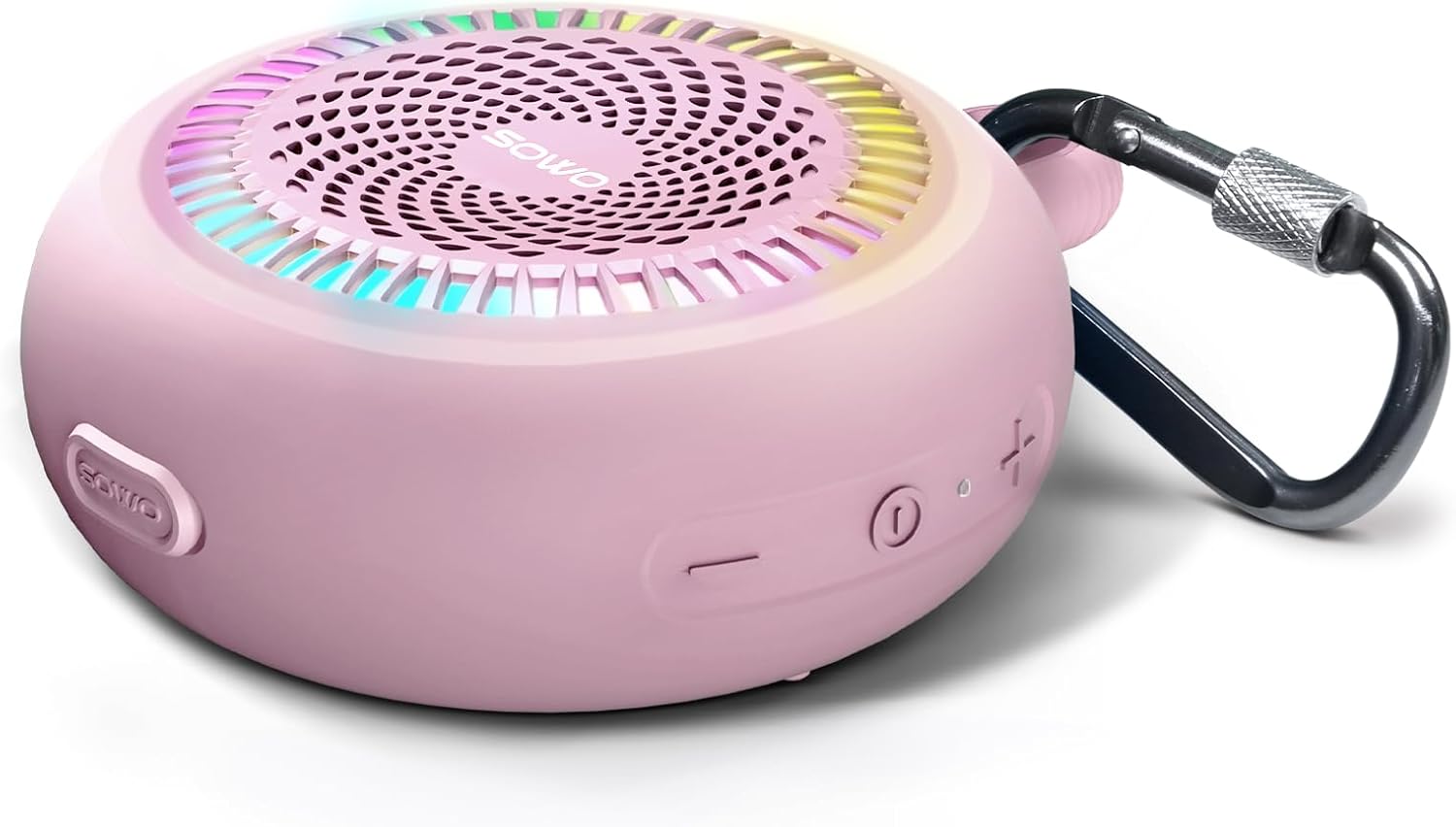
Image: A pink SOWO speaker showing the power button, volume controls, and carabiner attachment point.
નિયંત્રણો અને સૂચકાંકો:
- પાવર બટન: ચાલુ/બંધ કરવા માટે દબાવો અને પકડી રાખો. ચલાવવા/થોભાવવા માટે ટૂંકું દબાવો.
- વોલ્યુમ વધારો (+): વોલ્યુમ વધારવા માટે ટૂંકું દબાવો. આગલા ટ્રેક માટે લાંબા સમય સુધી દબાવો.
- અવાજ ધીમો (-): વોલ્યુમ ઘટાડવા માટે ટૂંકું દબાવો. પાછલા ટ્રેક માટે લાંબા સમય સુધી દબાવો.
- લાઇટ બટન: Short press to cycle through light modes. Long press to turn off lights.
- ચાર્જિંગ પોર્ટ: USB-C port for charging. Ensure rubber plug is sealed when not charging.
- એલઇડી સૂચક: પાવર સ્ટેટસ, ચાર્જિંગ સ્ટેટસ અને બ્લૂટૂથ પેરિંગ સ્ટેટસ બતાવે છે.
5. સેટઅપ
૩.૧ સ્પીકરને ચાર્જ કરવું
Before first use, fully charge the speaker. The battery capacity is 1500 mAh, and a full charge takes approximately 2.5 hours.
- ચાર્જિંગ પોર્ટનું રબર કવર ખોલો.
- આપેલ USB ચાર્જિંગ કેબલને સ્પીકરના ચાર્જિંગ પોર્ટ સાથે કનેક્ટ કરો.
- Connect the other end of the USB cable to a USB power adapter (5V) or a computer's USB port.
- The LED indicator will show charging status (e.g., red while charging, off when fully charged).
- Once fully charged, disconnect the charging cable and securely close the rubber cover to maintain waterproof integrity.
5.2 પાવરિંગ ચાલુ/બંધ
- પાવર ચાલુ કરવા માટે: Press and hold the Power button for approximately 2-3 seconds until you hear an audible prompt and the LED indicator lights up.
- પાવર ઓફ કરવા માટે: Press and hold the Power button for approximately 2-3 seconds until you hear an audible prompt and the LED indicator turns off.
6. ઓપરેટિંગ સૂચનાઓ
6.1 બ્લૂટૂથ પેરિંગ
The speaker will automatically enter pairing mode when powered on for the first time or if no device is connected.
- Ensure the speaker is powered on and the LED indicator is flashing, indicating it's in pairing mode.
- તમારા ઉપકરણ (સ્માર્ટફોન, ટેબ્લેટ, કમ્પ્યુટર) પર બ્લૂટૂથ સક્ષમ કરો.
- માટે શોધો "SOWO" in the list of available Bluetooth devices.
- Select "SOWO" to connect. Once connected, you will hear an audible confirmation, and the LED indicator will stop flashing and remain solid.
- જો ઉપકરણ રેન્જમાં હશે, તો સ્પીકર ચાલુ થવા પર છેલ્લા જોડીવાળા ઉપકરણ સાથે આપમેળે ફરીથી કનેક્ટ થશે.

Image: A smartphone screen displaying Bluetooth settings, showing the SOWO speaker as a discoverable device.
6.2 ઑડિયો વગાડવું
- ચલાવો/થોભો: પાવર બટનને ટૂંકમાં દબાવો.
- અવાજ વધારો: '+' બટનને ટૂંકું દબાવો.
- અવાજ ધીમો: '-' બટનને ટૂંકું દબાવો.
- આગળનો ટ્રેક: '+' બટનને લાંબા સમય સુધી દબાવી રાખો.
- પાછલો ટ્રેક: '-' બટનને લાંબા સમય સુધી દબાવી રાખો.
6.3 LED લાઇટ મોડ્સ
The speaker features built-in LED lights with multiple modes.
- લાઇટ મોડ બદલો: Short press the Light button to cycle through available light patterns.
- લાઇટ બંધ કરો: Long press the Light button to turn off the LED lights.
6.4 Wireless Stereo Pairing (TWS Function)
You can pair two SOWO speakers together for a stereo sound experience.
- Ensure both SOWO speakers are powered off.
- બંને સ્પીકર્સ ચાલુ કરો. તેઓ બ્લૂટૂથ પેરિંગ મોડમાં પ્રવેશ કરશે.
- On one of the speakers (this will be the primary speaker), double-press the Power button. The speakers will attempt to connect to each other.
- Once successfully paired, you will hear an audible confirmation. The LED indicator on the primary speaker will flash, and the secondary speaker's LED will be solid.
- હવે, વિભાગ 6.1 માં વર્ણવ્યા મુજબ બ્લૂટૂથ દ્વારા તમારા ઉપકરણને પ્રાથમિક સ્પીકર સાથે કનેક્ટ કરો.
- To disconnect TWS, double-press the Power button on either speaker.

Image: Two SOWO speakers placed on a blanket, illustrating wireless stereo pairing for an enhanced audio experience.
7. જાળવણી
- સફાઈ: સ્પીકરને સોફ્ટથી સાફ કરો, ડીamp કાપડ ઘર્ષક ક્લીનર્સ અથવા સોલવન્ટનો ઉપયોગ કરશો નહીં.
- સંગ્રહ: લાંબા સમય સુધી ઉપયોગમાં ન હોય ત્યારે સ્પીકરને સીધા સૂર્યપ્રકાશ અને અતિશય તાપમાનથી દૂર ઠંડી, સૂકી જગ્યાએ સંગ્રહિત કરો.
- વોટરપ્રૂફ સીલ: Always ensure the charging port's rubber plug is fully sealed when the speaker is exposed to water to maintain its IP67 waterproof rating.
8. મુશ્કેલીનિવારણ
| સમસ્યા | સંભવિત કારણ | ઉકેલ |
|---|---|---|
| સ્પીકર ચાલુ થતું નથી. | ઓછી બેટરી. | સ્પીકરને સંપૂર્ણ ચાર્જ કરો. |
| બ્લૂટૂથ ઉપકરણ સાથે જોડી શકાતી નથી. | Bluetooth is off on your device; speaker is too far; speaker is already connected to another device. | Ensure Bluetooth is enabled on your device. Move speaker closer. Disconnect from other devices. Restart speaker and device. |
| કોઈ અવાજ નથી કે ઓછો અવાજ નથી. | Volume too low on speaker or device; speaker not connected properly. | Increase volume on both speaker and device. Re-pair the Bluetooth connection. |
| ધ્વનિ વિકૃતિ. | અવાજ ખૂબ વધારે છે; બેટરી ઓછી છે; વિક્ષેપ છે. | Reduce volume. Charge speaker. Move away from other electronic devices. |
| LED લાઇટ કામ કરતી નથી. | Lights turned off; malfunction. | Short press the Light button to cycle modes. Long press to turn on if off. If issue persists, contact support. |
| Power button failed. | આંતરિક ઘટક નિષ્ફળતા. | This indicates a potential defect. Contact SOWO customer support for assistance or warranty claim. |
If the problem persists after trying these solutions, please contact SOWO customer support.
9. સ્પષ્ટીકરણો
| લક્ષણ | વિગત |
|---|---|
| મોડેલનું નામ | SOWO Shower Speaker |
| કનેક્ટિવિટી ટેકનોલોજી | બ્લૂટૂથ |
| વાયરલેસ કોમ્યુનિકેશન ટેકનોલોજી | બ્લૂટૂથ |
| બ્લૂટૂથ રેન્જ | 40 ફીટ |
| સ્પીકરનો પ્રકાર | પોર્ટેબલ |
| સ્પીકર મહત્તમ આઉટપુટ પાવર | 12 વોટ્સ |
| ઓડિયો આઉટપુટ મોડ | Mono (Stereo with TWS pairing) |
| આવર્તન પ્રતિભાવ | 20 KHz |
| સિગ્નલ ટુ-અવાજ ગુણોત્તર | 72 ડીબી |
| અવબાધ | 3 ઓહ્મ |
| બેટરી ક્ષમતા | 1500 mAh લિથિયમ પોલિમર |
| ચાર્જિંગ સમય | 2.5 કલાક |
| વસ્તુનું વજન | 6.4 ઔંસ |
| ઉત્પાદન પરિમાણો | 1"D x 4"W x 5"H |
| પાણી પ્રતિકાર સ્તર | IP67 વોટરપ્રૂફ |
| નિયંત્રણ પદ્ધતિ | Touch (Buttons) |
| સામગ્રી | Plastic and PCB |
| સમાવાયેલ ઘટકો | Charging cable, buckle |
10. વોરંટી અને સપોર્ટ
SOWO products come with a limited warranty. For specific warranty details and duration, please refer to the warranty card included with your product or visit the official SOWO webસાઇટ
For technical support, troubleshooting assistance, or warranty claims, please contact SOWO customer service through the following channels:
- ઈમેલ: [Insert SOWO Support Email Here, if available]
- Webસાઇટ: SOWO Official Store on Amazon
- ફોન: [Insert SOWO Support Phone Number Here, if available]
Please have your product model number (Shower Speaker) and purchase date ready when contacting support.
Ask a question about this manual
Ask about setup, troubleshooting, compatibility, parts, safety, or missing instructions. Manuals+ will review the question and use this page’s manual context to help answer it.